
What’s Changed: SillyTavern lorebooks, which the app calls World Info, add background notes to the prompt only when a keyword shows up in recent chat. On a fresh install that window is the last 2 messages, and entries past a 25% token budget are dropped without a warning. Pre-made lorebooks come from Chub, CharacterHub and the lorebooks embedded in character cards.
SillyTavern lorebooks fail quietly more often than they fail loudly. The default settings file that new installs load scans only the last 2 messages for keywords and gives lorebook entries 25% of the model’s context.
When that budget fills up, extra entries are dropped, and the alert for it ships switched off.
That is why so many “my lorebook does nothing” problems turn out to be settings. I check scan depth and the budget before I touch a single entry, because those two numbers are the cheapest things to rule out.
This guide covers what SillyTavern lorebooks are, why entries fail to fire and where to find good ones. It also covers importing from Chub, character cards and Janitor AI, and what to change on a fresh install.
What Are SillyTavern Lorebooks?
SillyTavern lorebooks are collections of World Info entries, short notes that SillyTavern slips into the prompt only when a matching keyword appears in recent chat.
The World Info docs open with “World Info (also known as Lorebooks or Memory Books)”, so all three names point at the same feature.
Each entry has keywords and a content field, and only the content reaches the model: “Activation keywords, titles, and other information that is not in the Content field is not inserted into context.”
A lorebook can be attached in four places:
- Global: works in every chat once you select it.
- Character: travels with one character, and its primary lorebook is exported with the card.
- Persona: follows the persona you play as, whichever character you talk to.
- Chat: works only inside one conversation.
The docs also admit World Info “does not guarantee its appearance in the generated output messages”, because the model still decides what to use.
That warning matches how I treat lorebooks, as a strong nudge the model is free to ignore.
Why Are My SillyTavern Lorebook Entries Not Triggering?
SillyTavern lorebook entries usually fail to trigger because the keyword is older than the 2 messages scanned by default, the entry lost out to the token budget, or the lorebook is not linked to the chat you are in.
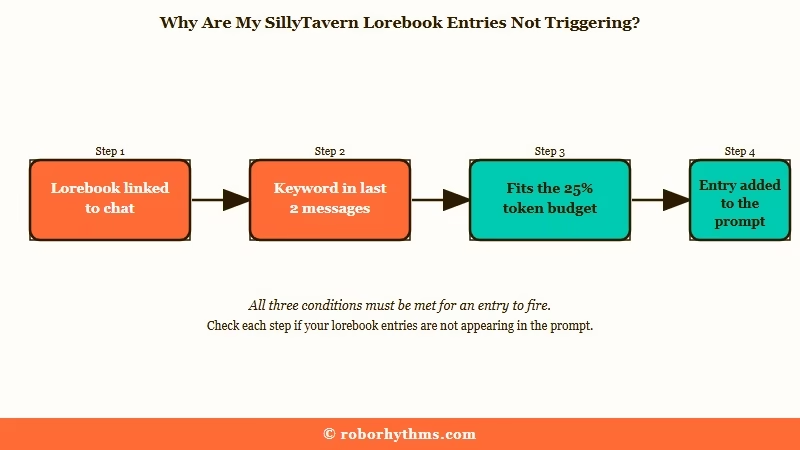
The order I work through, cheapest check first:
- Confirm the lorebook is active for this chat. A chat lorebook works only in its own conversation, and a character lorebook needs to be bound to that character with the globe button.
- Check that the keyword sits inside the scan window. Two messages is the default, and setting Scan Depth to 0 means “no regular keyword matches will be made” at all.
- Turn on Alert on overflow in the World Info settings. It is off on a fresh install, so a full budget drops entries without telling you.
- Add plural forms as extra keys. Whole-word matching is on by default, so a key of “king” does not match “kings”, though it still catches “king’s”.
- Untick “Delay until recursion” unless you meant it. An entry with it ticked “won’t be triggered in the initial pass”, and unticking it fixed the entries in one broken lorebook.
- Relink any lorebook you renamed on an older build. Version 1.19.0, released on 14 September 2026, makes a rename update chat, character and persona links.
If tuning keyword lists sounds like more upkeep than you want, some roleplayers move to a hosted app such as Nectar AI instead.
Why Does Every Lorebook Entry Fire at Once?
Every entry firing at once usually means recursion, where the text of one triggered entry sets off the keywords of the next.
A user in one thread about token counts had the whole lorebook active on every message until recursion was capped, and the active tokens fell to 2,396.
Setting Max Recursion Steps to 1 “effectively disables recursion”, per the docs, and ticking “Prevent further recursion” stops a single noisy entry from waking others. The WorldInfoInfo extension shows which entries were active in the last reply, and I keep it installed for exactly this.
| Symptom | Likely cause | Fix |
|---|---|---|
| Entry never fires | Keyword is older than the scan window | Raise Scan Depth or mention the keyword again |
| Entry fires in one chat only | It sits in a chat lorebook | Move it to a character or global lorebook |
| Some entries vanish on long scenes | Token budget is full | Turn on Alert on overflow and trim entries |
| Plural mentions are ignored | Whole-word matching | Add plural keys |
| Entry waits for other entries | “Delay until recursion” is ticked | Untick it |
| Everything fires every turn | Runaway recursion | Set Max Recursion Steps to 1 |
Where Can You Find Good SillyTavern Lorebooks?
The main places to find SillyTavern lorebooks are Chub’s lorebook section, CharacterHub and the lorebooks embedded inside character cards, though many public ones need editing before they work well.
One reply in a thread about finding lorebooks points to chub.ai/lorebooks and characterhub.org/lorebooks, and other replies warn that most public lorebooks are low quality.
One answer there puts it plainly: “Good lorebooks? You make your own.”
Card sites are the other big source, because a character card can carry its own lorebook inside the file. When the download button goes missing on Chub, the fix in Chub’s missing download button still gets you the card file.
I start small, because ten entries I wrote beat three hundred I have to audit. Before keeping a downloaded lorebook, open five entries and check that each one names its subject inside the content, since the keywords never reach the model.
How Do You Import a Lorebook Into SillyTavern?
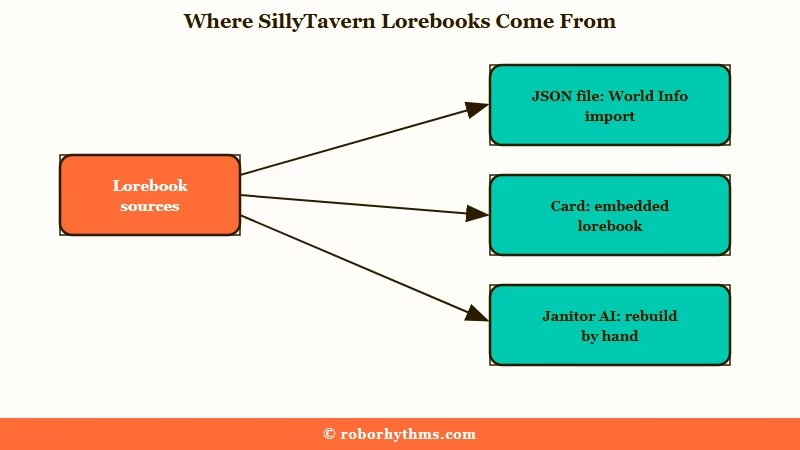
You import a standalone lorebook as a JSON file from the World Info panel, and SillyTavern offers to import a lorebook embedded in a character card as soon as you import that card.
- Open the World Info panel from the top bar.
- Use the panel’s import button to load the lorebook’s .json file.
- Link it, either as a global lorebook or to a character with the globe button in the character panel.
- For a card with a built-in lorebook, accept when SillyTavern says “This character has an embedded World/Lorebook.”
- If you skipped that prompt, use “Import Card Lore” in the “More…” menu on the character panel.
One export rule catches people out. Only the character’s primary lorebook is embedded when you export a card, so extra lorebooks you linked stay behind when you share it.
Can You Import Janitor AI Lorebooks Into SillyTavern?
Importing a Janitor AI bot by its link brings the card into SillyTavern without the lorebooks attached to it.
The answer in a thread asking exactly this is that “you’d have to have the creator provide an ST card that includes them”.
Replies in another import thread say Janitor AI has no JSON export for lorebooks and that creators can now block copying. When a lorebook is public, the fallback is to copy each entry by hand and rebuild it as a SillyTavern entry.
Rebuilding by hand is the route I take, and the keywords need the most care, because each one has to survive SillyTavern’s whole-word matching and 2-message window. Janitor’s lorebook triggers covers that side, and what SillyTavern is covers what else changes when you move.
What Settings Should You Change on a Fresh SillyTavern Install?
The lorebook settings worth changing first on a fresh SillyTavern install are the overflow alert and scan depth, because the defaults hide budget overflows and scan only the last 2 messages.
| Setting | Fresh-install default | What it means | What to do |
|---|---|---|---|
| Scan Depth | 2 messages | Keywords older than that do not trigger | Raise it for slow scenes |
| Context % budget | 25% of context | Entries past the budget are dropped | Trim entries before raising it |
| Alert on overflow | Off | Drops happen silently | Turn it on |
| Recursive scan | On | Entries can trigger other entries | Cap Max Recursion Steps if it runs away |
| Match whole words | On | “king” does not match “kings” | Add plural keys, or turn it off for Japanese or Chinese |
| Insertion strategy | Character Lore First | Character entries go ahead of global ones | Switch to Sorted Evenly to rank by order number alone |
The first change I make is the overflow alert, because a silent drop is the hardest failure to spot. The insertion strategy row also contradicts the docs, which label Sorted Evenly as the default, while the settings file a new install loads selects Character Lore First.
Where an entry lands in the prompt changes how much the model uses it. A Stanford-led study found language models use information best when it sits at the beginning or end of the context, and worst in the middle.
The “@ D” position puts an entry at a set depth near the bottom of the prompt, which is where rules the model keeps ignoring belong.
What Does a Good Lorebook Entry Look Like?
A good lorebook entry names its subject inside the content, because the keywords that trigger it are never sent to the model.
An entry that only says “she” gives the model nothing to attach the fact to.
Before: keys
mother, mom, contentShe runs the bakery on Elm Street and hates liars.After: keys
mother, mom, Maria, contentMaria, Elena's mother, runs the bakery on Elm Street and hates liars.
The second version still makes sense when the model reads it cold. The extra key catches her name, which is how most scenes will mention her.
What Are SillyTavern Memory Books?
SillyTavern memory books means two things: the docs use it as another name for World Info, and Memory Books is also a popular extension that turns finished chat scenes into lorebook entries.
The Memory Books extension has 312 stars on GitHub and was still being updated on 28 September 2026. It turns completed scenes into structured, editable lorebook entries, and older messages can then be hidden from the context while the summary stays available.
It is the extension I point long chats toward first, because it writes lorebook entries from scenes you have already played.
Those entries still cost tokens every time they fire, which lorebook token usage explains for Janitor AI with the same basic mechanic.
How Do You Write SillyTavern Lorebook Entries That Work?
Lorebook entries work best when each one names its subject in the content, uses specific keywords, stays short and keeps plot secrets out of the model’s view.
My rule for every entry is that it has to make sense with its keywords deleted. Five habits cover most of the rest:
- Name the subject in the content, since titles and keys never reach the model.
- Use specific keywords and skip words like “he” or “city”, which fire on almost every turn.
- Keep constant entries rare and short, since they load on every message.
- Keep plot secrets out of enabled entries, because anything in context is visible to the model.
- Give entries that must win a higher order number, which places them later in the prompt and keeps them first in line when the budget runs short.
A constant “vision” lorebook solves a group-scene problem, per a long SillyTavern tips thread. It holds each character’s current visible appearance, so every character in the scene knows what the others look like, and the appearance leaves the card so it is not paid for twice.
How Is a Lorebook Different From a Character Card?
A character card is sent with every message, while a lorebook entry is sent only when its keyword is in the scan window or the entry is set to constant.
The card holds who the character is, and the lorebook holds the world, loaded only when the chat needs it.
Moving side details out of the card saves tokens on every message. A character’s hometown, their family and a magic system’s rules can all live as entries that load when someone mentions them.
Should You Stick With SillyTavern Lorebooks or Use a Hosted App?
Stick with SillyTavern lorebooks if you enjoy building and tuning your own world, and consider a hosted companion app if you want the characters without maintaining keyword lists.
SillyTavern is free and open source, with 33,891 GitHub stars, and what SillyTavern is covers the costs of running it. The cheapest way in is a free OpenRouter setup, and a lorebook is the part of SillyTavern I would miss most anywhere else.
If you would pay to skip the upkeep, Candy AI is built around one-to-one companion chat with a character you create. Its free tier is five messages in total across all characters, per its help center, so plan on paying if you switch.
For anime-style character roleplay, Nectar AI is the closer fit, and it needs no lorebook setup to get started.
Quick Takeaways
- SillyTavern lorebooks are World Info entries that load only when their keyword appears in the last 2 messages on a fresh install.
- Turn on Alert on overflow first, because entries past the 25% budget are dropped silently.
- Chub, CharacterHub and card-embedded lorebooks are the main sources, and most public ones need editing.
- Janitor AI lorebooks do not come along with a Janitor bot import, so rebuild public ones by hand.
- Write every entry so it names its subject, since keywords and titles never reach the model.
