
TL;DR: Meta Muse is free for up to 100 million tokens a week, and paid plans cost $20 or $100 a month for more. An invite code redeemed within 48 hours of joining adds 1 billion tokens for you and the friend who shared it. Muse is open only to adults in the US and Canada, and most errors since Meta Connect come from Meta’s side.
Is Meta Muse free? Yes, and the free tier is far bigger than most people expect. Meta gives every account up to 100 million Muse tokens a week, and one early test that built games, websites and a fake Mac used only about a tenth of it.
The confusing part is everything around the free tier. There are invite codes worth 1 billion tokens, a 48-hour window to claim them, a waitlist outside two countries, and a run of “expired credentials” errors that started right after Meta Connect, the company’s September 23 product event.
I care most about where a free tier stops being free, so that comes first. After that comes how to claim the 1 billion bonus before your 48 hours run out, and what to do when Muse throws an error.
Is Meta Muse Free to Use?
Yes, Meta Muse is free up to 100 million tokens a week. Heavier users can pay $20 a month for Power (500 million a week) or $100 a month for Maximum (3 billion a week).
Mark Zuckerberg set the free allowance at launch on September 8, 2026, and Gizmodo’s first look quotes that 100 million tokens a week figure from his launch post.
The paid tiers are listed on Meta’s Muse subscriptions page, which also says you must be 18 or older to subscribe.
| Plan | Price | Weekly Muse tokens | Who it suits |
|---|---|---|---|
| Free | $0 | 100 million | Almost everyone, including daily use |
| Power | $20 a month | 500 million | People running long jobs every day |
| Maximum | $100 a month | 3 billion | Many helper agents running at once, around the clock |
The free tier is where I start everyone, and I see no reason to pay before you hit the cap once. Meta’s help page says that when you reach the free limit, you can upgrade or wait for it to refresh.
How Does Meta Make Money if Muse Is Free?
Meta plans to earn from Muse through a small fee on transactions Muse completes, rather than through the free tier.
Zuckerberg said at Connect that Meta is “making Muse free for a huge number of tokens” and expects to profit “by taking a small fee from transactions,” as quoted in TechCrunch’s Connect roundup.
That tells me the free tier is there to stay for now, because Meta wants Muse doing your shopping and bookings. Meta has not said how big that fee will be or who pays it.
How Far Do 100 Million Free Muse Tokens Go?
For most people, 100 million tokens is more than a week of heavy use. Gizmodo’s reviewer built drawings, songs, games, websites and a fake bootable Mac in one sitting and used about 11% of the weekly allowance.
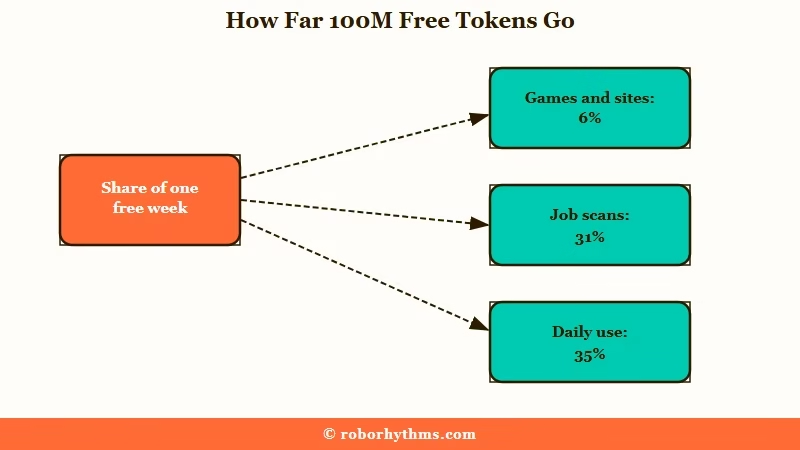
Meta does not publish what a single Muse token buys, which makes the number hard to picture. So the best guide is what real workloads use up.
| Workload | Share of the free week used | Source |
|---|---|---|
| Drawings, MIDI songs, small games and animated websites | About 6% | Gizmodo |
| All of the above plus a fake bootable Mac with apps | About 11% | Gizmodo |
| Regular daily use over two weeks | About 35% (34 to 35 million a week) | r/MetaAI |
| Job scans every few hours, partway through a week | About 31% | r/MuseAgent |
In these numbers, recurring background work like a job scan every few hours uses far more of the week than a long burst of one-off projects. That is where I would look first if the meter climbs faster than you expect, and it is also why your reset day matters.
When Does the Free Token Limit Reset?
The free allowance resets weekly, and the reset looks tied to the day your account was created, so different people reset on different days.
Gizmodo’s account opened on September 8 and was told its tokens would reset on September 15.
That matches one r/MuseAgent thread, where one account resets on a Wednesday and another on a different day. Meta has not published the reset rule, so check your own date rather than assuming a shared one.
The easiest way I know to track the reset is to ask Muse itself. It can read your current usage and estimate whether you will make it to the reset.
Vague: “How many tokens do I have left?”
Specific: “Check my Muse token usage for this week. Tell me the percent used, my exact reset date, and whether I will run out before then at my current pace.”
The specific version gets you a date and a forecast instead of a bare number. It also tells you whether a planned long job is safe to start today.
The same weekly-cap model trips people up on other assistants too, and Grok’s weekly usage limits follow a similar reset pattern. The habit I keep across all of them is to check the reset date before starting anything long.
How Do Meta Muse Invite Codes Work?
A Meta Muse invite code gives both people 1 billion tokens when a new user redeems it in Settings within 48 hours of creating an account.
That bonus equals about ten weeks of the free allowance.
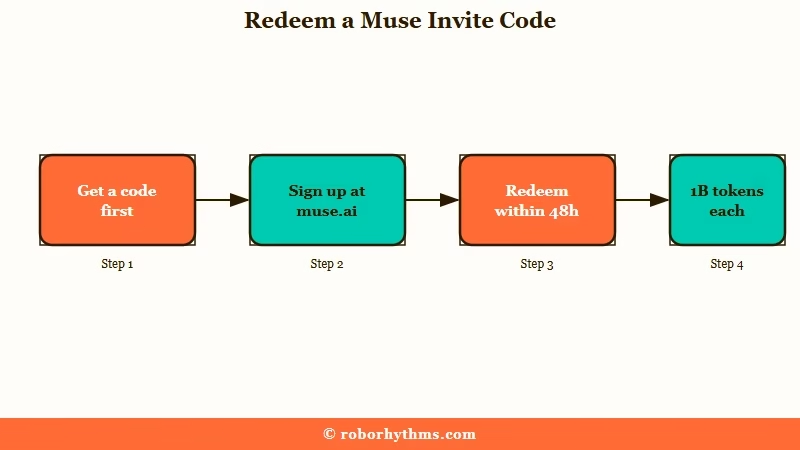
Meta’s own account spelled out the rules on Threads: both sides get 1 billion tokens when a code is redeemed in Settings within 48 hours of joining. Meta’s chief AI officer Alexandr Wang launched the program on September 16.
The person sharing a code earns the bonus for up to 20 friends, PostFast reports, which caps a referrer at 20 billion bonus tokens.
The order of steps matters here, because the 48-hour clock starts at sign-up, not when you find a code. This is the sequence I recommend:
- Get a code before you sign up, from a friend or a code thread you trust.
- Create your account at muse.ai/join or in the Muse app, signing in with your Meta account.
- Open Settings and tap Redeem Invite Code.
- Enter the six-character code and confirm.
- Check that the 1 billion bonus tokens show in your balance before you close Settings.
Why Does a Muse Invite Code Say It Is Used Up?
A Muse code stops working once it has been redeemed a set number of times, so a code posted publicly can run out fast.
Codes in public threads often carry a note like “26/30 spots available” for that reason.
Meta’s Threads reply puts the uses per code at 20 to 30 depending on rollout, while the reward side is capped at 20 friends. If a code fails, try a fresher one before your 48 hours run out, since you only get the one window.
Does an Invite Code Get You Past the Waitlist?
No, an invite code only adds tokens, and it does not unlock Muse in a country where it has not launched.
You redeem the code inside Settings, which means you need a working account first.
I don’t trust any site that sells codes or claims a code skips the waitlist. The codes are free, and every account gets its own code to share.
Who Can Get Meta Muse Right Now?
Meta Muse is available only to adults 18 and older in the United States and Canada.
It launched in the US on September 8, 2026, and reached Canada on September 18, according to iPhone in Canada.
It runs on iOS, Android, the web at muse.ai, and a Mac app that arrived the same day as the Canadian launch, according to a PostFast roundup. Meta’s launch announcement says Muse is also coming to Meta’s AI glasses.
Why Does Muse Show Me a Waitlist?
The waitlist screen means Muse has not launched in your country yet. Meta’s own reply on Threads says you are queued and will get a notification when your region opens up.
That is why people outside the US and Canada, including the UK and India, see the waitlist even with a valid Meta account. A workaround for India involves sideloading an Android install file (an APK), and that is a step I would skip. An agent that holds your email and payment details is the last app I would install from an unofficial download.
Muse is also limited to adults, so accounts under 18 are blocked. One user also had an active account roll back to the waitlist after two or three days, and Meta has not explained why.
Do You Need Facebook to Use Muse?
You sign in with a Meta account, but you do not have to connect Facebook or Instagram to use Muse. As one r/MuseAgent reply puts it, you control how much access to give it.
That choice matters to me more than any feature list. Starting Muse with nothing connected is a fair way to judge it before you give it your inbox. Access is the easy part, though, and keeping Muse working has been harder since Connect.
Why Is Meta Muse Not Working?
Most Meta Muse errors reported since Meta Connect on September 23 come from outages on Meta’s side, and waiting is the only fix found so far.
The rest come from sites blocking Muse, like Amazon, or from Muse not being open in your region.
Check this table before you reinstall anything. My first move with any Muse error is to rule out a Meta outage, because most of these problems sit outside your phone.
| Symptom | Likely cause | Fix |
|---|---|---|
| “Expired credentials” or rejected-login errors on search, avatars and payments | Backend outage on Meta’s side | Wait it out; no local fix has turned up |
| Muse cannot open its browser or research anything | Same outage hitting Muse’s tools | Wait, and pause scheduled jobs so they do not fail silently |
| Amazon pop-up about an “unauthorized AI agent” | Amazon blocked Muse on September 20 | Shop with a Muse partner store or buy on Amazon yourself |
| Captchas on most websites | Sites detecting an automated agent | Log in to that site yourself, then hand the task back |
| “Couldn’t finish signing in” on Mac | Sign-in failure in the Mac app | Use muse.ai or the phone app until the Mac app recovers |
| Waitlist screen after signing in | Muse is not launched in your country | Wait for a regional launch |
What Does “Expired Credentials” Mean in Muse?
“Expired credentials” in Muse means Muse’s own connections to its backend services have failed, which is a Meta outage and nothing wrong with your account.
In one expired credentials thread, the errors hit payment setup, avatar generation, web searches and even Muse’s own report button.
A reply in that thread puts the error at about a day, with nothing to do but wait for Meta to refresh its credentials. Logging out is unlikely to help, since the expired credentials sit on Meta’s side.
Why Did Amazon Block Meta Muse?
Amazon blocked Muse on September 20, 2026, saying an unauthorized AI agent accessing its store breaks its Conditions of Use.
TechCrunch reports that Muse users now see a message saying continued access by an unauthorized AI agent “violates Amazon’s Conditions of Use, to which our customers have agreed.”
That clause worries me. Amazon’s terms bind you, the customer, so pushing Muse past the block could put your own Amazon account at risk.
Walmart, Best Buy, Sephora, Wayfair and Instacart all joined Muse as shopping partners at Connect. For now, those partner stores are the safer places to let Muse shop.
Is Meta Muse Safe to Connect to Your Accounts?
Muse has had two serious security and privacy problems since its September 8 launch, so connect accounts one at a time and start with low-stakes ones. Both issues involved the Mac app.
On September 22, Mac security researcher Patrick Wardle disclosed a flaw that let a local app redirect Muse’s dictation traffic and capture your voice prompts and account token, Malwarebytes reported. InfoQ reports that Meta shipped a hotfix that stripped the hidden debug setting behind the redirect out of the public app.
A writer for Inc. found the Muse Mac app had synced his Messages database up to row 187,462, even though he remembered declining access to his messages. A Meta reply implied he had enabled it without realizing.
My rule with any agent is simple: give it one account, watch what it does for a week, then decide on the next one. Limiting access matters more here than with a chatbot, because Muse acts on its own after you close the app, and our developer guide to agent access explains the same principle for builders.
- Start with nothing connected and test Muse on public web tasks.
- Connect one low-risk account, like a spare email, and review what Muse did after a week.
- Check your connections in Settings regularly and remove any you no longer use.
- On a Mac, keep the Muse app updated, since the dictation fix shipped as an app update.
What Is the Difference Between Muse, Meta AI and Muse Spark?
Muse is Meta’s personal agent that runs on its own virtual computer and completes tasks, Muse Spark is the model that powers it, and Meta AI is the chat assistant inside Meta’s apps.
Muse Code is a separate coding agent for developers and has no bearing on the free tier.
Meta’s launch post describes Muse running on “Muse Secure VM,” a dedicated virtual machine, where it can open a browser, fill in forms and keep working after you close the app. Meta AI answers questions in WhatsApp, Instagram and Messenger, and it runs on the same Spark model.
The model side has its own history, which our Muse Spark breakdown covers from its April release. The short version I give people is that Meta AI answers questions and Muse carries out tasks for you.
What Are Jolly and the Muse Charm?
Jolly is the default Muse avatar, and the Muse Charm is a pocket-sized device for talking to your Muse, due around the holidays.
Axios reports that you can set your Muse’s name, look and style during setup.
Gizmodo notes that Meta has given no price or release date for the Charm beyond “the holidays,” so I’m not planning around it yet.
Is the Free Tier Enough, or Should You Pay?
The free tier is enough for almost everyone, and paying only makes sense once you hit the weekly cap more than once.
An invite bonus stretches that further, though Meta has not said whether bonus tokens expire or when they get used.
Power at $20 a month suits people running scheduled jobs all day. Maximum at $100 is for people running many helper agents at once, and I cannot picture a personal use that needs it yet.
Quick Takeaways
- Meta Muse is free up to 100 million tokens a week, and Power ($20) and Maximum ($100) add more.
- Redeem an invite code in Settings within 48 hours of joining to get 1 billion bonus tokens for you and your friend.
- The free allowance resets weekly on a day that looks tied to your sign-up date, so check your own reset date before long jobs.
- Muse is open only to adults in the US and Canada, and a code will not get you past the waitlist.
- “Expired credentials” and browser errors after Connect trace back to Meta outages, so wait instead of reinstalling.
Signing up this week? Grab a code first, redeem it in Settings the same day, then ask Muse for your reset date.
