
What’s Changed: A Janitor AI custom prompt fails for two reasons that have nothing to do with the words you chose. It sits fifth of six blocks in what Janitor sends the model, so growing chat history pushes it out of range. And most shared prompts are written as “do not” rules, which Janitor’s own documentation says the model cannot follow.
You pasted a Janitor AI custom prompt someone swore by, saved it, and the bot carried on exactly as before. Still asking what you want to do next. Still writing your character’s lines for you.
The advice you will find on this is thin, and most of it is another prompt to paste. My problem with that is it treats the symptom, not the reason the last one failed.
Copying a longer block of text into a field that is already being ignored gets you a longer block of text that is ignored.
Two things decide whether a custom prompt lands, and neither is the cleverness of the wording. The first is where your prompt sits in the payload Janitor sends the model.
The second is whether your rules are phrased in a form the model can act on. Get both right and a short prompt beats a 2,000-word one.
Why Does My Janitor AI Custom Prompt Do Nothing?
A Janitor AI custom prompt usually does nothing because chat history is appended after it, so the instruction drifts further from the end of the payload with every message you send.
Wording matters too, and it is the second thing to check.
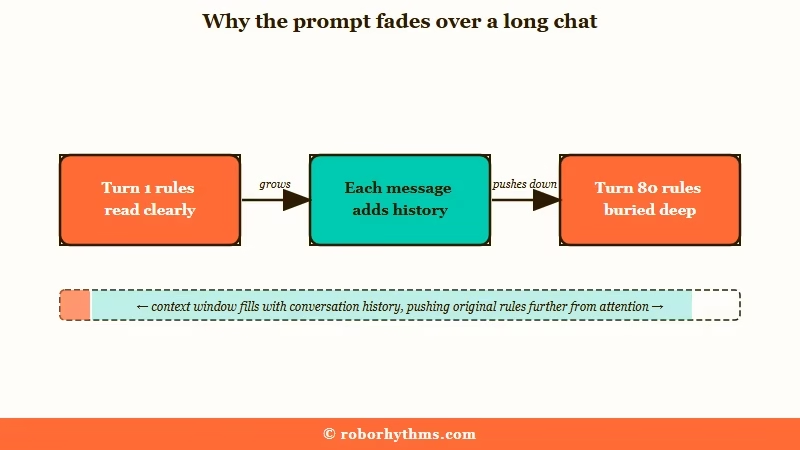
Janitor does not send the model your prompt on its own. It assembles a stack of blocks in a fixed order and sends the whole thing every single turn. Your rules are one block inside that stack.
That order matters more than anything else here. In practice it means a prompt which behaved well early in a chat can stop mattering deep into the same one, without you changing a thing.
That is the pattern I look for first when someone says their prompt is broken. If it worked at the start and faded, the wording was probably fine and the position is what moved.
Where Does the Advanced Prompt Sit in What Janitor Sends?
The advanced prompt is the fifth of six blocks Janitor assembles, sitting after your persona, the bot’s personality, chat memory and the scenario, and immediately before the entire message history.
Everything you and the bot have said arrives after your rules.
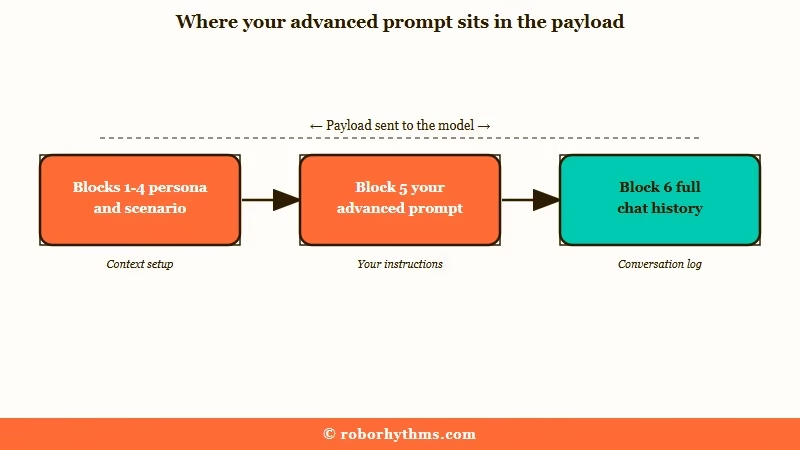
The order is:
- Your persona
- The bot’s personality
- Chat memory
- The bot’s scenario
- Advanced prompt
- Previous messages, yours and the bot’s
Language models weight the beginning and the end of a long input more heavily than the middle, an effect documented in primacy and recency research.
On turn one your rules sit near the end and land clean. On turn eighty they are buried under every exchange since.
My take is that this single fact explains more “the prompt does nothing” complaints than bad wording ever has.
It also tells you the fix: keep the rules short enough to survive, and restate the one that matters most in chat memory, which sits higher in the stack and gets refreshed.
Why Do Negative Instructions Like Do Not Fail?
Negative rules fail because a model generating text works from what is in front of it, so naming the thing you want removed puts that thing in the payload.
Janitor’s own help documentation is blunt about this.
The platform’s Advanced Prompting 101 guide states it directly: “This is why negative prompting does not work. Do not use ‘no,’ ‘don’t,’ ‘never,’ or ‘stop.'” It gives the reason in one line. “Models don’t filter like humans, they generate based on ingredients. ‘No blood’ is still ‘blood.'”
This is not folk wisdom. Peer-reviewed work presented at EACL on external negation in transformers found that models trained on natural language inference fail systematically once a negation is layered on top, and that the failure is structural rather than a gap in training data.
I find the next part genuinely funny. Google’s AI answer for prompt help on this platform currently recommends a fix beginning “[NEVER summarize, skip time, change scenes…]”.
That is one of the exact four words the platform’s own documentation tells you not to use.
How Do I Rewrite a Rule That Uses Do Not?
Rewrite a negative rule so it names the action you want instead.
A rule the model can execute always describes something for the character to do.
The community has half-solved this already. The common advice now is to swap “do not” for “avoid” or “refrain from”, which is a real improvement in tone and still leaves the model holding the thing you did not want. “Refrain from asking the user for direction” still contains asking the user for direction.
The working version adds a destination. This is the pattern I use whenever a rule is not sticking:
Before:
Do not ask me what I want to do next. Never speak for my character.After:
When {{char}} would ask {{user}} for direction, replace it with an action {{char}} takes alone. Write only {{char}}'s speech, thoughts and actions.
The second version never leaves the unwanted behaviour sitting there as a standalone instruction. It routes it somewhere. That routing clause does the work, and most pasted prompts leave it out.
The same documentation gives two smaller rules worth taking. Strong verbs beat soft ones, so “describe the setting in vivid detail” outranks “feel free to describe the setting”.
And repetition reads as noise, so say a thing once rather than restating it three ways for emphasis.
| Symptom | Likely cause | Fix |
|---|---|---|
| Prompt never worked at all | Rules phrased as “do not” or “never” | Rewrite each rule to name the replacement action |
| Worked early, faded later | Prompt buried under long chat history | Shorten it, move the key rule into chat memory |
| Bot writes your character’s lines | Opening message already spoke for you | Add a routing rule, and see the persona fix below |
| Rules followed on one model, ignored on another | Model swap with no prompt change | Retune length and temperature per model |
| Whole prompt seems absent | Token budget overrun, silent truncation | Cut to under 2,000 permanent tokens |
How Long Should a Janitor AI Custom Prompt Be?
Short. Janitor’s documentation puts the working memory at roughly 8,000 to 9,000 tokens, and everything competes for it: persona, personality, chat memory, scenario, your prompt and the entire conversation.
Overrun it and the platform’s own guidance is that “stuff gets pushed out of memory”.
The working ceiling is lower than it looks. There is no good reason for a bot to run past 2,000 permanent tokens, and a 1,000-token bot will outperform a 10,000-token one on accuracy and retention whether the context is 8k, 80k or 800k. Roughly 1,000 tokens is 750 words.
Janitor’s persona guidance is tighter still, recommending around 500 tokens or less on the grounds that anything more is weighing you down. I keep mine well under that and have never wanted the space back.
What this means for your custom prompt is unglamorous. Five rules that survive beat twenty-five that get truncated, and a prompt competing with an auto-generated memory summary and sixty messages of history is not going to win on length.
Does the Custom Prompt Work the Same on JLLM and Proxy Models?
No, and sizing a prompt for the wrong one is a common way to get silent truncation.
The free built-in model and an external proxy have very different budgets and very different tolerances.
What is JLLM: Janitor’s own built-in language model, free to use and the default if you have not connected an outside model through a proxy.
This is where a lot of copied prompts go wrong, and it is the mismatch I run into most. The widely shared preset guides are written for proxy models running 16k to 32k context, and pasting one of those into a free JLLM session hands a small budget a prompt built for a large one.
| Setup | Working budget | Prompt approach |
|---|---|---|
| JLLM (free, built in) | Roughly 8k to 9k tokens per the official docs, often lower in practice under load | Five short rules maximum. It mirrors your writing style, so write the way you want it to write. |
| DeepSeek via proxy | 16k to 32k is the commonly recommended ceiling | Handles structure well. Community guides settle on 0.5 to 0.6 temperature. |
| GLM via proxy | Similar to DeepSeek | Strong instruction following. Runs warmer, around 0.8 to 0.9 temperature. |
One newer convenience helps here. The multi-configuration proxy screen gives each configuration its own custom prompt slot, so a prompt can be swapped mid-story rather than rewritten. The configurations are buggy and there is no delete button, so set them up deliberately.
How Do I Check Whether My Prompt Is Arriving?
Open Janitor’s DevTools and read the assembled payload. Janitor publishes a DevTools guide for exactly this, and it turns a guessing game into a two-minute check.
Reading the raw payload settles the question that prompt-swapping never will. Either your rules are in there and the model is not following them, which is a wording problem, or they have been squeezed out, which is a budget problem.
Those two failures need opposite fixes, and guessing which one you have is how people end up cycling through presets for a week.
My habit is to check this before changing a single word. If the prompt is present and intact, I go to the rewrite in the section above. If it has been truncated, no amount of rewording will help and the answer is to cut length.
For symptom-level fixes you can type mid-scene without touching settings, the out-of-character command guide covers the bracketed nudges that steer a single reply. Those are a different tool from the advanced prompt and they are better at different jobs.
What to Do When the Setup Work Is the Dealbreaker
Janitor gives you a lot of control and expects you to use it, and some people would rather have the character work on arrival.
That is a legitimate preference, not a lack of patience.
Everything above is real work. You are budgeting tokens, rewriting rules into a form a model can execute, and checking payloads in developer tools to keep a character behaving. I enjoy that part, and plenty of people bounce off it and stop roleplaying entirely.
If the tuning is what you want to skip, Candy AI handles persona and memory on its own side, with no prompt field to maintain. Different trade: less control over the internals, far less setup before a character holds its shape.
One specific behaviour may be your whole issue rather than the prompt as a system. Bots writing as your persona has its own fix, and so does an unread character definition.
If your sliders have gone missing instead, the advanced generation settings explain where they went.
Frequently Asked Questions
Where do I put a custom prompt on Janitor AI?
It goes in the advanced prompt field in your settings, which applies across bots. If one rule keeps getting ignored late in a long chat, put that rule in chat memory instead, since chat memory sits higher in the assembled stack.
Why did my custom prompt stop working after a while?
Chat history is appended after your prompt, so every message pushes it further from the end of what the model reads most closely. Shorten the prompt and move the critical rule into chat memory.
How long should a Janitor AI custom prompt be?
Short enough to survive the token budget. Keep permanent tokens under 2,000 in total, and remember your persona, the bot’s definition, chat memory and the full conversation are all competing for the same 8,000 to 9,000 tokens.
Does the custom prompt work differently on JLLM and DeepSeek?
Yes. JLLM has a small working budget and mirrors your writing style, so it needs a handful of short rules. Proxy models like DeepSeek and GLM hold more and follow structure better, though they still degrade past roughly 32k.
Why do “do not” rules get ignored?
Naming a behaviour puts it in the payload whether or not you prefixed it with “do not”. Janitor’s documentation puts it as “‘No blood’ is still ‘blood'”. Rewrite each rule to name the action you want instead.
Quick Takeaways
- Your advanced prompt is block five of six, and chat history lands after it, so a prompt that faded was probably buried rather than badly written.
- Rules built on “do not” and “never” are the ones the platform’s own documentation says will not work.
- Rewrite every negative rule so it names a replacement action, since the routing clause is the half that does the work.
- Keep permanent tokens under 2,000 and size the prompt for the model you are running, not the one the preset was written for.
- Read the assembled payload in DevTools before rewording anything, because truncation and bad phrasing need opposite fixes.
