
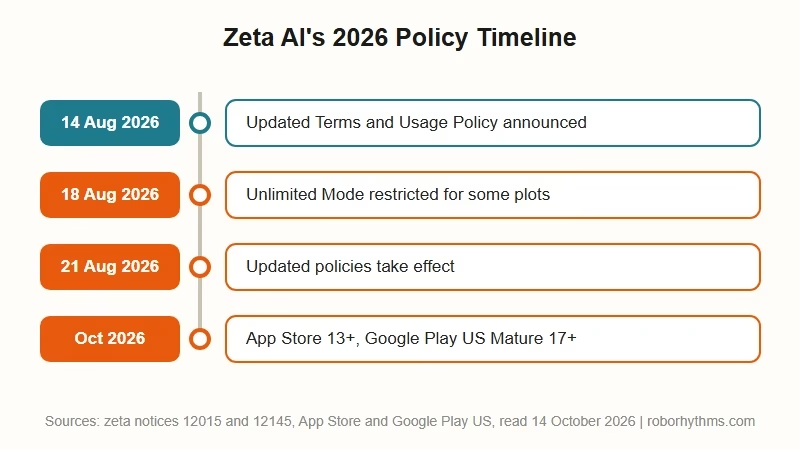
What’s Changed (October 14, 2026): Zeta’s App Store listing rates it 13+ “with content restrictions,” while Google Play’s US listing rates it Mature 17+. Its corrected policy notice dates the tighter rules August 14, effective August 21. Zeta’s Terms and Usage Policy keep an adults-only Unlimited Mode for age-verified users, but it is still filtered, and an August 18 notice restricted it for some plots.
If you have started looking for Zeta AI alternatives, you are not overreacting to a bad afternoon. Zeta tightened its content rules in August, and its App Store listing rates it 13+ even though Google Play’s US listing rates it Mature 17+.
Zeta was the app I used to point people toward when they got tired of Character AI’s guardrails. Its adult mode felt genuinely open, the character creation ran deep, and the model did not flinch at dramatic scenes.
That changed in August through published policy, so waiting for a patch will not bring the old behaviour back. Zeta’s dated Terms and Usage Policy keep a filter in front of every chat, including the adults-only Unlimited Mode.
This covers what broke, the one workaround that still works, how to rescue your characters before you go, and which apps are worth moving to.
Why Zeta AI Alternatives Are Suddenly Worth Looking At
Zeta AI alternatives are in demand because Zeta tightened its content filter in August 2026, and even its adults-only Unlimited Mode stayed filtered.
Zeta’s updated Usage Policy and Terms were announced August 14 and took effect August 21, and an August 18 notice restricted Unlimited Mode for some plots.
If you want an app built for adults from the start, Candy AI is the one I would try first. Its $13.99 Premium plan lists unlimited text messages.
Zeta already runs an age-verified adult tier beside its filtered default, and it is older than the August 2026 changes. The Korea Herald reported Scatter Lab launching a separate adults-only “unlimited mode” with age verification in August 2025. Zeta’s Terms ban sexually explicit content “except within an adults-only mode,” and its Usage Policy opens that mode to “users aged 18 or older who have completed adult age verification.”
One undated help-center FAQ still reads as if that mode did not exist. It says Zeta has “received many requests, such as for an 18+ service or differentiating plot visibility within zeta based on registered age.” It adds that Zeta prioritises “balanced content that all users can enjoy” over “content specialized for specific age groups.”
What changed my mind about waiting it out was the 13+ App Store rating. An app rated for 13-year-olds is built around its filter, and Zeta’s Usage Policy keeps it running in adult mode too, so planning around a full reversal means planning against published rules.
What is Unlimited Mode: Zeta’s adults-only chat setting, open to users 18 or older who complete age verification, that relaxes content restrictions compared to Safe Mode.
Zeta is a big app, so the change reaches a lot of people. It logged 73.62 million cumulative hours of use in South Korea during October 2025, ahead of ChatGPT’s 48.28 million, in Wiseapp Retail figures reported by The Korea Herald. Its US Google Play listing shows over 5 million downloads and about 209,000 reviews.
Does Zeta AI Have a Filter
Yes. Zeta’s help center says AI-based filtering “is applied as a mandatory measure,” and its Usage Policy says “Unlimited Mode does not permit unrestricted content.”
Unlimited Mode loosens the thresholds without disabling moderation. Zeta’s Terms still ban content that is “excessively graphic or salacious” there, and anything sexual involving minors is prohibited in every mode. Zeta’s August 18 notice says Unlimited chats may be restricted on plots where a character is or “could be perceived as a minor,” and on plots that encourage or glorify self-harm or suicide.
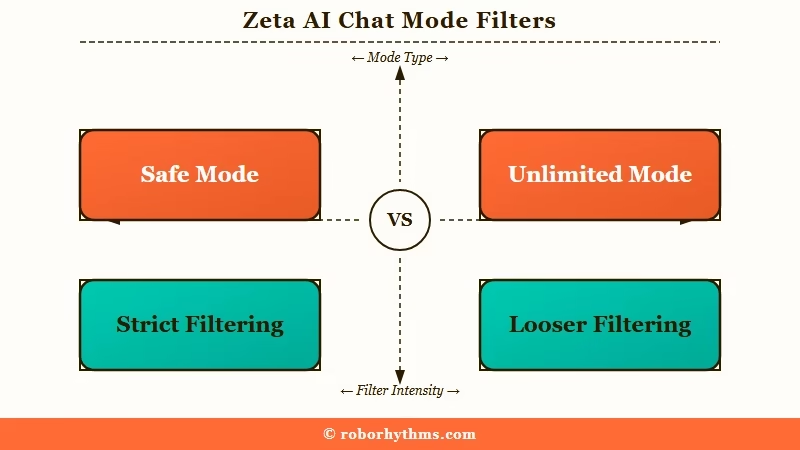
The naming is what trips people up. “Unlimited” reads like an off switch, so users turn it on, hit a block anyway, and assume their account is broken.
I keep running into the same wall on two separate accounts, and the setting was never the culprit. The toggle lives behind the gear icon inside a chat, and switching it does not change which underlying model you are talking to. Unlimited only unlocks for users 18 or older who have completed Zeta’s adult age verification.
There is a second layer that catches almost everyone. The “inappropriate reply detected” popup frequently fires on the AI’s output rather than your input, which is why you can send a completely ordinary message and still watch the reply vanish mid-generation.
| Symptom | Likely cause | Fix |
|---|---|---|
| Reply appears then disappears | Filter caught the model’s output, not your message | Regenerate, or rephrase the scene setup to steer away from the trigger |
| Ordinary words blocked | Keyword blocklist matching, not context analysis | Swap the flagged word for a synonym |
| Blocks tightened overnight | August 14 policy update, in force from August 21 | No fix, this is the new baseline |
| Older private plots now restricted | Private plots are still scanned by moderation | Back up the text, they are not exempt |
| Only some chats affected | Character age under 18 triggers stricter thresholds | Set adult characters to 21 in the character settings |
Why Does Zeta Block Hospital But Allow Crude Slang
Zeta’s filter behaves like a keyword blocklist rather than a system that reads context, so it flags ordinary words while missing genuinely explicit ones.
Users report blocks on “hospital,” “kick,” “cigarettes,” “mate,” and “attitudes.”
The inconsistency is what makes it so hard to write around. Clinical anatomical terms such as “vulva” and “labia” trigger the warning, while cruder slang for the same anatomy passes through untouched.
This is the part that genuinely frustrates me, because it breaks ordinary storytelling and not just adult scenes. A medical drama cannot use “hospital,” and a fight scene cannot use “kick,” which means the filter is hitting action and hurt-comfort roleplay just as hard as anything spicy.
There is one reported behaviour worth knowing. Zeta’s Usage Policy withholds Unlimited Mode where a character “could be perceived as a minor based on their settings.” Users report that setting an adult character to 21 stops blocks that were firing at 18.
Before: Character age left at the default, scene keeps getting cut off mid-reply with no explanation.
After: Character age set to 21 in the character profile, same scene runs without triggering the block.
That fix is legitimate, and it costs nothing to try before you decide to leave. It will not help with the blanket word bans, but it clears the age-linked tier of restrictions.
Is the App Finished or Is the Panic Overblown
The community is genuinely split, and both sides are describing real experiences.
Some users report no change at all, while others cannot complete a scene. The rollout is uneven.
Most coverage picks a side here, and the split deserves saying plainly. Plenty of users are posting that their chats run exactly as before, with one writing that their “nsfw chats are working perfectly fine” while others in the same thread cannot get a reply past the filter.
My read is that the variation comes down to timing and what people are writing. The stricter rules were announced on August 14 with an effective date of August 21, so users who had not hit the new thresholds yet were describing the old baseline.
If your chats still work, you have time to plan your exit properly. The direction is set by the age rating and the company’s published policy, and neither of those is provisional.
How Do I Save My Characters Before Leaving Zeta
Zeta has no bulk export feature, so characters must be copied out manually before you delete anything.
Deleting your account erases your chat history for good, but Zeta’s help center says the plots you created “will not be automatically deleted and will remain publicly available.” Cancelling a subscription locks most private characters.
This is the piece of advice I would give before you touch anything else, because the subscription trap catches people who are already halfway out the door. Zeta’s own documentation is explicit about what happens when a paid plan lapses.
When Zeta Pass ends, only one private character survives, described in the support docs as “the most recently edited one,” while “all other private characters will become restricted.” You lose the ability to converse with them or change their settings.
The order of operations matters, and almost nobody knows this:
- Open the private character you care about most and make a trivial edit, so it becomes the most recently edited one.
- In My Page, set “Private Character Display Order” to “Edit Date” to confirm it sits at the top.
- Copy the prompt, intro, examples, About text and every Sourcebook entry into a document.
- Delete any public plots you do not want left online, then cancel the subscription or delete the account.
Do not assume a private plot is beyond moderation either. Users have reported older private characters being restricted after the policy update, so private storage is not a safe archive.
Which Apps Like Zeta AI Are Worth Switching To
The best replacement depends on whether you want polished memory, deep character creation, or no filter at all.
No single app matches Zeta on every axis, and pretending otherwise sets you up for a second migration.
Candy AI is the one I hand people first, mostly because the memory holds across sessions without the constant re-priming that kills immersion elsewhere.
If you want a companion that carries context forward between sessions, Candy AI is the closest thing to what Zeta was before the filter tightened.
| App | Filter level | Best for | Watch out for |
|---|---|---|---|
| Candy AI | Permissive | Long-running companions where memory matters | Less community bot sharing than Zeta |
| Nectar AI | Permissive | Image-heavy roleplay and visual scenes | Smaller character library |
| Janitor AI | Minimal | Users who want full control over the backend | Interface is a real adjustment, API setup required |
| SpicyChat | Minimal | Large community bot library | Free tier limits arrive quickly |
For image-led scenes over long text roleplay, Nectar AI handles visual generation inside the conversation better than Zeta ever did.
Janitor AI and SpicyChat are where a lot of the Zeta community has landed, and both come with a real caveat. Several users who moved described bouncing off Janitor’s interface and feeling stranded, so it rewards patience more than the others.
Our rundown of Janitor AI alternatives covers that trade-off in more depth, and the wider uncensored AI chatbots comparison is a better starting point if the filter is your only complaint.
If you want the biggest library of community-made characters and care more about volume than memory, SpicyChat is the closer match, though the free tier runs out fast.
One pattern worth noticing before you pick. A lot of Zeta users arrived from Chai or Character AI in the first place, and the same tightening keeps repeating across the category, which is covered in our Character AI alternative guide and the Chai alternative breakdown.
What Does Zeta Still Do Better Than the Alternatives
Zeta still leads on character creation depth, multi-character scenes, and chat privacy from other users.
These are the things you will miss, and they are worth weighing before a rushed migration.
I do not buy the idea that Zeta is finished as an app. The creation tools are genuinely the best in the category, with long prompt fields and a Sourcebook that feeds keyword-triggered entries to the AI.
Multi-character scenes are the other feature that does not transfer cleanly. Zeta handles several characters in one room without losing track of who is speaking, and most alternatives either lack group chat or degrade quickly once a third character joins.
Chat privacy is the point where Zeta gets unfairly criticised. Bot creators cannot read your conversations, and the development team has stated this directly, so the widespread worry that the person who made your character is watching your chats is misplaced.
Is Zeta AI Safe to Use With Your Data
Zeta records and processes conversation content to train its models, though it does offer a training opt-out.
The opt-out applies going forward and does not affect models already trained.
Zeta’s privacy policy is unusually blunt about this. It states the company will “record, store, and process the content of your conversations with AI Characters, including messages you send and the outputs generated,” in order to train and improve its models.
The caveat sits in the same document and deserves attention. Opting out stops future training, but the policy notes it “does not require us to retrain, alter, or delete AI models that have already been trained, which may retain patterns derived from data processed before your request.”
The history here is why that wording reads as more than boilerplate to me. Zeta’s developer Scatter Lab was fined 103.3 million won by Korea’s Personal Information Protection Commission over its earlier Luda chatbot. Luda had been trained on 9.4 billion conversations from around 600,000 people without adequate safeguards.
The case became the first application of Korea’s Personal Information Protection Act to an AI system, and is analysed in the Asia Pacific Law Review.
None of that makes Zeta uniquely unsafe, and every major companion app trains on something. It does mean I treat a Zeta chat as recorded by default, and that is the same rule worth carrying to whichever alternative you land on. Our Zeta AI safety guide covers its ads, payment disputes and bans.
Frequently Asked Questions
Does Zeta AI have a filter in Unlimited Mode
Yes. Unlimited Mode is Zeta’s adults-only, age-verified mode, and it relaxes the content filter without removing it. Content Zeta’s Terms call “excessively graphic or salacious” stays banned there, and since August 18 some plots lose Unlimited Mode, including ones built around self-harm or a character who could be perceived as a minor.
Why does Zeta say inappropriate reply detected on normal messages
The warning often fires on the AI’s generated response, not on what you typed. The filter also matches keywords without reading context, so words like “hospital” or “cigarettes” can trigger it in completely innocent scenes.
Can I export my characters from Zeta AI
No. Zeta has no bulk export or download tool. You have to copy the prompt, intro, examples and Sourcebook entries manually into your own document before deleting an account or cancelling a subscription.
What happens to my private characters if I cancel Zeta Pass
Only the most recently edited private character keeps its private setting. Every other private character becomes restricted, and you cannot chat with them or edit them until you resubscribe.
Is Zeta AI free
Standard chat is free with unlimited messages and ads. Zeta Pass costs $14.99 per month and includes 200 Pieces, which expire monthly. Premium models such as Koji and Luca consume Pieces per turn.
Are there apps like Zeta AI with no filter
Janitor AI and SpicyChat run far lighter moderation, and Candy AI sits between them with stronger memory. None of them match Zeta’s character creation depth, so expect a trade-off whichever you pick.
Quick Takeaways
- Zeta’s App Store listing rates it 13+ while US Google Play rates it Mature 17+, and its tighter rules took effect August 21.
- Unlimited Mode is Zeta’s adults-only, age-verified mode, and it loosens the filter without disabling it.
- The filter matches keywords instead of reading context, blocking words like “hospital” and “mate” while cruder slang passes.
- Setting an adult character’s age to 21 clears the stricter under-18 filter tier and is worth trying before you leave.
- Back up your characters manually and edit your favourite private plot last, because cancelling Zeta Pass locks all but the most recently edited one.
- Candy AI is the closest replacement on memory, while Janitor AI and SpicyChat run lighter moderation.
