
What’s Changed: The long press menu on Character AI messages stopped responding in the phone app, so copy, edit, rewind, delete and start new chat all fail or vanish when tapped. Staff have confirmed a fix is coming. Until it lands, the menu still opens normally on your own messages, on tablets, and in the browser.
If the Character AI message menu is not working on your phone, you are not looking at a broken handset. Hold a message, and the options panel either crawls upward and refuses to respond, or it appears and then disappears the instant you tap copy, edit or rewind.
That kills a lot at once. Rewinding a scene, fixing a typo in a reply, copying a line you liked, starting a fresh chat from a specific point: all of it lives behind that one gesture.
I put this one squarely on the release. Your handset is fine, the reports began clustering hours after a new build shipped, and the same account still works on other devices.
This covers what broke, why the usual fixes are dead on arrival here, the three routes that still work today, and what to do if you are paying for the subscription and have had enough.
Why Is the Character AI Message Menu Not Working?
The Character AI message menu is not working because of a client side gesture failure in the phone app build, not a server outage or an account problem.
The touch is registering and then being cancelled before the menu can accept input.
Users describe it in consistent terms. The panel “pulls up very slow then wont even respond”, the popup “just disappears and the option doesn’t work”, and text cannot be copied at all.
A Character AI staff member confirmed it in the community thread, saying the team is “working on a fix for the menu scrolling issue” and that it “won’t be too far away”. Support has separately been asking affected users to file tickets with a screen recording.
I trust that staff wording more than any generic fix list. It settles two things at once: the bug is real and tracked, and nothing you did brought it on.
What is c.ai+: Character AI’s paid tier, priced at $9.99 a month or $94.99 a year, which unlocks faster replies, larger memory and subscriber only chat styles.
What Did the August 11 Status Update Fix?
The August 11 status update promised fixes for chat style scrolling, memory and Auto Memory interaction, persona tab scrolling and wallpaper setting. The message action menu was not on that list.
That omission is the reason this bug has outlived the others.
The sequence matters here. LongSqueak, a subscriber only chat style with four times the usual memory, went live alongside the Style Control dials on August 5, and a blank message bug was acknowledged on August 9.
The iOS build 1.17.2 then shipped on August 11, carrying release notes that read, in full, “Bug fixes and other improvements”.
Menu failure reports began stacking up that same evening, after the patch rollout started. One user summed up the mood in the thread: “another new bug after they fixed the existing bugs”.
Skip the temptation to sit and wait for that official patch to cover your problem. It was written before this symptom existed, and the separate menu fix is being tracked on its own.
I read the omission as a timing accident rather than a brush off. The list went up at 21:34 UTC and the complaints landed after it.
Why Does the Menu Work on a Tablet but Not a Phone?
The failure is device specific rather than account wide, so the same login that fails on a phone will open the menu normally on a tablet.
Two users tested it side by side and confirmed the split.
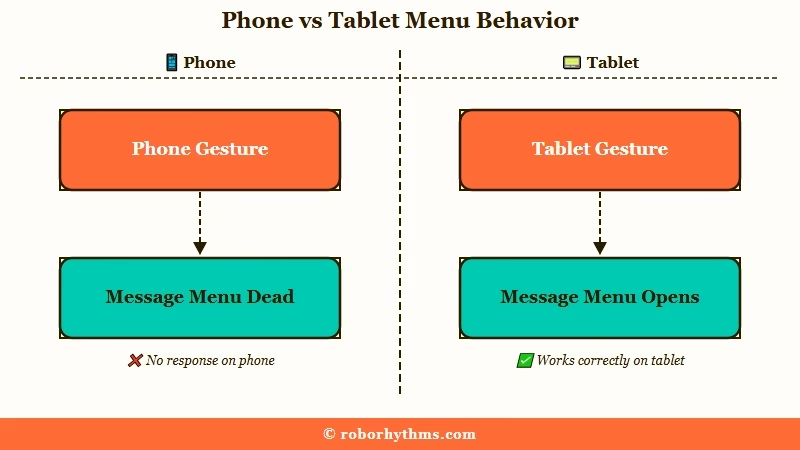
Their wording was blunt. “Its not happening on my tablet so I dunno why its happening on my phone”, followed by another reader replying “Same just tested. Working on tablet but not the phone.”
I rate the tablet check as the fastest way to tell a real bug from a broken device. If the menu opens on a second screen with the same account, nothing on your phone needs fixing.
The mechanism is mundane once you see it. A chat feed is a virtualised scrolling list, and a long press inside one is easy to cancel: the React Native long press gesture defaults to a 500 millisecond hold and fails if your finger drifts more than 10 points.
On Android that cancellation boundary is known to trigger too eagerly, and tighter phone layouts make the drift more likely than a roomy tablet one does.
Why Won’t Clearing Cache or Reinstalling Fix This?
Clearing cache, reinstalling, restarting, switching networks and toggling a VPN cannot fix this bug, because none of them change the shipped code that is cancelling your touch.
Every one of those is the standard opening move in general troubleshooting guides, and every one of them is wasted effort here.
Reinstalling downloads the identical build with the identical defect. Users who cleared cache reported it “didn’t help at all”. A VPN changes how your traffic is routed and has no bearing on whether a tap registers on glass.
There is a sharper version of this trap. The app overrides your device’s own accessibility settings, including the Android and Samsung touch and hold delay, so tuning long press duration at the system level does nothing at all inside Character AI.
My take is that the standard checklist survives on how easy it is to write. Nobody wants to publish a fix list whose first entry is “this one is not yours to fix”.
| Symptom | Likely cause | Fix that works |
|---|---|---|
| Menu slides up slowly, ignores taps | Gesture cancelled inside the chat list | Long press your own message instead |
| Popup vanishes the moment you tap an option | Same cancellation, later in the sequence | Switch to the browser or a tablet |
| Cannot copy text from a reply | Copy sits behind the same dead menu | Open the chat on desktop or mobile web |
| Cannot edit a bot’s opening message | Intro editing needs the menu to be live | Send a temporary message first, then rewind |
| Menu dead on phone, fine on tablet | Device specific layout and gesture conflict | Nothing to fix, use the working device |
The table above is the short version. The section below walks the same routes in the order I reach for them.
How Do I Get the Message Options Back Right Now?
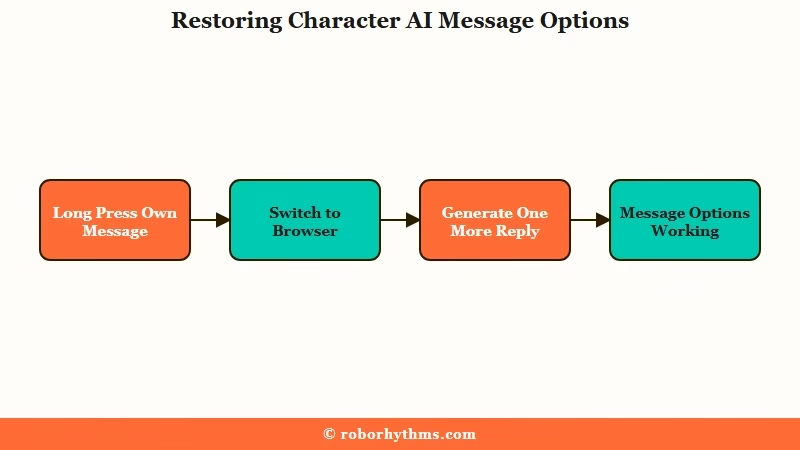
Three workarounds restore most of the menu today: long press your own messages, move to a browser or tablet, or generate a fresh reply to force a redraw. None require a reinstall.
I still keep the browser open in a second tab whenever the app goes through one of these phases. It costs nothing and it removes the guesswork.
- Long press one of your own messages rather than the bot’s. The panel opens normally from your side of the conversation, which is enough to rewind or start a new chat from that point. As one reader put it, “if you wanna rewind or start a new chat from a certain point, you can only do it from your own side of the conversation.”
- Open the same chat in a mobile or desktop browser. Long press, copy and edit all behave there.
- Load the chat on a tablet if you have one. Same account, same features, working menu.
- Generate one more reply and try again. A few users found the menu recovered on its own: “I just loaded another reply and mine went back to normal.”
One caution before you commit to the browser. The newer web interface carries a rewind bug of its own, where a single rewind can jump a chat back to its beginning. One user lost “weeks of History” that way.
Open your web account settings and choose the Stable option first. That reverts the site to the older interface and takes the rewind risk off the table before you start using it as your main route.
How Do I Edit a Bot’s Intro While the Menu Is Broken?
Send a throwaway message to unlock the menu mechanics, edit the intro, then rewind to the throwaway message to erase it while keeping your edit. The edit survives the rewind.
The trick is that sending anything at all wakes the menu up. I’d use this route before giving up on an intro edit entirely.
Before: you open a chat, long press the bot’s greeting to fix a typo, and nothing happens because the intro sits behind the dead menu.
After: you type “ok” and send it, long press the greeting (which now responds), correct the typo, then long press your own “ok” message and choose Rewind to here. The “ok” disappears and the corrected greeting stays.
What is Rewind: The bulk delete feature under a different name. It keeps the message you select and removes everything after it, so you do not have to retype your own lines.
That renaming caused years of confusion. Plenty of people still read Rewind as a downgrade from bulk delete when it does the same job and saves more of your own writing.
Is Character AI Down or Is It Just Your App?
Character AI’s servers are running normally, which is exactly why status pages will tell you nothing useful about this bug. The failure never reaches a server.
The monitoring data makes the gap obvious. UptimeRobot’s probes, which ping the site every ten minutes, reported 100% uptime and zero incidents across the same window.
StatusGator, which folds in crowdsourced reports, logged 1,515 user submitted outage reports on August 11 alone and has tracked more than 568 disruptions since March 2025.
Both are measuring honestly. One is asking “does the server answer”, the other is asking “can people use the product”, and a rendering bug splits those two questions apart.
Status pages will not help you here. I treat them as a server check and nothing more, which is worth remembering before your next outage hunt.
If you want the fuller version of that distinction, the breakdown of when Character AI is down covers the cases where the servers really are the problem.
| Where you are | Bot message menu | Your message menu | Worth using today |
|---|---|---|---|
| Phone app | Dead or unresponsive | Usually still opens | Only for rewind from your side |
| Tablet app | Working | Working | Yes, best option if you own one |
| Mobile web | Working | Working | Yes, switch to Stable first |
| Desktop web | Working | Working | Yes, most reliable route |
Can You Get a Refund on c.ai+ If the App Keeps Breaking?
The written policy says no refunds on web purchases and no partial refunds for unused time, but support has granted full refunds on request well past that point. Asking costs nothing.
The gap between policy and practice is documented. One subscriber emailed support to say they were unhappy after a sudden update and received a full refund more than 15 days into the billing period. Others report that a PayPal billing appeal resolves it when support goes quiet.
If you bought through the App Store or Google Play, the subscription is billed by the store and the refund request has to go there instead. Character AI support cannot process those.
Ask anyway. The written policy is not the whole story, and a paid tier that cannot copy a message is a reasonable thing to raise.
I rate a polite, specific email as the best route of the three. Name the dates, say what stopped working, and let support decide.
This is also the point where a lot of people start looking sideways. Time spent in the app is not trivial: users averaged more than 950 minutes a month on Character AI in the first half of 2026, per Sensor Tower data via TechCrunch. Sixteen hours a month of anything makes a broken core gesture hard to shrug off.
If you want a platform where the paid tier is the product rather than a queue for features, Candy AI is the one most people land on, and Nectar AI is the closer fit if character consistency matters more to you than volume.
Be clear-eyed about the tradeoff: neither imports your Character AI history, so a move means starting your chats again.
Two adjacent problems are running alongside this one. The same regression cycle produced blank messages appearing in chats, and the LongSqueak and Style Control rollout is the release the whole sequence traces back to.
If you are weighing whether the subscription still earns its price, the full c.ai+ value breakdown goes through the maths.
The honest answer for now is that this one gets fixed on Character AI’s schedule and not yours. Long press your own messages, keep a browser tab open beside the app, and wait for the next build rather than reinstalling the current one.
Frequently Asked Questions
Why is the Character AI long-press menu not working?
A gesture cancellation in the current phone app build stops the options panel from accepting input. The menu opens slowly then ignores taps, or closes the moment you select an option. Staff have confirmed a fix is in progress.
Why can I only edit my own messages now?
The long press gesture still completes on your own messages while failing on the bot’s. Rewind, copy and start new chat all work from your side of the conversation, which covers most of what people need until the patch lands.
Why does the c.ai menu swipe up so slowly?
The panel is being animated and cancelled at the same time, so it crawls upward and then refuses input. It is a rendering and gesture conflict inside the app build. A slow phone or a weak connection has nothing to do with it.
Can I copy text from Character AI while the menu is broken?
Not from the phone app, since copy sits behind the same dead menu. Open the chat in a mobile or desktop browser and copy works normally. A tablet works too if you have one available.
Will reinstalling the Character AI app fix the message menu?
No. Reinstalling downloads the same build containing the same defect. Clearing cache, restarting your phone and switching networks have no effect either, because the failure is in shipped code rather than local data.
How do I delete a single message when the menu will not open?
Use the browser version, where the menu responds normally. On the phone you can sometimes reach it by long pressing your own message and rewinding to that point, which removes everything after it.
Quick Takeaways
- The Character AI message menu is broken in the phone app build, not on your device, and the same account works on tablets and in the browser.
- The official August 11 fix list did not include this bug, so a separate patch is being tracked for it.
- Long pressing your own message still opens the panel, which is enough to rewind or start a new chat from any point.
- Reinstalling, clearing cache and changing your system long press delay all do nothing, since the app overrides device level touch settings.
- Switch your web account to the Stable interface before relying on the browser, because the newer one can rewind a chat back to its start.
