
What’s Changed: Janitor AI’s Chat Summary and Memory box is where you stop your bot from forgetting, and it lives inside a tight 8,000 to 9,000 token budget. Write a short summary the right way and refresh after every save, and most of the memory loss and reload problems people are hitting this week just go away.
Janitor AI chat summary is the feature people reach for the second a bot starts forgetting names, dropping plot points, or blanking on who said what three scenes ago.
The trouble is that almost nobody explains what that box is doing under the hood. So folks paste a wall of text into it, watch the token counter jump, and end up worse off than when they started.
The real cause surprises most people. Your bot did not get dumber and the model did not get nerfed. You quietly ran out of room in a memory budget most users never knew existed.
I will walk through how the memory system really works, how to write a summary that sticks, and how to clear the two settings bugs people keep hitting this week. That means the page that reloads the moment you save, and the API settings that refuse to save at all.
You will walk away knowing exactly what belongs in that box and what to leave out.
How Does Janitor AI Chat Summary and Memory Work
Janitor AI Chat Summary and Memory is a text box you open from the three line menu, and whatever you put in it gets sent to the model with every single message.
You can hit Auto Summary to generate a recap, or type your own. The bot then treats that text as fixed context it always sees.
What is Chat Memory: A user-editable note attached to a single chat that Janitor injects into every prompt so the bot keeps remembering key facts as the conversation grows.
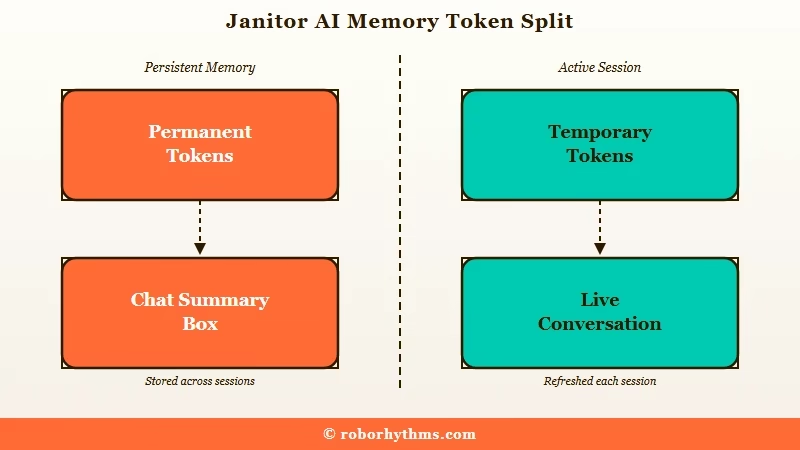
The way I see it, the mental model matters more than the button. Janitor splits everything the model reads into two buckets, and only one of them is under your control. The official token guide calls them permanent and temporary, and the difference is the whole game.
Permanent tokens ride along on every message: your Chat Memory, the character personality, the scenario, and any advanced prompts. If the box refuses to store what you type at all, that is the separate failed to save message error rather than a token ceiling.
Temporary tokens are the live conversation, your lines and the bot’s replies, and they get pushed out as the chat grows. Chat Memory is your one lever to promote something from the temporary pile into the permanent one.
| Token type | What it includes | When it is sent | Your control |
|---|---|---|---|
| Permanent | Chat Memory, personality, scenario, advanced prompts | Every single message | High, you edit the memory box directly |
| Temporary | Your messages and the bot’s replies | Until they scroll out of the budget | Low, the oldest lines drop first |
Why Your Bot Forgets Everything Mid Chat
Your bot forgets because Janitor’s default model runs on roughly an 8,000 to 9,000 token budget, and once it fills, the oldest messages silently drop out with no warning.
The official guide calls this a silent failure. The AI does not stop, it just starts quietly forgetting to make room.
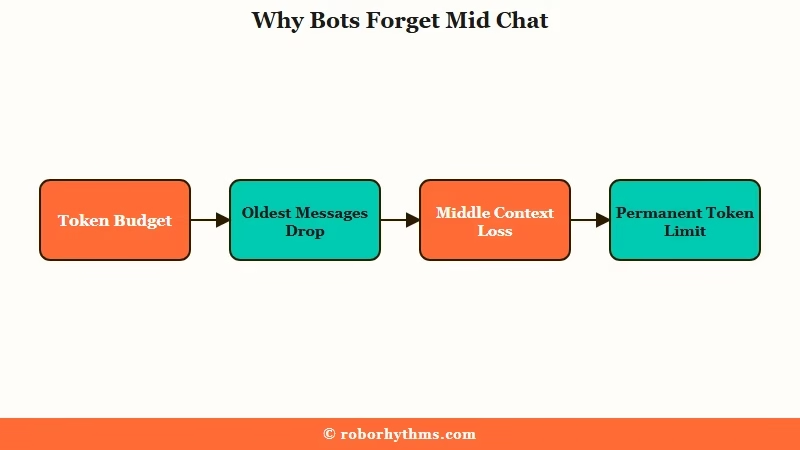
There is real research behind why the middle of a long chat is the first thing to go. A peer reviewed study from Stanford, Lost in the Middle, found that models reliably use information at the very start and very end of their context but lose track of what sits in between.
Your carefully built backstory from an hour ago is exactly the buried middle the model struggles to reach.
The numbers make the ceiling concrete. Janitor’s own guidance says a bot performs best with under 1,500 permanent tokens, and past 2,000 it starts to stumble because there is too little room left for the live conversation.
One 2026 analysis of long chats found instructions set early in a session were followed only about a third as often sixteen turns later, down from near total compliance five turns in.
This is why I treat the JLLM token budget as the real constraint, not the model’s intelligence. If your replies have gone short and generic, that is often the same ceiling showing up a different way, which the guide on Janitor AI responses too short digs into. Chat Memory is how you re-pin the facts that matter before they fall off the edge.
How Do You Write a Chat Summary That Sticks
A summary that sticks is short, structured, and written in bullet points, not a full recap of the chat pasted back in.
Janitor’s own template breaks it into Environment, Relationship Dynamic, Current Plot Points, character notes, user notes, and Important Past Events. The official advice is blunt: be short, be specific, do not write a novel in here.
My rule of thumb is to keep the whole box comfortably under that 1,500 token guidance so the live scene still has room to breathe. Auto Summary is a fine rough draft, but treat it as a first pass you then trim by hand. It has been known to generate a fresh scene instead of a recap, so never paste it in blind.
Janitor AI Chat Memory Template You Can Copy
Copy the structured block in this section into Chat Memory and swap each line for your own details, keeping the whole box under about 1,500 tokens. It uses the six headings Janitor recommends, so the note stays compact and the bot keeps the details it would otherwise drop.
Here is the difference between a memory box that eats your budget and one that earns its place.
Before: a 900 word recap pasted straight from the chat, every line of dialogue included, shoving permanent tokens well past 2,000.
After: a tight structured note that captures the same story in a fraction of the space:
Environment: Rainy port city, late autumn. {{char}} runs a small smuggling crew.
Relationship Dynamic: Uneasy allies slowly turning to trust after the warehouse job.
Current Plot Points: Rival crew found our safehouse. Debt to Mara is still unpaid.
{{char}} notes: Guarded, dry humor, protective of the crew, hates open water.
{{user}} notes: Former cop, quick temper, owes {{char}} a life debt.
Important Past Events: {{char}} took a knife wound saving {{user}} back in chapter two.
If your characters lean on lorebooks too, the same budget math applies, and trimming lorebook token usage frees up even more room for the summary to work.
Why Do the Memory and API Settings Keep Reloading
The settings page reloads because a hard refresh is a required step, not a bug, and your saved memory or API config only loads once the page reloads fresh.
Janitor’s own proxy guide is emphatic about it: save, then refresh the page, then reopen the chat. Skip the refresh and your changes look like they vanished.
That said, there is a separate and genuine problem where the site reloads over and over on its own. The two get blamed on each other constantly, so the fix depends on which one you are hitting. The table below sorts the common symptoms so you are not guessing.
| Symptom | Likely cause | Fix |
|---|---|---|
| Settings page reloads right after you hit save | The refresh is a required step, the new config loads only on a fresh page | Save, hard refresh the browser, then reopen the chat |
| API settings will not save at all | Several fields changed at once, or a stale login session | Change one field, save, refresh, then add the next |
| Page reloads over and over by itself | Cached data, a script blocking extension, or the site open in many tabs | Clear cache and cookies, disable the ad blocker, keep one tab open |
| Token counter resets after you edit the box | The counter recounts from the new total, nothing was lost | Ignore it, recheck the number after your next reply |
| Bot forgets details from earlier | You hit the token ceiling, oldest messages dropped | Move the key events into Chat Memory |
From what the fixes have in common, the sequence I would run before touching anything drastic is short and boring, and it clears most cases:
- Save your settings, then do a full browser refresh with Ctrl and Shift and R.
- Reopen the chat and send one test message to confirm the config took.
- If it still fails, clear the site’s cache and cookies and log back in.
- Disable ad blockers and privacy extensions that block scripts, then reload.
- Close every extra Janitor tab and keep a single one open.
When the reload loop is stubborn, it usually overlaps with a broader connection fault, and the steps in fixing Janitor AI proxy problems cover the API side in more depth.
When Manual Memory Is Not Worth the Hassle
Manual memory stops being worth it when you would rather chat than babysit a summary box, and that is the honest trade Janitor asks you to make.
The free control is real, but so is the upkeep. Some people want the fine grained editing, and some just want a companion that remembers on its own.
The way I see it, Janitor rewards tinkerers. If you enjoy shaping exactly what your bot recalls, nothing else gives you that dial for free, and the deeper memory recall issues are usually solvable once you understand the budget. If constant summarizing sounds like a chore, that is a fair reason to look elsewhere.
Apps built around automatic long term memory take that job off your plate. Candy AI keeps track of your history without a memory box to manage, so a companion there can reference last week’s conversation without you re-pasting it. It trades Janitor’s manual control for a system that just remembers, which is the right call for a lot of people.
If you want a middle ground with strong recall and creative roleplay, Nectar AI is the other one I would point people toward before they give up on the idea entirely.
Neither replaces the control Janitor gives you, but both remove the summarizing homework.
Frequently Asked Questions
Where is Chat Memory on Janitor AI?
Chat Memory lives inside an active chat. Open the three line menu at the top of the chat and select Chat Memory. The API and proxy settings sit in the same menu under API Settings, which is why the two get confused.
Why does my token counter reset after I update Chat Memory?
The counter is recounting, not deleting. When you edit the memory box, Janitor recalculates the new permanent total, so the number shifts without losing anything. Check it again after your next reply to see the true figure.
Is Auto Summary good enough on its own?
Auto Summary works as a rough draft, not a final answer. It has been caught writing a new scene instead of a recap, and it often includes filler you do not need. Generate it, then trim it down to the structured template before you rely on it.
How many tokens should my Chat Memory be?
Keep the whole permanent load under about 1,500 tokens for the best results. Past 2,000, the bot has too little room for the live conversation and quality drops. A tight bullet summary usually fits well within that budget.
Why do my Janitor AI settings keep saying they did not save?
Most of the time they did save, but the page needs a hard refresh to load them. Save, refresh the browser, and reopen the chat. If they truly will not stick, change one field at a time and avoid editing several settings in one pass.
Quick Takeaways
- Janitor runs on roughly an 8,000 to 9,000 token budget, and hitting it makes your bot forget the oldest messages with no warning.
- Chat Memory is permanent context sent on every message, so keep it short, structured, and under about 1,500 tokens.
- Write summaries in bullet points using the Environment, Plot, and Past Events template, and treat Auto Summary as a draft to trim.
- Settings reloading after a save is normal, always refresh; a nonstop reload loop is a separate cache or extension problem.
- If summarizing by hand feels like a chore, a companion with built in memory like Candy AI removes that work entirely.
