
What’s Changed: A July 2026 JLLM update added a Short or Default Prompt Generation pop-up, and tapping it quietly caps your reply length. The bigger reason replies feel short is JLLM’s small 8,000 to 9,000 token memory and the fact that it mirrors how you write. You fix it with the toggle, a stronger custom prompt, and tighter token management, not the Max New Tokens slider.
If your Janitor AI responses are too short all of a sudden, you are not imagining it and you did not break your bot. A JLLM model update in mid July 2026 pushed a new pop-up called Short or Default Prompt Generation, and plenty of people tapped it without clocking what it did.
Their replies dropped from full paragraphs to one or two lines, with no obvious button to switch it back.
That pop-up is the trigger everyone noticed. It is not the whole story, though, and this is the part most quick fixes skip.
JLLM has always run on a small memory budget, and it copies your writing style more than people realize. So the reliable way to get long answers back is a mix of turning that toggle off, rewriting your custom prompt, and managing your token space.
The one lever that will not save you is the Max New Tokens field, and I will show you why. Stick with me and you will know exactly which setting to change first and which to ignore.
The toggle fix and the prompt wording that restores full paragraphs are both below, and they work without touching the Max New Tokens slider.
If you would rather not manage toggles and token budgets at all, Candy AI holds detail across a long session and does not shrink replies after an update. Nectar AI is the one built around persistent memory and longer scenes. Neither asks you to learn a token budget just to get a full paragraph back.
What Changed With Janitor AI Responses Too Short
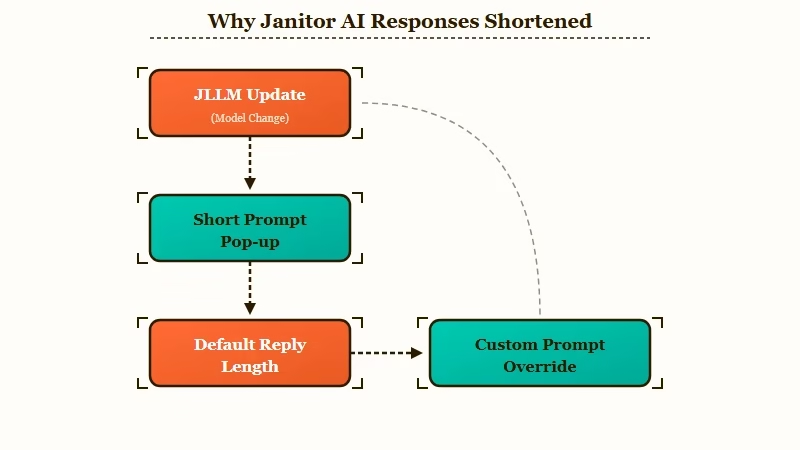
Janitor AI responses got too short because a mid July 2026 JLLM update introduced a Short or Default Prompt Generation pop-up that lowers the default reply length once enabled.
The pop-up appeared for a wave of users at once, and many enabled it by accident.
The r/JanitorAI_Official board filled up with the same confusion inside a day. One official post was titled JLLM Model Update for Shorter Responses, and the replies underneath it were a stream of people asking how to get long answers back and how to stop the thing that made their chats shorter.
A separate post just asked how many pop-ups do we need, which tells you the mood.
Here is the honest bit the platform did not make clear. The toggle changes the default generation behavior, but it does not override a strong instruction inside your chat.
That is good news, because it means you are not stuck even if you cannot find the switch again. If you want the background on the model itself, what JLLM is covers the engine behind all of this.
Why Your JLLM Replies Really Went Short
Short JLLM replies come from three things at once: the new toggle, JLLM’s 8,000 to 9,000 token memory filling up, and the model copying your own message length.
The toggle is just the one you can see.
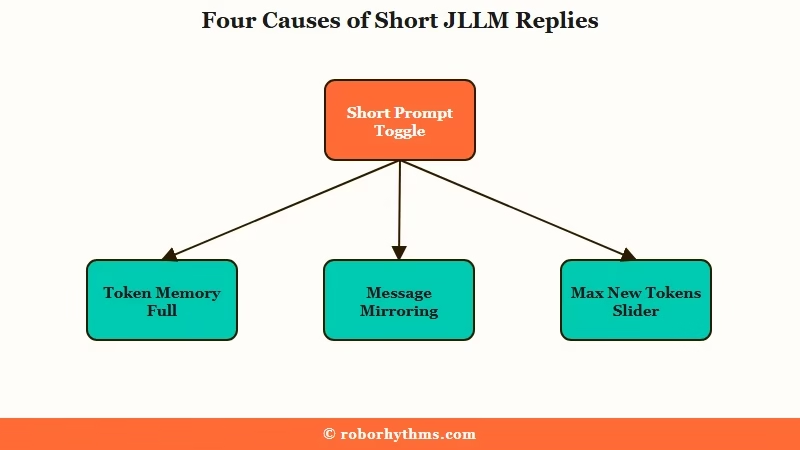
Start with memory, because this is the reason most quick fixes miss. Janitor AI’s official docs put the JLLM token wallet at roughly 8,000 to 9,000 tokens, and when that fills, the system silently drops the oldest parts of your chat with no warning and no error. That silent drop differs from a write that fails outright, so Janitor AI messages that fail to save covers the save-error path.
A long session slowly loses the setup that made replies rich in the first place, so the bot has less to work with and answers get thinner. If memory is your real pain, AI companion long-term memory goes deeper on this.
The second cause surprised me the first time I saw it spelled out. JLLM mirrors your writing.
Janitor’s own guidance says if you write flowery descriptions the bot will too, and if you lean on snappy one liners it follows that style. So a run of short user messages quietly trains the bot to answer short, no toggle required.
The third cause is the trap. The Max New Tokens field looks like the length dial, but the community has flagged for months that it does not hold reliably on JLLM. Reaching for it is the most common wasted fix I see, and it is why the sections below lead with prompt and memory changes instead.
Is This the Same as the Removed Advanced Settings
No, the Short Prompt toggle is a separate change from the early July settings move, and mixing them up sends you chasing the wrong fix.
Two different July updates hit within days, so the confusion is fair.
In early July 2026 the advanced generation sliders for JLLM (temperature, Top P, Max New Tokens) were relocated rather than deleted, and many now sit under the Proxy tab area instead of their old spot.
That change is covered in the Janitor AI advanced settings guide. The mid July Short or Default Prompt Generation pop-up is a different thing entirely, and it targets reply length specifically.
This is also the opposite of the older complaint where replies ran on forever and got cut off mid sentence. If that is your issue instead, the Janitor AI responses too long guide is what you want. Here is how the three situations line up.
| Change | When | What it does | Right fix |
|---|---|---|---|
| Short or Default Prompt pop-up | Mid July 2026 | Caps default reply length once enabled | Turn it off, then override length in your custom prompt |
| Advanced settings moved | Early July 2026 | Relocated temperature, Top P, Max New Tokens | Look under the Proxy tab area, not the old panel |
| Replies too long | Ongoing, older issue | Runs past the token budget and cuts off mid sentence | Ask for 1 to 3 paragraphs, use a prefill |
How Do You Get Long Answers Back on Janitor AI
You get long answers back by disabling the Short Prompt toggle, forcing length in your custom prompt, and freeing up token space, in that order.
The toggle and the prompt are where I would start, and together they clear this up for most people before you ever touch a slider.
Here is the sequence I would walk through, starting with the change that undoes the update and ending with the cleanup that keeps replies long over a whole session.
- Reopen the Short or Default Prompt Generation pop-up or its generation setting and switch it back to the default, longer mode. If you cannot find the pop-up again, do not stall on it, because the next step overrides it anyway.
- Add a length instruction to your custom prompt using positive phrasing. Write limit responses to 3 to 4 rich paragraphs rather than a negative like do not be short.
- Trim your permanent tokens. Janitor recommends keeping permanent info under about 1,500 tokens, and past 2,000 you get repetition and forgotten context, so cut bloated advanced prompts and scenario text.
- Match your own message length. Write two or three full sentences instead of one, since JLLM mirrors your style and short inputs breed short outputs.
- Skip Max New Tokens. It does not reliably hold length on JLLM, so leave it and let the prompt do the work.
This table is the quick reference version for when a chat suddenly goes flat.
| Symptom | Likely cause | Fix |
|---|---|---|
| Replies dropped to one line overnight | Short Prompt toggle got enabled | Switch it back, then add a length line to the custom prompt |
| Long chat slowly got shorter | Token wallet filled and dropped old context | Trim permanent tokens under 1,500, summarize the chat |
| Only this bot answers short | Bloated character card eating tokens | Shorten the bot definition and scenario |
| Nothing works after slider changes | Leaning on Max New Tokens | Ignore that field, drive length from the prompt |
| Replies short and robotic | Your own messages are terse | Write fuller messages so the bot mirrors length |
What a Good Length Prompt Looks Like
A good length prompt uses strong verbs, a concrete paragraph target, and zero negatives, because JLLM treats words like never and stop as ingredients to include rather than rules to follow.
That last point is why do not be short can backfire.
Janitor’s prompting guidance is specific here. Phrasing like limit to 1 to 3 paragraphs works, while no more than three paragraphs can fail because the model reads the number as content to use.
Strong commands beat soft ones too, so describe the setting in vivid detail lands better than feel free to describe the setting. Here is the difference in practice.
Before: “make your responses longer and don’t give me short replies”
After: “Write 3 to 4 full paragraphs per reply. Describe the setting, body language, and inner thoughts in vivid detail. Keep the pacing slow and let scenes breathe.”
The second version gives the model something to do instead of something to avoid, and it names the length as a target. If you want a ready-made booster, the community patch prompts push for rich characterization, interior monologues, and detailed scenes while telling the model to avoid rushed resolutions and repeated templates.
One more trick from those docs is dropping a short inline note like reset cache and speak coherently when a chat gets stuck in a terse loop. For the model quality dips that sometimes ride alongside this, the JLLM quality drop breakdown has more context.
Short replies are one problem, and messages that are gone from the thread altogether are another. If whole turns have vanished rather than shrunk, start with recovering Janitor AI messages that suddenly disappeared.
What to Use If You Want Longer Replies Without the Fiddling
If you would rather not babysit toggles and token budgets, a companion platform with a larger memory and steadier default length is the low-effort route.
JLLM is free and creative, and I still use it, but its small token wallet is a real ceiling on long sessions. Janitor AI pulls tens of millions of visits a month per Similarweb traffic data, so this ceiling is frustrating a lot of people at once.
Two alternatives keep replies long without the tuning. Candy AI holds detail across a session and does not shrink your replies after an update, which is the main thing people are chasing here.
If you want something built around persistent memory and immersive scenes, Nectar AI is the one I would try next. Neither asks you to learn a token budget just to get a full paragraph back.
None of that means you have to leave Janitor. Plenty of people run the fixes above and stay. The alternatives are there for the nights you want long, consistent replies without opening a settings menu at all.
Frequently Asked Questions
Why did my Janitor AI responses suddenly get short?
A mid July 2026 JLLM update added a Short or Default Prompt Generation pop-up that lowers default reply length once enabled. Many users turned it on by accident. Turning it off and adding a length line to your custom prompt reverses it.
How do I turn off the short response setting on Janitor AI?
Reopen the Short or Default Prompt Generation pop-up or its generation setting and switch back to the longer default mode. If you cannot find it again, a custom prompt that requests 3 to 4 paragraphs overrides the shorter default anyway.
Does Max New Tokens fix short replies on JLLM?
Not reliably. The community has reported for months that the Max New Tokens field does not hold length consistently on JLLM. Drive reply length from your custom prompt and by trimming permanent tokens instead.
Is the short response issue the same as the removed advanced settings?
No. The advanced sliders were relocated in early July 2026, many to the Proxy tab area, while the Short Prompt pop-up is a separate mid July change aimed at reply length. They are two different updates.
Why do my replies get shorter the longer a chat goes?
JLLM holds only about 8,000 to 9,000 tokens, and once that fills it silently drops the oldest messages. The bot loses earlier context, so answers thin out. Trim permanent tokens and summarize long chats to slow this down.
Does my own message length affect the bot?
Yes. JLLM mirrors your writing style, so short one line messages train the bot to answer short. Writing two or three fuller sentences nudges it back toward longer replies.
Quick Takeaways
- A mid July 2026 JLLM update added a Short or Default Prompt Generation pop-up that caps reply length once enabled, and many users tapped it by accident.
- The deeper causes are JLLM’s 8,000 to 9,000 token memory filling up and the model mirroring your own short messages.
- Fix it by turning the toggle off, requesting 3 to 4 paragraphs with positive phrasing, and keeping permanent tokens under 1,500.
- Skip the Max New Tokens field, since it does not hold length reliably on JLLM.
- If you want long replies with zero tuning, a larger-memory companion like Candy AI is the low-effort alternative.

Or just press the 3 lines on the top right and press API settings 😭
That menu is where a lot of the generation settings live now, yes. The catch is that Max New Tokens in there doesn’t reliably hold length on JLLM, which is why the guide leans on other fixes.
If you’re working out how to make Janitor AI responses longer, switch the Short or Default Prompt Generation option back to default and ask for 3 to 4 paragraphs in your custom prompt. Keeping permanent tokens under about 1,500 helps the length stick.