
What’s Changed: Character AI Lorebook went live on July 13, 2026 in beta for c.ai+ subscribers. It lets your characters pull from keyword-triggered world knowledge. Public is still the default, but the August update added a Private discovery setting for c.ai+ subscribers, plus lorebook importing, and Entry Visibility controls how much of a public lorebook strangers can read.
If you are trying to figure out how to use Character AI Lorebook, the first thing worth knowing is that the launch-day complaint has been answered. At release every published lorebook was public, and you had to publish one to use it in a chat at all. Character AI’s Lorebooks documentation, updated 13 August 2026, now lists a Private discovery setting that keeps a lorebook off your profile and out of search.
Lorebook is the worldbuilding feature the community has asked for through years of memory complaints. It rolled out on July 13, 2026 in beta, and for now it sits behind the c.ai+ subscription. Free users are still waiting on a date.
I will walk through what it does, how to set one up step by step, and the single setting that decides how much of your world a stranger can read. I will also cover where lorebook creation actually works now that the app has caught up, and where people are moving worldbuilding they want kept private.
The feature is genuinely useful once you understand the rules. It is also the kind of launch where the fine print matters more than the announcement video.
How to Use Character AI Lorebook and What Just Changed
Character AI Lorebook is a keyword-triggered memory tool that feeds world details into a chat only when a matching word appears.
It launched July 13, 2026 in beta for c.ai+ members, billed as one of the most requested features in the platform’s history.
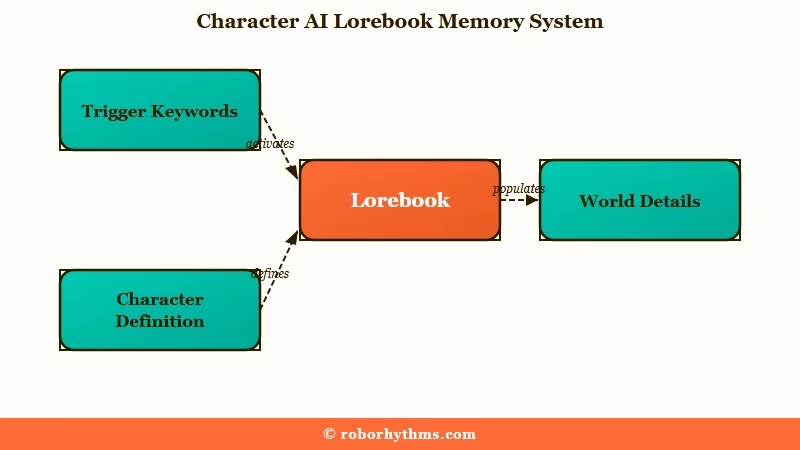
A lorebook is a collection of entries about your world: side characters, locations, items, factions, events, and the rules that hold a story together. Each entry stays dormant until one of its keywords shows up in the conversation, so the detail arrives when the story needs it instead of eating space the whole time.
What is a Lorebook entry: A single note holding one piece of world detail plus the keywords that trigger it, which the character reads only when a keyword appears in chat.
The official rule of thumb from the Character AI Help Center is clean: always-relevant facts go in the character Definition, sometimes-relevant facts go in the Lorebook. I lean on that one line hard, because it stops people from cramming every detail into a space the model barely reads.
This launch is part of a fast feature run. Character AI has been shipping constantly through 2026, and TechCrunch reported users still spend over 950 minutes a month in the app even with roughly 20 million monthly users after its peak. Lorebook is the retention play aimed at the people who build worlds.
Are Character AI Lorebooks Private or Public
Public is the default, and a public lorebook sits on your profile’s Lorebooks tab for anyone to open. Character AI now also offers a Private setting under Lorebook discovery, available to c.ai+ subscribers, which keeps the lorebook off your public profile and out of search. The documentation limits it to your private characters, so a character you have already shared publicly is not covered.
On a lorebook you leave public, the lever is Entry Visibility in Lorebook Settings, which hides your entry content but never the titles or keywords.
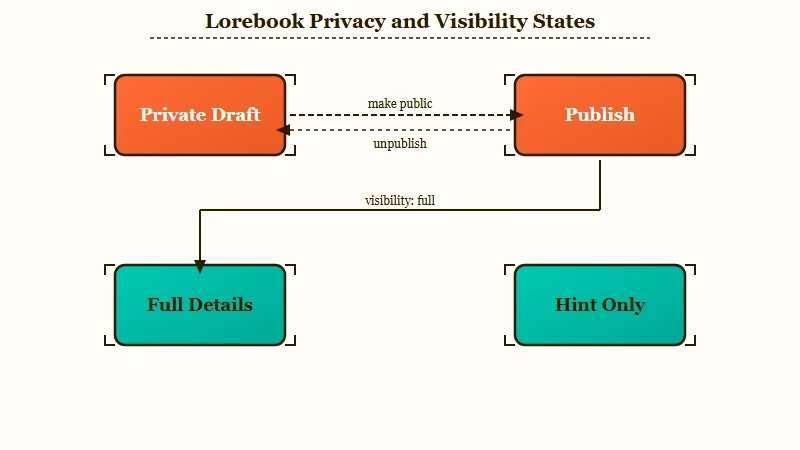
Here is the trap. A brand-new lorebook starts as a Draft, and a Draft cannot be used in a chat at all. To even test how your character reacts to the lore, you have to hit Publish, which runs a brief review and then makes the lorebook live and visible to everyone.
That caught the community off guard fast. Within hours of launch, the loudest reaction had nothing to do with features. People wanted to know how to keep their work private.
A community moderator first reassured users, then admitted plainly: “Yes, Lorebooks are public once they’re published” and “We currently only have public Lorebooks atm.” That was accurate in July, and “atm” turned out to be the operative word. Character AI’s own Lorebooks page now documents a Private setting under Lorebook discovery.
The one lever you do get is Entry Visibility, which lives in Lorebook Settings and applies to the whole lorebook. Set it to Hint Only and other users see just titles and keywords while the content stays hidden. Leave it on Full Details and everything shows.
Hint Only is a partial measure rather than privacy, because your entry titles and trigger words still leak the shape of your world. If the world is genuinely sensitive, set discovery to Private instead of relying on Hint Only.
| Lorebook state | What others can see | What stays hidden | Best for |
|---|---|---|---|
| Draft, unpublished | Nothing, it is not shared | Everything, but you cannot use it in chat | Work in progress only |
| Published, Private | Nothing, it is off your profile and out of search | Everything, and it still works in chat | A private character and a world you want to keep to yourself, c.ai+ only |
| Published, Full Details | Title, keywords, and full content | Nothing | A public world you want others to reuse |
| Published, Hint Only | Title and keywords only | The entry content | Using lore in chat while hiding details |
Because titles and keywords stay public even on Hint Only, name your entries in a way that gives nothing away. An entry titled “Aldenmoor betrayal” tells a reader more than you think.
How Do You Create a Lorebook Step by Step
You create a Character AI lorebook from the + Create menu, add entries with keywords, link it to a character you own, then publish it.
The whole c.ai lorebook flow now works on the web and in the app, and templates make the first one faster.
Before the steps, one framing note from my testing: the keywords are the entire game. Good keywords make an entry fire at the right moment, and lazy keywords either never trigger or fire constantly and clog the chat.
- Open + Create and choose Lorebook. On the web it sits in the left sidebar, and in the app it is the + button in the bottom navigation.
- Start from scratch or pick a template. There are eight: Side character, Location, Item, Event, Faction or group, System or rules, Culture and Religion, and Species.
- Fill each entry’s three fields. A Title that only you and other users see, the Content that the AI reads, and the Keywords that trigger it.
- Add up to 8 keywords per entry. Use names, nicknames, and specific phrases, and skip common words that fire on every message.
- Link the lorebook to one or many characters you own. You cannot attach it to someone else’s bot.
- Publish. The lorebook runs a quick review, then a blue +Lore tag appears on the character.
If you edit a published lorebook later, changed entries highlight in yellow until you either discard them or push the update live. I like that safety net, since it stops a half-finished edit from going out in the middle of a story.
Here is the difference good keywords make.
Before: keywords like “the”, “he”, “city”, “war” fire on nearly every message and keep re-injecting the same entry until the chat forgets what just happened.
After: keywords like “Aldenmoor”, “Captain Vey”, “the northern blight”, “oathbreaker” fire only when that part of the world is in play, so the entry shows up on cue and stays out of the way otherwise.
Placeholders, Autosave and Editing Lore Mid-Chat
Lorebook entries accept the same {{char}} and {{user}} placeholders as a character Definition, so one entry can read differently for every character and persona it touches. {{char}} resolves to whichever linked character is chatting, and {{user}} resolves to the persona in the conversation.
Two smaller conveniences are easy to miss. Your lorebook autosaves while you work, with drafts waiting under the Lorebook tab on your profile, and in any chat with a Lore-tagged character you can open the Lorebook viewer from the chat menu to see the active world without breaking the scene.
If you own that lorebook, a pencil icon in the viewer lets you edit an entry on the spot. That is the quickest fix when you catch a character drifting halfway through a story.
Importing a Lorebook From Another App
The same August update added importing, which is the faster route if your world already exists somewhere else. Character AI’s importing guide takes a plain text or JSON file up to 10 MB, or entries pasted straight into a text box.
Lorebooks exported as JSON from other apps and tools import directly, and Character AI says the file is processed locally on your device. The route is Create, then Lorebook, then Import on the Fresh Start screen, and the result opens in the editor ready to edit and publish like any other lorebook.
Can You Create a Character AI Lorebook in the Mobile App
You can now create a lorebook inside the Character AI mobile app. At launch in July 2026 every lorebook option bounced you out to a browser, but the app added native creation, and the Help Center now documents starting one from the + button in the bottom navigation.
The launch post said you could create lorebooks “on web and mobile,” which set the wrong expectation at the time. Users hit the wall right away, with one asking why “when I click on anything regarding lorebook in the app, it takes me to a browser.” A moderator called native app support “coming soon,” and it has since shipped.
If you are still getting bounced to a browser, update the app first, since the in-app editor shipped after the July launch. The mobile browser at character.ai still works as a fallback and stays the better option for heavy editing on a small screen.
The recent Drafts feature shipped with a similar mobile gap that also closed later, so expect that pattern on the next launch.
Why Your Lorebook Might Make Your Bot Forget More
A lorebook reuses your chat’s existing context budget rather than adding new memory. Overloaded or over-triggering entries compete with the live conversation and can push recent messages out, so more lore can mean more forgetting.
This is the part most launch coverage skips. The lorebook is not a bigger brain bolted onto the model. When an entry fires, its text goes into the same limited window your chat already uses, so a bloated entry or a keyword that triggers constantly quietly starves the scene you are in.
Keep entries lean, around 100 tokens each, and split big ideas into smaller entries with precise keywords. It also helps to know that Personas, Pinned Memories, and Lorebooks are separate layers that do not sync, so updating one does not update the others.
Here are the problems people are hitting in the first days and how I would fix each one.
| Symptom | Likely cause | Fix |
|---|---|---|
| Entry never fires in chat | Keywords too obscure or misspelled | Add the exact words you type, including nicknames |
| Bot forgets the current scene | Common keywords over-triggering and filling the window | Swap generic words for specific names, trim entry length |
| Your lore shows on your profile | Lorebook Entry Visibility left on Full Details after publishing | Set Entry Visibility to Hint Only, rename titles to reveal nothing |
| Cannot make a lorebook on the app | App version predates the native lorebook editor | Update the app, or build it in a mobile browser as a fallback |
| Favorite bot cannot use lore | You can only link lorebooks to characters you own | Save a copy you own, or pick a character that supports it |
Moving Your Worldbuilding From the Definition Box
Character AI reliably reads only about the first 3,200 characters of a character Definition, so years of crammed backstory is mostly dead weight.
The Lorebook is where that overflow world detail should now live.
The Definition box accepts up to 32,000 characters, but in practice the model leans on the opening 3,200 and treats anything past roughly 5,000 as background noise it may ignore or invent around. That is why so many detailed bots drift into a generic voice after a while.
My migration approach is straightforward. Audit the Definition, pull out the sometimes-relevant material like room layouts, side characters, and faction history, and rebuild each piece as a short lorebook entry with one to eight precise keywords.
Keep only the always-on identity and behavior rules in the Definition itself. The older Lorebook and PipSqueak 2 announcement hinted this was coming back in April, and the tool is finally here to do it.
What to Do If You Want Private Persistent Memory
If keeping your worldbuilding private matters more than Character AI’s library size, a companion app with private, built-in memory is the cleaner fit.
Character AI’s lorebook is public by default, and the Private setting that changes it only covers characters you have kept private, which rules it out for anyone building on a character they have already shared.
I want to be fair here. Character AI still has the deepest character catalog anywhere, and for plenty of people the Hint Only workaround is enough.
If your worlds are casual, the public tab may not bother you at all. This section is for the users telling the platform “my characters are private, so my lorebook for them should be too.”
For that group, Candy AI is a cleaner fit, since its memory is private to your account and built in rather than published to a profile.
If your priority is specifically long-term memory that carries context across sessions, Nectar AI leans hard into persistent recall without asking you to expose your world to strangers.
It also helps to know the wider field. Janitor AI’s version of lorebooks, its Scripts, is far more advanced, with boolean secondary keys like AND ALL and NOT ANY plus probability and message-delay triggers. SpicyChat skips manual keywords with vector memory that resurfaces past scenes on its own.
CrushOn AI has its own take, called World Cards, with keyword-triggered notes, always-active notes, and one world shared across all your characters. A card can be switched to Private to hide it from other users. The catch is the model, since CrushOn says World Cards run on select Pro models and all Ultra models, and free tiers won’t trigger them.
If you want the full rundown, the best Character AI alternatives guide breaks down who each one is for, and the c.ai+ value breakdown covers whether the subscription is worth it just for Lorebook.
Frequently Asked Questions
How do I use Character AI Lorebook for the first time?
Open + Create, choose Lorebook, add entries with content and up to 8 keywords each, link the lorebook to a character you own, then publish it. You need a c.ai+ subscription during the beta, and you can build it on the web or in the app.
Can I keep my Character AI lorebook private?
Yes, with conditions. Public is still the default, but Character AI’s Lorebooks page lists a Private setting under Lorebook discovery, a c.ai+ feature that keeps a lorebook off your public profile and out of search. Private works only with your private characters, so a character you have already shared publicly still needs a public lorebook, where Entry Visibility set to Hint Only hides the entry content but never the titles or keywords.
Is Character AI Lorebook free?
No. During the beta it is limited to c.ai+ subscribers. The team has said it will reach free users later, but noted some features may stay exclusive to c.ai+.
Can I create a lorebook in the Character AI app?
Yes. Native creation is documented in the app from the + button in the bottom navigation, and you can also long-press a lorebook on your profile to delete it. If lorebook options still send you to a browser, your app build predates the feature, so update it.
Can one lorebook be linked to multiple characters?
Yes. You can link a single lorebook to as many of your own characters as you want, which keeps a shared world consistent across a whole cast. You cannot attach it to characters other people made.
Do lorebooks give my character more memory?
No. Lorebook entries share the same context window as your chat, so they improve consistency but do not add capacity. Bloated or over-triggering entries can crowd out recent messages instead.
Quick Takeaways
- Character AI Lorebook launched July 13, 2026 in beta for c.ai+ subscribers, with free access still undated.
- Public is the default, but c.ai+ subscribers can set Lorebook discovery to Private to keep one off their profile and out of search. On a public lorebook, Hint Only hides an entry’s content but never its title or keywords.
- You must publish a lorebook to use it, since a Draft cannot run in a chat.
- Creation now works in the app from the + button in the bottom navigation, and the mobile browser still works too.
- If private, built-in memory matters more than library size, a dedicated companion app is the cleaner path.
