
What’s Changed: Grok’s free tier technically still exists for basic text chat, but xAI moved everyone onto a shared weekly usage quota that drains fast and, for many free users, has stopped resetting. If you are stuck staring at a purchase prompt, here is what really happened and the no-lockout alternatives worth trying.
If you have been wondering whether Grok is no longer free, you are not imagining it. Over the past week, free users have watched their weekly limit sit frozen for two full days without resetting, replaced by a single button that asks them to purchase more.
Here is the part that stings. Grok now runs on one shared weekly quota that counts text chat, voice, images, and video against the same meter, and even blocked or moderated attempts burn through it.
I will walk through exactly what changed, why the free tier feels dead even though it technically still exists, and the accessible alternatives people are moving to for casual chat and creative writing.
If you mainly used Grok to talk and write stories, you have cheaper options that will not lock you out every seven days.
Why Grok Is No Longer Free
Grok’s free tier is now text-only and metered by a shared weekly quota, so free users can still chat with a lighter model but get locked out fast when the quota runs dry. The generous early-2026 version is gone.
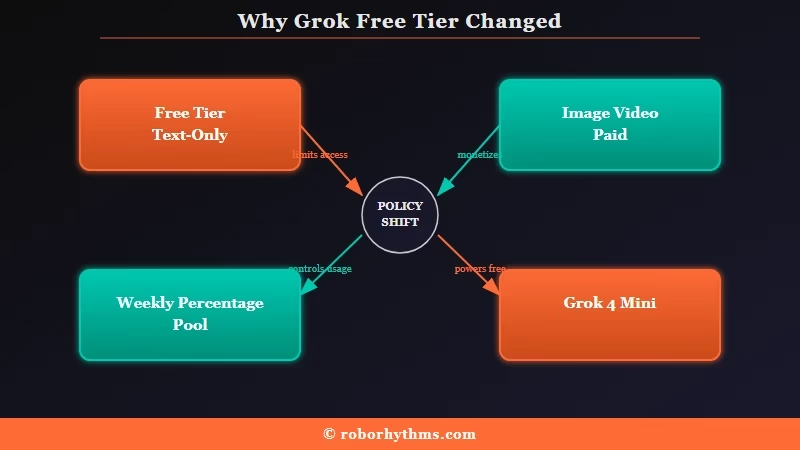
Two shifts stacked up to create the “no longer free” feeling. First, in early 2026 xAI restricted image and video generation to paid subscribers after safety and regulatory pressure, a move Mashable reported at the time, and by the spring, the free plan was strictly text.
Second, in June and July 2026 xAI replaced the old daily caps with a single weekly usage pool measured as a percentage.
What is the weekly usage quota: A single pool, refilled once a week, that every Grok action draws from, so chat, voice, images, and video all compete for the same allowance.
The way I read it, the free experience people remember, quick image edits and long back-and-forth chats, died with those two changes. Free access still runs a lighter model in the Grok 4 Mini class rather than the flagship, which was always the trade, but the new quota is what turned a limited but usable tier into one that stalls after a short session.
The mechanics behind the cap are covered in more depth in this breakdown of Grok’s weekly usage limits, and the image side is spelled out in the guide to Grok Imagine limits.
Why Won’t My Grok Limit Reset
The most common reason your Grok limit will not reset is the new weekly pool combined with reports of free-tier quotas freezing for days, which leaves you with a “purchase more” prompt instead of a refill. Paid users are hitting buggy resets too.
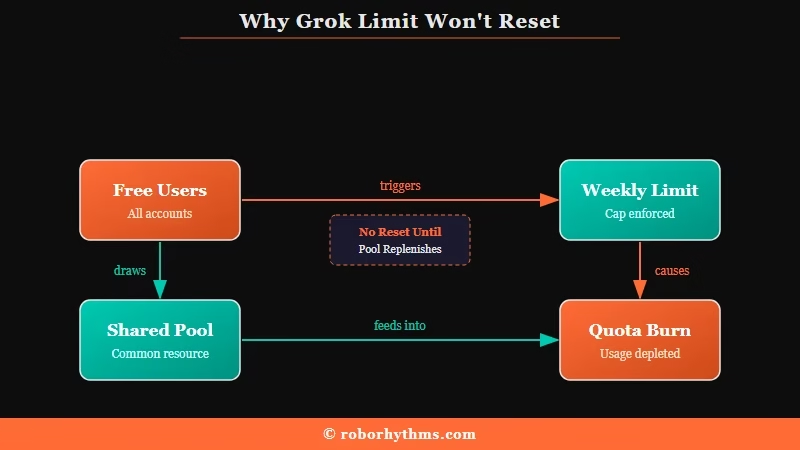
This is where the frustration is loudest. Free users describe their meter sitting at 100 percent for two or three days past the supposed reset, and instead of clearing it just surfaces a paid top-up option.
I would not spend money to unfreeze something that looks broken either, and plenty of people are making the same call.
Two design choices make it worse. Everything counts against the same weekly pool, so a bit of casual chatting eats the exact allowance you needed for anything else, and failed or moderated generations still consume quota even when Grok refuses to finish the task. That second one feels like paying for a vending machine that keeps your coins when the snack gets stuck.
Here is the quick way I would diagnose a stuck limit before assuming your account is broken.
| Symptom | Likely cause | Fix |
|---|---|---|
| Limit stuck at 100% past the reset day | Weekly pool not refreshing on schedule (widely reported bug) | Wait out the full weekly cycle, then check the Usage tab for the real reset date |
| Quota drained after only a few messages | Chat, voice, and media all share one pool | Do heavy brainstorming elsewhere and save Grok for the one task only it does |
| Percentage jumped with no big generation | Failed or moderated attempts still count | Tighten prompts so they clear filters on the first try |
| Only a “purchase more” button shows | Free-tier freeze pushing an upgrade | Treat it as a soft paywall and test an alternative rather than paying to unfreeze |
How Much Does the Weekly Quota Give You
The weekly quota gives you far less than it sounds, because a single 480p video costs about 2 percent, a quality image around 4 percent, a speedy image roughly 1 percent, and two new chats about 1 percent, all from the same weekly pool.
Hit 100 percent and both chat and image generation stop.
Those figures come straight from users reverse-engineering the meter, and once you see the math the “no longer free” complaints make sense.
If a handful of short videos and a few dozen chats can drain a whole week, the pool was never built for the casual creator who used to open Grok every day.
| Action | Approx share of weekly quota | What that means in practice |
|---|---|---|
| One 480p video | ~2% | Around 50 short clips a week before you are done |
| One quality image | ~4% | Roughly 25 high-quality images empties the pool |
| One speedy image | ~1% | Lower-quality images stretch further but add up fast |
| Two new chat conversations | ~1% | Heavy chatting alone can burn the week |
| Failed or moderated attempt | Same as a success | You pay for outputs you never received |
What I would do differently now is stop wasting quota on prompts that get blocked, since a rejected attempt costs the same as a finished one. Precise, in-bounds prompts clear the filter on the first try and protect your percentage.
Before: “make the scene way more intense and edgy” (vague, can trip the content filter, still costs quota when it fails)
After: “write a tense standoff between the two characters, keep it PG-13” (specific, stays in bounds, completes on the first attempt)
Is Paying for SuperGrok Worth It Right Now
Paying for SuperGrok is a hard sell right now, because even the $30 and $300 tiers share the same throttling logic, get scaled back during peak traffic, and no two guides even agree on the real limits. For pure chat and writing, cheaper tools win.
The prices themselves are clear enough. What is not clear is what you really get, and that ambiguity is the whole problem.
| Tier | Price | What you get | Limit reality |
|---|---|---|---|
| Free | $0 | Text chat only, lighter model | Weekly pool, reports of frozen resets |
| SuperGrok Lite | $10/mo | Bridge plan, limited media | Same weekly pool math applies |
| SuperGrok | $30/mo | Flagship model, image and video | Users report the whole week gone in days |
| SuperGrok Heavy | $300/mo | Multi-agent, highest ceiling | Still throttled and downscaled at peak load |
The tell that convinced me to stop recommending an upgrade is the disagreement between the guides. One widely cited source lists SuperGrok at 200 images and 50 videos a day, another pegs the same plan at 10 to 15 images and 15 to 20 videos, and even the top Heavy tier shows up at $80 in one write-up and $300 in the rest.
When the published numbers are that far apart, it usually means the caps are undeclared and shifting under load, which lines up with what paid users describe as quiet mid-day downgrades.
If you want the deeper worth-it math, the SuperGrok value breakdown and the notes on how Grok chat quality nerfed both go further than I can here.
One more cost trap: when you hit 100 percent, the “Extra Usage Credits” top-up starts around $5 and bills at standard rates, which xAI’s own documentation confirms is a higher effective price than what your subscription already bought. You are paying a premium to finish the week you already paid for.
What to Use Instead of Grok for Chat and Roleplay
The best alternatives to Grok for casual chat and creative writing are dedicated companion apps that do not meter every message against a weekly pool, with Candy AI and Nectar AI as the two I would test first.
Both are built for conversation rather than a shared media quota.
The free users hit hardest here are the ones who used Grok to talk and write fiction, and that is exactly the use case a purpose-built companion handles better anyway. The way I see it, if your main need is a character that remembers you and keeps a scene going, you were overpaying in quota to get that out of a general chatbot.
Here is the order I would work through when picking a replacement.
- Decide your primary use. If it is ongoing conversation and creative roleplay, a companion app fits better than a metered general model.
- Check how it handles memory. A companion that recalls earlier chats saves you the re-explaining that burns quota on Grok.
- Test the free tier for a week of normal use, not one heavy session, so you see the real ceiling.
- Only pay once one tool plainly beats the others for your workflow, not before.
For most people leaving Grok over the limits, I would start with Candy AI, which is built around persistent memory and steady conversation rather than a shared media meter. It keeps a scene going without charging you a slice of a weekly pool every time you reply.
If you want a second option to compare voice and character depth against it, Nectar AI is the alternative I would line up next.
For a direct sense of how a companion app stacks up against Grok’s own companion mode, this Candy AI vs Grok Ani breakdown covers the differences in plain terms.
Grok’s own companion mode is also on the way out. The July 24, 2026 statement retired the animated avatars, and Grok companions shutting down explains what stays behind and how to export a character first.
Example scenario: Say you want to continue a story you started last week. On Grok’s free tier, you may open the app to a frozen 100 percent meter and never get a reply. On a memory-focused companion like Candy AI, the character picks the thread back up and keeps going without eating a weekly quota.
Frequently Asked Questions
The most common questions about Grok’s free tier cover why limits stopped resetting, what the weekly quota really gives you, whether paying fixes it, and what to switch to.
Is Grok still free in 2026?
Grok is still free for basic text chat on a lighter model, but image and video generation now require a paid plan and the free chat runs on a weekly quota. Many free users report that quota freezing without resetting.
Why won’t my Grok weekly limit reset?
The shift to a weekly usage pool has come with widespread reports of limits not refreshing on schedule, especially for free accounts. Check the Usage tab for the actual reset date, and treat a stuck “purchase more” prompt as a soft paywall.
How much does the Grok weekly quota give you?
Not much for heavy use. A 480p video runs about 2 percent of the weekly pool, a quality image around 4 percent, and two new chats roughly 1 percent, so a week can drain in a day or two of normal activity.
Is SuperGrok worth it for the new limits?
For image and video creators it is a tough sell, since even the $30 and $300 tiers get throttled and downscaled during peak traffic. For pure chat and writing, cheaper dedicated tools give you more usable time.
What can I use instead of Grok for chat and writing?
For conversation and creative roleplay, dedicated companion apps like Candy AI and Nectar AI are built for ongoing chat and do not meter every message against a shared media pool. Test their free tiers over a normal week before paying.
Quick Takeaways
- Grok’s free tier is now text-only and runs on a weekly quota, and many free users report their limit has stopped resetting entirely.
- Everything shares one pool, so casual chat, images, video, and even failed or moderated attempts all drain the same weekly allowance.
- A single 480p video costs about 2 percent and a quality image about 4 percent, so a week of normal use empties fast.
- Paying does not fully fix it, because even SuperGrok and Heavy get throttled at peak and no two guides agree on the real caps.
- If you mainly chatted or wrote fiction on Grok, test a memory-focused companion like Candy AI first and compare Nectar AI before you pay.
