
The Fix: When Grok Imagine sticks at 20 percent, it is usually not frozen. It is quietly regenerating your video four to six times in the background and eating your weekly limit, so hit Cancel right away instead of waiting. Most other failures trace back to the shared weekly usage pool, a server outage the status page has not admitted yet, or a local browser problem.
If Grok Imagine is not working for you right now, you are in a crowd. The stuck renders, the videos that never finish, the sudden “limit reached” walls: they hit thousands of people at once whenever xAI ships an update or the servers get slammed.
The costly part is what happens while you wait. A render that looks frozen at 20 percent is often looping in the background, spitting out copy after copy of the same clip and charging every one to your weekly quota.
This guide walks through the real causes in order, starting with the bug that can drain your whole week in minutes. You will know how to stop the quota bleed, how to tell an outage from a you-problem, and how to fix the everyday loading errors.
Why Is Grok Imagine Not Working Right Now?
Grok Imagine usually fails for one of four reasons: a generation bug that loops in the background, the shared weekly usage limit running dry, an xAI server outage, or a local browser or app fault. The order you check them in matters.
The most urgent one is the generation loop. Since a July 2026 update, videos have been sticking at 20 percent and auto-regenerating, which produces several identical clips and burns quota fast. That one needs action within seconds, so I put it first.
The rest are slower burns. A shared limit that ran out, an outage on xAI’s side, or a cached browser session all show up as “not working” but have very different fixes. I will take them one at a time so you are not guessing.
What is Grok Imagine: Grok Imagine is xAI’s image and video generator inside Grok, available on the web, in the X app, and on iOS and Android.
How Do You Stop a Stuck Video From Draining Your Limit?
When a Grok Imagine video freezes at 20 percent, cancel it immediately, because the system is looping and can render four to six copies of the same clip, each one charged to your weekly quota. Waiting is the expensive mistake.

Here is what happens under the hood. The render stalls, the backend keeps retrying it with slightly different parameters, and each retry counts as a fresh generation. Heavy users have watched a single stuck prompt eat close to 10 percent of a week’s allowance before they caught it.
Those phantom retries are the largest single source of quota you never meant to spend, and the breakdown of where Grok Imagine credits get wasted covers the rest. Clip length feeds into it too, since the move to 15 second Grok videos changed what a single generation costs you.
The fastest way I have found to protect your limit is a tight sequence:
- Watch the progress bar for the first 10 to 15 seconds after you hit generate.
- If it stalls at 20 percent or starts producing more than one clip, tap Cancel right away.
- Do not leave the page open hoping it resolves, since that is when the copies pile up.
- Try a text-to-video prompt instead of image-to-video, which sidesteps the loop for some users.
- If you already lost attempts, note the timestamp so you can ask support for a reset.
There is a second quota trap worth knowing. A generation that gets moderated does not just stop; it can trigger two more background attempts with different settings, so a single blocked clip can be charged three times.
Before: The video sticks at 20 percent, you leave the tab open hoping it finishes, and it quietly renders five copies that eat your week.
After: The video sticks at 20 percent, you cancel within a few seconds, and you lose one attempt instead of ten.
Is Grok Imagine Down or Is It Just You?
Check status.x.ai first, which splits Grok into four separate surfaces: Grok Web, Grok in X, Grok on iOS, and Grok on Android.
If your surface shows an incident, it is xAI, not you.
The catch is that the official page lags. One outage tracker logged a 57-minute image-to-video disruption on July 8, 2026 that xAI’s own status page never acknowledged, so a green dashboard does not always mean the service is healthy. When the page and your experience disagree, I would trust your experience and give it 15 minutes.
If only one surface is down, switch entry points. When the mobile app hangs, open Grok in a desktop browser, or move from the X app to the standalone site. A quick look at the current Grok Imagine limits also helps you rule out a quota wall before you blame an outage.
Regional blocks are the other possibility people forget. Grok has faced access restrictions in some countries, and The Guardian reported on bans in Malaysia and Indonesia, so if the app suddenly stopped working after travel, your location may be the cause.
| Symptom | Likely cause | What to do |
|---|---|---|
| One surface down on status.x.ai | xAI outage on that platform | Switch to web, X app, or another device |
| All surfaces green but still broken | Local cache, extension, or VPN | Hard reload, disable extensions, drop the VPN |
| Worked at home, dead after travel | Regional restriction | Confirm Grok is available in your region |
| Slow and glitchy at peak hours | Server throttling under heavy load | Generate off-peak or switch to Speed mode |
Why Do You Hit the Grok Limit So Fast Now?
In June 2026 xAI merged Chat, Imagine, Voice, and Build into one shared weekly usage pool, so video generation now quietly drains the same allowance you use for images and text chat.
One heavy video session can starve everything else.
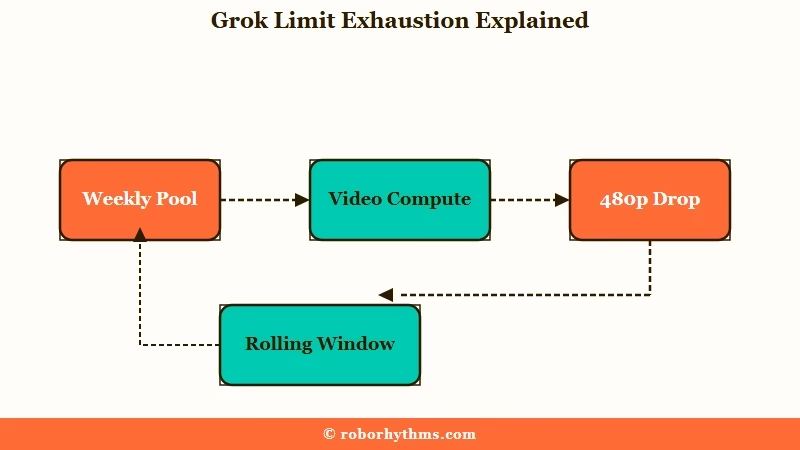
The math is harsh for video. A short clip can cost the compute of dozens of static images, and SuperGrok’s effective ceiling has dropped to roughly 80 attempts at 720p per week. Once you cross the high-definition cap, Grok does not hard-stop you; it silently downgrades new videos to 480p.
Eighty attempts a week is the number worth holding against the price. Our breakdown of what $30 a month actually buys on SuperGrok sets that ceiling against the tiers.
The reset is not a fixed midnight clock either. Grok uses a rolling window, so capacity trickles back as your oldest requests age out rather than refilling all at once.
That is why checking at the same time each day can still show you empty. The Grok weekly usage limits breakdown covers the exact tiers.
Some frustrated users read the shrinking caps as a deliberate squeeze, arguing that money-losing consumer video pushes xAI to ration compute until heavy creators cancel.
Whether or not that is the intent, the way I see it the practical takeaway is the same: budget video sparingly and expect the ceiling to move with server demand.
| Behavior | What it means | Your move |
|---|---|---|
| Videos drop to 480p | You hit the weekly 720p cap | Wait for the rolling window or accept 480p |
| Images fail after one video | Video drained the shared pool | Space video sessions out across the week |
| Limit not back at midnight | Rolling reset, not a fixed clock | Check the Usage tab in Settings for timing |
How Do You Fix Grok Imagine Loading and Generation Errors?
Most loading and generation errors clear with a fresh session, so hard reload, open an incognito window, or log out and back in before anything drastic. The everyday failures are local, not fatal.
When a video hangs at 99 percent with a black box, it is almost always a background moderation check, not a crash. The AI is scanning the clip frame by frame, which takes a few minutes. Open a new tab and go to your favorites, and the finished video usually appears there.
For a “Failed to generate image” message where the image flashes and vanishes, the fix is a hard reload or a cache clear, and switching browsers if it persists. Here is the sequence I run through when Grok Imagine stops cooperating:
- Hard reload the page, then try an incognito or private window.
- Turn off browser extensions and any VPN or proxy.
- On mobile, force-stop the app, clear its cache, and update to the latest version.
- Toggle between Wi-Fi and mobile data to rule out a network fault.
- If you see “High Demand,” wait 10 to 15 minutes or generate during off-peak hours.
One more that trips people up: a “Video Moderated” error. Grok checks video far more strictly than static images because it evaluates motion and physics, so a prompt that made a clean image can get flagged once it moves.
Rephrasing to plainer, clearer motion usually gets it through, and the Grok Imagine moderation guide goes deeper.
When Grok Imagine Isn’t Worth the Weekly Roulette
If the weekly-limit roulette and the quota-draining bugs have made Grok Imagine unreliable for the visual content you came for, a dedicated companion platform gives you image and video generation without the shared-pool math.
Sometimes the fix is a different tool.
I still think Grok Imagine is impressive when it works, and for casual, occasional clips the free surface is fine. The trouble starts when you depend on it and a server bug or a rolling cap decides your week for you.
For consistent visual companion content, Candy AI runs its own image engine and short video clips without the weekly pool draining every time you generate, which is the exact pain point Grok users keep describing.
If you want more character-writing control alongside the media, CrushOn AI is the other one I would test.
None of this means you have to quit Grok. Keep it for the prompts it nails, and reach for a steadier tool when a deadline or a project cannot survive the roulette.
For a wider set of options, the Grok Imagine alternatives rundown lays them out.
Frequently Asked Questions
Why is my Grok Imagine video stuck at 20 percent?
A July 2026 update bug makes videos stall at 20 percent and loop in the background, generating several copies that drain your weekly limit. Cancel it fast, and try text-to-video instead of image-to-video.
Do failed or moderated Grok generations still count against my limit?
Yes, in most cases. A generation that fails mid-process, times out, or gets moderated still consumes compute and counts. A moderated clip can even be charged three times from hidden background retries.
How do I check if Grok Imagine is down?
Visit status.x.ai, which shows Grok Web, Grok in X, iOS, and Android separately. Third-party trackers like StatusGator also help, since the official page sometimes misses real outages.
When does the Grok Imagine limit reset?
Grok uses a rolling window, not a fixed daily reset, so capacity returns gradually as older requests age out. Paid plans share one weekly pool across Chat, Imagine, Voice, and Build.
Why did my Grok video drop to 480p on its own?
You hit the weekly 720p cap. Instead of blocking you, Grok downgrades new videos to 480p until the rolling window frees up more high-definition capacity.
Quick Takeaways
- A Grok Imagine video stuck at 20 percent is usually looping and burning quota, so cancel it within seconds rather than waiting.
- Failed, timed-out, and moderated generations still count, and moderated ones can be charged up to three times.
- Check status.x.ai by surface, but trust your experience, since the page has missed real outages like the July 8 image-to-video disruption.
- Video shares one weekly pool with chat and images now, so space heavy sessions out and expect a rolling reset.
- If the roulette keeps ruining your projects, a dedicated tool like Candy AI generates visual content without the shared-pool drain.
