
What’s Changed: SpicyChat lorebook priority is only a visual sort for your menu. It does not decide what the AI loads, so chasing priority numbers will never make a stubborn entry fire. Entries trigger only when their keyword appears in your last few messages, which means keyword design, token budget, and a couple of known bugs are what you really need to fix.
If you have been reordering entries to fix SpicyChat lorebook priority and nothing changed, you are not doing it wrong. You are fighting a setting that was never wired to do what its name suggests.
I went deep on how the lorebook really decides what the model sees, and the short version surprised me.
Priority is cosmetic. The real levers are your keywords, your token budget, and a few silent failure modes that no in-app warning tells you about.
Here is exactly how activation works, why your entries vanish mid-scene, and the setup that keeps your most important lore firing every time.

What SpicyChat Lorebook Priority Really Controls
SpicyChat lorebook priority is only the display order in your menu, not a load-order control.
It does not decide which entry wins when your token budget fills up, so tuning it does nothing for what the model really reads.
This trips up almost everyone migrating from another platform. On Chub AI and NovelAI, priority and insertion order genuinely decide which entries survive when the context overflows. On SpicyChat, that same word is just how the list is sorted on your screen.
An entry fires for one reason only. Its keyword shows up in the recent chat. There is no ranking, no weighting, no “this one is more important” logic behind the scenes.
What is a lorebook: A set of keyword-triggered notes that inject background details about your character or world into the chat only when the matching word appears.
The way I see it, this single misunderstanding wastes more power-user hours than any real bug. Once you stop chasing priority and start designing keywords, the whole system gets predictable.
Why Do SpicyChat Lorebook Entries Stop Firing
Entries stop firing because SpicyChat only scans your last 4 messages for keywords, and a triggered entry stays active for just 2 turns.
If the keyword does not reappear, the lore silently drops out of the model’s memory.
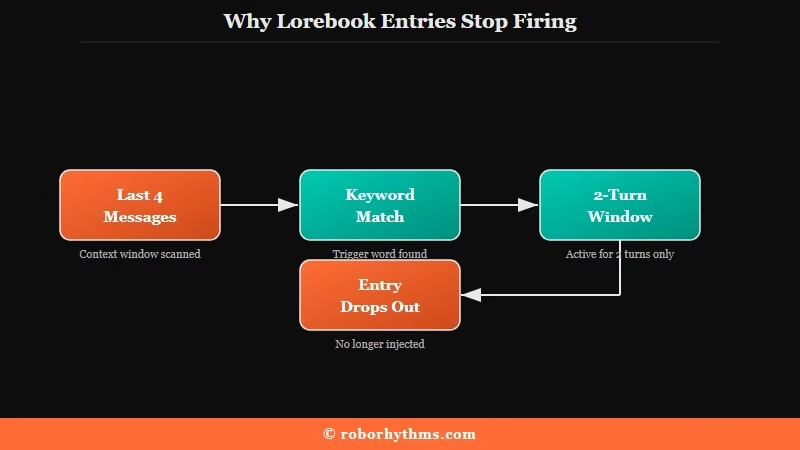
The platform scans the four most recent messages, counting both yours and the character’s, for any keyword match. Miss that window and the entry never loads. This is why a fact you established 10 messages ago suddenly gets forgotten.
Persistence is short too. Once an entry triggers, it lingers for roughly two turns, one message from you and one reply, then it falls back out unless the keyword is mentioned again.
There is a harder limit underneath all of this. SpicyChat does not support “constant” or always-on entries, so nothing can stay permanently loaded.
It also does not do recursive triggering, so a keyword mentioned inside one entry will not fire a second entry. Only words typed in the live chat count.
The way I see it, that combination is the whole story of “my lore keeps disappearing.” The model is not ignoring you, the entry just timed out of the scan window.
How Much Lore Can SpicyChat Hold at Once
Your lorebook is capped at about 20 percent of your total context window, which is a hard token ceiling that scales with your subscription tier.
Cross it and entries get dropped with no warning.
Every tier gets a fixed context window, and lore can only occupy a slice of it. That slice is where a lot of “why did three entries stop working at once” confusion comes from. When a busy scene pushes past the budget, SpicyChat quietly trims lore to fit.
Here is how the tiers break down, based on the current token limits.
| Tier | Total context window | Lorebook budget (about 20 percent) | Max reply length |
|---|---|---|---|
| Free and Get A Taste | 4,096 tokens | About 740 tokens | 180 tokens |
| True Supporter | 8,192 tokens | About 1,600 tokens | 300 tokens |
| I’m All In | 16,384 tokens | About 3,080 tokens | 300 tokens |
I would treat that lore budget as the real cap on your world-building, not the entry count. A free user with 740 tokens of lore space cannot keep a sprawling cast loaded at once, which matters when you plan a complex scene.
For reference, AI companion and roleplay apps skew young and heavily used, with people aged 18 to 24 making up more than 65 percent of the audience per Statista data on companion apps.
There is a sneaky trap in entry length too. Entries can run up to 2,000 characters, but the moment a single entry crosses 1,000 characters, the whole lorebook gets auto-tagged as Premium and free users lose access to it.
If you build public bots, an overlong entry quietly locks out a chunk of your audience. The SpicyChat lorebook filter rules interact with this too, so keep entries tight.
Why Is My Lorebook Under Review or Unattachable
A lorebook usually breaks because you edited an entry’s trigger words after saving it, which flags the whole book as “Under Review” and makes it unattachable.
It is a known bug, not something you did wrong.
This one caught me off guard. Add, change, or delete a keyword after the first save, and SpicyChat can reject the entry or lock the whole lorebook out of attachment. The counter in the editor sometimes shows “0 entries” too, even when the book is fully populated and working.
Here is the sequence I would run when a lorebook goes sideways.
- Ignore the “0 entries” display if your keywords still trigger in chat, since that counter is a known visual bug.
- For an entry stuck “Under Review,” open it, add a single full stop to the content, and save again to force a fresh update.
- If the book is fully unattachable, copy every entry into a brand new lorebook and do not touch the trigger words once you save them.
- Test each entry by typing its exact keyword in chat rather than trusting the editor to confirm it works.
The rule I follow now is simple. Get the keywords right before the first save, because editing tags afterward is what triggers the bug in the first place.
How Do I Make My Most Important Lore Always Fire
Since there are no always-on entries, the reliable trick is precise keywords plus re-mentioning them every couple of turns.
Specific trigger words and the character macros do far more than any priority setting.
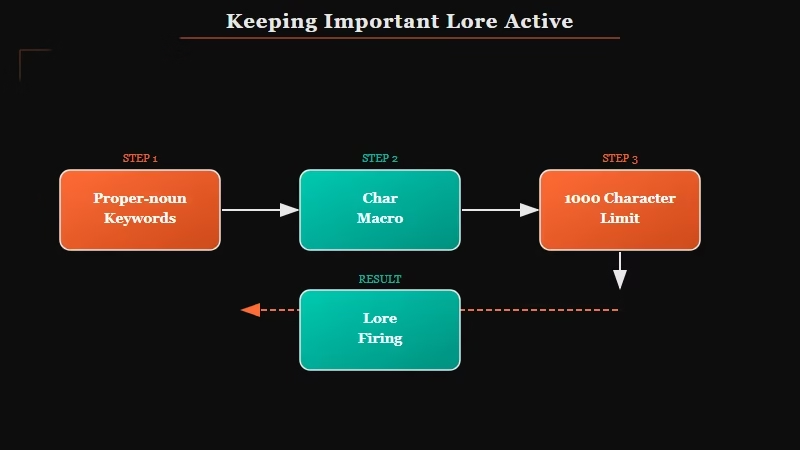
Broad keywords are the quiet killer. A word like “magic” or “world” fires constantly, burns your token budget, then gets dropped. Specific names win because they match cleanly and only load when they are truly relevant.
Here is the difference in practice.
Before: keyword set to “magic” on a 1,400-character entry that covers your whole setting.
After: keyword set to “Aldermoor Academy” on a tight 300-character entry about that one location, re-mentioned naturally every few messages.
The second version fires exactly when you name the place, fits the token budget, and stays under the 1,000-character Premium trap. A few habits make important lore stick:
- Use distinct proper nouns as keywords, not generic words that appear everywhere.
- For a multi-word trigger like “coffee shop,” remember the exact phrase must appear unbroken to fire.
- Add an asterisk wildcard when you want partial matches, so
*bookcatches “notebook” and “storybook.” - Set
{{user}}and{{char}}as keywords on core background entries, so they load whenever either name comes up.
I lean on the macros hardest. Tying your most important character facts to {{char}} means the lore reloads almost every turn, which is the closest thing to an always-on entry SpicyChat gives you. For deeper persona tuning, the SpicyChat persona tips guide pairs well with this.
Here is a quick reference for the failures people hit most.
| Symptom | Likely cause | Fix |
|---|---|---|
| Entry never loads | Keyword not in the last 4 messages | Re-mention the exact keyword every couple of turns |
| Lore forgotten mid-scene | The 2-turn persistence expired | Tie the fact to a {{char}} keyword so it reloads |
| Several entries drop at once | Past the 20 percent token budget | Trim entries or upgrade to a bigger context window |
| Free users cannot see your lore | An entry crossed 1,000 characters | Split it into two entries under 1,000 characters each |
| Lorebook will not attach | Trigger words edited after saving | Copy entries into a fresh book, do not edit tags |
How the Memory Manager Fits In
The Memory Manager is a separate 500-token slot for pinned facts, and it competes with your lorebook and persona for the same context space.
Over-pin it and the model stops recalling anything new.
Pinned memories are the one thing that behaves like always-on lore, since they load every round. The catch is the budget. That slot holds only about 500 tokens, roughly 5 to 10 short memories, or up to 800 tokens on premium.
What is the Memory Manager: A premium slot where you pin key facts so they stay in the model’s context every message, separate from the keyword-triggered lorebook.
There is a common reason the model seems to ignore it entirely. If your character description is bloated, the persona hogs the context and leaves no room for pinned memories to load. Trim the character card and the memories usually start sticking again.
What I would not do is scold the bot out of character for forgetting. The model cannot see the hidden memory plumbing, so an out-of-character lecture just spends tokens you needed for actual lore.
If memory is your core issue, the deeper fixes in why SpicyChat memory stops working go further.
When to Upgrade or Switch
Upgrade when your lore keeps hitting the token ceiling, and switch platforms when you would rather not manage keywords at all.
The right move depends on whether you want control or convenience.
If you are constantly fighting the 740-token free lore budget, a paid SpicyChat tier is the honest fix, because the jump to 16,384 tokens of context and roughly 3,080 tokens of lore is exactly what a heavy world-builder needs. You can upgrade your SpicyChat plan to get that headroom and the larger Memory Manager slot.
For readers who would rather not micromanage keywords at all, a memory-first companion is a smoother path. Candy AI leans on automatic memory rather than manual lorebooks, so it remembers context without you tuning trigger words, though you trade away the fine-grained control SpicyChat gives you.
Example scenario: You want your character to always remember a secret backstory. On SpicyChat, you tie it to a {{char}} keyword or pin it in the Memory Manager and watch your token budget. On Candy AI, the character tends to carry that thread forward on its own, with less setup but less control over exactly when it surfaces.
The way I see it, SpicyChat rewards people who enjoy the tuning and frustrates people who do not. Pick the tool that matches how much fiddling you want to do.
Frequently Asked Questions
Does changing lorebook priority make entries fire more often?
No. Priority is only the display order in your lorebook menu. Entries fire when their keyword appears in your last four messages, so tuning keywords is what changes activation, not the priority sort.
Why do my SpicyChat lorebook entries keep getting forgotten?
Because a triggered entry stays active only about two turns. If the keyword does not reappear in your recent messages, the lore drops out of context. Re-mention the keyword or tie it to a character macro.
How do I fix a lorebook stuck “Under Review”?
Open the flagged entry, add a single full stop to its content, and save to force an update. If the whole book will not attach, copy the entries into a new lorebook and avoid editing trigger words after saving.
How much lore can a free SpicyChat account hold?
Free accounts get a 4,096-token context window, and lore is capped near 20 percent of it, so about 740 tokens of active lore. Premium tiers raise that to roughly 1,600 or 3,080 tokens.
Can I make a lorebook entry always active on SpicyChat?
Not directly, since constant entries are not supported. The closest option is setting {{char}} or {{user}} as the keyword so the entry reloads almost every turn, or pinning the fact in the Memory Manager.
Quick Takeaways
- SpicyChat lorebook priority is only a visual sort, so tune keywords instead of reordering entries.
- Entries fire only when their keyword hits your last 4 messages and persist about 2 turns, so re-mention key terms.
- Lore is capped near 20 percent of your context window, from 740 tokens on free to 3,080 on the top tier.
- Editing trigger words after saving causes the “Under Review” bug, so lock keywords in before the first save.
- Upgrade for more lore headroom, or move to a memory-first app like Candy AI if you would rather skip the tuning.
