
What’s Changed: Grok folded chat, image, and video into one shared weekly usage pool and started routing some prompts to older, lighter models when servers are busy. That is why replies feel shorter and your limit vanishes faster than it used to. You can soften it with timing and prompt tweaks, or move to a companion app that never rations your conversation.
If you feel like Grok chat got nerfed this week, you are not imagining it. Replies got shorter, the personality flattened out, and the usage limit that used to last for days now empties before you finish a good conversation.
I have been digging into what really changed on the backend, and it is two quiet shifts stacked on top of each other, not one obvious update.
The frustrating part is that xAI never announced most of it in plain language. People upgraded to SuperGrok expecting more room to talk and got a shared weekly pool and a model that sometimes swaps itself out mid-session.
Here is what broke, why it is happening, and the specific moves that get you back to normal-length conversations, including a few uncapped alternatives if you are done fighting the meter.
Why Does Grok Chat Feel Nerfed All of a Sudden
Grok chat feels nerfed because xAI merged every feature into one shared weekly usage pool and started silently routing prompts to cheaper models under load.
Neither change shows up in the interface, so the chat just quietly gets shorter and stingier.
The first shift landed in June 2026, when xAI moved paid users off separate per-feature daily limits and onto a single weekly pool covering Chat, Imagine, Voice, and Build. Many subscribers describe the new caps as a downgrade in disguise, with some reporting their effective allowance dropped by around 84 percent.
The second shift is quieter and harder to prove from the chair. Under peak load, the consumer app can route your prompt to an older model without telling you, which is the real reason a reply that would have run six paragraphs last month now comes back thin and generic.
What is the shared weekly pool: A single usage budget that every Grok feature draws from, so images and videos you generate spend the same allowance your text chat needs.
Comparing the timelines, I think the two changes hit close enough together that most people blamed a single “update” when it was really a pricing-structure change and a serving change landing at once.
What Exactly Nerfed Grok Chat on the Backend
The core nerf is the shared pool draining fast plus quota being spent on failures.
A single high-definition video, or even a long text-analysis session, can burn a large slice of your weekly allowance, and moderated or failed prompts still count against you.
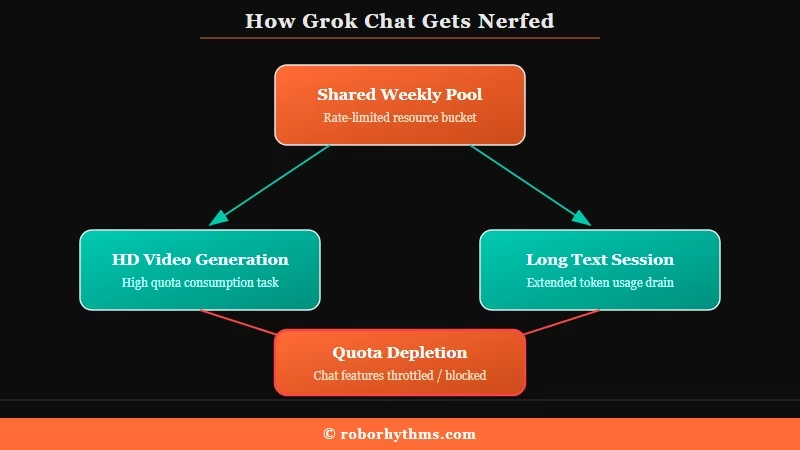
Because text, image, and video now pull from the same budget, a short video experiment on Monday can leave you rate-limited on plain chat by Wednesday. That coupling is new, and it is why longtime text-only users suddenly hit walls they never saw before.
There is a second trap worth knowing. If a prompt gets blocked by the safety filter or fails to render because the servers choked, that attempt still spends your quota. Retrying a flagged prompt five times drains your account for nothing in return.
Here is roughly how the tiers and their cuts line up right now across the 2026 pricing data.
| Tier | Price | Rough chat allowance | What got cut |
|---|---|---|---|
| Free | $0 | About 10 to 20 messages every 2 hours | No image or video generation at all |
| SuperGrok | $30/month | Roughly 100 to 1,000 messages/day, shared pool | Video quota slashed about 96 percent, voice cut from 90 to 60 minutes |
| SuperGrok Heavy | $300/month | Roughly 500 to 10,000 messages/day | Still hits moderation blocks and rate-limit errors |
I would not read those message numbers as promises. They swing based on model, server load, and how much media you generate, which is exactly the unpredictability people are angry about.
If you want the finer detail on the caps themselves, the breakdown of Grok’s weekly usage limits covers the reset math.
Why Do Grok Replies Feel Dumber and Shorter Now
Replies feel dumber because the app can serve you an older model under load and because tighter safety guardrails flattened Grok’s tone.
The interface never shows which model answered, so two identical prompts can get very different quality.
That same guardrail pass is the reason Grok’s unhinged mode was removed, so if the flattened personality bothers you more than the shorter replies, start there.
Grok rolls out its newest model through staged releases and an “Auto Mode” router. When demand spikes, that router can hand your prompt to a lighter, older variant to save compute, and you never get told. The way I see it, this single design choice explains most of the “Grok got lobotomized” complaints better than any conspiracy about a secret downgrade.
On top of that, xAI tightened its content rules in early 2026 after a wave of deepfake controversy, which Mashable covered in detail. The same caution bled into text, so dramatic or emotionally intense roleplay now trips filters that used to let it through.
The clamp tightened again in August 2026, when Minnesota’s nudification law began fining platforms per image, and xAI widened its image filters far beyond that one state.
What is Auto Mode routing: A system that picks which Grok model answers each prompt based on server load, which means you can be downgraded to a weaker model without any notice.
One prompt trick genuinely helps here. When you give the model tight structure, it holds quality better even when routed to a lighter variant.
Before: “write me a long dramatic scene”
After: “Continue our story in 4 to 6 detailed paragraphs. Stay in character as Mara, keep the tense mood from the last message, and end on a cliffhanger.”
The second version pins down length, character, tone, and ending, so a weaker model has fewer ways to give you filler. I lean on this whenever a reply comes back suspiciously short.
Why Is Grok Rationing Compute This Hard
Grok is rationing compute because xAI is prioritizing enterprise deals and training over consumer chat, not because it lacks hardware.
The throttling is a business and software choice, which is why it feels so arbitrary.
This is the counterintuitive part. xAI runs roughly 550,000 Nvidia GPUs, yet reporting puts its model FLOPs utilization at around 11 percent, far below the 35 to 45 percent that production systems usually hit. The bottleneck is software coordination, not a shortage of chips.
Meanwhile the company is monetizing that capacity elsewhere. xAI reportedly leased its Colossus 1 cluster, more than 220,000 GPUs, to a rival lab for about $1.25 billion a month, and committed more compute to training its next foundation model. Consumer Grok gets whatever is left, which is why your chat is the first thing squeezed at peak hours.
Knowing this changes how I use it. The limits are not a fixed law of physics, they are a dial xAI turns based on load, so timing your sessions genuinely works.
How Do I Get Around the Grok Chat Nerf
The fastest fixes are timing your sessions off-peak, keeping media generation away from your chat budget, and reframing prompts so they survive a weaker model.
None of these unlock hidden capacity, but together they claw back most of what the nerf took.
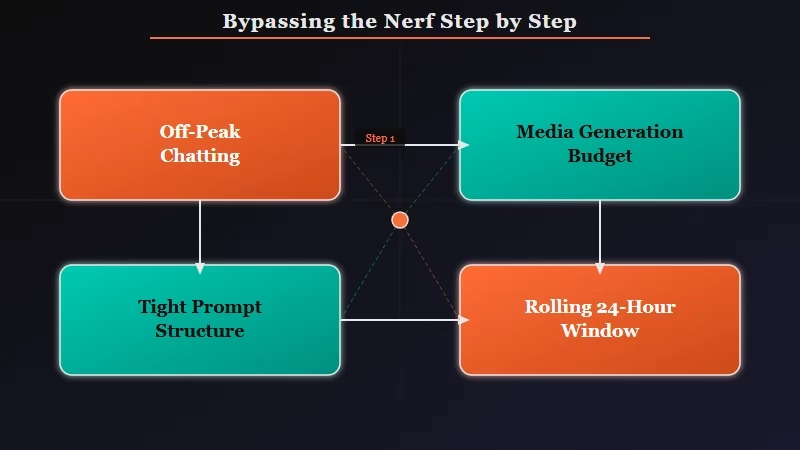
The single biggest lever is timing. Late-night and off-peak sessions dodge the worst of the Auto Mode downgrades because the router has more headroom. Here is the sequence I walk through when Grok starts acting nerfed.
- Start a fresh chat with a simple message like “Hello” to clear any throttle before you dive into a long session.
- Move heavy image or video generation to a separate day so it does not eat your chat allowance from the shared pool.
- Structure long prompts with a set length, character, and tone so a lighter model cannot get away with filler.
- If you hit a “high demand” block on the web, open the Grok feature inside the X app or an incognito window and try again.
- Summarize a long roleplay every 30 or 40 messages, then continue from the summary so you burn fewer tokens on context.
- If you are close to the wall, buy the Extra Usage Credits, which start around $5, instead of paying for a whole tier upgrade you may not need.
A quick warning on the platform-swap trick in step four. Some guides swear the X app has a separate priority quota, and it does sometimes work, but xAI’s own docs treat limits as account-wide, so do not count on it as a permanent bypass.
Here is a fast diagnostic table for the symptoms people report most.
| Symptom | Likely cause | Fix |
|---|---|---|
| Replies suddenly short and generic | Auto Mode routed you to an older model under load | Retry off-peak or start a fresh chat to force a re-route |
| Weekly limit gone early | Video or image generation drained the shared pool | Keep media generation on a separate day, buy $5 extra credits |
| “High demand” on your first prompt | Load-based web throttling at peak hours | Open the X app or an incognito window, send a simple prompt first |
| Video looks blurry at 480p | Soft downgrade after you hit the HD cap | Wait for the rolling 24-hour reset, stop retrying |
| Roleplay flagged out of nowhere | Tighter 2026 safety filters | Reframe as fictional story context, or switch to a no-filter companion app |
One more misconception worth killing. A lot of guides say limits reset at midnight, but the accurate answer is a rolling 24-hour window from your first interaction, which is why people get blocked first thing in the morning expecting a fresh tank. For the image and video side of this, the notes on Grok Imagine limits go deeper on the reset behavior.
Is SuperGrok Still Worth Paying For
For most casual and companion users, SuperGrok is no longer worth it, and Heavy at $300 is hard to justify.
That maths changed again on July 24, 2026, when xAI said the 3D avatar companions were being retired. If Ani was your reason for paying, read what Grok discontinuing its companions actually removes before you renew, because the personality survives even though the avatar does not.
Both still hit moderation blocks and rate errors, so the upgrade buys headroom, not freedom.
I would only point a heavy researcher or a team toward the $300 Heavy tier, and even then only if they need guaranteed access to the top model and hundreds of deep-search queries a day. For a person who mostly wants long, uninterrupted conversation, that money buys a lot of frustration.
If you are weighing the upgrade purely for chat, my honest take is to test the free workarounds above for a week first. The full argument sits in this look at whether SuperGrok is worth it, and the math rarely favors the casual user right now.
What to Use Instead of Grok for Uncapped Chat
The best alternatives for uncapped, in-character conversation are dedicated companion apps that do not share your chat budget with video generation.
They are built for long conversations, so the meter is not fighting you the whole time.
If you leaned on Grok mainly for a responsive, personality-driven chat partner, a purpose-built companion is a smoother fit than another general assistant. Candy AI is the one I would try first, because it holds character across long sessions and does not ration your conversation the way a shared compute pool does. It handles text, image, and memory in one place, which is what most people wanted from Grok companionship in the first place.
For a second option with a big community-driven character library, CrushOn AI covers creative roleplay with fewer of the mid-chat interruptions that got worse on Grok this year. If you specifically miss the Grok Ani style of companion, the comparison of Candy AI versus Grok Ani lays out where each one lands.
Example scenario: You want to pick up a story you were telling last night. On nerfed Grok, a busy server can route you to a lighter model that forgets the thread and answers in two flat sentences. On a dedicated companion app, the character remembers where you left off and continues at full length because nothing else is draining the same budget.
For pure productivity work rather than companionship, mainstream assistants like ChatGPT, Claude, or Gemini are the sensible switch. The choice really comes down to whether you want a work tool or a conversation partner.
Frequently Asked Questions
Did Grok really get nerfed or is it just me?
Grok did change. In June 2026 xAI moved paid users to a shared weekly usage pool and began routing prompts to lighter models under load. Both changes shorten replies and drain limits faster, so the nerf is real, not a personal glitch.
Why are my Grok chat limits gone so fast now?
Because chat, image, and video share one weekly budget. Generating even a couple of videos can wipe out the allowance you needed for text. Failed and moderated prompts also count against your quota, so retries drain you quickly.
Do Grok limits reset at midnight?
No. Limits refresh on a rolling 24-hour window from your first interaction, not at a fixed midnight. That is why an early-morning session can still hit a wall if you used the app heavily the previous evening.
Does opening Grok in the X app bypass the limit?
Sometimes, but not reliably. A few users find the X app has separate priority, yet xAI documents limits as account-wide across web and apps. Treat the platform swap as a lucky workaround, not a guaranteed fix.
What is the best Grok alternative for long conversations?
For companion-style chat, a dedicated app like Candy AI or CrushOn AI avoids the shared-pool drain and holds character across long sessions. For work tasks, ChatGPT, Claude, or Gemini are the stronger switch.
Quick Takeaways
- Grok chat got nerfed by two changes at once, a shared weekly usage pool and silent routing to lighter models under load.
- Video and image generation now drain the same budget as text, and failed or moderated prompts still spend your quota.
- Chat off-peak, keep media generation separate, and structure long prompts to claw back most of the lost quality.
- SuperGrok and the $300 Heavy tier still hit moderation and rate limits, so test the free fixes before upgrading.
- If you mainly wanted a conversation partner, a dedicated companion app like Candy AI avoids the meter entirely.
