
What’s Changed: After the mid-2026 switch to weekly limits and the Video 1.5 update, more Grok Imagine clips are landing at a soft, 480p, potato-looking quality. Two different things cause it. One is a download trap you can fix in five seconds, and the other is an automatic drop to a cheaper 480p model that paying more does not fully stop.
If your Grok Imagine clips suddenly look like a compressed potato, you are not imagining it and you are not doing anything wrong. Two separate problems are dragging the quality down, and almost every guide only talks about one of them.
Grok Imagine video quality gets blamed on “480p” as if resolution were the whole story. It is not. Part of the blur is a file you are downloading too early, and part is a hidden model swap that kicks in once you burn through your daily allowance.
I want to split those two causes cleanly, because one is a quick fix and the other you mostly have to work around. You will know exactly which problem you have and what to do about each by the end.
Why Does Grok Imagine Video Quality Look So Bad
Grok Imagine video quality looks bad for two separate reasons: a download trap that saves a compressed preview instead of the real file, and an automatic drop to a cheaper 480p model once you use up your daily 720p allowance.
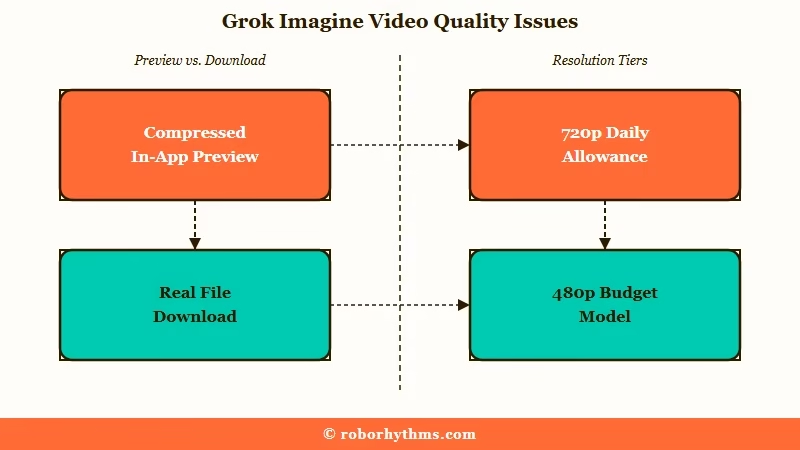
The way I see it, this is two problems wearing one costume. The first is fixable in seconds once you know it exists, and it fools even experienced users. The second is a deliberate cost-saving move by xAI that you can soften but not fully escape.
Here is the quick map before we go deeper. Match your symptom to the real cause, then jump to the fix that fits.
| Symptom | Real cause | What to do |
|---|---|---|
| Downloaded file looks blurry | You saved the in-app preview thumbnail | Open full-screen, wait for the spinner, then download |
| Stuck generating at 480p | Auto-throttle after your daily 720p cap | Generate 720p early in your cycle, or accept the drop |
| Melty faces and broken motion | 480p uses a cheaper budget model | Keep shots tight and close, or switch tools |
| Upscaled clip looks worse | The native upscaler only stretches frames | Use a dedicated upscaler instead |
| Extended clip goes soft | Compression stacks with each extension | Stop chaining at two clips |
Why Does My Downloaded Grok Video Look Blurry
Your downloaded Grok video looks blurry because you saved the in-app preview, a compressed web-optimized thumbnail, before the full-resolution file finished rendering in the background.
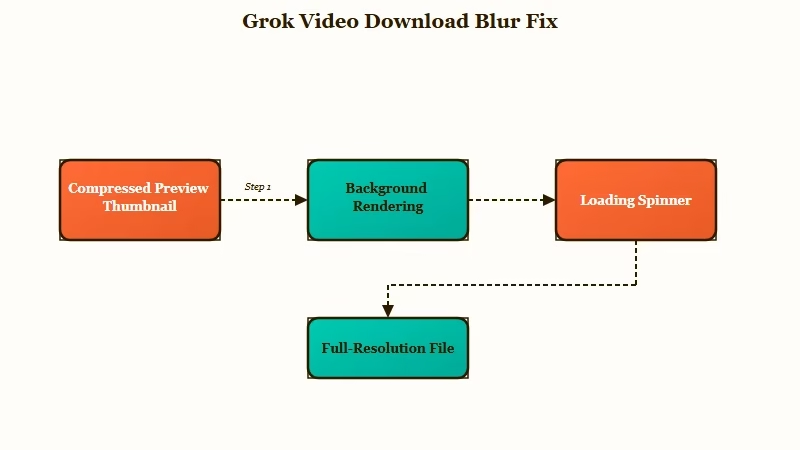
This one genuinely surprised me the first time I saw it. To keep the chat responsive, Grok instantly shows a low-resolution, heavily compressed preview of your clip while the real, uncompressed file keeps rendering behind the scenes. Download at that moment and you save the potato, not the actual video.
The fix costs you about five seconds. Tap the clip to open it in full-screen view, wait until the loading spinner completely disappears, and only then hit the download button.
Before: you click download on the still-loading preview and save a compressed 448×672 clip that looks like a potato.
After: you open the clip full-screen, wait for the spinner to vanish, then download and get the full-resolution native file.
If a big share of your “bad quality” complaints trace back to this, you are in luck, because it is the one Grok Imagine quality issue that is entirely on the interface and not the model.
Why Is Grok Imagine Stuck at 480p Instead of 720p
Grok Imagine drops you to 480p as an automatic soft fallback once you hit your daily 720p cap, and paying for a higher tier raises the cap but does not remove the fallback.
What is a soft fallback: Instead of blocking you when you hit your limit, Grok quietly keeps generating at a lower 480p quality so you can keep going.
Here is what changed and why it stings. In mid-2026, xAI replaced separate daily limits with a shared weekly usage pool, which users worked out to be roughly an 83.8 percent cut in total video capacity. A 10-second 720p clip eats about 2 percent of your weekly quota, a 480p clip eats 0.5 to 1 percent, and even a clip that fails or gets flagged by moderation still drains around 1 percent.
Paying more does not buy you out of it. Standard SuperGrok users get roughly 15 to 20 high-definition clips a day before the throttle hits, and even SuperGrok Heavy accounts report dropping to 480p after about 20 to 30 generations.
TechCrunch reported that xAI restricted generation to paying subscribers as demand exploded to tens of millions of videos a day, and that compute strain is exactly why the throttle exists.
Here is how the tiers line up on video access and rough daily 720p output before the throttle kicks in.
| Plan | Price | Video generation | Rough 720p clips per day |
|---|---|---|---|
| Free | $0 | Not available | None |
| SuperGrok | About $30 a month | Yes | About 15 to 20 |
| X Premium+ | About $40 a month | Yes | Similar to SuperGrok |
| SuperGrok Heavy | Higher tier | Yes | About 30 to 50, still drops to 480p |
What I would do is treat your 720p clips like a limited resource. Generate the shots that matter most early in your cycle, and check my notes on the weekly usage limits and the broader Grok Imagine limits so the cap does not catch you mid-project.
Whether the paid jump is worth it before you accept the throttle is covered in is SuperGrok worth it.
Is 480p a Worse Model or Just Lower Resolution
480p on Grok Imagine is more than lower resolution, it switches to a cheaper budget model where motion, physics, and face consistency fall apart, and it is not even a true 480p.
This is the part that reframed the whole thing for me. Dropping to 480p does not just shrink the pixels, it routes you to a downgraded model tier that uses far less compute. Prompt understanding gets shakier, physics gets floaty, and faces melt outside of tight close-up shots.
The resolution is quietly worse than advertised too. A 2:3 clip that should be 480p really comes out around 464×688, and users have caught it silently dropping further to 448×672. One developer even documented that the Grok video API ignores requests for 720p and locks output to about 688×464 regardless of what you ask for.
Now the honest wrinkle, because the community does not fully agree. Most users find 480p noticeably worse, but a vocal minority insists 480p gives them better prompt adherence and consistency and just looks rougher.
In my experience the majority read is right for realistic clips, but if your style is stylized or animated, 480p can hold up better than you would expect.
Does the Grok Upscaler or Video Extension Help
The Grok upscaler does not add real detail, it only stretches the existing frames, so it often makes realistic clips look worse, and chaining more than two extensions stacks compression artifacts.
The built-in upscaler is where a lot of people waste quota hoping for magic. It takes your 464×688 clip and scales it up to 928×1376 without regenerating any detail, which introduces color shifts, smeared textures, and a bloated, over-sharpened look. For anime or cartoon styles it is passable, but for anything photorealistic I would skip it.
For a real quality lift you need a dedicated upscaler that truly reconstructs detail, like Topaz Labs, rather than the native button. A native 720p generation almost always beats a 480p clip run through the internal upscaler, so spend your high-definition quota on the shot instead of trying to rescue a low one.
Video extension has the same trap. Chaining one extra clip usually stays clean, but push to three or more “Extend from Frame” passes and the footage gets visibly soft with blocky artifacts. I treat extension as a tool for short sequences, not a way to fake a smooth 60-second scene.
How Do I Get the Best Quality Out of Grok Imagine
You get the best Grok Imagine quality by downloading the full file from full-screen, generating in 720p while you still have quota, keeping clips short, and using a real upscaler instead of the built-in one.
None of these are complicated, and together they fix or dodge almost every quality complaint. Here is the order I would run through.
- Download from full-screen view and wait for the spinner to finish, so you save the real file and not the preview.
- Generate your important shots in 720p early in your weekly cycle, before the throttle drops you to 480p.
- Keep clips short and framing tight, since the 480p model handles close-ups far better than wide, fast motion.
- Skip the native upscaler for realistic clips and run them through a dedicated tool like Topaz Labs instead.
- Stop chaining extensions at two clips to avoid stacked compression.
- Try generating through agent mode inside Imagine, which some users report routes to a better 480p model and saves quota.
When Should You Use a Different AI Video Tool
Switch to a different AI video tool when you need consistent, higher-resolution clips that hold together past eight seconds, since that is where Grok Imagine’s budget model and 480p throttle hurt most.
I will give Grok its due first. It is fast, it is cheap once you are paying, and Video 1.5 adds native synced audio in a single pass, which most rivals still make you bolt on separately. For quick, short, social-style clips it is genuinely good value.
The moment you need reliable character consistency or resolution that does not collapse under a quota, a purpose-built video model is the better call.
Kling AI is the one I would point most people to for realistic physics and longer clips that stay coherent, and a wider set of options lives in my Grok Imagine alternatives roundup.
If your goal is specifically character or companion visuals rather than general video, a platform built for that keeps quality steadier than a general generator on a throttle.
Something like Candy AI handles that use case without the daily resolution roulette. Pick for the exact thing that is breaking, and stop paying quota to fight the fallback.
Frequently Asked Questions
Why are my Grok Imagine videos suddenly 480p?
Grok auto-throttles you to 480p once you use up your daily 720p allowance, as a soft fallback instead of blocking you. It also happens during heavy server load. Generating important shots early in your cycle helps.
Is Grok 480p a lower-quality model or just lower resolution?
It is both. 480p routes to a cheaper budget model with weaker physics, prompt understanding, and face consistency, and the actual output is often nearer 464×688 or lower, not a true 480p.
Why does my downloaded Grok video look worse than in the app?
You downloaded the compressed preview thumbnail before the full file finished. Open the clip in full-screen, wait for the loading spinner to disappear, then download to get the uncompressed version.
Does paying for SuperGrok fix the 480p problem?
Not fully. Higher tiers raise your daily 720p cap, but the automatic drop to 480p still kicks in once you pass it, even on SuperGrok Heavy after roughly 20 to 30 clips.
Does the Grok upscaler improve quality?
Rarely for realistic clips. It stretches existing frames to 928×1376 without adding detail, causing smearing and color shifts. A native 720p clip or a dedicated tool like Topaz Labs looks far better.
Can I generate Grok Imagine videos on the free plan?
No. Video generation requires SuperGrok at about $30 a month or X Premium+ at about $40 a month. The basic X Premium tier only unlocks image generation, not video. What a non-paying account still gets is covered in what the free Grok Imagine tier still allows.
Quick Takeaways
- Grok Imagine video quality has two causes, a fixable download trap and an unfixable 480p auto-throttle.
- If a download looks blurry, you saved the preview, so open full-screen, wait for the spinner, then download.
- 480p is a cheaper budget model, not just fewer pixels, and its real resolution is often below 480p.
- Paying more raises your 720p cap but does not stop the drop to 480p once you pass it.
- For consistent, higher-quality clips, generate 720p early, skip the native upscaler, or move to a purpose-built tool.
