
What’s Changed: A wave of “cannot continue the chat” errors on Janitor AI looks like a total outage, but it is often your own proxy, not Janitor’s servers. There is a one-tap test that tells you which. Switch the chat to the native JLLM model. If it works, your proxy is the problem, not the site.
If you keep getting a Janitor AI error when you try to continue a chat, the first thing to know is that the error you see is almost useless. The same generic message shows up whether Janitor’s own servers are down or your proxy quietly ran out of money.
That is the trap. People spend an hour clearing their cache and toggling Wi-Fi while the real cause is a Chutes wallet sitting at zero, which shows a plain error instead of a low-funds warning.
I will show you the one-tap test that isolates the cause in seconds, the exact fixes for the two things that really break, and the traps that make the error keep coming back. You will finish knowing whether to wait it out or fix your own setup.
Why Janitor AI Errors When You Try to Continue a Chat
A Janitor AI error when you try to continue a chat comes from one of two places: Janitor’s own JLLM servers being overloaded, or your external proxy failing, and both throw a nearly identical generic error. Telling them apart is the whole game.
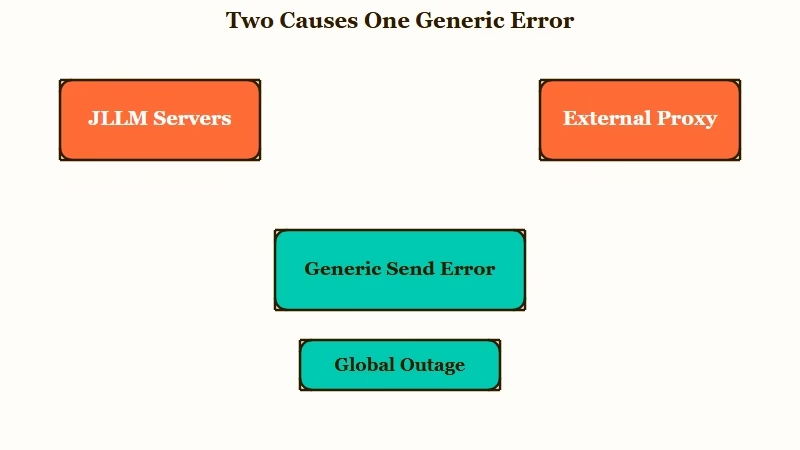
What is JLLM: JLLM is JanitorLLM, the model built into Janitor AI that runs without a proxy, so you can use it as a clean test bed when a proxy chat breaks.
Here is the one-tap test that settles it fast. Open the broken chat, switch the model to the native JLLM, and send a message.
If JLLM replies normally, the outage is not real and your proxy is the problem. If JLLM also errors, Janitor’s servers are having a moment and you just wait.
The reason this matters is that a failed proxy and a real outage feel identical from your seat. I would run the JLLM test before touching a single setting, because it saves you from rewriting a proxy config that was never broken.
For the plain popup version of this, the unexpected error breakdown covers the simpler cases.
How to Tell If Janitor Is Down or It Is Your Proxy
Janitor is genuinely down only when the status page confirms it or the native JLLM also fails, otherwise the problem is on your end.
Two quick checks separate a real outage from a local or proxy issue.
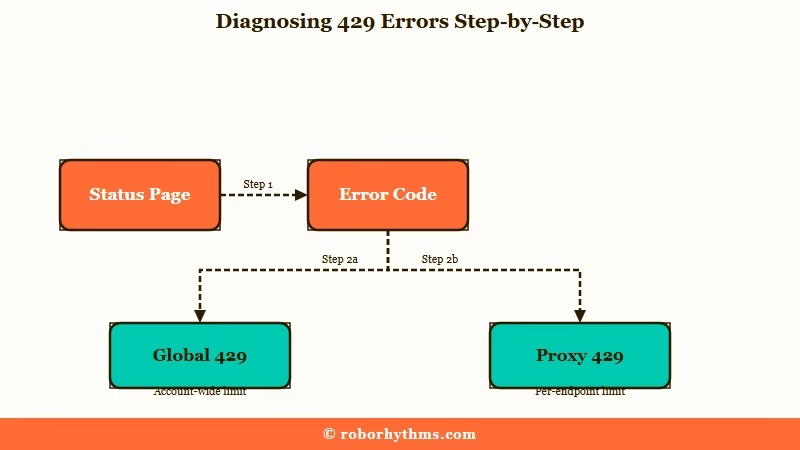
First, load the official status page at status.janitorai.com. It flags a “Partial Outage” or “Degraded Performance” when Janitor’s infrastructure is the cause. If it reads “All Systems Operational” but you still error, the problem is local: clear your cache and cookies, try an incognito window, or toggle your Wi-Fi or VPN.
Second, read the error code if there is one. A “Global 429” means Janitor’s own JLLM servers are overloaded, so you wait it out.
A “Proxy 429” means your external provider rejected the request, which is your credits or your rate limit, not Janitor’s. The way I see it, most people who swear the site is down are looking at a Proxy 429.
Here is a quick read on what each error is telling you.
| What you see | Likely cause | What to do |
|---|---|---|
| Generic error on send, JLLM works fine | Your proxy failed (empty wallet, wrong key or URL) | Fix your proxy setup |
| Generic error, native JLLM also fails | A real JLLM server outage | Wait, and check the status page |
| Proxy Error 429 | Your provider rate limit or overload | Slow down or add credits |
| 401 Invalid token | Wrong or mistyped API key | Re-paste the key with the right prefix |
| 400 maximum context length | The chat got too long | Lower context, do a chat transplant |
If it turns out the platform really is offline, the Janitor AI not working guide has the wider checklist.
How to Fix a Proxy That Stopped Working
A proxy that stopped generating is almost always an empty wallet, a wrong key or URL, or a mismatched model name, and each has a specific fix.
The generic error hides which one, so you check them in order.
A dead proxy wallet is the sneakiest cause. When your Chutes or OpenRouter balance hits zero, the interface shows a generic error, not a low-funds message, so you do not realize you have run out. Here is the sequence I would walk through:
- Check your provider balance first. On Chutes, a one-time $5 top-up unlocks 200 messages a day, and you keep that daily allowance even after the credit drops to zero.
- Verify your key prefix. An OpenRouter key must start with
sk-or-v1-and a Chutes key must start withcpk_, with no stray spaces. - Verify your proxy URL exactly. OpenRouter is
https://openrouter.ai/api/v1/chat/completionsand Chutes ishttps://llm.chutes.ai/v1/chat/completions, with no extra slashes. - Confirm the model name matches the provider. On OpenRouter free models, the name must end in
:free, or you hit a 402 quota error trying to use a paid model on a zero balance. - Generate a fresh API key, paste it, save, and hard-refresh the page. Do not trust the built-in Check Key button.
The single most common setup mistake I see is mixing providers. People paste a URL from one service, a key from another, and a model name copied off an old thread.
Before: OpenRouter URL, a Chutes cpk_ key, and a DeepSeek model name from a year-old guide.
After: OpenRouter URL, an OpenRouter sk-or-v1- key, and an OpenRouter model ending in :free, all from the same provider.
Here is how the two most common proxies compare when you set them up.
| Setting | Chutes | OpenRouter |
|---|---|---|
| API key prefix | cpk_ | sk-or-v1- |
| Proxy URL | llm.chutes.ai/v1/chat/completions | openrouter.ai/api/v1/chat/completions |
| Free daily messages | 200 after a one-time $5 top-up | 50, or 1,000 after a one-time $10 credit |
| Model name note | Match the provider’s model list exactly | Free models must end in :free |
If your specific symptom is a 429, the proxy error 429 fix goes deeper on rate limits.
Why the Error Keeps Coming Back
The error keeps returning because a few common habits quietly burn your quota or reapply a broken setting, not because the fix failed. Four traps cause most repeat failures.
The biggest one surprises people: error messages count against your daily limit. On OpenRouter’s free tier of 50 messages a day, every failed generation still burns one, so mashing the regenerate button during a rough patch can drain your whole day in minutes.
Here are the traps I would watch for, in the order they bite:
- Spamming regenerate. Three fast retries can trigger a 429 on their own, and each one eats a message from your daily cap.
- Trusting the Check Key button. It is known to throw a false Network Error, so ignore it and test with a hard page refresh instead.
- Hitting the context limit. Janitor’s context sits around 4k to 6k tokens, and when a chat fills it the bot starts rambling or waxing poetic before it errors out.
- Oversized context settings. Pushing context above 16k makes the bot slower and more forgetful, not smarter.
For a long chat that has hit the context wall, the fix is a chat transplant. Summarize the key events of your current roleplay, start a brand-new chat with the same bot, and paste that summary as your first message to carry the memory over. When a specific proxy fetch keeps failing, the Chutes failed to fetch fix narrows it down.
What to Do When Janitor Keeps Breaking on You
If you are tired of babysitting a proxy that runs dry or a server that stalls mid-scene, a managed companion platform removes the whole failure layer.
There is no proxy to configure and no wallet to top up, so the send error does not happen at all.
Janitor AI is one of the most-used companion apps around, ranked among the top consumer AI products on Andreessen Horowitz’s Top 100 Gen AI Apps list with roughly 15 million users, which is exactly why its free servers get overwhelmed. That scale is the root of the outages.
I usually point people who are done troubleshooting toward Candy AI first. It runs its own model with no proxy setup, so there is no key prefix to fix and no balance to run out. If you want a second managed option to compare, Nectar AI is the other one I would try before going back to proxy juggling.
Frequently Asked Questions
Why can I not continue my chat on Janitor AI?
The most common causes are a JLLM server overload or a failed proxy. Switch the chat to the native JLLM model to test. If it works, your proxy is the issue, likely an empty wallet, wrong key, or wrong URL.
Is Janitor AI down right now or is it just me?
Check status.janitorai.com. If it says “All Systems Operational” but you still get errors, the problem is local or proxy-side. Clear your cache, try incognito, and switch to the native JLLM to confirm.
Does a failed message use up my daily proxy limit?
Yes. On free tiers like OpenRouter’s 50 messages a day, an errored generation still counts against your quota. Avoid spamming the regenerate button during an outage, since three fast retries can also trigger a 429.
How do I fix a Chutes or OpenRouter proxy that stopped working?
Check your balance first, since a zero wallet shows a generic error. Confirm your key prefix (cpk_ or sk-or-v1-), the exact proxy URL, and a matching model name. Then generate a new key and hard-refresh.
Why does my bot start rambling before it errors?
You have hit the context limit, around 4k to 6k tokens. The bot dumps memory and waxes poetic, then fails. Fix it with a chat transplant: summarize the story and paste it into a fresh chat with the same bot.
Quick Takeaways
- The error looks identical whether Janitor’s servers or your proxy failed, so run the native JLLM test first to isolate the cause.
- A Chutes or OpenRouter wallet at zero shows a generic error, not a low-funds warning, so check your balance before your network.
- Global 429 means wait it out, Proxy 429 means fix your own credits, key, or URL.
- Failed messages still burn your daily limit, so stop mashing regenerate during an outage.
- If you are done babysitting proxies, a managed platform like Candy AI has no proxy to break in the first place.
