
Bottom Line: SuperGrok is still worth $30 a month for light, mixed use, some chat, a handful of images, the occasional video. It is not worth it if you generate video at any volume, because a single 720p clip now costs 2% of your entire week and blocked generations still count. Heavy video creators should cancel and use a specialized tool instead.
If you are asking whether SuperGrok is worth it after the new weekly limit, the honest answer depends on how you use it, and the math got a lot worse in June 2026.
A single 10-second 720p video now eats 2% of your entire weekly allowance, and a generation the content filter blocks still costs you that 2% even though you never receive the file.
That last part is the detail almost no one mentions. You can pay $30, hit generate, get nothing back because the prompt tripped moderation, and watch your quota drop anyway. One user reported a single image request spawning 20 auto-moderated attempts in a row, then a lockout, with zero images delivered.
I will walk through exactly what the new shared weekly pool gives you for $30, the hidden ways it drains faster than you expect, whether the $300 Heavy tier fixes anything, and where I would send my money instead if you mostly generate video or use the Ani companion.
Is SuperGrok Still Worth It Under the New Weekly Limit
SuperGrok is worth it for light and mixed users but not for volume video creators, because xAI replaced separate daily limits with one shared weekly pool that a few high-resolution videos can drain in a single sitting.
The price is the same $30, but you get far less for it.
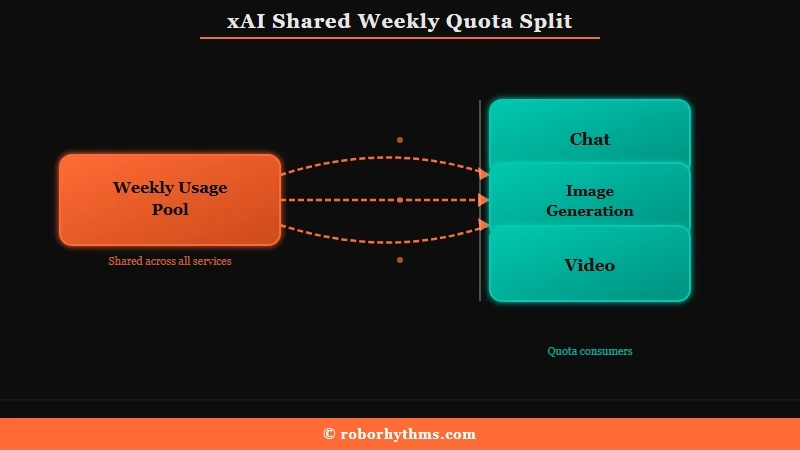
What is the SuperGrok weekly pool: A single weekly usage allowance, introduced June 2026, that every Grok product draws from, so chat, image generation, video, and voice all spend the same meter.
In xAI’s own words, you no longer get “separate daily limits for each product (like Chat, Imagine, Voice, or Build)” and instead get “one shared weekly usage pool” you can spend “across any Grok product.” The company frames this as flexibility. On paper, that sounds fine.
The way I see it, the flexibility is real but the size is the problem. You can now spend your whole week on video if you want, but the whole week is not much video.
The weekly limit mechanics get more granular, but the short version is that the pool is small enough that heavy users hit zero fast.
If you are weighing platforms, the Grok Imagine alternatives worth trying are covered separately.
What You Really Get for $30 a Month Now
For $30 a month you get roughly 50 high-resolution videos per week or about 5 to 6 hours of chat, all sharing one pool, which represents an 83% to 99% cut from the old daily limits.
The tier name stayed the same while the ceiling dropped through the floor.
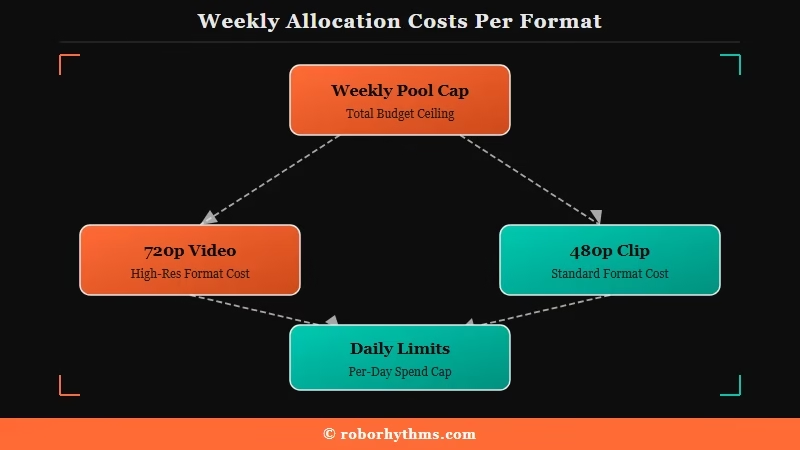
Community testing lines up on the rough costs. A 10-second 720p video runs about 2% of the weekly pool, a 480p clip is 0.5% to 1%, and roughly five short chat messages cost 1% to 2%.
Do the arithmetic and the whole week caps out near 50 crisp videos, or a few hundred chat turns.
Here is how the tiers compare under the new system.
| Plan | Price | What the weekly pool gets you | Best for |
|---|---|---|---|
| Free | $0 | Separate basic schedule for chat and voice | Casual, occasional use |
| SuperGrok | $30 per month | About 50 720p videos or 5 to 6 hours of chat, shared across all products | Light to mixed users |
| SuperGrok Heavy | $300 per month | Up to about 500 renders per day and a 16-agent mode, same Grok 4 model | High-volume businesses |
What I would flag before you subscribe is how quickly a normal creative session burns the meter. This is the exact scenario people keep running into.
Example scenario: Generate five 720p videos in one sitting and you are already near 43% of your weekly pool. Two of them trip moderation and never arrive, but you still paid the 2% for each. At video seven or eight, you are dropped to the free tier until your reset day.
Why Moderated Generations and Overnight Jumps Drain Your Quota
Your quota drains faster than the raw numbers suggest because blocked generations still deduct, upscaling costs fresh credits, and the meter can climb on its own overnight.
These are the costs that make the $30 feel like less than $30.
Three drains matter most, and I would watch all of them:
- Moderated or failed generations still count. A prompt the filter rejects, or a render that dies at 90% to 99%, deducts from your pool exactly like a successful one.
- Upscaling now costs credits. Taking a 480p clip up to 720p pulls fresh usage from the weekly pool rather than reusing what you already spent.
- The meter moves without you. Users have reported their usage jumping from 30% to 67%, or 60% to 100%, overnight with no activity, which several attribute to a dynamic fair-use algorithm that reflects server load rather than pure personal use.
There is also a monetization catch worth knowing before you throw more money at the problem. xAI says you can buy Extra Usage Credits from $5 to keep going, and that they apply immediately.
In practice, several users report topping up $15, seeing the credits register, and staying fully blocked from generating anything, with the extra credits only working for the API or Build. If you are already capped, do not assume a top-up will unblock you.
I want to be careful with one popular theory here. Some users speculate xAI is deliberately throttling consumers to free up compute for a large enterprise deal, but xAI has not confirmed any such motive, so treat that as community guesswork, not fact.
The measurable reality is enough on its own. For the image side specifically, Grok Imagine limits follow the same shared-pool logic.
When the SuperGrok Weekly Limit Resets
Your weekly pool refills on a personal schedule shown in Settings, then Usage, not on a fixed day shared by every subscriber.
That same screen shows the percentage you have already burned.
xAI has been explicit that the reset is not random. The Usage tab carries your personal breakdown, the percentage used, and the date the allowance returns, so reading it beats guessing from the day you subscribed.
Running out does not lock you out of the account. When the included quota is gone, paid features pause until the reset date while free-tier Chat and Voice keep working, which is why some subscribers assume their plan silently downgraded. What that free tier still covers has narrowed a long way, as the rundown of what Grok stopped giving away free lays out.
If the allowance did not come back when the Usage tab said it would, that is a separate and fairly common fault. We cover the causes and the workarounds in Grok weekly limit not resetting.
Is SuperGrok Heavy Worth the $300 Upgrade
SuperGrok Heavy is not worth it for individuals because it costs ten times more without giving you a smarter model, it only buys volume and parallelism.
The upgrade solves a volume problem for businesses and does nothing for output quality.
Heavy runs the same Grok 4 model with the same 256K context window as the $30 plan. What the extra $270 buys is throughput: up to around 500 renders a day and a 16-agent parallel mode built for teams and constant workloads. The intelligence does not change.
For a solo creator or freelancer, that is the wrong trade. Even some Heavy subscribers report burning a full week of quota in a single day of heavy image and video work, so the tier is not an escape hatch from limits either.
What I would tell most people is that if standard SuperGrok is too small for you, the fix is a specialized tool, not a $300 bill.
The Verdict on SuperGrok
SuperGrok is worth keeping if your use is light and mixed, and worth cancelling if you generate video at any real volume.
The plan quietly became a demo for the heaviest users and stayed genuinely useful for everyone else.
Here is where I land after weighing the tradeoffs.
The case for keeping it:
- You get Grok 4 with DeepSearch and multimodal generation in one $30 bundle.
- The shared pool is flexible, so you can pour a light week into whichever product you want.
- Extra credits from $5 exist as a pressure valve for the occasional overage.
- For chat, research, and a few images a week, the limit rarely bites.
The case for cancelling:
- Generation capacity dropped an estimated 83% to 99% versus the old daily limits.
- Moderated and failed generations still burn your quota.
- The meter can climb overnight with no activity from you.
- Five or six hours of ordinary chatting can exhaust the entire week.
- Purchased top-up credits sometimes fail to unblock generation at all.
Match your use case to the call below.
| Your use case | What I would do |
|---|---|
| A few videos plus normal chatting each week | Keep SuperGrok |
| Dozens of videos a day | Cancel and use a specialized video tool |
| Mainly the Ani companion | Switch to a no-meter companion |
| Corporate volume or constant parallel research | The only case where Heavy makes sense |
What to Use Instead of SuperGrok
The best alternatives are specialized tools that cost less than SuperGrok and do not share one weekly meter across everything.
If Grok was mostly your video engine or your companion, unbundling is cheaper and less frustrating.
For AI video, dedicated generators give you unthrottled output for around the same price or less. Kling AI runs about $10 a month and is built purely for video, so you are not spending a shared pool that your chat habit also draws from.
Luma Dream Machine ($9.99) and Runway ($15) are the other two I would shortlist, and major roundups like CNET’s best AI video generators rank several of these above the all-in-one bundles for pure generation.
If you were mainly there for the Ani companion, a managed companion app makes more sense than paying a compute meter to chat.
Candy AI has no weekly generation pool hanging over every message, which is the whole point when your use is conversation rather than rendering. For a direct feature-by-feature look, the Candy AI vs Grok Ani comparison covers where each one wins.
Frequently Asked Questions
How much does SuperGrok cost in 2026?
SuperGrok costs $30 per month or $300 per year. SuperGrok Heavy is $300 per month. Both now share a single weekly usage pool across chat, image, video, and voice, rather than separate daily limits per product.
How many videos can I make on SuperGrok per week?
A 10-second 720p video uses about 2% of your weekly pool, so roughly 50 high-resolution clips per week if you do nothing else. Lower 480p clips cost 0.5% to 1% each, and any chatting or image work eats into the same total.
Do moderated Grok videos still count against my limit?
Yes. Generations blocked by the content filter or failed by errors still deduct from your weekly quota, even though you never receive the output. This is a common reason subscribers hit their cap faster than expected.
Is SuperGrok Heavy worth $300 a month?
For most individuals, no. Heavy uses the same Grok 4 model as the $30 plan, so you pay ten times more only for volume and parallel processing, not smarter output. It suits businesses generating hundreds of renders daily.
Should I cancel SuperGrok?
Cancel if you generate video at volume, since the weekly pool caps you quickly and blocked generations still cost you. Keep it if your use is light and mixed. You can cancel through grok.com billing settings or your app store subscription, and the steps to cancel a Grok subscription differ depending on which one you signed up through.
When does the SuperGrok weekly limit reset?
On a personal schedule rather than a universal day. xAI shows your exact reset date and the percentage you have used in Settings, then Usage, and the pool refills on that date.
What happens when you hit the SuperGrok weekly limit?
Paid features pause until your reset date. Free-tier Chat and Voice stay available, so the account keeps working in a reduced form rather than locking you out entirely.
Quick Takeaways
- SuperGrok stayed $30 a month, but the June 2026 shift to one shared weekly pool cut generation capacity an estimated 83% to 99%.
- A single 720p video costs 2% of your week, and moderated or failed generations still deduct from the pool.
- SuperGrok Heavy at $300 buys volume and parallelism, not a smarter model, so it is not the fix for individual creators.
- Keep SuperGrok for light mixed use, cancel it if you generate video at volume.
- For video, a specialized tool like Kling AI at about $10 avoids the shared-meter tax, and a managed companion avoids it for chat.
