
What’s Changed: When your Janitor AI messages disappeared, they are usually still saved on the server, hidden by a visual bug rather than deleted. The counterintuitive fix for a vanished bot reply is to delete your own newest message so the missing one re-renders. The one exception is the “is_main” commit error, where refreshing can make the loss permanent.
You are mid roleplay, you send a reply, and the whole chat blinks. When it comes back, a bot message is gone, or the entire conversation looks empty.
That stomach drop is real, and if your Janitor AI messages disappeared this way, you are not alone.
The good news is that most of the time nothing has been erased at all. The message is sitting safely on the server, hidden behind a front-end rendering glitch, and there is a specific trick to force it back into view.
The one situation that does destroy data is a particular commit error, and the instinct almost everyone reaches for makes it worse.
So I want to walk through how to tell the recoverable cases from the rare unrecoverable one, the exact steps to get a vanished message back, and how to back up your chats so this stops being scary. A message hidden by the rendering glitch differs from one that never reached the server, and Janitor AI not saving messages covers that failed to save error.
Why Your Janitor AI Messages Disappeared
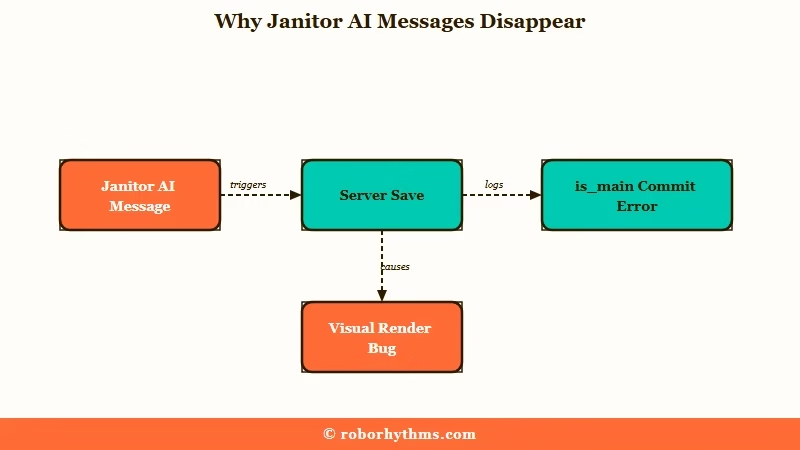
A disappeared Janitor AI message is usually still saved on the server, hidden by a visual rendering bug rather than truly deleted.
The chat data lives server-side, so a message vanishing from your screen rarely means it is gone from the database.
Here is the part that surprises people. If a bot reply vanishes from the middle of your chat, the fastest way to bring it back is to copy and then delete your own most recent message, the one you sent right after the missing reply.
Because the bot message was never deleted, only hidden by the glitch, removing your newer message forces the log to re-render and the “missing” reply reappears.
What is the ismain error: A pop-up reading “Failed to commit previous answer: Cannot read properties of undefined (reading ismain)” that means the last reply never saved to the backend.
The exception to the it-is-fine rule is that is_main commit error. When it shows up, the last answer genuinely failed to write to the server, and refreshing the page to clear the error screen makes the bot’s unsaved reply vanish for good, leaving only your own messages behind. That is the one moment where a reflexive refresh costs you.
I treat the two cases very differently, and so should you. A message that vanished on a normal refresh or mid chat is almost always recoverable, while an is_main error is a signal to stop and act before touching refresh.
| Symptom | Likely cause | Fix |
|---|---|---|
| Bot reply gone from mid chat | Visual render glitch, message still saved | Delete your own newest message to force a re-render |
| Whole chat looks empty after refresh | Temporary cache or migration display bug | Send a new message, then refresh once |
| is_main commit error pop-up | Last answer never saved to the server | Do not refresh yet, copy anything visible first |
| Old 2023 or 2024 chats missing | Database migration not finished | Wait, they are expected to return |
How Do I Get My Disappeared Messages Back
You get disappeared messages back by re-rendering the chat rather than refreshing blindly.
The right move depends on which failure you are looking at, so match the fix to the symptom.
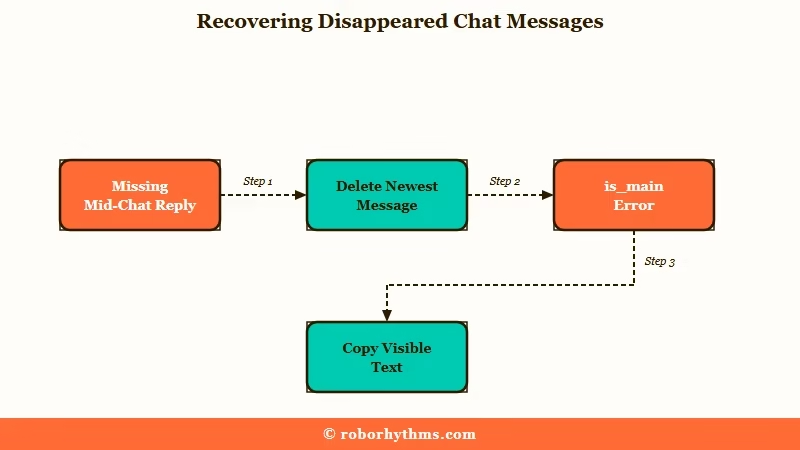
For a single bot reply that vanished from the middle of the log, the delete-your-own-message trick is the cleanest recovery I know. For a whole chat that looks empty, the official guidance is gentler and works for the common visibility glitch.
The steps I would run, in order:
- If one bot reply is missing mid chat, copy your newest message somewhere safe, then delete that newest message so the hidden bot reply re-renders.
- If the whole chat looks empty, send a new short message in that chat, then refresh the page once.
- If you see the is_main error, do not refresh first, copy whatever text is still on screen into a notes app.
- Only after copying, refresh and re-send your last line so a fresh commit can succeed.
- If nothing returns and the chat is from 2023 or 2024, leave it alone and check back later.
Before: Chat refreshes, the bot’s last reply is gone, you panic and hit refresh three more times.
After: You copy your own newest message, delete it, and the “missing” bot reply pops right back into the log.
The reason the order matters is that refreshing is a fix for one problem and a trigger for another. For a plain visibility glitch it clears the display and the messages return, which is why the is Janitor AI down checks lean on a reload. For an uncommitted answer, that same reload throws away the only copy.
Is This a Vanished Message or a Deleted Bot
A vanished message and a deleted bot are different problems with different fixes, and confusing them wastes hours.
A message disappearing happens inside a chat you can still open, while a deleted bot makes the entire character inaccessible.
If the bot itself was removed or set to private, you will not see an empty chat, you will see a hard error. Janitor throws a “Can not find this character” message with a 404 status, or the character shows a “Deleted or Privated” tag in your My Chats list.
That is a completely separate situation from your own messages glitching out, and I cover it in the piece on Janitor AI bots disappearing.
What is a chat migration: When the developers move stored chats between server databases to upgrade storage or security, which can briefly make older chats hard to load.
There is also a middle case that looks like loss but is not. Chats specifically from 2023 or 2024 that vanished have often not finished a database migration, and the team expects them back in the main database, so waiting is the correct move rather than frantic troubleshooting.
| What you see | What it means | What to do |
|---|---|---|
| A reply missing inside an open chat | Visual render bug, message still saved | Delete your newest message to re-render it |
| 404 or a Deleted or Privated tag | The bot itself was removed or privated | The character is gone, not your chat data |
| Old 2023 or 2024 chats absent | Database migration not yet finished | Wait, they are expected to return |
Why Forking a Chat Makes Messages Disappear
Forking a chat is the single most common trigger for the last few bot messages disappearing.
The site reloads to build the new branch and sometimes fails to save the most recent replies before the switch.
What is forking: Starting a new chat branch from a chosen point in an existing conversation, using the three-dot menu on a message and picking fork into new chat.
The habit that saves veterans a lot of grief is simple, and I have adopted it myself. Copy your last two or three messages into a Google Doc or notes app before you click fork into new chat, so when the reload eats the latest replies you can paste the context straight back in.
One thing not to panic over during a fork is the lorebook icon. When you fork or refresh, the purple or red lorebook logo on the bot’s replies can flip back to the default blue icon, but the lorebook connection is still fully intact underneath.
If your bot suddenly forgets details in a longer session, that is a separate issue I break down in the guide on Janitor AI memory not working, rather than a lorebook that detached. When the details slip because the memory box itself is too vague, writing a chat summary that survives long sessions is the fix.
How Do I Back Up Janitor AI Chats So This Never Hurts
You back up Janitor AI chats with a one-click exporter extension so a lost message is an annoyance instead of a disaster.
Once you have a backup habit, none of the glitches above can genuinely cost you a story.
The most approachable option is the JanitorAI Chat Downloader, Reader and Exporter browser extension, available for both Chrome and Firefox. It adds download buttons to your chat page and exports full conversations to EPUB, TXT, Markdown, JSON, and JSONL, and the JSONL format drops straight into SillyTavern if you ever migrate.
For heavier users there are sturdier tools. JAIPA, short for Janitor AI Personal Archive, is a desktop application that archives your histories locally, and janitor-scraper is a terminal tool on GitHub that pulls chats into a clean readable format.
The routine I would set up takes a minute a week:
- Install the JanitorAI Chat Downloader extension in Chrome or Firefox.
- After any long or important session, click the export button and save a JSONL or TXT copy.
- Before forking or after a big plot beat, copy the last few messages into a doc as a quick manual backup.
- Keep exports in one folder so a full account wipe still leaves you with everything.
If disappearing messages come bundled with the interface feeling broken since the redesign, the rundown on the Janitor AI new UI covers what changed and which glitches are cosmetic.
Janitor sits among the most-trafficked consumer AI apps in the a16z Top 100 AI apps ranking, which is exactly why its migrations and refresh bugs hit so many people at once.
When Losing Your Chats Is the Real Dealbreaker
If the thought of losing a months-long roleplay is unbearable, a hosted companion that stores everything server-side removes the risk.
Backups solve most of it, but some people would rather not manage exports at all.
For that reader, Candy AI keeps your conversations on its own servers with no fragile browser cache in the loop, so a refresh does not gamble with your history.
It trades away Janitor’s enormous community bot library, so I see it as a different deal rather than a clean upgrade.
If continuity across sessions matters more than any single message, Nectar AI holds long-term memory so a lost UI state does not erase who your companion has become.
I still keep Janitor around for its free model and character catalog, and I just pair it with a weekly export so a glitch is never a catastrophe.
Frequently Asked Questions
Are my Janitor AI chats gone forever when they disappear?
Usually not. Most disappearances are visual bugs and the data is still on Janitor’s servers. The main exception is a message hit by the is_main commit error or data lost mid migration, which can be unrecoverable.
How do I bring back a bot message that vanished mid chat?
Copy your own newest message somewhere safe, then delete that newest message. Because the bot reply was hidden rather than deleted, removing your later message forces the chat to re-render and the missing reply reappears.
Should I refresh when I get the is_main error?
Not first. Refreshing to clear the “Failed to commit previous answer” error makes the unsaved bot reply disappear permanently. Copy anything still on screen, then refresh and re-send your last line.
Why do my messages disappear when I fork a chat?
Forking reloads the site to build the new branch and sometimes fails to save the latest replies. Copy your last two or three messages into a doc before you click fork into new chat as a failsafe.
How do I back up my Janitor AI chats?
Use the JanitorAI Chat Downloader browser extension for Chrome or Firefox to export chats to EPUB, TXT, Markdown, JSON, or JSONL. Heavier users can archive locally with JAIPA or the janitor-scraper GitHub tool.
Quick Takeaways
- A disappeared message is usually still saved, deleting your own newest message re-renders the missing bot reply.
- The is_main commit error is the one case where refreshing makes the loss permanent, copy first.
- A vanished message is not a deleted bot, a 404 or Deleted or Privated tag means the character itself is gone.
- Forking is the top trigger, copy your last few messages before you fork.
- Install a chat exporter extension and export weekly so no glitch can ever cost you a story.
