
What’s Changed: If your Janitor AI responses are too long or keep stopping mid sentence, the Max Tokens setting is almost always the culprit. It caps where a reply gets chopped rather than telling the model to write less, and setting it to 0 still limits output near 2,000 tokens. The fix is to leave Max Tokens at 0 and steer length through your prompt and generation settings.
There is a specific kind of frustration that hits when your Janitor AI responses are too long, and you did everything right.
You set Max Tokens to 300, expecting tidy replies, and instead the bot writes a five paragraph monologue that guillotines itself in the middle of a word.
So you crank Max Tokens back to 0 to stop the chopping, and now every reply is a small novel. It feels like the setting is broken, or the site is fighting you on purpose.
It is neither. The length controls on Janitor AI do not work the way the names suggest, and once you see what they really do, the fix is quick.
I will walk through why the cutoff happens, why “keep it short” prompts get ignored, and the exact settings and prompt strings that give you replies at the length you want.
Why Janitor AI Responses Are Too Long or Cut Off Mid Sentence
Janitor AI responses cut off because Max Tokens sets a hard ceiling rather than a target length.
The model writes a full reply and gets sliced the instant it hits the number you set, mid sentence and all. It never plans a shorter, complete answer to fit the limit.
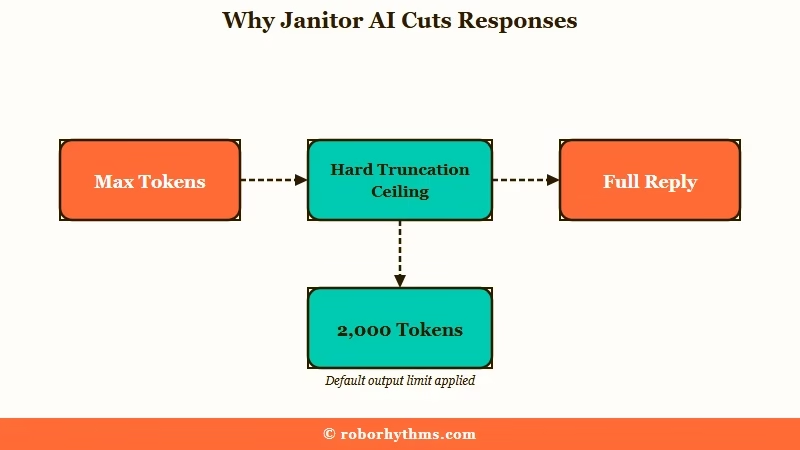
Here is the part almost nobody mentions, and it is the reason the usual advice backfires. Setting Max Tokens to 0 does not mean unlimited output.
Per the advanced prompt guides that circulate in the community, 0 technically caps generation near 2,000 tokens, so a long enough reply can still stop mid sentence even when you think you disabled the limit.
What is Max Tokens: The maximum length of a single reply measured in tokens, where roughly 1,000 tokens equals about 750 words. It truncates output rather than shortening it.
That single detail rewrites the whole problem. When I stopped thinking of Max Tokens as a “make it shorter” slider and started treating it as a guillotine set to whatever number is showing, every weird cutoff suddenly made sense. A low number chops early, and 0 just moves the blade out to around 2,000 tokens.
The other half of the problem is the model itself. On JLLM, the free in house model, the default behavior leans long, and it will happily fill a 500 token budget with narration before it gets anywhere near your point.
| Symptom | Likely cause | Fix |
|---|---|---|
| Reply stops mid sentence | Max Tokens set too low, hard truncation | Set Max Tokens to 0, control length by prompt |
| Reply still cuts off at Max Tokens 0 | 0 caps near 2,000 tokens, reply ran past it | Add a prompt length cap, trim your own long messages |
| Replies are huge walls of text | JLLM mirrors a long greeting or your long messages | Shorten your messages, set a paragraph target |
| Length prompt worked, then stopped | Chat passed roughly 10,000 context tokens | Move the rule into Response Prefill |
How Do I Get Shorter Replies on Janitor AI
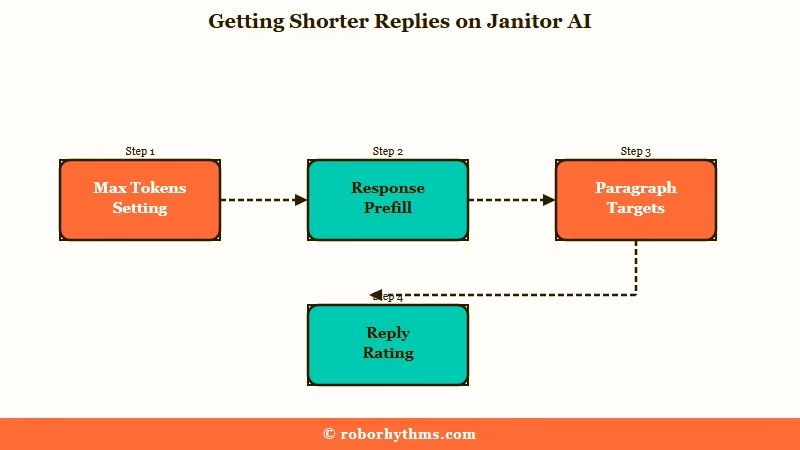
You get shorter replies by leaving Max Tokens at 0 and telling the bot how many paragraphs to write, not how many words.
Length lives in your prompt, not the token slider. This is the single biggest mindset shift that fixed it for me.
The reason word counts fail is mathematical, not a Janitor bug. A language model predicts the next token by probability and has no internal counter, so a command like “write exactly 300 words” asks it to plan across an impossibly large space of word sequences.
Paragraph and sentence targets are coarse enough that the model can hit them consistently.
Here is the sequence I would run, in order:
- Set Max Tokens to 0 so replies stop getting chopped.
- Add a paragraph rule to your prompt, something like “Responses should contain 3 paragraphs of 2 to 5 sentences each.”
- If the bot ignores that after a while, move the rule into Response Prefill instead of the custom prompt box.
- Edit one or two overlong replies down to your ideal length yourself, then rate them 5 stars so the bot learns your pacing.
- Shorten your own messages, since the bot mirrors the length and energy of what you send it.
What is Response Prefill: A field under Generation settings, Advanced settings, generation rules, that seeds the start of the bot’s own reply so it behaves as if it already agreed to your rule.
The Prefill trick is the one people sleep on. Dropping the exact line “I will keep my replies within 400 to 500 tokens.” into Response Prefill stops runaway walls far more reliably than the same instruction sitting in the custom prompt box, because the model treats its own prefilled words as a commitment it already made.
Before: “Do not write long responses. No more than 300 words please.”
After: “Responses should normally contain 4 to 7 paragraphs. Avoid exceeding 7 paragraphs unless the scene requires unusual detail.”
The first version names a word count the model cannot count to, and it leads with “do not,” which is its own problem covered in the next section. The second gives a paragraph range the model can pattern match against.
If your bot leans toward heavy description, the same idea as a strict cap works well too, phrased as an out of character note like “((OOC: write responses that are 2 to 4 paragraphs long, 2 to 3 sentences per paragraph.))” placed at the end of your message.
Why the Bot Ignores Your Keep It Short Instructions
The bot ignores “keep it short” because negative phrasing makes the model focus on the exact thing you forbade.
Tell it “do not be long winded” and the attention mechanism lights up on “long winded.” Researchers call it the Pink Elephant problem, and it is well documented.
A arXiv study on pink elephants from 2024 shows why negative instructions misfire in transformer models. Naming a concept to suppress still activates that concept strongly, so “do not write a poem” primes the model toward poems. The practical takeaway is to always phrase length rules as what you want, never as what you want to avoid.
There is a second reason your instruction seems to work and then quietly dies. Custom prompts tend to get ignored once the chat memory fills up, roughly past 10,000 context tokens, because the older instruction gets crowded out by more recent conversation. The other ways a custom prompt quietly does nothing are covered on their own page.
If your length rule held for the first twenty messages and then the walls came back, that is what happened, and it is the reason the Prefill field beats the custom prompt box for durability.
Bloated character cards make this worse, which is the same memory budget issue I dug into in the piece on why Janitor AI forgets things.
One more thing I see people get wrong is fighting an overlong reply by arguing with the bot in character. That just feeds more text into the context.
The clean move is to delete the offending part of the reply so the model does not treat its own wall of text as the new normal, a cousin of the fix for when Janitor AI narrates too much.
JLLM Versus a Proxy When You Want Length Control
JLLM and proxy models fail at length in opposite directions, so the fix depends on which you use.
JLLM tends to over generate and needs reining in, while lean proxy models like DeepSeek often need pushing to write more. Knowing which side you are on saves a lot of guesswork.
On JLLM, expect novels. It will produce sprawling replies even when capped at 500 tokens, so your job is mostly restraint, paragraph caps and Prefill limits.
If you run a proxy through OpenRouter or DeepSeek, a mid sentence stop is more likely a stream interruption from the provider than a Max Tokens issue, and you will sometimes see the reply visibly break where the connection dropped.
| Situation | What is really happening | What to change |
|---|---|---|
| JLLM writes walls of text | Model defaults long and mirrors your input length | Max Tokens 0, paragraph cap in Prefill, shorter messages |
| DeepSeek replies feel clipped | Lean model, needs a push for detail | Ask for a paragraph range, Temperature around 0.6 |
| Proxy reply snaps off cleanly | Stream interruption from the provider, not a cap | Tap continue, or reroll the message |
| You must use a hard cap | A number will always truncate, choose a safe one | Set 700 to 800 tokens, the community sweet spot |
For a DeepSeek setup, the settings I would start with are Temperature 0.5 to 0.75, Max Tokens 0, Top K 50, Top P 0.9, and Repetition Penalty around 1.02.
One rule I follow religiously is to never raise Temperature and Top P together, since stacking both tips replies into incoherence fast. If you are wiring a proxy up from scratch, the Janitor AI proxy setup walkthrough covers the connection side.
Which Length Fixes Contradict Each Other and Which to Trust
The community disagrees on three fixes, and each disagreement traces back to a real mechanism.
Once you know which side has the mechanism right, you can stop cycling through advice that cancels itself out. I have gone back and forth on all three myself.
The first split is Max Tokens 0 versus picking a number. Some users swear by a hard cap like 360 or the 700 to 800 range for shorter replies, while others insist you set it to 0 and never touch it.
Both are describing something true. A number gives you full control over the ceiling but also guarantees the occasional mid sentence chop, while 0 returns complete sentences at the cost of steering length yourself through prompts.
The second split is whether negative out of character commands work. The guides say never use “don’t” or “stop,” yet plenty of users report “((OOC: don’t speak for me))” working for a stretch.
Both can be right, because a negative command can win short term through recency and then relapse as it pollutes the context, the same reason the fix to stop Janitor speaking for you leans on positive phrasing.
The third split, word counts versus paragraph counts, is the least ambiguous. The math favors paragraphs, every time.
When the Right Reply Length Just Is Not Worth the Fight
If you would rather not babysit token settings and Prefill fields, a hosted companion handles reply length for you.
Some people enjoy tuning the machine, and some just want a conversation that lands at a natural length. There is no wrong answer, and I have landed in both camps depending on the week.
If you are in the second camp, Candy AI keeps replies conversational by default, without a Max Tokens slider or a Prefill field to manage, because the length tuning happens server side. It will not give you the raw knob level control that a proxy does, so it is a genuine trade off rather than a strict upgrade.
For longer running stories where consistent pacing matters more than any single reply, Nectar AI holds memory across sessions so the rhythm you establish tends to stick.
I would still keep Janitor around for its free model and enormous bot library, and lean on a hosted option only when the setting wrangling stops being fun.
If runaway length comes packaged with the bot forgetting things, the Janitor AI message limit guide covers the memory side of the same coin.
If the reply stops and will not resume at all, that is a different fault from a length cutoff, and our guide to the Janitor AI continue response error covers it.
Frequently Asked Questions
Why does Janitor AI cut off in the middle of a sentence?
Because Max Tokens is a hard truncation limit. The model writes a full length reply and gets sliced the moment it reaches your token number, with no attempt to finish the thought. Set Max Tokens to 0 and control length by prompt instead.
Does setting Max Tokens to 0 make replies unlimited?
No. Setting it to 0 caps output near 2,000 tokens rather than truly unlimited, so a long reply can still stop mid sentence. It is far better than a low cap, but pair it with a paragraph rule in your prompt.
How do I make JLLM give shorter responses?
Leave Max Tokens at 0, then add a paragraph target like “3 paragraphs of 2 to 5 sentences each” to your prompt or Response Prefill. Editing a couple of long replies down and rating them 5 stars also trains the bot toward your preferred length.
Why does the bot ignore my request to keep it short?
Two reasons. Negative phrasing like “do not be long” focuses the model on length through the Pink Elephant effect, and custom prompts fade once the chat passes roughly 10,000 context tokens. Use positive phrasing and put the rule in Response Prefill.
Should I use word counts or paragraph counts to control length?
Paragraph and sentence counts, always. Language models cannot reliably count words because they generate by predicting tokens, so “write 300 words” rarely lands while “3 short paragraphs” usually does.
Quick Takeaways
- Max Tokens truncates, it does not shorten, and 0 still caps you near 2,000 tokens.
- Leave Max Tokens at 0 and control length with paragraph targets, never word counts.
- Move length rules into Response Prefill when the custom prompt stops working past long chats.
- JLLM runs long and needs reining in, DeepSeek runs lean and needs pushing.
- If the setting wrangling stops being fun, a hosted companion like Candy AI handles length for you.
