
What’s Changed: Since early July 2026, Janitor AI’s chat list labels a missing bot Moderated, Deleted or Unpublished instead of the old “Deleted or Privated”. Moderated means Janitor’s moderators took the bot down under its content guidelines, and users report every bot from a banned creator gets the same label. Since 11 September 2026, forking an old chat with a removed bot has also been failing.
Moderated on Janitor AI means Janitor’s moderators took the bot down for breaking its content guidelines. Deleted means the creator removed the bot or their whole account, and Unpublished means the creator made it private.
Before July 2026 every missing bot showed a vague “Deleted or Privated” banner that left you guessing whether the creator quit, went private, or got banned. The new Janitor AI moderated vs deleted bots labels finally end that guessing game.
A bot showing “Moderated” or “Deleted” does not always mean your conversation is dead.
Chats you already had usually keep replying after the bot disappears, according to users in r/JanitorAI_Official. What you lose is the ability to start a fresh chat with it, and since 11 September 2026 the fork button has been failing too.
Losing the chat itself is a different failure with its own causes, and our guide to Janitor AI chats that will not save covers how to get vanished messages back.
This confusion has been building for months, and the panic is almost always bigger than the actual damage.
This guide breaks down each status label, what it means for your chats, why Janitor removes bots that look perfectly innocent, and how to protect the characters you care about before they get pulled.
How to read the label, and whether your existing chat still works in each case, is covered below.
If your favorites keep getting moderated and you are tired of the roulette, Candy AI is the one I would rebuild a character on first, because you build the character yourself instead of depending on someone else’s upload. If you are leaving specifically over heavy moderation, CrushOn AI is the closer match.
What Janitor AI Moderated vs Deleted Bots Labels Mean
Janitor AI moderated vs deleted bots labels are three statuses that tell you who removed a bot.
Moderated means Janitor removed it, Deleted means the creator removed it or their account, and Unpublished means the creator hid it from the public without breaking any rule.
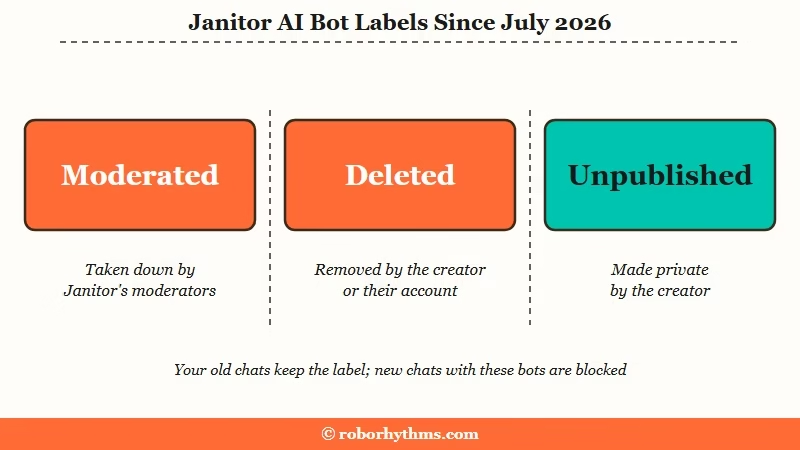
The July 2026 label change was a real quality-of-life fix. Before it, every inaccessible bot showed the same generic warning, which is why the subreddit filled up with daily “what happened to this bot?” posts.
In an early thread about the labels, posted on 6 July 2026, the top answer put it plainly: Deleted means the creator deleted the bot or their account, and Moderated means the mods removed the bot or deleted the creator’s account, taking all of their bots down with it.
That same July refresh shipped some rougher edges too, and a number of users found their chat kept scrolling back to the top every time a new reply loaded.
A creator who deletes their account no longer vanishes at once. Since 13 August 2026, Janitor’s changelog says, deletion starts a 30-day restore window in which the creator’s characters go private, and everything comes back if they sign in again before it closes.
The way I read it, the labels split cleanly into two camps. Deleted and Unpublished are creator choices. Moderated is the only one where Janitor itself made the call, and that distinction changes everything about what you can do next.
What is Moderated: A “Moderated” bot was removed or hidden by Janitor AI’s moderators or automated filter for breaking a content or Terms of Service rule, not by its creator.
Janitor AI is one of the largest AI companion platforms in the world, ranking among the most-used consumer AI apps in a16z’s Gen AI app ranking.
At that scale Janitor leans on automated checks. Its Safety page says automated systems screen every piece of content before it is published, with more than 1 million automated reviews a week against more than 20,000 human moderation actions a month. Blunt automated calls are the root of most of the frustration I see.
If the label sits on a chat rather than a bot, it usually means the bot behind that chat was moderated. Chats you publish go through the same automated checks, and on mobile Janitor’s restricted mode can stop a chat with a notice about your content settings.
Why the Difference Between These Labels Matters
The label matters because it predicts whether the bot can ever come back, while your existing chat usually keeps replying under all three labels.
A moderated bot is gone under a decision Janitor’s guidelines call final. A deleted one returns only if its creator uploads it again, while an unpublished bot can reappear whenever the creator makes it public.
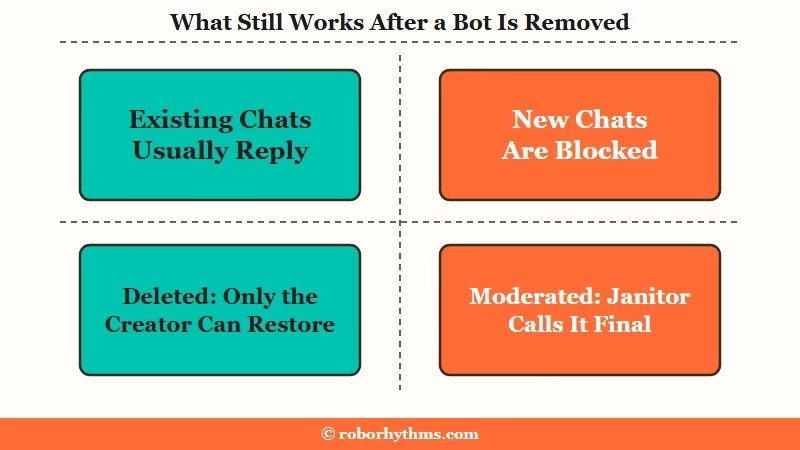
Your existing conversations are the first thing people worry about, and the news there is better than expected. Users report that a removed bot usually keeps replying inside a chat you already had, and one says opening the bot’s character page from that chat dropped it from their My Chats list, though a more upvoted reply says the chat stayed put. Either way, users warn never to delete that chat, since there is no other way back to a removed bot.
You just cannot start a new conversation with it, an option users say Janitor removed for deleted bots well before the July labels, and how private bots really work confuses more people than it should.
Can Janitor’s moderators see your chats? Its privacy policy, updated 17 September 2026, counts chat logs as content and lists content moderation among the uses of that data, so treat no chat or private bot as beyond review. The Safety page adds that human moderators review anything users report, and on mobile the restricted mode also scans chat messages for simple keywords.
The newer catch is forking. Since 11 September 2026, branching an old chat with a removed bot has failed for many users with “Character not found”, and that day Janitor’s changelog logged “an issue with chat branching on private characters” that it was working to fix. Many users suspect Janitor is closing the loophole for deleted and moderated bots on purpose, since the note named only private characters, and no fix had appeared in the changelog by 1 October 2026.
Users were still reporting the problem on 19 September. The workaround they share is to delete your messages in that chat and restart the story inside it, so back the chat up first.
Moderated bots are a harder story. These were pulled for a rule violation, and Janitor’s content glossary says plainly that “Moderation decisions are final”, so do not expect the character back in the public catalog.
If it was one of your favorites, the honest move is to stop waiting and plan around it, which is where the migration options later in this guide come in.
| Symptom | Likely cause | What you can do |
|---|---|---|
| Bot shows “Deleted” but old chat still replies | Creator removed the bot or their account | Keep using the existing chat, do not expect new chats |
| Bot shows “Moderated” | Janitor’s moderators removed it under the content guidelines | Treat it as gone, back up the chat, find a replacement |
| Bot shows “Unpublished” | Creator made it private | Keep the existing chat, save the definition if you still can |
| Bot gone only on the mobile app | App hides some content for app store rules | Turn on “Enable NSFW for App” on janitorai.com, then restart the app |
| Fork fails with “Character not found” | Branching on removed bots has failed since 11 September 2026 | Back up the chat, then delete your messages and restart the story inside it |
Why Janitor Moderates Bots and What Creators Can Do About It
Janitor moderates bots that break its content guidelines, and its glossary says a character with vague or contradictory age coding may be removed under Minor Content even when the issue is inconsistency rather than a confirmed minor.
Janitor’s Minor Related Content rules only recognize an adult age stated in the personality or scenario field, and a character whose age appears only in the title, tags, blurb or first message is removed. The rules also treat a character as underage when the writing leans on innocence or childlike behavior, especially alongside repeated descriptors such as “tiny”, “petite”, “childish” or “innocent”.
The complaint I hear most is that bots get pulled without breaking any rule at all, and it is a fair one. In a 20 September 2026 thread asking whether a moderation wave was under way, the top reply said many creators they follow had bots moderated, mostly dead dove bots, and others were privating or deleting theirs out of fear for their accounts.
Janitor’s guidelines carry a Dead Dove section on how sensitive content must be labeled, linked from the glossary since 18 June 2026. Users also report that when Janitor bans a creator, every bot on that account shows Moderated at once, which is why a whole favorites list can flip overnight.
On the mobile app, Janitor’s restricted mode blocks characters with higher content scores and hides definitions, so a bot can vanish on your phone with no moderation action at all. That behaves a lot like the disappearing bots problem people keep reporting without understanding the cause.
If you create bots yourself, a few formatting habits cut down on false flags. I would not describe them as guaranteed, because the filter changes, but they help. Automod flags on images and chats are a separate problem, and our guide to why Janitor’s automod flags harmless chats and images covers those.
- State an adult age in the personality or scenario field, the only places Janitor’s rules recognize it.
- Avoid stacking diminutive descriptors like small, young-looking, and petite together.
- Keep childhood or school references out of the persona unless the plot truly needs them.
- Re-read the definition with the age line covered up, because Janitor says a character that still reads as a minor without it will be treated as one.
- If a bot gets flagged wrongly, check the tag and block rules that quietly gate content before you assume it was a manual ban.
Before: a personality field that opens with “she is small, shy, and still remembers her school days,” which reads as innocent to a person but states no adult age and leans on the diminutive and school cues Janitor’s rules warn about.
After: “she is a 27-year-old librarian, reserved and precise, who left teaching two years ago,” which anchors the age and drops the risky descriptors while keeping the same personality.
If one of your own bots is moderated, check your email first. Since 13 February 2026 Janitor sends an email for every moderation action on your account, including bans, mutes and content removals, with the action type, the reason and a link to open a support ticket if you think it was a mistake.
Keep expectations low on that ticket, because the glossary says moderation decisions are final and will not be explained in granular or technical detail. A ban on the whole account has its own appeal route, and Janitor’s help center says a rejected ban appeal is final. Do not open a second account to re-upload the bot, because Janitor’s community guidelines ban creating new accounts to evade moderation.
How to Protect Your Favorite Bots Before They Get Pulled
The reliable fix is to back up a bot before it disappears, because recovery after a moderation is nearly impossible.
Export the chat and save the character definition while the bot is still live, since a moderated bot cannot be re-downloaded.
I treat this like backing up photos. You do not think about it until something is gone, and by then it is too late. Since Janitor’s moderation runs in waves, the smart move is to grab a copy of anything you would miss now, not after the next crackdown.
Here is the sequence I would run on any bot you are attached to:
- Open the bot’s page while it still loads and copy the character definition text if it is public.
- Save the direct bot URL somewhere outside Janitor, so you can spot whether it is hidden or fully removed later.
- Save the conversation outside Janitor, by copying it into a document or with a chat-export browser extension you trust.
- Copy any lorebook entries you wrote into your own notes, so you can rebuild the setup elsewhere.
- If the bot is already showing “Moderated,” skip straight to saving the chat, because the definition is likely locked.
If a bot looks gone on mobile, check the desktop site before assuming it was moderated, since the new Janitor interface changed how saved and deleted bots appear in your list.
The app starts in a restricted mode to satisfy app store rules, and that alone fools a lot of people into thinking they were hit by a ban. Janitor’s mobile moderation FAQ says to turn on “Enable NSFW for App” in your settings on janitorai.com, then close and reopen the app.
Where to Go When a Favorite Character Is Gone for Good
When a moderated bot is not coming back, the practical answer is to rebuild the character on a platform with steadier rules.
A companion app with consistent moderation lets you recreate the personality without gambling on the next automod wave.
I want to be straight about the tradeoff. Janitor’s free model and huge creator library are genuinely hard to match, and your existing chat with a removed bot may still carry you for a while. The migration case is really for people whose favorites keep getting moderated and who are tired of the roulette.
If you want a companion you can customize and keep long term without watching it vanish, Candy AI is the one I would rebuild on first, because a character you build there does not vanish with another creator’s account.
For readers who specifically left over heavy moderation and want fewer content restrictions, CrushOn AI is the closer match to the freedom Janitor used to offer.
Either way, recreate the character from the definition you backed up, not from memory, so you keep the details that made the bot yours.
If the moderation was an account-level action rather than a single bot, that is a different problem, and the restricted account fixes are worth reading before you migrate anything. If you would rather stay, our breakdown of whether Janitor+ is worth paying for covers what the subscription adds and when a proxy does the same job.
Quick Takeaways
- Moderated means Janitor pulled the bot for a rule break, Deleted means the creator removed it, and only the creator statuses are ever recoverable.
- Your existing chat usually keeps replying after a bot is removed, but you cannot start new chats with it, and forking has been failing since 11 September 2026.
- Janitor can remove a character for vague or contradictory age coding, so state an adult age in the personality or scenario field and avoid stacking diminutive descriptors.
- Back up the character definition and export the chat now, before the next moderation wave, since recovery afterward is nearly impossible.
- If your favorites keep getting moderated, rebuild them on a steadier platform like Candy AI, or CrushOn AI if fewer restrictions are the priority.
