
The Short Answer: To delete your Janitor AI account, open Settings, go to the Security tab, scroll to the bottom, click Delete Account, and confirm with the six-digit code emailed to you. It is instant and permanent. Cancel your Janitor Plus subscription and back up your bots first, because deletion does not stop App Store billing and cannot be undone.
If you are looking up how to delete your Janitor AI account, there is a trap waiting that almost no guide mentions. The deletion itself is instant and permanent, but it does not stop your Janitor Plus subscription if you paid through the App Store or Google Play. People delete the account, feel finished, then watch another charge leave their bank a week later.
The deletion click is the easy part. The part that costs you is everything around it: the billing that keeps running, the bots you built and never saved, and the chat logs you assumed were erased the moment you left.
So here is the full order of operations, in the sequence I would follow. Cancel the subscription first, back up your bots and chats, then delete the account, and know exactly what happens to your data afterward. I will also cover where to go if you are leaving because Janitor wore you down.
How Do You Delete Your Janitor AI Account?
Deleting your Janitor AI account takes four steps: open Settings, go to the Security tab, scroll to the bottom, click Delete Account, and confirm with the six-digit code sent to your email.
The whole thing runs off email verification, which is where most people get stuck.
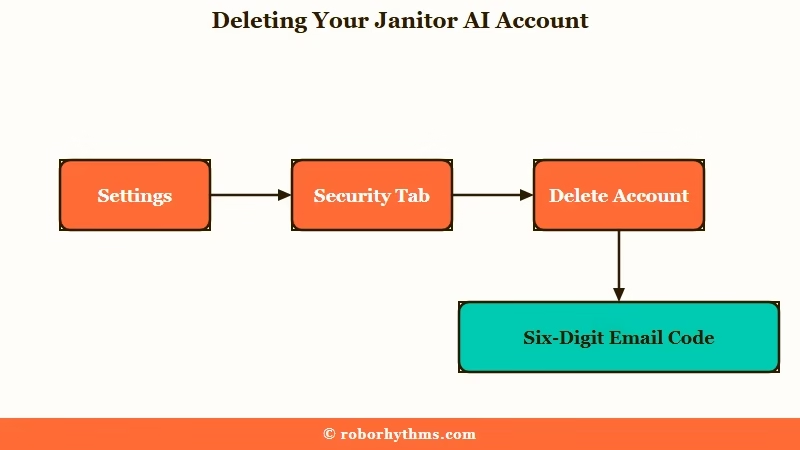
From what I have seen, the sequence trips people up less than the confirmation code does. Here is the exact path:
- Log in and open your Settings from the profile menu.
- Click the Security tab.
- Scroll to the very bottom of the page.
- Click Delete account and follow the prompt.
- Enter the six-digit one-time code sent to your registered email to confirm.
There is one hard requirement that catches people out. You must have access to the email address tied to your account, because the confirmation code goes there and nowhere else.
If you signed up with a throwaway or temporary email you can no longer open, you are stuck, and Janitor support will not delete the account for you. Their policy bars staff from manually deleting accounts for security reasons, so a lost inbox means a lost off-ramp.
If your email itself is the problem, fix that before you try to delete. You can change your login email under the same Settings area first, then come back and run the deletion once the code can reach you.
Why You Should Cancel Janitor Plus Before You Delete
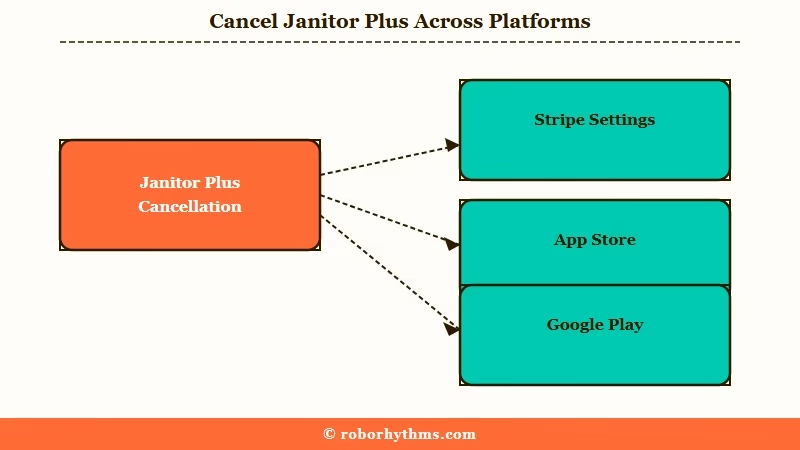
Canceling Janitor Plus and deleting your account are two separate actions, and if you subscribed through the App Store or Google Play, deleting the account does not stop the charge.
This is the most expensive mistake I see people make on the way out.
What is Janitor Plus: Janitor AI’s paid subscription tier, around $12.99 a month, that adds premium features on top of the free platform.
Here is why the order matters. Web subscriptions run through Stripe and cancel from inside your Janitor settings, but mobile subscriptions live in your app store account, not on Janitor’s servers. Wiping your Janitor account does nothing to a subscription Apple or Google is managing on their side.
Before: You subscribed to Janitor Plus inside the iPhone app, then deleted your account on the website and assumed the billing stopped.
After: The account is gone, but Apple keeps charging you every month because the subscription lives in your App Store account, and Janitor never had control over it.
So cancel in the right place first. The table below shows where each subscription type really lives. If you are still weighing whether the paid tier earned its keep, our Janitor Plus breakdown goes deeper on the features.
| Where you subscribed | How to cancel it | Does deleting the account stop it |
|---|---|---|
| Janitor website (Stripe) | Settings, then Billing, then Manage Subscription | Cancel here first to be safe |
| Apple App Store (iOS) | iPhone Settings, your name, then Subscriptions | No, you must cancel in the App Store |
| Google Play (Android) | Play Store, Payments, then Subscriptions | No, you must cancel in Google Play |
Canceling keeps your access until the end of the current billing period, then drops you to the free tier. That gives you a window to finish backing things up before anything locks.
How Do You Back Up Your Bots and Chats First?
Janitor AI has no native download button, so back up chats with a browser extension and save your bot cards with a scraper or a manual copy of the definition before you delete.
Once the account is gone, every character and roleplay goes with it, and there is no export-on-exit option.
The way I see it, this is the step people regret skipping most. Losing a favorite bot you spent hours tuning stings more than any billing slip. Here is what I would grab first:
- Chats: install the JanitorAI Chat Downloader browser extension, which exports conversations to EPUB, TXT, Markdown, or SillyTavern JSONL so they open anywhere.
- Bots you created: use a card scraper like the JannyAI trick (editing the bot URL) or a tool such as sucker.severian.dev to pull the full character card.
- Anything you cannot scrape: open the bot editor and manually copy the personality, scenario, and greeting into a text file.
- Personas: copy each persona’s text the same way, since these vanish with the account too.
Do this while your account is still live and, ideally, while Janitor Plus is still active for the billing period. A deleted account gives you nothing to export from.
What Happens to Your Bots, Chats, and Data After You Delete?
When you delete your account, your public bots are removed for everyone and your profile data is wiped, but whether your private chat logs are truly erased is something Janitor AI does not spell out.
That gap matters if privacy is the reason you are leaving.
The official help docs say deletion removes all your data, including posts, characters, personas, and profile information, and that it cannot be recovered. That is reassuring on paper.
What surprised me is that outside reviews flag Janitor AI as having no published data retention or privacy policy for the chatbot platform, so there is no written promise about how long chat logs sit on the backend. If truly scrubbing your conversations is the goal, you are trusting a claim you cannot verify.
One more twist worth knowing. Some users report that people who already started chats with your bots can keep those conversations after you delete, while others in the same threads say their chats were wiped without warning when a bot went down.
The behavior is inconsistent, so treat anything you care about as something to back up rather than assume.
| Your data | What happens when you delete | Back up first? |
|---|---|---|
| Your created public bots | Removed from the platform for everyone | Yes, scrape the card or copy the definition |
| Your personas and profile | Wiped and unrecoverable | Yes, if you want to reuse them |
| Your private chat logs | Hidden from you, backend retention unclear | Yes, export with a downloader extension |
| Other users’ chats with your bots | May survive on their side, reports vary | You cannot control this |
Can You Undo It or Recover the Account Later?
No. Janitor AI account deletion has no grace period and no recovery window, so everything is gone the moment you confirm the code.
This is stricter than most platforms people are used to.
In my experience, most services give you a 14 or 30 day cooling-off period where a deleted account sits frozen and can be restored if you change your mind. Janitor does not work that way.
The action is treated as immediate and absolute, with no cooldown to reverse it, which is exactly why the backup and billing steps above have to come first. Once you enter that final code, there is no button that brings your bots back.
Why Are So Many People Deleting Janitor AI in 2026?
Most people leaving Janitor AI in 2026 point to the same handful of reasons: mandatory age verification in some regions, the shift to a paid tier with ads, tighter content filters on the new app, and an in-house model that forgets context.
It is rarely one thing. The reasons stack up until leaving feels easier than staying.
The platform is not small, which is part of the frustration when it stumbles. Janitor AI draws tens of millions of visits a month according to Similarweb traffic data, so outages and policy shifts hit a huge audience at once. When a site that big changes the rules, a lot of people head for the door together.
The specific triggers I keep seeing are consistent. Mandatory age verification rolled out for Brazil and Australia on March 30, 2026, with the UK following in June, and the invasive ID checks pushed privacy-minded users away.
The official mobile app that launched in February hides sensitive characters to satisfy Apple and Google store rules, which the community reads as creeping restriction.
On top of that, the free in-house model is repetitive and forgets context quickly even on the paid tier, and the reliability wobbles do not help.
If your exit is really about broken connections, fixing Janitor AI proxy errors and the is Janitor AI down checklist are worth a look before you burn the account down.
What Should You Switch to if You Are Leaving?
If you are leaving Janitor AI because of the proxy setup, the downtime, and the billing traps, the simplest replacement is a managed companion app that runs without any of that overhead.
The whole appeal is not having to babysit a connection.
What I would recommend depends on why you are quitting. If the proxy juggling and outages are the dealbreaker, Candy AI runs as a managed platform with built-in models and image generation, so there is no external API to wire up and nothing to keep online yourself.
It stays available without the free-tier connection roulette that makes Janitor feel like work.
If your priority is a companion that holds onto details across long conversations, Nectar AI leans hard on persistent memory, which lands well for anyone who left because the JanitorLLM kept forgetting the plot. Either way, you skip the setup tax entirely.
For a wider set of options mapped to different needs, our Janitor AI alternatives roundup breaks down who each one fits.
Frequently Asked Questions
Can Janitor AI support delete my account for me?
No. Janitor AI support cannot delete your account manually, for security reasons. Deletion requires a six-digit code sent to your registered email, so you must have access to that inbox. If you lost the email, change it in Settings first, then delete.
Does deleting my Janitor AI account stop my subscription?
Not always. Web subscriptions through Stripe should be canceled in Settings before you delete. Mobile subscriptions bought through the App Store or Google Play keep charging you until you cancel them directly in that store, because Janitor does not control them.
Will my chat history be gone if I delete my account?
Your chats disappear from your side, but Janitor AI publishes no data retention policy, so there is no written guarantee the logs are scrubbed from their servers. Export anything you want to keep with a chat downloader extension before deleting.
Can I make a new Janitor AI account with the same email?
Janitor AI treats deletion as permanent with no recovery window, and it does not spell out whether you can reuse the email. If you plan to return, keeping the account and just canceling Janitor Plus is safer than deleting and hoping to re-register.
What happens to the bots I created for other users?
Your public bots are removed from the platform when the account is deleted, so other users can no longer find or start new chats with them. Some people who already had a chat open report keeping it, but this behavior is inconsistent.
Quick Takeaways
- Cancel Janitor Plus in the right place first, since deleting your account does not stop App Store or Google Play billing.
- Back up bots with a card scraper and chats with a downloader extension, because deletion wipes everything with no export option.
- The steps are Settings, Security, Delete Account, then a six-digit email code, and a lost inbox blocks you entirely.
- Deletion is permanent with no grace period, so treat it as final the moment you confirm.
- If proxy hassle and downtime pushed you out, a managed app like Candy AI removes the setup work that made Janitor feel like a chore.
