
What’s Changed: Your Janitor AI favorites are almost certainly not gone. The new UI redesign changed the default page to Trending and removed the favorites tab button, so your saved bots are sitting behind a direct link. A blocked tag or a brief trending-list bug can hide individual ones, and a developer said in mid 2026 that the missing tab was being added back.
If Janitor AI favorites are not showing after the new UI update, take a breath, because they are almost certainly still there. The redesign changed the default page to Trending and quietly removed the favorites tab button, so your saved bots got hidden, not deleted.
The data behind the scenes is intact. One direct link pulls your whole favorites list straight back, and a developer said in mid 2026 that the missing tab was on the way back.
That covers the mass panic where the entire favorites section seems gone. A single bot vanishing is a different story, with three separate causes that even longtime users mix up.
This guide gives you the exact link to reach your favorites right now, the click path inside the new layout, and a clear way to tell whether a missing bot is hidden, filtered, or really deleted.
Why Janitor AI Favorites Are Not Showing
Janitor AI favorites are not showing because the new UI changed the default landing page to the Trending tab and removed the favorites and following tab buttons, so your saved bots are hidden behind a link rather than deleted.
The list still exists, you just lost the easy door to it.
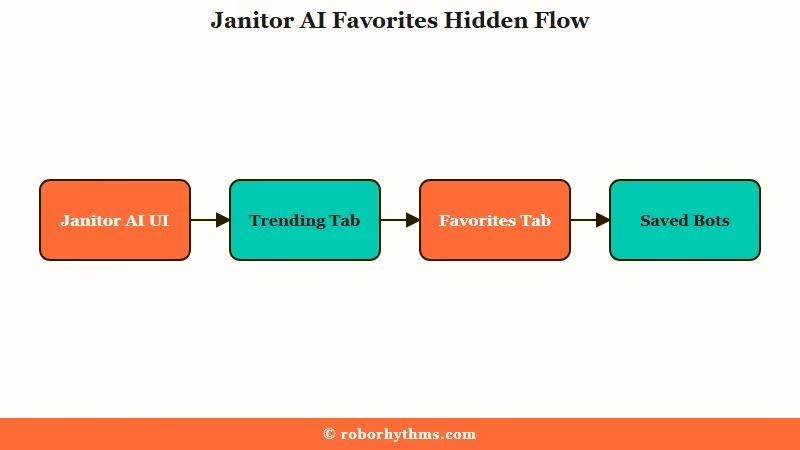
The redesign did three things at once. It made Trending the page you land on instead of your favorites, it stripped out the old character search box, and it removed the simple options to sort bots by Favorites and Following.
What I keep telling people is that none of that touches your actual saved data. When users click a bot they think vanished, its own page still shows the heart filled in, which is the giveaway that the bot is hidden by the layout rather than erased.
The broader Janitor AI new UI changes follow the same pattern of moving things around rather than deleting them.
The frustration is real even if the data is safe. Landing on a wall of trending bots instead of your own shortlist feels like the app threw your collection out, and the missing search box makes a big favorites list painful to dig through.
How to See Your Liked Characters and Favorites on Janitor AI
You see your liked bots on Janitor AI by opening a direct favorites link or clicking the Janitor logo in the top-left corner to reach the homepage that still holds the favorites bar.
Both routes bring the full list back in seconds. Janitor AI files a liked bot and a favorited bot in the same place, so if you tapped the heart on a character, it is already in your favorites list, just filed under the other word.
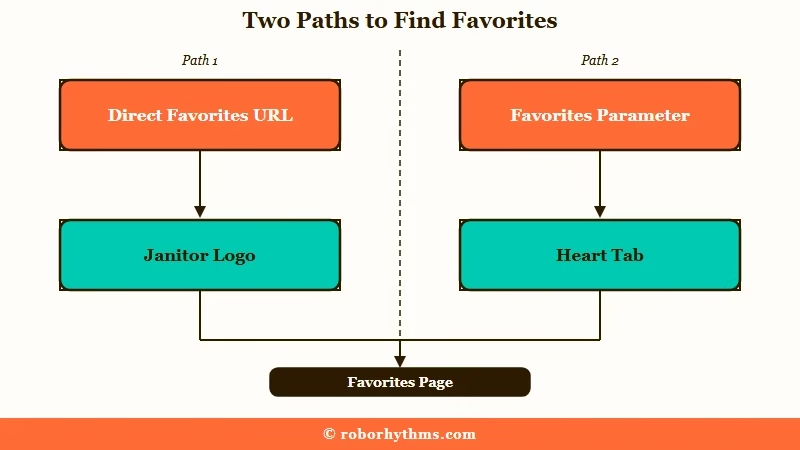
The fastest fix is a direct link the community started passing around once the tab disappeared. Paste this into your browser to jump straight to your saved bots:
https://janitorai.com/search?favorites=true&mode=all&sort=latestSwap favorites=true for following=true in that same link to pull up the creators you follow instead. Here is the click path I would use when I do not want to fiddle with URLs:
- Click the Janitor AI logo in the upper-left corner of the screen.
- Wait for it to route you to the proper homepage layout.
- Look for the heart icon bar sitting next to the Following and Trending tabs.
One thing the new layout cannot do yet is sort favorites by the date you saved them, only by date posted, popularity, or relevance. Folders and custom playlists do not exist either, though both are heavily requested, so a huge favorites list still takes some scrolling.
Here is where each piece of your collection lives in the new layout:
| What you want | Where it lives now |
|---|---|
| Your favorites list | The direct link with favorites set to true, or the logo then the heart tab |
| Creators you follow | The same direct link with following set to true, or the logo then the following tab |
| The old favorites homepage | Click the Janitor logo in the top-left corner of the screen |
When a Favorited Bot Really Is Missing
A single favorited bot goes missing for one of three reasons: a blocked tag is hiding it, a brief trending-list bug flagged it, or the creator deleted or privated it.
Checking the bot’s own page tells you which one you are dealing with.
What are blocked tags: Words you add to a block list so bots tagged with them stay out of your feed, a filter that can quietly hide bots you have already favorited.
The blocked-tag trap is the sneakiest one, and it is the first thing I check when a single bot vanishes. If a creator edits a bot and adds a word you have on your block list, that bot disappears from your favorites everywhere, even though you never unfavorited it. To check, click your profile picture, open your Blocks or settings, and review the list for anything that might be catching bots you want.
Before: the bot is gone from your favorites and you assume it was deleted for good.
After: open the bot’s own page first, a filled-in heart means it is only hidden, while a 404 or private notice means the creator removed it.
Here is the quick map of what a missing bot usually means:
| Symptom | Likely cause | Fix to try first |
|---|---|---|
| Bot gone from favorites, heart still filled on its page | Blocked tag is hiding it | Review and trim your blocked tags list |
| Bot shows as deleted then returns hours later | Temporary trending-list bug | Wait it out, it usually self-corrects |
| Deleted bot missing only in the app, fine on web | App-only display flaw | Open the same chat in a desktop or mobile browser |
| Bot page shows a 404 or private notice | Creator deleted or privated it | The bot is genuinely gone, save a backup next time |
That app-versus-web split catches a lot of people. The latest app build hides deleted bots you used to chat with, but the disappearing bots problem often resolves the moment you open the same account in a browser, where those chats are still reachable.
For the tag side of things, the Janitor AI block tags guide walks through cleaning up an overzealous filter.
Is the Favorites Change a Bug or Permanent
The missing favorites tab is a known issue a developer said in mid 2026 was being added back, while the Trending default and the public favorite count are deliberate design choices.
Knowing which is which saves you from waiting on a fix that is not coming.
A verified Janitor developer replied to the complaints about the vanished favorites navigation with a short “Working on adding this back” around the mid 2026 redesign, so the tab itself reads as a temporary gap. Janitor has not mentioned it in the newsroom or changelog since, so treat the direct link as the reliable route for now.
The Trending default is a different matter, and there is no toggle to make favorites your home page again. The way I read it, the team leans on favorites as a popularity signal for ranking bots, while most users treat the heart as a private bookmark or watch-later list.
That mismatch is the root of a lot of friction, including the wave of favorite notifications that spammed creators every time someone bookmarked a bot.
If your saved bots also scattered across the reorganized layout, the chats not grouped by bot breakdown comes from the same redesign.
What to Use If Janitor AI Keeps Hiding Your Bots
If the constant interface churn keeps burying your saved characters, the cleanest move is a companion app with stable organization, and the two I would point people to are Candy AI and Nectar AI.
Neither shuffles your collection out of reach every update.
Janitor AI pulls in well over 100 million visits a month per Similarweb, so a redesign that hides everyone’s favorites at once sends a lot of people looking for steadier ground. That scale is also why the team experiments aggressively with the layout.
For a place where your saved characters stay put and the interface does not move the furniture every week, Candy AI is the one I would try first. It keeps fictional roleplay simple and your favorites where you left them.
If your real worry is losing the thread of a long story when bots come and go, Nectar AI leans on stronger memory to hold continuity across sessions.
I would keep either as a backup you run alongside Janitor rather than a full switch, especially while the favorites tab is still missing.
Frequently Asked Questions
Where did my Janitor AI favorites go?
Your favorites did not get deleted. The new UI changed the default page to Trending and removed the favorites tab button, so the list is hidden behind a link. Your saved data is intact, and a Janitor developer said in mid 2026 that the tab was being added back.
How do I see my favorites on Janitor AI now?
Open the direct link janitorai.com/search?favorites=true&mode=all&sort=latest to jump straight to your favorites. You can also click the Janitor logo in the top-left corner to reach the homepage that still has the favorites and following bar.
Where are my liked characters on Janitor AI?
Liked characters and favorited characters are the same list on Janitor AI, because tapping the heart on a bot files it under favorites. Open janitorai.com/search?favorites=true&mode=all&sort=latest to see every character you have hearted, whether you call them likes or favorites.
Why are there bots I never favorited in my favorites?
A glitch can flood your favorites with bots you never saved, usually from creators whose other bots you liked. It is a server-side display bug, not a real change to your list, and it typically corrects itself without you doing anything.
Did Janitor AI delete my favorited bots?
Almost never. If a bot is gone but its own page still shows a filled heart, it is hidden by a blocked tag or a temporary bug. Only a 404 or a private notice on the bot page means the creator removed or privated it.
Can I get the old Janitor AI UI back?
No, there is no option to revert to the old UI or toggle between versions. The direct favorites link and the logo click path are the current workarounds, and as of mid 2026 the developers said the missing favorites tab was being added back, and Janitor has published no update since.
Quick Takeaways
- Janitor AI favorites not showing is a UI change, not data loss, since the redesign made Trending the default and hid the favorites tab button.
- Paste janitorai.com/search?favorites=true&mode=all&sort=latest to pull your whole favorites list back instantly, or click the logo in the top-left corner.
- A single missing bot is usually a blocked tag or a brief bug, check the bot’s own page, a filled heart means hidden, a 404 means deleted.
- A developer said in mid 2026 that the favorites tab was being added back, with no Janitor update since, so treat the direct link as the durable route.
- If the layout churn keeps burying your saved bots, a steadier app like Candy AI is worth keeping on hand.
