
What’s Changed: Character AI’s current model leans hard on a small set of overused phrases like “her breath hitched” and “most people would, but not you,” and the complaints have spiked again. The repetition is not random. It comes from how the model was trained and from a memory trap you can feed without noticing, and you can cut most of it with swipes, edits, the right recap, and word muting.
Character AI overused phrases are the canned lines the bot reaches for over and over, no matter who the character is or what scene you set.
If you have watched a gruff mercenary and a shy librarian both whisper “you’re going to be the death of me,” you already know the pattern.
A lot of these “AI tells” are not robot noise at all. The “no this, no that, just this” rhythm and the “it wasn’t X, but Z” beat are real writing techniques humans have used for centuries to build tension. The model picked them up from the fan fiction and novels it trained on.
The problem is the model uses them like a beginner who just learned a trick and now ends every paragraph with it. On top of that, a chunk of the repetition is something you train by accident every time you accept a reply with a cliche in it.
This guide covers why the phrases happen, the ones people complain about most, and the exact moves that stop the repetition. Expect a copy-paste recap command, a word-muting trick most people get wrong, and a plain answer on whether out-of-character notes still work.
Why Character AI Overused Phrases Keep Showing Up
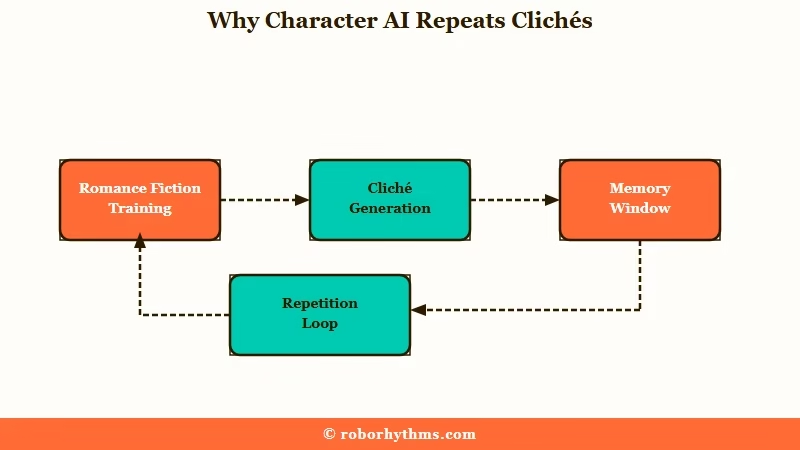
Character AI overused phrases keep showing up because the model is a predictive text engine trained on romance-heavy fiction, and its safety tuning pushes it toward the same sanitized patterns.
It writes the most statistically likely next line, and that line is usually a cliche.
What is mode collapse: When a model keeps falling back on the same few words or structures because they scored as safe and probable, instead of varied, situation-specific writing.
The deeper cause is a memory trap. The bot decides what to write from a rolling window of roughly the last 20 to 50 messages. Every time you accept or swipe to a reply with “smirk” or “breath hitched” in it, that word stacks up in the window and its odds of appearing again climb.
That is the loop, and the model is not being stubborn. It is working from a recent history you handed it, one now soaked in a single phrase. I have watched one accepted “smirk” snowball into a smirk on every line within ten messages.
There is also the ChatGPT problem. Heavy safety tuning, the kind that makes a model cautious and literal, flattens its voice toward a polite corporate default. That is why so many users say the bots changed writing style overnight and read like a help-desk script.
The Most Overused Character AI Phrases People Complain About
The most overused Character AI phrases fall into three buckets: physical tics, verbal tics, and cadence patterns.
Once you can name the bucket, you can spot the line before it derails the scene.
The physical tics are the actions the bot stages on repeat. Hair gets fingers run through it even on a bald character, chests get clutched, knuckles turn white, and someone’s breath is forever hitching.
The verbal tics are the catchphrases. “You’re going to be the death of me” is the headliner, and it mutates into “the end of me” or “the ruin of me” when the bot wants variety it does not have. “You know that, right?” and a constant “pang of” something round out the set.
The cadence patterns are the sentence shapes, and they are the ones that feel most robotic even though they are borrowed from real writing. Here is how the buckets break down:
| Bucket | Example phrases | Why it grates |
|---|---|---|
| Physical tics | “her breath hitched”, “runs fingers through their hair”, “knuckles turning white” | Staged every message no matter the scene or the character |
| Verbal tics | “you’re going to be the death of me”, “you know that, right?”, “a pang of” | Filler that mutates into near-copies when overused |
| Cadence patterns | “No X. No Y. Just Z.”, “Most people would, but not you”, “it wasn’t X, but Z” | A genuine writing device the model leans on far too hard |
What I find useful is treating the list as a slop radar rather than a list of villains. The moment two of these show up in one reply, the bot is drifting, and that is your cue to step in before it sets the pattern.
How to Stop Character AI From Repeating the Same Phrases
You stop Character AI repeating phrases by clearing the poisoned memory window and showing the model cleaner examples to copy.
Swipes, edits, ratings, word muting, and a good recap do the heavy lifting.
Here is the quick map of what is going wrong and the first move for each:
| Symptom | Likely cause | Fix to try first |
|---|---|---|
| One word repeats every reply | Cliche filled the recent-message window | Swipe or edit it out, then rate the clean reply high |
| Bot forces romance you did not set up | Trained on romance-heavy data | Put a priority rule in the character definition |
| Bot ignores your “stop saying X” | It reads “no” weakly and you fed it the word | Use positive phrasing or mute the word |
| Replies sound like ChatGPT | Safety tuning flattened the voice | Switch the chat style away from the default |
| Loop survives everything | The window is fully poisoned | Delete back to where the loop began |
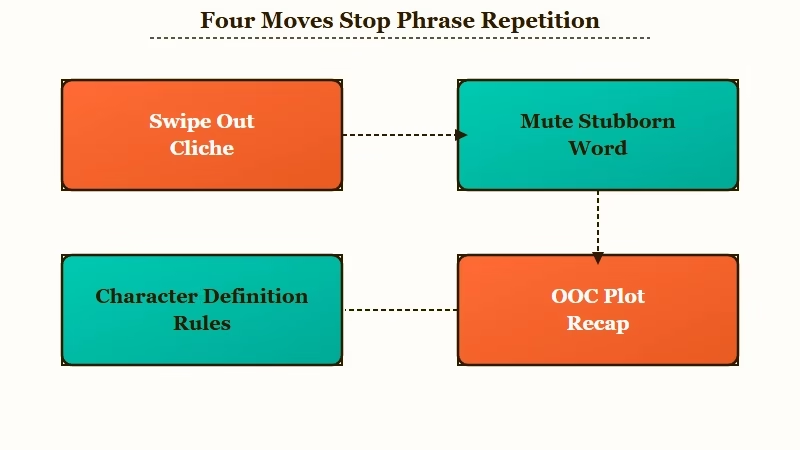
The single most reliable habit is correcting the bot the instant a cliche appears. Here is the order I would work through:
- Swipe for a new reply, or edit the line to cut the cliche, before you send your next message.
- Rate the clean reply high and the cliche-heavy one low so the model learns which formatting you want.
- If a loop is already locked in, delete your messages back to the point where it started, which wipes the phrase from the window.
- For a stubborn word, use the word-mute feature so the model physically cannot produce it.
- Put behavior rules inside the character definition, not just your persona, using double brackets to raise their priority.
One detail people get wrong with word muting trips up the whole fix. When you ban a token, include a leading space before the word, so you mute ” smirk” and not “smirk.” Skip the space and the model can output mashed-together text with the spacing stripped, turning “Kate softly” into “Katesoftly.”
The persona fix matters just as much for forced romance. Negative commands barely register, so naming what you hate often makes it worse. Watch the difference:
Before: “(OOC: stop making him flirt, he is not romantic.)”
After: “((Daniel sees {{user}} as a close friend. He keeps things platonic and warm.))”
The first names the thing you do not want and feeds “flirt” straight into the window. The second states the rule positively and pins it high with brackets, which is the version that holds. For the bots that keep adding OOC notes to every message, the same positive-framing rule applies.
Does OOC Still Work to Break the Loop
Out-of-character notes still work, but only when you recap the plot instead of scolding the bot for a phrase.
Scolding feeds the hated word back into the memory window and the bot uses it more.
This is where the community splits hard. One camp swears by a full pause-and-recap, where you stop the scene, restate the setup, and have the bot read it back before you continue. The other camp says out-of-character notes are dead, because asking the bot to “stop repeating” just gets an apology followed by the same word again.
The way I read it, both are right about different things. A plot recap genuinely flushes the window with fresh, clean text and resets the bot. Naming the offending phrase pollutes the window further, so the recap works and the scolding backfires.
Here is the recap I would paste when a chat goes off the rails:
(OOC: Pause RP. Quick recap so we stay on the same page. Scenario: X. Goal: Y. Your role: Z. My role: R. The story so far: ABC. Current moment: D. Please read this back to me, then we continue.)Run a lighter version every 10 to 15 messages as a wellness check, something like “(OOC: any questions about where the story is right now?)”.
It stalls the loop before it forms and keeps the bot tracking the actual plot instead of its own greatest hits. If your replies have also gone short and less engaging, a recap often revives those too.
What to Use If Character AI Keeps Writing Like a Robot
If the repetition will not quit, the cleanest move is a companion app whose default model writes with less canned filler, and the two I would point people to are Candy AI and Nectar AI.
Both sidestep the flattened, recycled voice that drives people off Character AI.
Character AI is one of the most-used companion platforms around, pulling tens of millions of visits a month per Similarweb, so the slop frustration is shared by a lot of people at once. That scale is also why the model plays it safe, which is exactly what produces the sameness.
For roleplay that does not slip into the same five phrases, Candy AI is the one I would try first. Its writing leans more specific and in-character, so a scene holds its own voice instead of melting into stock lines.
If your bigger gripe is the bot forgetting the story and looping because of it, Nectar AI leans on stronger memory to keep continuity across long chats.
I would treat either as a backup you run beside Character AI rather than a clean break, especially while you are still rationing swipes. The wider problem of bots acting like a yes-man shows up on most platforms, so the steering habits here carry over.
Frequently Asked Questions
Why does Character AI keep using the same phrases?
Character AI writes the most statistically likely next line, and its training data is full of stock romance and fan-fiction phrasing. Once a cliche enters the recent-message window, its odds of repeating climb, which creates a loop you feed by accepting it.
Do overused phrases mean Character AI got worse?
Not exactly. The phrases come from heavy safety tuning that flattens the model’s voice toward a cautious default, plus the memory loop. The model is being careful and predictable, which reads as bland and repetitive rather than broken.
How do I stop Character AI from repeating a specific word?
Use the word-mute feature and include a leading space before the word, so you mute ” smirk” not “smirk.” Skipping the space can break the model’s spacing. Avoid scolding the bot in chat, since naming the word feeds it back in.
Does sending an OOC message fix the looping?
Yes, if you recap the plot rather than complain about a phrase. A pause-and-recap flushes the memory window with clean text and resets the bot. Telling it to “stop repeating” usually backfires and increases the repetition.
What is the fastest way to break a locked loop?
Delete your messages back to the point where the loop started. That clears the repeated phrase out of the bot’s recent memory window. If that fails, save your progress and start a fresh chat with a tight recap.
Quick Takeaways
- Most overused Character AI phrases are recycled human writing tropes plus a memory loop you feed by accepting cliche replies, not a sign the app is broken.
- Correct a cliche the instant it appears with a swipe, an edit, and a rating, before it stacks up in the recent-message window.
- Mute stubborn words with a leading space included, and put positive behavior rules in the character definition rather than scolding the bot.
- Recap the plot in an out-of-character note to reset a loop, but never name the phrase you hate, since that feeds it back in.
- If the sameness will not lift, a less repetitive companion app like Candy AI is worth keeping on hand for the scenes that matter.
