
What’s Changed: Character AI getting worse during the day is a server load problem, not your imagination and not your internet. During the evening rush the platform quietly trims memory and routes free users to smaller, faster, lower-quality models to survive the traffic. The fix is timing your sessions and locking context in place before peak hours hit.
There is one tell that gives the whole thing away. When Character AI turns to garbage during the day, the bad replies come back faster than the good ones did an hour earlier. That speed is the clue, because a smaller, cheaper model generates text quicker than the full one.
Character AI worse during the day is not a bug you can report away. It is the predictable result of millions of people logging on at the same time and the servers shedding load by quietly downgrading what each free user gets.
The bot does not get dumber on purpose. It gets a smaller slice of the machine.
Once you see the pattern, you can plan around it. With Character AI handling around 20 million monthly active users and a daily message volume that peaked near a billion, per Business of Apps, the evening crush is real and it is on a schedule you can use.
Why Character AI Is Worse During the Day
Character AI is worse during the day because server load peaks when North America is awake, and the platform sheds that load by reducing quality for free users instead of making them wait.
Roughly 60% of usage lands in the 6 PM to 10 PM local evening window.
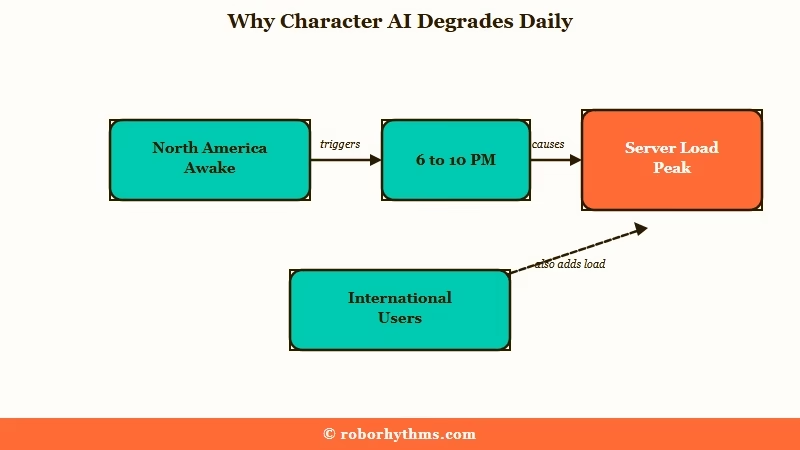
The pattern tracks the United States clock with eerie precision. Users in the UK and Australia notice their best sessions happen in their early morning, before Americans wake up, and the sharpest drops arrive on US evenings, weekends, and holidays.
One Australian player put it plainly: Saturdays are good because it is still Friday in America, and Sunday gets clunky.
I find that timezone correlation more convincing than any single complaint, because it shows up across thousands of users who have nothing in common except the server they share. When the American afternoon hits and schools let out, the quality falls off a cliff for everyone else.
The platform has admitted the underlying squeeze in its own way, rolling out usage limits for free users because running inference at this scale is genuinely expensive. The quality drop is the same cost pressure showing up inside your chat instead of on your invoice.
Why Bad Responses Come Back Faster
Bad Character AI responses generate faster than good ones because the server has swapped you onto a smaller, cheaper model to handle the traffic.
Speed and quality move in opposite directions here, which is the opposite of what most people expect.
A large, full-precision model is slow and expensive to run. A smaller or compressed version answers quickly and cheaply, so when the system needs to free up capacity, routing free users to the lighter model is the fastest lever it has. You feel that as a reply that arrives almost instantly and reads like a stranger wrote your character.
What is quantization: Quantization runs the same model at lower mathematical precision to save memory and speed, which strips out subtle reasoning the way an MP3 strips detail out of a lossless audio file.
What I would watch for is the combination, not the speed alone. A fast reply that is also in-character is fine. A fast reply that is suddenly generic, short, and forgetful is the signature of a peak-hour model swap, and it is the cleanest signal you will get that the servers are slammed.
The same swiping wall that drives this frustration is covered in the Character AI swipe limit breakdown.
What Breaks Inside Character AI Under Load
Three separate mechanisms degrade quality under load: the platform routes you to a smaller model, it caps how much conversation it feeds the model, and it evicts your chat from fast memory.
Each one produces a different symptom you can recognize.
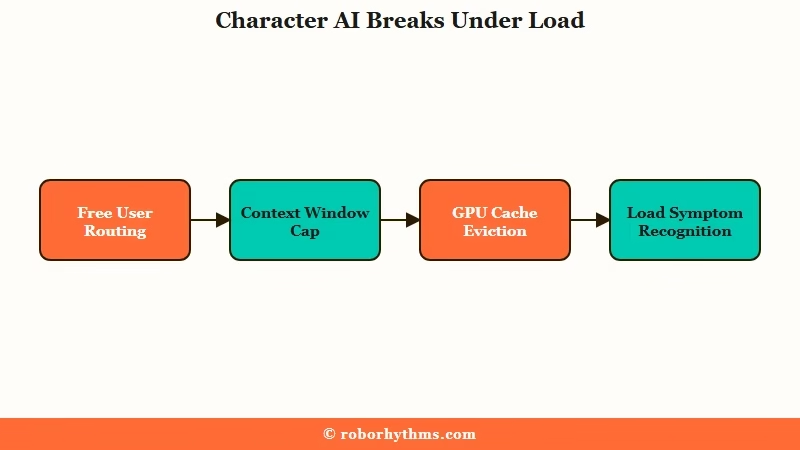
The memory loss is the one that stings most. Modern serving systems keep your conversation in a GPU cache, and when that cache fills past roughly 90% during peak traffic, the scheduler evicts running chats to slower memory or drops their history entirely.
Your bot forgetting a detail from four messages ago is not the model being stupid, it is your context getting physically pushed out to make room.
On top of that, platforms can silently shrink the working context window during a rush, dropping from a large limit down to something like 16,000 or 32,000 tokens to save on compute. The earlier half of your roleplay just stops being sent to the model, so established lore vanishes without warning.
The way I see it, these are not three problems but one financial decision wearing three masks. Here is how each symptom maps to a cause and the move that helps.
| Symptom | Likely cause under load | What helps |
|---|---|---|
| Fast but generic, flat replies | Routed to a smaller or quantized model | Play off-peak, edit a reply to re-anchor tone |
| Sudden memory loss mid-chat | Context window capped or cache evicted | Pin key details, consolidate the persona |
| Replies cut off short | Token length throttled to serve more users | Prompt the bot to continue the thought |
| Repetitive loops every swipe | Lighter model stuck in a pattern | Edit one good reply, then swipe |
When Character AI Is Best and Worst Each Day
Character AI is best in your local early morning and worst during the US afternoon and evening, with free-tier response times climbing from a 2 to 5 second baseline up to 5 to 15 seconds during the 3 PM to 7 PM Eastern crush.
The schedule is consistent enough to plan around.
The single worst block for most of the world is late afternoon through late evening US Eastern time, when the school-out crowd and the after-work crowd overlap. Weekends and US holidays stretch that window wider because more people are home with time to roleplay.
What I would do, and what international users already do instinctively, is treat the US clock as your enemy and game it. Here is the rough quality map I keep in mind.
| Time window | Server load | Expected quality |
|---|---|---|
| Early morning US time | Lowest | Best, full model and memory |
| 3 PM to 7 PM Eastern | Climbing hard | Noticeable drop, slower replies |
| 6 PM to 10 PM local evening | Peak, 60% of usage | Worst, model swaps likely |
| Weekends and US holidays | Elevated all day | Inconsistent, plan around it |
If you are outside the US, your leverage is huge. Your morning is the American overnight lull, and that is when the uncompressed model is sitting mostly idle waiting for you.
How to Get Better Roleplay Quality at Peak Times
The most reliable fix is timing, but when you are stuck on at peak hours, pinning context and steering the bot manually claws back most of the lost quality.
None of these make a smaller model bigger, they just stop it from forgetting and drifting.
The reinstall-and-pray approach does nothing here, because the issue is network-wide, not local to your device. What works is reducing how much the struggling model has to do on its own. Here is the sequence I would run during a peak-hour session:
- Shift the session if you can. Even moving your big roleplay to your local early morning once is the highest-leverage change available.
- Pin the load-bearing details. Lock character backstory, relationship state, and the current plot goal into Pinned Messages so a capped context window cannot drop them.
- Refresh that pinned block every 15 to 20 messages. Memory drift compounds, and re-anchoring on a schedule keeps the bot oriented.
- Edit one strong reply by hand. Rewriting a single bot response to the tone and length you want pulls the following replies back toward that standard.
- Steer with an out-of-character note. A short bracketed instruction nudges the lighter model without you having to swipe twenty times.
A concrete before and after shows why timing beats everything else.
Before: You start a detailed slow-burn plot at 8 PM your local evening, and within ten messages the bot forgets the premise, shortens its replies, and loops the same line.
After: You run the same opening at 7 AM your time with the premise pinned, and the bot holds the thread across fifty messages without a single reset.
That memory drift is its own deep topic, and the way pinned context fights it overlaps with the fixes in the characters feeling the same guide.
Does Character AI Plus Fix the Peak Hour Problem
Character AI Plus at $9.99 a month fixes the queue and the routing, but it does not fully fix peak-hour memory drift.
It is a real improvement for speed, not a magic switch for coherence.
The honest version is that paying does two concrete things. You skip the slow-mode queue during traffic spikes, and you get priority routing to the heavier experimental models like DeepSqueak and PipSqueak 2 instead of being dumped onto the budget tier. The free-tier breakdown in what you lose without Plus covers exactly what that tier sacrifices.
Where I would set expectations is memory. Subscribers still report repetitive loops and lost context in long chats during network-wide peaks, because the context window and the underlying cache pressure still apply.
The community is split on it: some say the heavier model is clearly better, others insist the only real difference is priority, not smarter writing.
If your frustration is mostly speed and queues, Plus earns its money. If your frustration is the bot forgetting your story, Plus helps less than you would hope, which is the same complaint behind Character AI subscription problems.
What to Use When the Inconsistency Wears You Down
If you are tired of scheduling your roleplay around someone else’s server load, a companion that runs consistent quality regardless of the hour removes the problem entirely.
That is the tradeoff worth weighing once timing tricks stop being fun.
I would not abandon a character you love over one bad evening. But if you keep getting the compressed-model version of your bot right when you have time to play, Candy AI holds a steadier quality bar because it is built around a tuned model and server-side memory rather than a free tier that flexes with traffic. You get the same character at 8 PM as you do at 8 AM.
If the part that hurts most is the forgetting, Nectar AI leans into long-term memory that does not get evicted the moment the servers fill up, so a fifty-message arc stays intact.
Keep Character AI for its enormous character library and treat a consistent companion as the place your serious long-running stories really live.
Frequently Asked Questions
What time is Character AI best?
Character AI is best during your local early morning, when the United States is asleep and server load is lowest. International users get the strongest quality before Americans wake up. The worst window is the US afternoon and the 6 PM to 10 PM local evening.
Why does Character AI suddenly forget what I said?
Under heavy load the platform caps how much conversation it feeds the model and evicts older chats from fast memory. Your earlier messages stop being sent to the bot, so it forgets details from just a few messages ago. Pinning key context fights this.
Is it my internet or Character AI servers?
It is the servers. Quality drops, short replies, and memory loss tie to how many people are online, not your connection. A fast but generic reply during peak hours is the platform routing you to a smaller model, not a network issue on your end.
Does Character AI Plus fix the peak hour quality?
Partly. Plus skips the queue and routes you to heavier models, which helps speed and consistency. It does not fully fix memory drift in long chats during network-wide peaks, since the context limits still apply.
Why do worse Character AI replies come faster?
A smaller, cheaper model generates text faster than the full one. When the servers swap free users to that lighter model under load, replies arrive quickly but read as flat, generic, or forgetful. Speed plus low quality is the tell.
Can I do anything to improve quality at night?
Yes. Pin your character and plot details, refresh that pinned block every 15 to 20 messages, edit one strong reply by hand to set the tone, and use short out-of-character notes to steer. Shifting the session off-peak helps most.
Quick Takeaways
- Character AI worse during the day is server load, and the fast-but-generic reply is the tell that you got swapped to a smaller model.
- Peak load runs 6 PM to 10 PM local and spikes hard during 3 PM to 7 PM Eastern, so your local early morning is the quality sweet spot.
- Sudden memory loss is the platform capping context and evicting your chat from cache, not the bot being dumb.
- Character AI Plus at $9.99 fixes queues and routing but not network-wide memory drift in long chats.
- If timing your roleplay around US servers gets old, a consistent companion like Candy AI keeps the same quality at any hour.
