
What’s Happening: Character AI subscription not working usually means your c.ai+ payment is fine but the app lost the entitlement link, often because you are signed into a different store account than the one that paid. The fastest fix is the easy-to-miss Restore Purchase button on the get c.ai+ screen.
You are paying for c.ai+. You open the app, and it acts like you never subscribed, locking your features and even nudging you to buy the plan you already pay for.
If your Character AI subscription is not working despite an active payment, you are not being scammed and you almost certainly do not need to buy it again.
Here is the part that trips people up. In most cases the charge went through perfectly. What broke is the link between your payment and the app, and there is a fix button sitting right on the upgrade screen that most people never notice because it is barely visible.
The frustrating version is when the app tells you to “buy for better memory” or quietly drops you out of Plus mid-session. That looks like theft, but it is almost always a sync or login mismatch, and re-buying is the one thing you should not do.
This guide walks through why c.ai+ stops being recognized, the exact recovery steps in the right order, and the two traps that cost people real money. If the subscription is fine and the ads are what pushed you to buy it in the first place, we cover how to stop ads on Character AI separately.
I will also be honest about when the smarter move is to take your subscription budget somewhere more stable.
Why Your Character AI Subscription Is Not Working
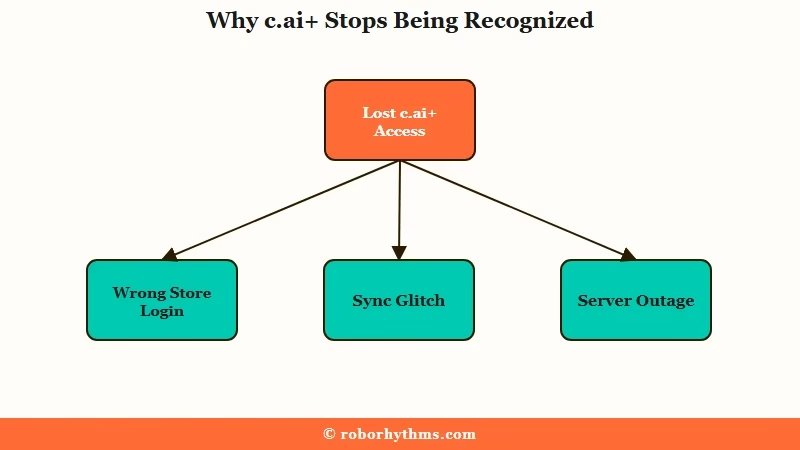
Character AI subscription not working almost always means the payment succeeded but the app failed to sync the entitlement, usually from a store-account mismatch, a sync glitch, or a server outage.
The money left your account. The app just lost track of it.
With Character AI still pulling tens of millions of monthly active users, per TechCrunch, a billing desync like this tends to hit a lot of people in the same wave.
The single most common cause is a login mismatch. Your c.ai+ purchase is tied to the exact Apple ID or Google Play account that paid, not to your Character AI username.
If you signed into the app with a different method than the one that bought the plan, the app cannot match the purchase and shows you as a free user.
This hits “Hide My Email” and Private Relay users especially hard, since the masked address on the store receipt does not line up with the email on the chat account. The way I see it, that single detail explains a huge share of the “I paid and got nothing” reports.
What is an entitlement: An entitlement is the app store’s record that you own a subscription. The app has to fetch and verify it, so a sync failure can leave you paying without access.
The other causes are more mundane. A synchronization glitch can stop the app store receipt from reaching the app, a stale app cache can show old status, and a broad server outage (a past one traced back to an AWS issue) can break Plus features for everyone at once until the servers recover.
How to Fix Character AI Subscription Not Working
The first fix to try is the Restore Purchase button on the get c.ai+ screen, which re-syncs your entitlement, and it works for most people who think their subscription vanished.
Run these in order before you ever consider re-buying.
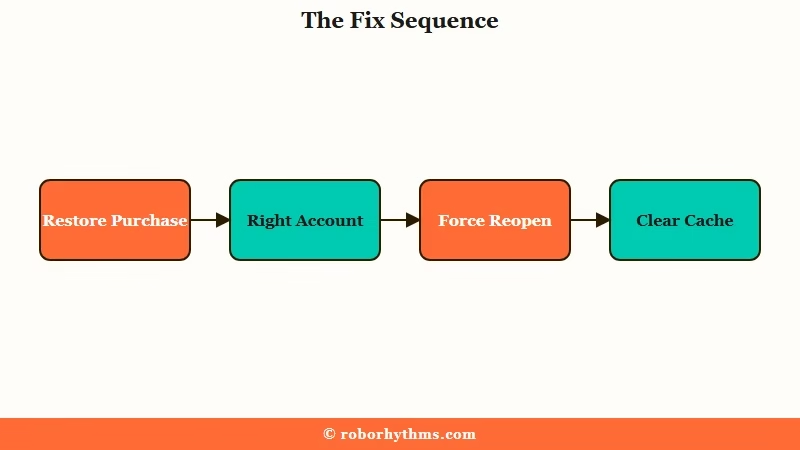
From what I can tell, most people give up before trying the one step that works, because the button is genuinely hard to spot. Here is the sequence I would walk through.
- Tap Restore Purchase. Open the “get c.ai+” screen and look at the top right. The Restore button is there, just faint and easy to miss. Tapping it re-syncs your entitlement and fixes the majority of “lost subscription” cases on the spot.
- Confirm you are on the right store account. Check that your phone is signed into the same Apple ID or Google Play account that bought c.ai+. If you have multiple logins, the subscription only shows under the one that paid.
- Force-close and reopen. Fully close the app, reopen it, and tap the subscribe button again. If it was a sync glitch, the app often pulls the correct status on the fresh launch instead of charging you.
- Clear the cache or hard refresh. On mobile, clear the Character AI app cache. On desktop, do a hard refresh. Android users should also update Android System WebView, since an outdated version causes blank screens and session errors.
- Use the two-minute logout. Log out, wait a full two minutes for the old session token to expire, then log back in. Logging straight back in too fast keeps the stale token, which is why a quick re-login often does nothing.
- Contact support with your receipt. If none of that works, file a billing ticket with Character AI support and include your store receipt. This is the path for double charges or a subscription that will not restore no matter what you try.
What is Restore Purchase: Restore Purchase is an app store function that re-checks your account for an active subscription and re-applies it to the app, fixing access without a new charge.
Symptom, Cause, and Fix at a Glance
| Symptom | Likely cause | Fix |
|---|---|---|
| App says no subscription but you are charged | Entitlement sync failed | Tap Restore Purchase on the get c.ai+ screen |
| Plus missing after switching login method | Subscription tied to a different store ID | Sign into the Apple or Google account that paid |
| Prompted to buy a feature you already pay for | Stale cache or visual glitch | Clear cache, force-close, reopen the app |
| Everyone’s Plus broke at once | Server or AWS outage | Wait it out, do not re-purchase |
| Re-login does nothing | Stale session token still active | Log out, wait two minutes, log back in |
Two Traps That Cost You Real Money
There are two moves that turn an annoying glitch into a billing mess, and both feel like the obvious thing to do.
Before: The app says you are not subscribed, so you buy c.ai+ again to get your features back.
After: You tap Restore Purchase first and check that you are on the right store account. If it is an outage, you wait. Re-buying during a sync glitch or outage does not restore anything and routinely leaves people double-charged.
The second trap is quieter. Deleting your Character AI account does not cancel your subscription, because the billing lives in the App Store or Google Play, not in your profile.
People delete the account, assume the charges stop, and keep paying for a profile that no longer exists. Cancel the subscription in your store settings separately.
When to Stop Paying and Switch
If your access keeps disappearing and support is slow, moving your subscription budget to a more stable companion app is a reasonable call.
A subscription you have to keep rescuing is not much of a subscription.
Paying and still getting nothing back is a different fault from paying and losing access, and we cover that one in blank messages on Character AI.
The honest read is that these entitlement bugs keep recurring, and the platform’s billing has a reputation for being fragile. If you enjoy Character AI enough to keep fighting for access, the steps above will get you back in most of the time.
There is a separate guide on the Character AI Plus refund wave if you want your money back instead, and one on using Character AI without Plus if you would rather drop the paid tier entirely.
If you are tired of paying for access that randomly vanishes, a companion app with steadier billing and support is worth a look. Something like Candy AI keeps your plan and your companion’s memory consistent without the restore-purchase dance every few weeks. For people who switched mainly because the reliability wore them down, that stability is the whole point.
I would not call it a clean upgrade for everyone, since Character AI’s character library is hard to match. If your only problem is billing, fix it with the steps above first.
If billing is the latest in a long list, our breakdown of why Character AI search breaks shows it is rarely the only recurring issue.
Frequently Asked Questions
Why does Character AI say I have no subscription when I am paying?
The payment succeeded but the app lost the entitlement link, usually because you are signed into a different store account than the one that paid, or because of a sync glitch. Tap Restore Purchase on the get c.ai+ screen to re-sync it.
Should I re-buy c.ai+ if my subscription stops working?
No. Re-buying during a sync glitch or server outage does not restore access and often gets you double-charged. Always try Restore Purchase, the right-account check, and a cache clear first.
Where is the Restore Purchase button in Character AI?
It is on the “get c.ai+” upgrade screen, in the top right corner. Many users miss it because it is faint and low-contrast, but tapping it re-applies an active subscription without a new charge.
Does deleting my Character AI account cancel my subscription?
No. Billing runs through the Apple App Store or Google Play, not your Character AI profile. You have to cancel the subscription in your device’s store settings, or you will keep getting charged.
Why did my subscription break after an update?
Recent updates, including new age verification steps, have triggered false “unsubscribed” states and visual glitches that prompt a re-purchase. A Restore Purchase or cache clear usually clears the false prompt.
Quick Takeaways
- Character AI subscription not working almost always means a synced entitlement failed, not a failed payment, so do not re-buy.
- The fastest fix is the faint Restore Purchase button in the top right of the get c.ai+ screen.
- Your plan is tied to the exact Apple or Google account that paid, so a login mismatch is the top cause of vanished access.
- Deleting your account does not cancel billing, cancel it in your store settings or keep getting charged.
- If access keeps disappearing, moving to a steadier-billing app like Candy AI is a fair call.
