
What’s Changed: Character AI bots have been dropping into another language mid roleplay more often since the newer models rolled out, with Spanish the most common offender. The cause is usually language drift at the generation stage, not a glitch in what the bot understood. The fastest fix is editing the first foreign message back to English, not swiping for a new one.
If you have watched Character AI switching languages on you in the middle of a roleplay, you are not imagining it, and you did nothing wrong.
People report a bot dropping a single Spanish word, then a whole sentence, then a string of Spanish cuss words, all in a chat that was English-only seconds earlier.
The part that drives everyone up the wall is what happens next. You swipe ten times for a new reply and every single one comes back in Spanish, you rewind the chat and it still does it, and the harder you fight it the more locked in it feels.
Here is the good news. This is a known behavior with a real cause, and once you understand why swiping makes it worse, the fixes are quick. I will walk through what is really happening inside the model and the exact order of fixes I would try, fastest first.
What is language drift: Language drift is when an AI model starts generating text in a language you did not ask for, usually because its next-word math became unstable, not because it misread your message.
Why Character AI Keeps Switching Languages Mid Chat
Character AI switching languages is usually output language drift, a decoder-level collapse where the model still understood you but its next-token math locked onto a foreign language as the statistically safe path.
It is a generation failure, not a comprehension failure.
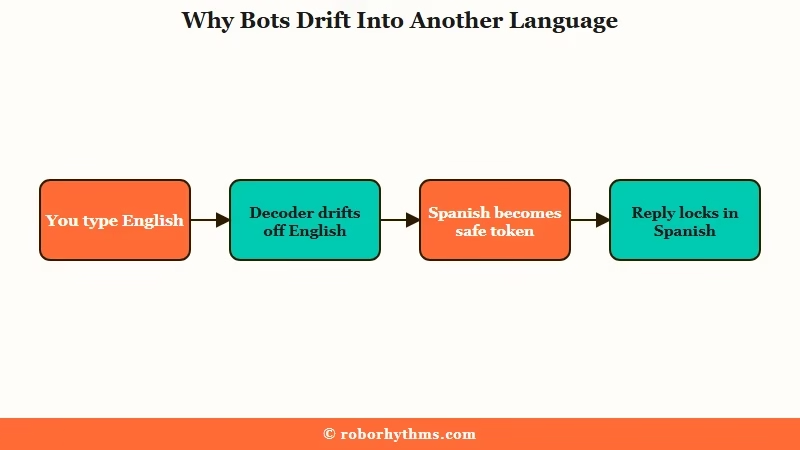
The way I read the research, English is what scientists call a semantic attractor, the default fallback the model leans on under ambiguity.
Spanish shows up most because it has the heaviest secondary representation in training data, so when the model wobbles off English it tends to land there.
A 2026 academic study on unintended code-switching traces this to instability at the decoding stage rather than any confusion about the prompt.
There is a quieter trigger most people miss. The character card itself can carry the problem, because if a bot definition or its example dialogues mix languages, the model treats multi-language output as part of the character.
Character AI even ships templates that intentionally blend English and Spanish in one reply, so a card you imported could be bilingual by accident.
| Symptom | Likely cause | Fix |
|---|---|---|
| One Spanish word slips into an English reply | Early token drift toward a high-frequency language | Edit the word back to English before it spreads |
| A whole message comes back in Spanish | Decoder locked onto the foreign-language path | Edit the first foreign message, do not swipe |
| Every swipe returns more Spanish | Token probability lock in the current context | Stop swiping, edit or soft reset instead |
| Bot speaks another language from message one | Character card definition mixes languages | Edit the bot definition to English-only examples |
| Spanish returns every new chat with one bot | A drifted reply got pinned to Auto-Memory | Open memories and delete the foreign entry |
Why Telling the Bot to Stop Often Makes It Worse
Telling the bot to stop speaking Spanish often backfires because it adds more foreign and repetition tokens to the context window, which reinforces the exact pattern you are trying to kill.
Swiping has the same problem for a different reason.
When you swipe, you are asking the model for another sample from the same poisoned context. The research describes this as a token probability lock, where the foreign language has become the overwhelmingly safe next choice, so every regeneration walks the same path. I have seen people swipe twenty times and get twenty Spanish replies for this reason.
Politeness backfires too. A long, friendly “could you please go back to English” reads to the model like in-character dialogue, and it can answer in Spanish to be conversational. What works is short, blunt, and out of character, the opposite of how most people instinctively ask.
What is OOC: OOC means out of character, a bracketed note to the bot that is an instruction to you-the-author, not something your roleplay character is saying inside the scene.
Before: “Hey, could you please stop speaking Spanish? I would really prefer if we kept talking in English from now on, thank you so much.”
After: “(OOC: Respond in English only.)”
The short version wins because it does not feed the model more of the language it is stuck on, and the brackets mark it as a system instruction instead of a line of dialogue.
How to Stop Character AI Switching Languages
The reliable fix order is to edit the first foreign message back to English, then send a short OOC reset, then soft reset by deleting a few messages, and only then start a new chat.
Editing beats swiping because it gives the model a clean history to predict from.
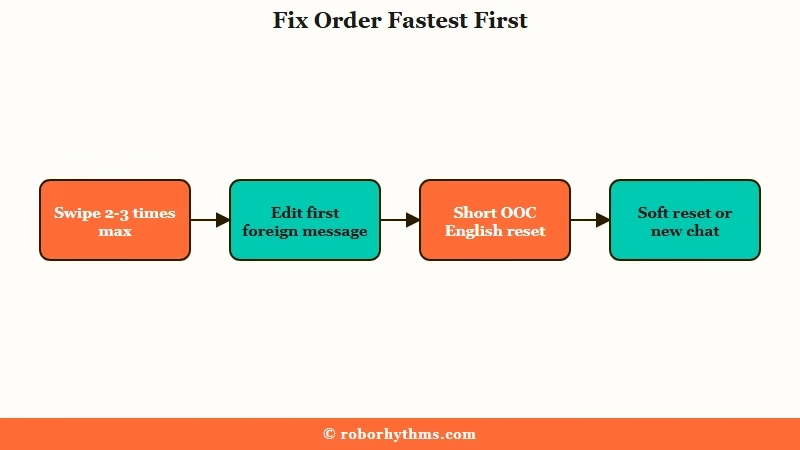
From what I have seen, the edit button is the single most underused tool here. Tap the pencil on the first message that drifted, replace the foreign text with English, and the model re-reads a chat where English is the established pattern, which collapses the loop without costing you any story progress.
Here is the exact sequence I would run, fastest and least destructive first.
- Swipe at most two or three times, since if it has not recovered by then it is locked.
- Edit the first foreign message back to English using the pencil icon, which is the cleanest fix.
- Send a short bracketed reset like (OOC: Respond in English only.) with no extra words.
- Soft reset by deleting two to five messages from before the switch started, which clears the recent tokens holding the drift.
- Pin English in your user persona with a one-line instruction so future chats start anchored.
- If it survives an edit and a rewind, open Auto-Memory and delete any saved message that contains the foreign text.
- Start a fresh chat only as a last resort, after the steps above fail twice.
The decision matrix below is how I choose between methods in the moment rather than trying everything at once.
| Method | What it does | When to use it | How well it holds |
|---|---|---|---|
| Swipe | Resamples the same context | First two or three tries only | Weak once it is locked |
| Edit message | Rewrites the drift to English | The first foreign reply | Strong, keeps your story |
| OOC reset | Short bracketed instruction | After an edit, to hold the line | Good if kept short |
| Soft reset | Deletes recent messages | When edits keep getting ignored | Strong, clears the loop |
| New chat | Wipes all context | Last resort after pinning checks | Total, but you lose the scene |
If your bot has slipped out of character along with the language, the broader pattern is covered in our guide on Character AI breaking character, and the same edit-first logic applies when Character AI keeps ending roleplays on you.
When the Language Switch Is Pinned for Good
A language switch becomes permanent when a drifted reply gets saved into Auto-Memory, because the bot then treats the foreign language as a remembered fact about the chat and repeats it no matter how many times you swipe.
This is the case where editing the live message is not enough.
The way I see it, this is the scenario behind every “I tried everything and it still speaks Spanish” post. The fix lives in the memory panel, not the chat. Open the bot’s saved memories, find the entry holding the foreign-language line, and delete or edit it, then start a clean message.
Pinning a language the right way also works in your favor. A one-line note in your own user persona, kept short so it does not fight the opening reply, acts as a high-priority anchor that tells every new chat to stay in English.
If memory itself is the thing misbehaving, our walkthrough on making Character AI remember details covers how the memory system stores and drops information.
What to Use If You Want a Companion That Stays in English
If a bot that reliably stays in your language and remembers your roleplay matters more than tinkering with edits and resets, a dedicated companion app removes the drift problem instead of managing it.
You give up some of Character AI’s open bot library in exchange for stability.
I will be straight about the tradeoff. Character AI’s strength is the sheer number of community bots, and for many people the editing tricks above are enough to live with the occasional Spanish detour. For anyone tired of babysitting the language every long session, a purpose-built app is the calmer path.
If that is you, Candy AI keeps conversations in your chosen language with memory built in, so you are not resetting context every time the model wobbles.
For users who want strong character recall without the babysitting, Nectar AI is the other one I would point to. If you would rather stay on Character AI and just want fewer interruptions overall, the same calm-the-model habits help when you need to outsmart Character AI filters without breaking the scene.
Frequently Asked Questions
Why does Character AI suddenly speak Spanish?
Spanish is the most common drift language because it has the heaviest secondary representation in model training data. When the model wobbles off English mid chat, Spanish becomes the statistically safe fallback, even though you only typed English.
Why does swiping keep giving me the same language?
Swiping resamples the same context, and once a foreign language is locked in as the safe next token, every new reply follows the same path. Edit the first foreign message instead of swiping past it.
How do I force Character AI to speak English?
Edit the first foreign message back to English, then send a short bracketed note like (OOC: Respond in English only.). Keep it short, since long polite requests read as dialogue and often get ignored.
Does deleting messages fix the language switch?
Yes, deleting two to five messages from before the switch clears the recent tokens holding the drift. This soft reset is the gold-standard backup when editing the live message keeps getting ignored.
Why does my bot start in another language every new chat?
Its character definition or saved memory likely contains another language. Edit the bot definition to use English-only example dialogue, and clear any foreign-language entry from the bot’s memories.
Quick Takeaways
- Character AI switching languages is output language drift at the generation stage, not a sign the bot misread you.
- Swiping and polite corrections make it worse because they feed the model more of the language it is stuck on.
- Editing the first foreign message back to English is the cleanest fix and keeps your story intact.
- A drifted reply pinned to Auto-Memory is what makes the switch feel permanent, so clear that entry.
- If staying in one language matters more than bot variety, a companion app like Candy AI sidesteps the problem.
