
What’s Changed: A Talkie AI bot not passing review in 2026 is usually caught by an automated filter, not a person, and it often passes first then gets rejected hours later on a second scan. The triggers are specific: a few flagged words, a borderline image, or even a name change that forces a fresh inspection. This guide covers every common rejection cause and the edits that get a bot approved.
I have lost count of how many Talkie characters I have watched pass review, go live, then vanish a few hours later with a rejection notice. That delay is the first thing to understand, because it tells you a machine is doing the checking, not a moderator reading your character with any context.
A Talkie AI bot not passing review almost always comes down to an automated content filter reacting to a specific word, image detail, or edit you made. The frustrating part is how arbitrary it feels, since the same bot can fail once and pass on an identical resubmission.
Talkie has tightened moderation hard through 2026 as it pivoted toward family-friendly positioning, so wholesome characters now get caught alongside the genuinely against-the-rules ones.
That pressure tracks the wider AI companion boom, a market TechCrunch’s $120M companion estimate underscores, which has pushed every big player toward safer content.
Here is what trips the filter, where the hidden appeal button lives, and the edits I have seen clear a stuck bot.
Why Your Talkie AI Bot Is Not Passing Review
A Talkie AI bot fails review when an automated filter flags a trigger word, a borderline image, or a change that forces a re-scan.
Almost none of it is a human decision, which is why the rejections feel random and why an identical resubmission sometimes passes.
The timing is the giveaway. A bot will often clear the first check and go public, then get pulled 4 to 8 hours later when a secondary automated scan runs. That second pass is stricter than the first, and it is where most “but it was already approved” rejections happen.
Public bots get judged far harder than private ones. The moment you make a character public, or edit one that is already public, the system re-evaluates the whole submission against the tighter public ruleset.
This is the creator-side version of the moderation that also hits users mid-chat. If your character clears review but then refuses to play out scenes, that is a different problem covered in the Talkie topic filter guide, and it is worth knowing which wall you are hitting.
What review really is on Talkie: It is an automated content scan of your character’s name, description, greeting, and image. A human only sees it if you escalate through an appeal, and even then the response is often scripted.
What Triggers a Talkie Rejection
Talkie rejections are triggered by flagged words, image details the filter reads as suggestive, real-person impersonation, and a handful of banned themes.
The filter pattern-matches on text and pixels, so context that is obvious to a human gets missed constantly.
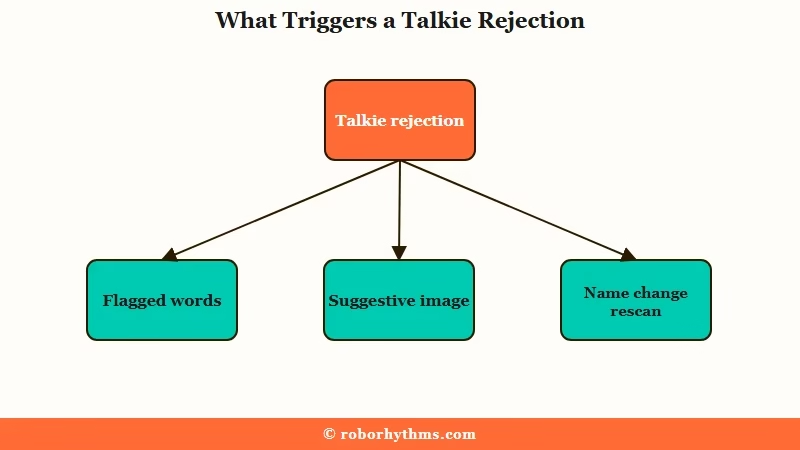
On the text side, the filter reacts to word combinations that vaguely gesture at sex or violence. The phrase “sleeping with” is a classic false trigger, and the filter will even read a line about siblings “loving each other” as romantic unless you add a clarifier like “as siblings.”
The word “Private” in a public bot’s name is its own trap, so creators swap in “Pvt.” to get past it. Naming matters more than people expect, and there is a worse version of that problem in the next section.
On the image side, the common flags are bust-style framing, anything the filter reads as a bulge, and bare legs on female characters. The banned-theme list is firmer: graphic violence, gore, self-harm, sexual content, sexualization of minors, impersonating real people, and oddly specific items like tentacle elements.
| Rejection trigger | Why it fires | The fix |
|---|---|---|
| Words like “sleeping with” | Filter reads sex or violence | Reword and add context clarifiers |
| “Private” in a public name | Flagged term in the name field | Use “Pvt.” or drop the word |
| Siblings “loving each other” | Misread as romantic | Add “as siblings” or respace words |
| Bare legs, bust framing, bulge | Image filter reads suggestive | Edit the image to cover skin |
| Real person likeness | Impersonation rule | Use an original or stylized design |
How the Name Change Trap Works
Changing a character’s name re-triggers a full automated review, including a fresh scan of an image that already passed.
This is the single most counterintuitive cause of a Talkie AI bot not passing review, because the thing you changed has nothing to do with the thing that gets rejected.
The way I see it, this is the trap that burns the most creators. You publish a character, the image clears, then weeks later you tweak the name and suddenly the untouched image fails a re-inspection it sailed through the first time.
It happens because any edit to a public bot forces the system to re-evaluate the entire submission, not just the field you touched. The image filter is also not perfectly consistent run to run, so the same picture can pass on Monday and fail on Wednesday.
The practical takeaway is to treat every edit to a live public bot as a fresh submission. If a character is approved and you do not need to change it, leaving it alone is sometimes the safest move.
How to Get a Rejected Talkie Approved
The fastest path to approval is to fix the specific trigger, then resubmit, and if the filter is being arbitrary, resubmit the same content until it passes.
Persistence genuinely works here because the automated scan is inconsistent between runs.
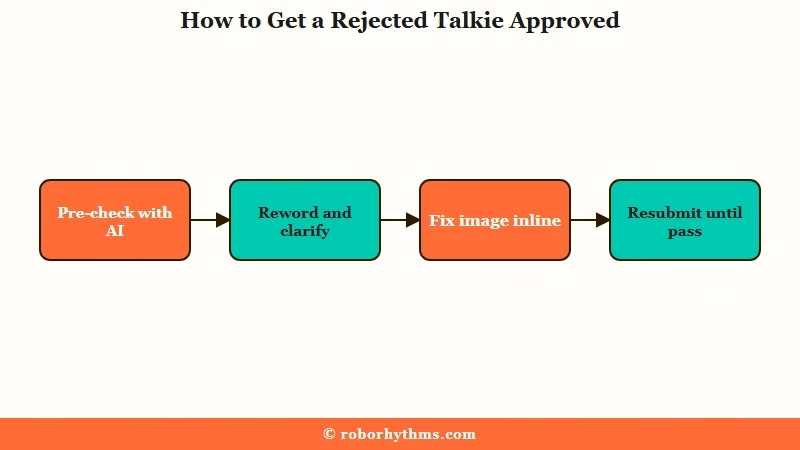
Here is the sequence I would walk through when a bot keeps failing, in the order that clears the most rejections.
- Run the name, description, and greeting through a separate AI like ChatGPT and ask it to flag any word combo that reads as sexual or violent.
- Reword the flagged phrases and add plain context (“as siblings”, “a mentor”, “platonic”) so the filter cannot misread the relationship.
- Swap any flagged name terms, like changing “Private” to “Pvt.” and removing real-person names.
- Fix the image directly with inline painting on the web version, covering bare legs or suggestive framing, rather than uploading a whole new picture.
- Resubmit the corrected bot, and if you are confident it is clean, resubmit the identical version again on a rejection since the scan often passes on a later attempt.
A worked example of the relationship-clarifier fix, which is the one creators miss most:
Before: “Two siblings who have always loved each other deeply and would do anything to stay together.”
After: “Two siblings with a close, protective bond who look out for each other as family.”
The image fix is worth doing on the web client specifically. The inline painting tool lets you add leggings or adjust framing on the existing approved-resolution image, which is less likely to trip a fresh scan than a brand new upload.
What to Do When the Appeal Does Nothing
The appeal button is hidden behind a long-press on the character in your gallery, but for image rejections it often does nothing because the image is already deleted.
Knowing which rejections are appealable saves you from wasting days waiting on a response.
To find the appeal, long-press the character’s image in the gallery that lists all your Talkies, then choose “Have Question” or “Ask a Question” from the menu. Some rejection notices also show an “or Appeal” link beside the “Edit now” button.
Here is the hard limit. When a bot is rejected for its image specifically, the system frequently deletes that image permanently, so even a successful appeal cannot bring it back, and Talkie has been removing the appeal option for image cases entirely.
Text and policy rejections are worth appealing because the content still exists to be re-reviewed. A formal appeal usually takes one to two days, while a direct staff DM asking for a proof-read can take several days, and the reply is often a scripted general response rather than a specific reason.
If the moderation grind is wearing you down, plenty of creators move characters to a platform with looser creation rules. The voice and character tools that make Talkie worth the hassle are covered in the full Talkie AI review, but the review wall is a real reason to keep a backup home for your bots.
SpicyChat allows more flexible character writing for creators who keep hitting Talkie’s filter, and a hosted companion like Candy AI skips the public-review model entirely if you mainly want a character for yourself.
Frequently Asked Questions
Why did my Talkie pass review then get rejected?
Talkie runs a second automated scan 4 to 8 hours after the first, and it is stricter. A bot that cleared the initial check often gets pulled on this secondary pass, especially if it is public, since public characters face harsher filtering than private ones.
What words get a Talkie bot rejected?
Word combinations that vaguely suggest sex or violence, like “sleeping with,” trigger rejections even in wholesome characters. The word “Private” in a public bot’s name also fails. Add context clarifiers and swap flagged terms, such as using “Pvt.” instead of “Private.”
Why does changing my Talkie’s name cause a rejection?
Any edit to a public bot forces the system to re-review the entire submission, including images that already passed. A name change re-triggers the image scan, and because the filter is inconsistent, a previously approved picture can fail the second inspection.
How do I appeal a Talkie rejection?
Long-press the character in your gallery and select “Have Question” or “Ask a Question,” or use the “or Appeal” link on the rejection notice. Appeals take one to two days, but image rejections often cannot be appealed because the image is deleted.
Why does the same Talkie bot fail then pass on resubmission?
The review is automated and inconsistent between runs, so an identical bot can fail one scan and clear the next. Many creators get a clean bot approved just by resubmitting the same content until the filter accepts it.
Can I fix a rejected Talkie image without re-uploading?
Yes. Use the inline painting tool on the Talkie web version to adjust the existing image, such as adding leggings to cover bare legs. Editing the approved-resolution image is less likely to trip a fresh scan than uploading a brand new picture.
Quick Takeaways
- A Talkie AI bot not passing review is almost always an automated filter, not a person, and it often rejects 4 to 8 hours after the first pass.
- Text triggers like “sleeping with” and “Private” in a name, plus image flags like bare legs, cause most rejections; reword and edit the image to fix them.
- Changing a public bot’s name re-triggers a full scan, so an untouched image can suddenly fail.
- Appeal text rejections by long-pressing the character, but image rejections usually cannot be restored since the image is deleted.
- If the filter keeps blocking clean characters, a platform with looser creation rules like SpicyChat is the cleaner home for your bots.
