
What’s Changed: If your Janitor AI proxy stopped working or keeps throwing a network error, the cause is almost never your connection. The usual suspects are a zero balance, a key that does not match the proxy URL, and a settings cache that never refreshed. Updated October 15, 2026: OpenRouter no longer lists any free DeepSeek model, so the working setup example below now uses a current paid model ID.
A Janitor AI proxy not working is the most common reason a chat suddenly goes silent, and the error you get back is usually misleading. The app shows a generic network error, so you blame your wifi, restart the router, swap browsers, and nothing changes. The real fault is sitting one layer down, in the link between Janitor AI and whatever model provider you connected.
That network error is often an HTTP 402, a billing signal dressed up as a connection fault. When a DeepSeek account spends its last credit or an OpenRouter balance hits zero, the request fails and Janitor reports it as a vague network problem instead of saying the account is empty.
A proxy that connects can still choke on long chats for a separate reason, which is the Janitor AI proxy prompt length limit that trims or rejects oversized context.
I have worked through every version of this, from a key pasted with a stray space to a provider whose servers were offline. The fixes are not hard once you know which layer broke. This guide maps each symptom to its real cause, gives you a five-minute fix sequence, and shows the exact settings that connect a proxy on the first try.
Why Is Your Janitor AI Proxy Not Working
A Janitor AI proxy stops working when one of three layers breaks. Your provider account has run out of credit, your proxy URL and API key belong to different providers, or Janitor cached an old setting and never refreshed.
Everything else is a variation on those three.
If you would rather skip keys and credit balances entirely, Candy AI is a hosted companion app with nothing to configure, and I weigh that trade at the end.
The way I see it, most people troubleshoot in the wrong order. They reach for the router and the VPN first because the word “network” is right there in the error, when the thing that broke is the account or the config you set up days ago.
What is a proxy in Janitor AI: It is the bridge that passes your chat to an outside model like DeepSeek or one routed through OpenRouter, since Janitor AI does not run a strong model of its own for most users.
Three fields make that bridge work, and they have to agree with each other. The proxy URL, the API key, and the model name all have to belong to the same provider.
Mixing a DeepSeek key with an OpenRouter URL is a common cause of a “network error”, and it returns a 401 under the hood every time.
What That Network Error Really Means
A Janitor AI network error often hides a payment problem: an empty provider balance comes back as a 402 that Janitor shows as a generic network error.
Janitor’s own OpenRouter error guide pins the same message on a wrong API URL and on the buggy Check Key button, so rule those two out before you reach for your wallet.
Its rate limit and network error guide starts somewhere else entirely, with a temporary swap to JLLM. That swap is the fastest way to tell a proxy fault from a site fault, and it costs one message.
The clearest tell is timing. If chats worked fine yesterday and died today with no settings change, check your provider balance before you touch anything else.
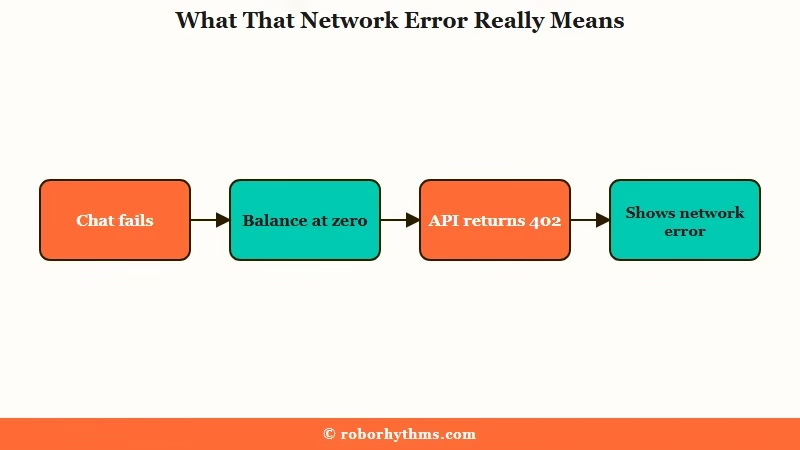
DeepSeek’s Models & Pricing page says every request is billed against your balance, granted balance first and topped-up credit after. Once the balance reads zero, the API answers with a 402, which DeepSeek’s error code list names Insufficient Balance, and Janitor flattens that into a plain network error. Adding a few dollars of credit fixes it in seconds, which is maddening only because the error never pointed you there.
OpenRouter has its own trap on the free side. Its rate limit documentation caps free models at 20 requests a minute, and at 50 a day for accounts that have bought less than 10 dollars of credit in total. Crossing the daily line throws a persistent 429 that resets only at 12:00 AM UTC, which lands early evening in the US and shifts by an hour with daylight saving.
Janitor’s OpenRouter error guide adds the cruelest detail: even error messages count toward the cap, so spamming the regenerate button on a broken bot can torch the whole daily allowance in minutes.
One more thing worth knowing. Putting 10 dollars or more into OpenRouter once lifts that daily cap from 50 to 1,000 messages, which is the cheapest upgrade in this whole hobby. If you keep slamming into the wall every evening, that top-up is the fix, not another round of proxy error 429 troubleshooting.
Every Janitor AI Proxy Error Code and What It Means
Each proxy error code points to one layer. 400 is a prompt too big for the model, 401 a bad or mismatched key, 402 no credit, 403 a request blocked before it reached the model, and 404 no endpoint for that model. 408 is a provider timeout, 429 a rate limit, and 500, 502 or 503 a provider failing on its own side.
The code tells you which layer broke. The word “error” does not.
Here is how I map every code I run into. Janitor often hides these behind its generic message, so it helps to open the browser console or your provider dashboard to see the real status. Janitor AI’s own OpenRouter error guide publishes the exact message text behind 400, 402, 404, 408, 429 and 502, and OpenRouter’s error reference defines 401 and 403.
| Error code | What it means | Real cause | Quick fix |
|---|---|---|---|
| 400 | Bad request | Janitor’s guide reports it as “This model’s maximum context length is X tokens. However, you requested Y tokens”, so the personality, chat history, Chat Memory and Advanced Prompt together overflow the model window | Trim Chat Memory and the Advanced Prompt, or move to a model with a larger context window |
| 401 | Unauthorized | Wrong key, a stray space in the key, or a key from a different provider than the URL. On OpenRouter, a 401 that reads “User not found” means the key itself is invalid or disabled | Re-paste the key clean and match it to the right proxy URL, or create a fresh key if OpenRouter says User not found |
| 402 | Payment required | Free tokens exhausted or balance at zero, shown as a network error | Add a few dollars of credit to the provider |
| 403 | Forbidden | On OpenRouter, a moderation flag on your message, a guardrail block, or a spending limit on the key that has run out | Read the full message, then rephrase the flagged text or raise the limit on the key |
| 404 | No endpoint available | Three separate causes in the official guide: the model no longer exists, your allowed-provider settings are too narrow, or your data policy blocks every endpoint | Copy the exact current model ID, widen the allowed providers, then check the privacy toggle on your provider account |
| 408 | Timeout | The provider servers are slow or overloaded and the request expires before a reply comes back, which can leave a chat sitting on replying | Resend after a minute, or switch to a model carrying less traffic |
| 429 | Too many requests | Free daily cap hit, more than 20 requests a minute on a free model, or the model is rate limited upstream because its provider is overloaded | Wait for the UTC reset, slow down, switch models, or top up to lift the cap |
| 500, 502 or 503 | Provider-side failure | The provider is down, overloaded, or restarting, and on 502 it passes the failure back with no detail beyond “Provider returned error” | Wait a few minutes, retry once, then switch to another model |
For a fast triage without the console, this symptom table covers what most people see on screen.
| Symptom | Likely cause | Fix |
|---|---|---|
| Network error, worked yesterday | Provider balance hit zero (402) | Add credit to DeepSeek or OpenRouter |
| Network error right after setup | Key and proxy URL from different providers | Match all three fields to one provider |
| Stuck at a daily wall every evening | OpenRouter 50 message free cap | Top up 10 dollars for 1,000 a day |
| Replies have visible reasoning text | Using a reasoning model through Chutes | Switch to a standard chat model |
| Worked, then froze mid long chat | Token overflow on a huge conversation | Lower the context size in your API settings or trim chat memory |
| Connection closed partway through a reply | The provider dropped the request after it left your browser. Balance, a model that was pulled, and a provider-side fault all produce it, and Janitor does not say which | Swap the chat to JLLM to see whether the proxy or the site is at fault, then recheck balance and model ID |
| Stuck on replying and no reply ever lands | Often a provider timeout, code 408, though a dropped request looks the same from the chat window | Resend after a minute, and if it repeats swap to JLLM to see whether the proxy or the site is at fault |
| The AI provider rejected this request (400) | Janitor’s full message tells you to check the selected model and proxy settings, and its guide documents the 400 as a context overflow. Between the two, it is either a bad model ID or a prompt too big for the window | Confirm the model ID first, then trim Chat Memory and the Advanced Prompt if the ID is correct |
| The AI provider could not be reached (upstream_transport_error) | Janitor never got through to the proxy URL, usually because of a typo, an extra slash or a provider that is offline | Paste the exact URL again, for OpenRouter https://openrouter.ai/api/v1/chat/completions, then save and refresh |
How to Fix a Janitor AI Proxy That Will Not Connect
The fastest fix is the double-refresh: open your API settings, click Save if it is lit, then hard refresh the whole page, the first step Janitor’s own guide tells you to try.
Janitor caches old settings in memory, so a test run against a stale state lies to you. Since Janitor redesigned the API settings page on July 19, 2026, its Save button only lights up when something changed, so an unlit button means nothing is waiting to be saved.
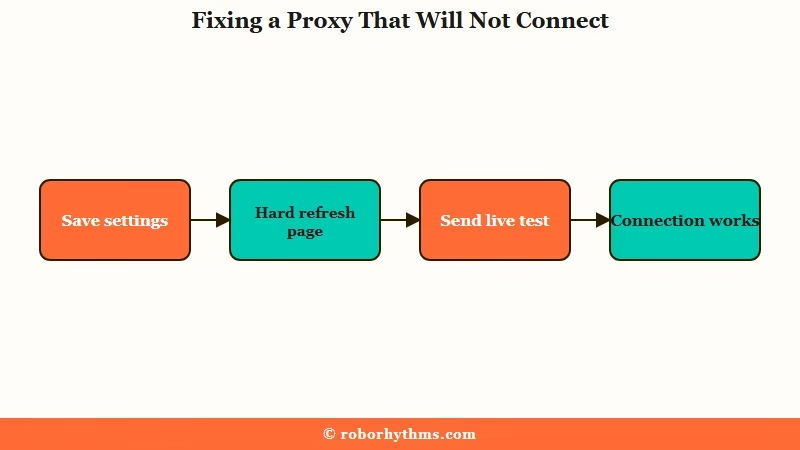
From what I have seen, the order you try things in matters as much as the fixes themselves. Here is the sequence I walk through before I assume anything is seriously broken.
- Open your API settings, click Save if it is lit (it stays unlit when nothing changed), then hard refresh with Ctrl+Shift+R.
- Ignore the built-in Check Key or Test button. It is buggy and throws false network errors even on a valid setup. Send a real one-line test message instead.
- Confirm your provider balance is above zero, since a 402 hides as a network error.
- Re-paste your API key into a plain text box first to strip invisible spaces, then back into Janitor. A “Can’t use proxy with no key defined” message means the key field is empty or was never saved.
- Open the chat in an incognito window to rule out a browser extension or ad blocker.
That Check Key button deserves its own warning. It is the verification tool most people trust, and it is the one that lies most often, so the genuine test is always a saved setting plus a refresh plus a real message.
When the connection still refuses to start, the problem is usually a mismatched config rather than a broken account. This is the difference between a setup that fails and one that connects on the first message.
Before: Proxy URL pointed at OpenRouter, API key copied from a DeepSeek dashboard, model name typed as
deepseek-chat. Result is a 401 that surfaces as a network error.After: Proxy URL set to
https://openrouter.ai/api/v1/chat/completions, an OpenRouter key that starts withsk-or-v1-, and a model ID copied from the model’s own OpenRouter page, such asdeepseek/deepseek-v3.2. All three fields now belong to OpenRouter, so the request goes through. It needs credit on the account, because no DeepSeek model on OpenRouter is free as of October 15, 2026.
The model name trips people more than anything else. Older tutorials still tell you to use deepseek-chat or deepseek-reasoner, and DeepSeek’s change log set July 24, 2026 as the date both names were discontinued. Its Models & Pricing page now lists only deepseek-flash and deepseek-v4-pro, so those are the names to use with a direct DeepSeek key.
OpenRouter IDs follow OpenRouter’s own list instead, and the free ones end in :free. On October 15, 2026 its public model list carried 14 model IDs ending in :free and none came from DeepSeek, which is why the old deepseek/deepseek-chat-v3-0324:free setting now fails. On Chutes the matching pair is the URL https://llm.chutes.ai/v1/chat/completions and a key that starts with cpk_, as Janitor’s Chutes error guide spells out.
When the Proxy Is Set Up Right and Still Fails
If your settings are correct and the proxy still fails, the cause is outside your config. It is usually a provider outage, a regional age check, a browser that is too old, or a VPN or firewall blocking the route.
These are the cases that feel impossible, and I have chased every one of them because nothing you change on your end seems to move the needle.
Start with the provider. A 500 error, a message reading “exhausted all available targets”, or an ErrorUpstreamFault:True all mean the model servers themselves are down, not you.
When Chutes throws a wall of failures at once, it is almost always server side, and the Chutes failed to fetch fix covers how to tell an outage from a config slip. If the whole site feels dead rather than just one model, the is Janitor AI down checklist is the faster place to start.
Region is the sneaky one. Janitor AI’s own announcement says anyone connecting from an IP address in Brazil, Australia or the UK has to pass a one-time k-ID age check. Janitor says the new laws in those countries left it no choice.
An unfinished age check can read as a connection failure rather than an age gate, so finish the k-ID step before you touch the proxy. A VPN that exits in one of those three countries can trigger the same check.
A few smaller culprits round out the list. Janitor needs a reasonably current browser, Chrome 92 or Firefox 91 at minimum, so a stale install can break the connection on its own.
A VPN can cause the error or cure it, so toggle it both ways, and on Windows the built-in firewall or antivirus sometimes blocks the site outright and produces a failed to fetch. If your replies suddenly arrive wrapped in visible reasoning text, you are on a reasoning model such as Chutes’ Qwen3 235B Thinking, and switching to a standard chat model gives you clean output again.
When You Are Done Fighting With Proxies
If the constant key swaps, top-ups, and daily resets are wearing you down, a hosted companion that needs no proxy at all is the cleaner path.
Proxy setup is the tax Janitor charges for free roleplay, and not everyone wants to keep paying it in time.
I still think Janitor is worth the hassle if you love building characters and tuning your own models. The control is the whole point. The trouble is that the control comes bundled with API keys, balance checks, model IDs that expire, and a rate limit that resets on a clock in another timezone.
For people who would rather open a tab and start talking, a companion that needs no proxy removes the entire failure chain this article is about.
Candy AI handles the model connection on its own side and remembers your conversations between sessions, so there is no key to paste and no proxy balance to watch. Its free plan stops at 5 messages in total, so treat it as a test drive rather than a free home. It is a different trade, less tinkering for more reliability, and which side you want depends on how much you enjoy the setup.
If you would rather stay on Janitor, its paid Janitor+ plan added a Router on July 30, 2026 that runs third-party models on the web with no API key or proxy, billed per token. Heavy chatters usually pay less on their own key, which is the main test of whether Janitor+ is worth it next to your own proxy.
Quick Takeaways
- A Janitor AI network error is often a 402 billing problem, so check your provider balance before blaming your connection.
- Match the proxy URL, API key, and model name to one provider, since mixing them throws a hidden 401.
- The double-refresh, saving any change and then hard reloading, is the first thing Janitor’s own guide tells you to try.
- Replace any old
deepseek-chatordeepseek-reasonermodel name on a direct DeepSeek key, since DeepSeek discontinued both on July 24, 2026, and copy OpenRouter IDs from OpenRouter’s own model pages.
- If the setup tax is not worth it, a hosted companion with no proxy removes the whole failure chain.
