
What’s Changed: A Character AI bot that suddenly changes the scenario is almost never broken. The original scene has scrolled out of the model’s short context window, so it rebuilds the scene from your last message and fills the gaps with unrelated characters. You can usually pull it back without losing the chat.
You are deep in a roleplay, the scene is working, and then the bot veers off a cliff. It drops the plot, switches perspective, starts writing weirdly poetic lines, and sometimes drags in characters who were never in the story. One minute it is a tense standoff, the next a Resident Evil bot is somehow writing Sonic.
If your Character AI bot changes the scenario like this, the cause is mechanical, not random. The model has a small working memory, and once your opening scene falls out of it, the bot loses the thread and improvises a new one.
People report the wildest versions of this: a private English roleplay getting hijacked by characters from a different show, all suddenly speaking German.
Here is what I will cover: the exact reason the scene drifts, how to tell a context limit apart from a genuine quality drop, the fastest way to snap the bot back mid-chat, and how to lock the scene down so it stops happening on long roleplays.
Why Your Character AI Bot Changes the Scenario
A Character AI bot changes the scenario when the original scene scrolls out of its limited context window, so the model rebuilds the scene from your most recent message and fills the missing pieces with unrelated training data.
It is a coherence failure, not a personality.
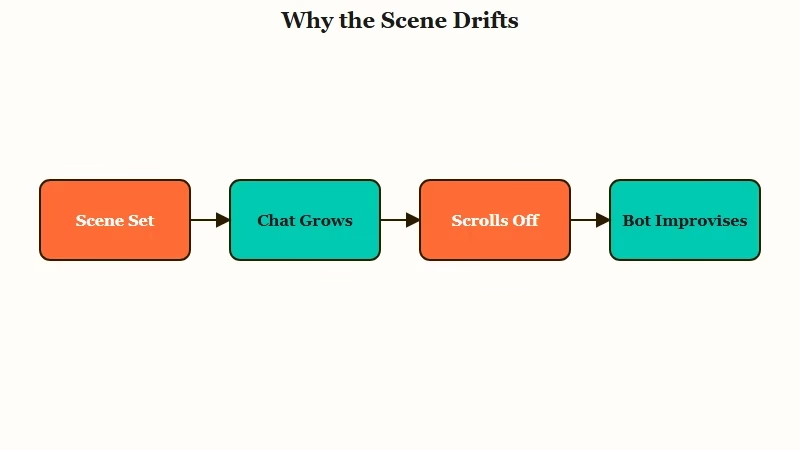
What is a context window: The fixed amount of text a model can hold in active memory at once, including your message, its reply, the chat history, and the character definition.
Character AI works inside a context window of roughly 3,000 to 4,000 tokens, which is around 17,000 characters of text. Think of it as a fixed-size desk. Everything has to fit on the desk at once, and when new messages pile on, the oldest pages slide off the edge and are gone from the bot’s view.
There is a second twist that makes it worse, and it surprised me when I first dug into it. Models do not pay equal attention across that desk. Stanford research on long contexts found that language models focus hardest on the very beginning and the very end of their input, and they get noticeably weaker in the middle.
So in a long chat, your opening scene drifts into that weak middle zone, then off the desk entirely. The bot is left staring mostly at your last message, and it reconstructs a scene from whatever fragments it can reach. That is when the memory feels broken and unrelated characters wander in.
Is It a Bug or a Context Limit
Scenario switching is usually a context-window limit rather than a true bug, though Character AI treats persistent cases as a model-quality issue you can report.
The two have different fingerprints, and telling them apart saves you a lot of wasted troubleshooting.
A context limit is a space problem. It shows up on long chats, gets worse the longer you go, and eases the moment you start fresh.
A quality regression is different. It hits short and long chats alike, usually after a server-side model update, and the whole platform feels dumber for a few days. The community has lived through several of these waves, the kind of stretch where roleplay quality breaks down across the board.
There is also a time-of-day tell. During peak traffic, the platform can route you to lower-tier inference layers, which makes replies shorter, flatter, and more prone to losing the scene. If your bot only drifts in the evening rush and behaves at 6am, that points to server load, the same kind of strain that shows up when Character AI is down.
What I would take from this: if it is tied to long chats, fix the context. If it is sudden, global, and date-stamped to an update, wait it out or file a Model Quality ticket with screenshots so the team can see it.
What to Do When the Bot Switches the Scene
The fastest fix is to edit a recent strong reply and add a bracketed instruction telling the bot to stay in the current scene, then rewind the chat if the scene is already fully lost. Both work without nuking your whole story.
The bracket trick is the one I reach for first, because it costs nothing and keeps your history. You find a recent message where the bot was still on track, open the edit pencil, and append a short instruction in square brackets that the model reads as a direction rather than dialogue.
Before: you just reply “I step back and wait,” and let the bot continue on its own.
After: you edit the bot’s last good reply to end with
[Stay in the current forest scene. Only Mara and the narrator are present. Respond with detailed roleplay narration.]
That bracket sits at the end of the context, the strongest attention zone, so the model snaps back to the scene you named. If the bot has already gone fully off the rails into a different cast or language, editing one message is not enough. Here is the sequence I would run, in order:
- Try the bracket edit first on the most recent coherent message.
- If it still drifts, use Time Travel to rewind to a point before the scene broke. This permanently deletes every message after that point, so pick the spot carefully.
- Re-steer from there with a clear scene-setting message.
- Switch the Chat Style to a different model and send a fresh line, since some models hold consistency better than others, and which model you pick genuinely matters.
- If the chat is too muddied to save, start a fresh chat to clear the desk entirely.
I treat the fresh chat as a last resort, but on a roleplay that has run for hundreds of messages, it is often the cleanest reset.
How to Keep the Scene From Drifting on Long Roleplays
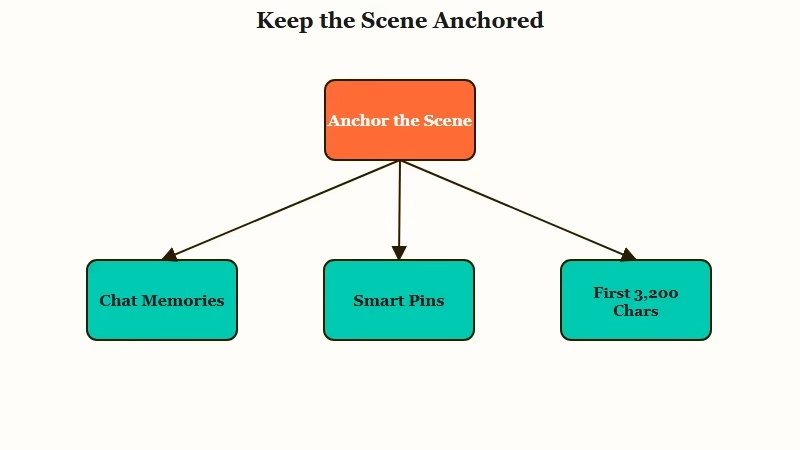
You prevent scene drift by anchoring the scene in the 400-character Chat Memories box and restating key constraints every 15 to 20 messages so they stay in the model’s strongest attention zone.
Prevention beats rescue once you understand the desk.
What is Lost in the Middle: A documented pattern where language models recall information best from the start and end of their context and worst from the middle of a long input.
Chat Memories is the most useful tool here. It is a fixed 400-character box for details the bot should always keep, so it is the right place for the scene’s absolute state, something like “We are in a forest at night, only Mara and the narrator are present.” That note stays high-priority no matter how long the chat runs.
Pinning is trickier than people expect, and overdoing it backfires. Every pinned message eats tokens from the same desk your live chat needs, so if you pin the full 15 with long messages, you can swallow a huge chunk of the window and the bot gets “locked” to the pins while ignoring what you just typed. I keep pins to five or six essentials, and a pin holding only a single space can sometimes break a bot out of a pin-fixation loop.
One more habit pays off: keep your most load-bearing lore inside the first 3,200 characters of the bot Definition. Character AI lets you write up to 32,000 characters there, but the model only reliably reads the first 3,200, so anything past that was never truly loaded.
Here is how the three memory tools compare so you can put each detail where it survives.
| Tool | What it holds | Limit | Best for |
|---|---|---|---|
| Chat Memories | Fixed facts about the scene and persona | 400 characters | The scene’s absolute state |
| Pinned messages | Specific moments you want kept | 15 pins, but they cost tokens | Five or six key beats only |
| Definition | Core character and setup | First 3,200 characters read | Permanent personality and rules |
For quick diagnosis mid-chat, this table maps the symptom you see to the likely cause and the move that fixes it.
| Symptom | Likely cause | Fix |
|---|---|---|
| Unrelated characters wander in | Opening scene scrolled out of context | Bracket edit, then rewind if needed |
| Bot switches to a different language | Model improvising from fragments | Rewind to before the break and re-steer |
| Replies go vague and poetic | Quality regression or peak-hour load | Switch Chat Style, or wait out the update |
| Drift only on very long chats | Context window full | Add Chat Memories, start a fresh chat |
| Bot ignores your live messages | Too many pinned messages | Cut pins to five or six |
If You Want a Companion That Holds the Scene
If scene coherence matters more to you than anything else, a companion platform built around persistent long-term memory holds continuity far better than Character AI’s short context window.
That is the structural fix, not a workaround.
I still think Character AI is great for spinning up a character fast, and the habits above keep most roleplays on track. The honest limit is the small context window, and no amount of pinning fully solves a memory that resets as the chat grows. If that is your main frustration, other platforms are built differently.
Nectar AI leans its whole design around long-term memory, so the scene, the relationship, and the running plot accumulate instead of sliding off a desk. For a more all-around persistent companion, Candy AI keeps the character’s profile and history server-side, so it references earlier moments without you re-feeding them. Either way, the appeal is the same: a story that does not quietly forget where it was.
Frequently Asked Questions
Why does my Character AI bot suddenly bring in unrelated characters?
Your bot lost the active scene when it scrolled out of the context window, so the model rebuilds the story from your last message and pulls in fragments from its training. It is a coherence failure, not a deliberate plot change.
Is scenario switching a bug or just a context limit?
It is usually a context limit. The window only holds a few thousand tokens, so long chats lose the opening scene. A true bug hits short chats too and usually follows a platform-wide model update.
How do I fix it without losing my whole chat?
Edit a recent good reply and add a bracketed instruction like stay in the current scene. If the bot has fully derailed, use Time Travel to rewind to before the break, knowing it deletes everything after that point.
Does pinning more messages keep the bot on track?
Only up to a point. Each pin uses tokens from the same context window, so pinning too many locks the bot to the pins and makes it ignore your live messages. Keep pins to five or six essentials.
How do I stop scene drift on long roleplays?
Put the scene’s fixed state in the 400-character Chat Memories box, keep core lore in the first 3,200 characters of the Definition, and restate key constraints every 15 to 20 messages so they stay fresh.
Quick Takeaways
- A Character AI bot changes the scenario when the opening scene scrolls out of its small context window and the model improvises a new one.
- Models recall the start and end of context best and the middle worst, so long roleplays drift first in the middle.
- Snap the bot back fast with a bracketed edit telling it to stay in the current scene, and rewind with Time Travel only when the scene is fully lost.
- Anchor the scene in the 400-character Chat Memories box and keep core lore in the first 3,200 characters of the Definition.
- If a short memory keeps breaking your story, a long-term-memory companion holds continuity far better than Character AI does.
