
What’s Changed: A “Character AI not available in your country” error is usually a temporary store re-indexing or an app-store age-gate, not a permanent regional ban. The instinct to fire up a VPN is the one move that can get your account banned. The real fix is almost always simpler.
You open the app or the download page and there it is: “not available in your country.” Maybe the app just vanished from your store entirely. Your first thought is that your whole region got cut off.
Here is the part that surprised me when I dug into it. The “Character AI not available in your country” error is usually not a permanent block on your location. In early 2026 the platform started re-indexing its app region by region to comply with new AI laws, and during that sync, users in those zones see a greyed-out download or a country error until the store catches up.
That matters because the panic move most people make, reaching for a VPN, is the single worst thing you can do here. Character AI moved to biometric age checks in 2026, so masking your IP does nothing for the real blocks, and a rotating VPN IP actively trips the security system that hands out account bans.
This article separates the temporary glitches from the genuine regional restrictions, explains why your app disappeared, lays out what really fixes the country error, and tells you when it is time to move to a platform that works without the regional roulette.
Why Character AI Is Not Available in Your Country
Character AI is not available in your country mainly because of a 2026 regulatory rollout, not a deliberate ban on your region.
The platform is re-indexing app downloads zone by zone to meet new AI laws, and app stores hide it from accounts not verified as over 18. The error is often a sync side effect.
Region and locale settings can surface in a stranger way once you are past the block, with chats flipping language mid scene. We cover that case separately in Character AI switching languages mid chat.
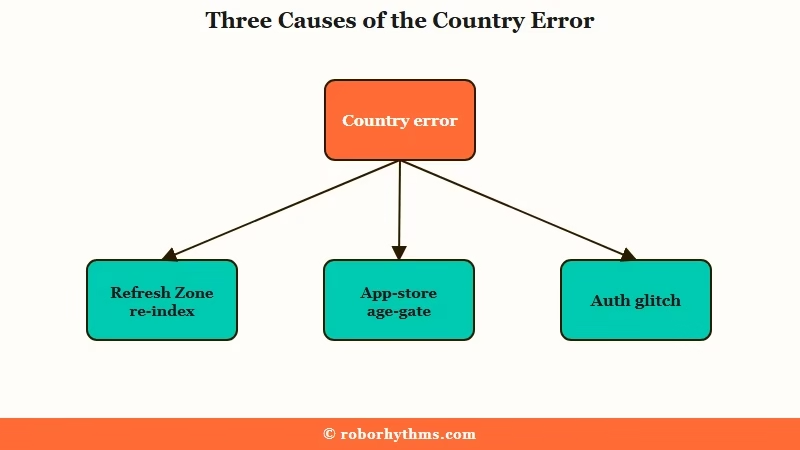
The way I see it, the confusion comes from one error message standing in for three very different causes. People read “not available in your country” and assume a hard geographic wall went up, when usually something more mundane is happening underneath.
Three forces are driving these errors in 2026. The first is regulatory compliance: the platform is re-indexing in what get called “Refresh Zones” to align with laws like the EU AI Act and US enforcement, and the download sits greyed out until the store syncs.
The second is age-gating at the store level. As of January 2026, if your Apple or Google account is not verified as over 18, the app can be hidden from your storefront entirely as part of a teen-safety rollout. The third is a plain authentication glitch, which I cover below.
The regulatory pressure here is real and dated. A Federal Trade Commission policy statement on age verification and COPPA enforcement landed in February 2026, and the EU AI Act’s high-risk rules take full effect in August 2026. Those deadlines are why access tightened so fast.
Is the Country Block Permanent or Temporary
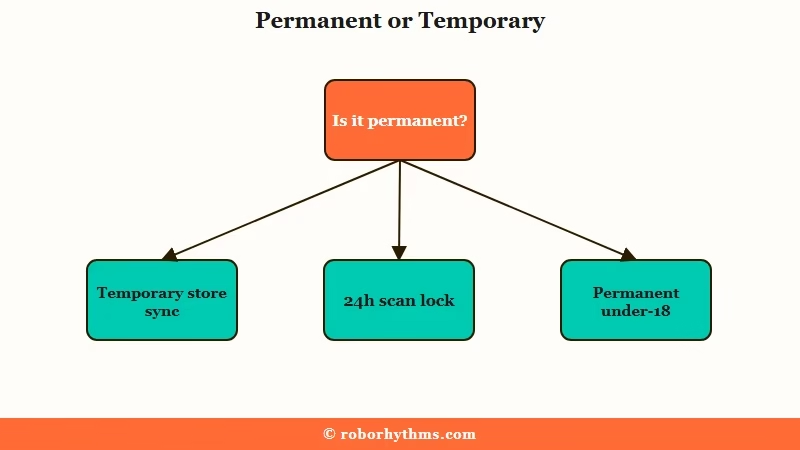
Most “not available in your country” errors are temporary, tied to a store re-index that resolves once the storefront syncs.
A genuine permanent block applies only to confirmed under-18 or unverified accounts after the November 25, 2025 cutoff. A failed face scan is a temporary 24-hour lock, not a country ban.
This is the distinction that saves people a lot of wasted effort. If you are an adult and the app worked for you last month, the odds are high that what you hit is a temporary sync issue, not a wall around your country.
Example scenario: An adult in a “Refresh Zone” sees the download button greyed out with a country error on Monday. They assume a permanent ban and spend an evening on VPNs. By Thursday the store finishes syncing the compliant build and the app installs normally. The wait would have fixed it, the VPN only risked the account.
Here is the rough breakdown of what is temporary and what is not. Confirmed under-18 accounts lost open-ended chat permanently on November 25, 2025. Everyone else is usually looking at a temporary state: a Refresh Zone re-index, a storefront age-gate, or a 24-hour lock after a failed verification scan.
What this tells me is that patience plus the right local fix beats a risky workaround almost every time. The Character AI restricted access guide covers the in-app age-scan state in detail, which is a separate problem from a country-level block.
Why the App Vanished From Your Store
Character AI vanishing from your store is usually an authentication glitch or the new age-gate hiding it, not proof your country lost access.
A February 2026 build had a bug where the app failed to authenticate and went invisible, often mimicking a regional error. Offloading and reinstalling typically clears it.
I find this one trips people up the most, because a missing app feels like the strongest possible signal that your whole region got cut. It usually is not.
There are two common culprits. One is the teen-safety age-gate that hides the app from accounts not verified as over 18. The other is the “disappearing app” glitch from a February 2026 update, where the app failed to sync with the store and the icon went invisible even though nothing was banned.
The fix for the glitch version is local, not regional. On iOS, offload the app and reinstall it. On Android, clear the Play Store cache and retry the download. If the cause was a local authentication failure, that clears it without touching your region at all. For the security-block variant of this, the Character AI blocks users breakdown covers the Cloudflare side.
Will a VPN Fix It and Is It Safe
A VPN will not fix a Character AI country block in 2026 and can get your account banned. The platform verifies age through biometric checks, not simple IP geoblocking, so masking your location does nothing for the real restrictions. A rotating VPN IP also trips the security system that issues blocks.
Let me be blunt here, because the internet is full of “just use a VPN” advice that is now actively dangerous. In 2026 the age and access system moved to biometric identity verification through a provider called Persona. A VPN changes your apparent IP, and that is no longer what the gate checks.
Worse, a VPN can make things worse in two specific ways. Frequently rotating IPs, the Opera VPN in particular, are a known trigger for the security filter that throws a “you have been blocked” message. And if you try to spoof your region or age to slip past verification, the documented outcome is a sweeping permanent account ban with total loss of your chat history.
There is a privacy angle too. Some workarounds ask you to upload an ID to a third-party site to “bypass” the block, which hands your sensitive documents to an unknown party and creates an identity-theft honeypot. I would not go near those.
The honest read: if you genuinely moved countries, change your App Store region the official way. If you are just trying to dodge a verification you would otherwise pass, the risk is your whole account.
How to Fix the Country Error the Right Way
To fix the Character AI country error, rule out the temporary and local causes before anything drastic. Wait out a Refresh Zone sync, reinstall to clear the disappearing-app glitch, complete age verification if prompted, and only change your App Store region if you have genuinely relocated. Skip the VPN.
Most of the fear here comes from treating a temporary sync as a permanent ban, so I would work the list from least to most drastic.
- Wait 24 to 72 hours if you are in a region with a pending store re-index, then retry the download.
- Offload and reinstall on iOS, or clear the Play Store cache on Android, to rule out the disappearing-app glitch.
- Confirm your app-store account is set to an age over 18, since the store hides the app from unverified accounts.
- Complete the in-app age verification if prompted, and retry after any 24-hour lock from a failed scan.
- Change your App Store country only if you have genuinely relocated, following the official steps below.
If you have genuinely moved and need to switch regions on iOS, the path is Settings, then your name, then Media and Purchases, then View Account, then Country/Region. Apple makes you spend any account balance and cancel active subscriptions first, and you will need a valid payment method for the new country.
Here is the quick-reference version of which error maps to which fix.
| Symptom | Likely cause | Fix |
|---|---|---|
| Greyed-out download, country error | Refresh Zone re-index in progress | Wait 24 to 72 hours, then retry |
| App vanished from phone or store | Disappearing-app glitch or age-gate | Offload and reinstall, verify account age 18+ |
| Restricted access after a face scan | Failed or pending age verification | Retry after the 24-hour lock, better lighting |
| “You have been blocked” message | VPN or rotating IP tripped security | Turn off the VPN, use a stable connection |
| Truly moved countries | App-store region mismatch | Change App Store region the official way |
From what I would do in your shoes, steps one through three clear the large majority of these errors without any risk to the account.
Alternatives That Work Without Regional Blocks
If your country is genuinely blocked or the verification keeps failing, a region-agnostic companion app is the clean way out. Several platforms run roleplay without mandatory face scans or the same regional re-indexing, so you skip the country roulette entirely. That is the safest path if waiting and reinstalling did not help.
The honest tradeoff with Character AI in 2026 is that the compliance machinery is only going to tighten, and the 5 to 15 percent of legitimate adults who fail the face scan are stuck in a loop the platform has not solved. If you are in that group, chasing the fix can cost more time than it is worth.
For a clean alternative I keep coming back to Candy AI, which runs a private companion experience without the face-scan gate or the region re-indexing that keeps locking people out. If you want strong long-term memory in that setup, Nectar AI is the other one I would test, since it keeps the conversation tied to your own account.
Plenty of people also move sideways to other roleplay platforms with bigger character libraries, and the best Character AI alternatives roundup compares those in depth. Whatever you pick, the point is to stop fighting a regional verification system that was not built to let you back in.
Frequently Asked Questions
Why does Character AI say not available in your country?
It is usually a 2026 compliance rollout, not a deliberate ban. The app is re-indexing region by region to meet new AI laws, and app stores hide it from accounts not verified as over 18. The error often clears once the store syncs.
Is the Character AI country block permanent?
For most adults it is temporary and resolves after the store re-index completes. A permanent block applies only to confirmed under-18 or unverified accounts after the November 25, 2025 cutoff. A failed face scan is a 24-hour lock, not a country ban.
Will a VPN let me use Character AI in my country?
No. The platform verifies age with biometric checks, not IP location, so a VPN does not bypass the real restrictions. Worse, a rotating VPN IP can trip the security system, and spoofing your region risks a permanent account ban.
Why did the Character AI app disappear from my phone?
Most often a February 2026 authentication glitch made the app invisible, or the new age-gate hid it from unverified accounts. Offloading and reinstalling on iOS, or clearing the Play Store cache on Android, usually brings it back.
Is the country error the same as restricted access?
They are linked but different. Restricted access is the in-app state after a failed or pending age scan. The country error is a store-level availability issue from the regional re-indexing. Both come from the same 2026 verification push.
How do I change my App Store country for Character AI?
On iOS, go to Settings, your name, Media and Purchases, View Account, then Country/Region. You must spend any account balance and cancel subscriptions first, and add a payment method for the new country. Only do this if you genuinely relocated.
Quick Takeaways
- A “not available in your country” error is usually a temporary store re-index, not a permanent ban on your region.
- A VPN does not bypass 2026 biometric age checks and can trigger a security block or a permanent account ban.
- If the app vanished, offload and reinstall on iOS or clear the Play Store cache on Android before assuming a regional block.
- Work the fix from least drastic to most: wait out the sync, reinstall, verify your account age, and only change region if you moved.
- If verification keeps failing, a region-agnostic companion app skips the country roulette entirely.
