
What’s Changed: Janitor AI caps blocked tags at 250 slots, the filter treats capitalization variants as different tags, and lookalike hashtags slip straight past your blocklist. The fastest fixes are blocking broad keywords instead of individual hashtags and blocking repeat-offender creators outright. This guide covers the full system, the bugs, and the workarounds that hold up.
Trying to block tags on Janitor AI should take ten seconds, and lately it feels like a part-time job. You block one unwanted theme, three near-identical hashtags appear in its place, and somewhere along the way you discover there is a hard cap on how many tags you can block at all.
The frustration is justified, but most of it comes from a mismatch between what the blocking system claims to do and what it does under the hood. It is both more powerful than people expect and more fragile than it should be. I have watched users burn their entire blocklist on hashtag variants that one broad keyword would have caught.
This guide walks through how the block system works, why blocked content keeps reappearing, and what I would do differently once you hit the cap. The goal is a clean feed without babysitting your blocklist every week.
What Is Happening With Janitor AI Tag Blocking
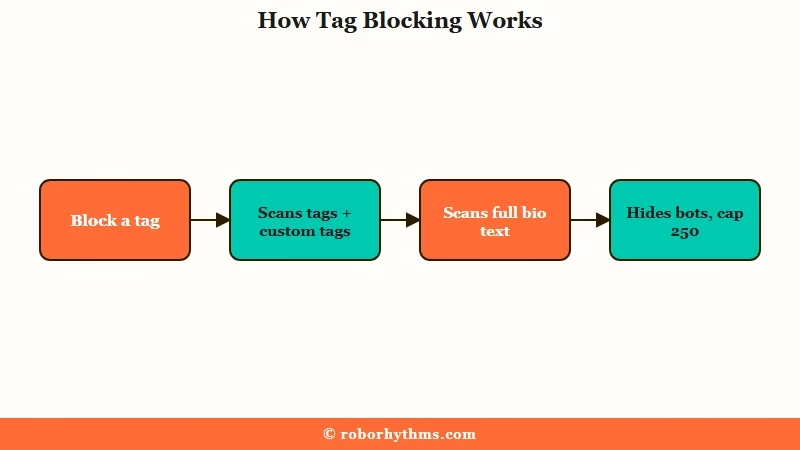
Janitor AI tag blocking is a full-text keyword filter with a 250-slot cap, and both halves of that sentence surprise people. It scans more than tags, and it runs out of room faster than anyone expects.
Janitor AI shipped its dedicated Block screen and formal tag blocking on January 18, 2026, according to the platform’s own changelog. Before that, content curation was a patchwork of search tricks. The new screen consolidated blocked creators, blocked characters, and blocked tags into one place under Settings.
The help docs bury the bigger surprise, which is that blocking a tag filters far more than the tag itself. The official FAQ confirms that a blocked term hides any character carrying it in their official tags, their custom tags, or anywhere in their bio text. Block the word “pink” and a bot whose description mentions a pink shirt disappears from your feed.
The way I see it, that single fact reframes the whole system. What you manage is a sitewide text filter that happens to wear a tag label. That has real consequences for how you spend your 250 slots, and it explains several of the ghost problems covered below.
How Do You Block Tags on Janitor AI
Blocking a tag takes four steps on the web version, and the only tricky part is making the dropdown surface the tag you want. The interface lives in the same place on desktop and mobile.
From my testing, this is the sequence that works without surprises:
- Open your profile menu and go to Settings, then select the Blocks tab (on the mobile app, tap your profile picture in the bottom-right corner and choose Blocks).
- Switch to the Block Tags section of the Block screen.
- Type the tag or keyword you want to hide and wait for the dropdown to populate.
- Select the existing tag from the dropdown list rather than pressing enter, then confirm it appears in your blocked list.
Step 4 carries the whole process. Pressing enter on free text can save an entry that looks blocked but matches nothing, because you created a new tag instead of blocking the real one.
Short tags make this worse. Three-letter tags often refuse to appear in the dropdown at all, and the field suggests something unrelated instead. The community fix is oddly reliable: add a junk letter to force the list to refresh.
Before: You type “NTR” into the block field, the dropdown suggests a different tag or nothing at all, and pressing enter saves a ghost entry that filters nothing.
After: You type “NTRA” with one junk letter added, the dropdown refreshes and the real #NTR tag surfaces in the list, and you select it directly instead of pressing enter.
Users report the extra-letter trick failing intermittently on the mobile app, where the dropdown keeps defaulting to the wrong suggestion. If it will not cooperate on your phone, do your blocklist maintenance on the web version. The lists sync to the same account.
Why Do Blocked Tags Keep Showing Up
Blocked content resurfaces because the filter is case-sensitive, creators deliberately spawn lookalike tags, and ghost entries from the dropdown bug block nothing. None of these are your fault, and all of them have workarounds. If a specific character disappears entirely rather than just slipping past a filter, that is usually a moderated or deleted bot, which is a different problem from tag blocking.
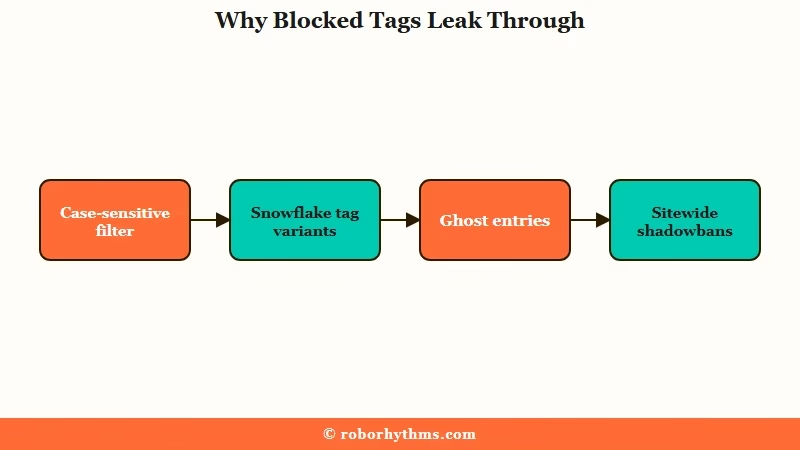
The case sensitivity issue is the one I would check first. Blocking “ntr” does not reliably catch “NTR” or “Ntr”, so a single theme can need three slots just to cover capitalization. User reports conflict on whether this has been patched, which tells you everything about how consistently it behaves.
What is a snowflake tag: A deliberately unique or misspelled tag variant a creator invents so their bots dodge common blocklists and stay visible in every feed.
Snowflake tags are the second leak. Some creators append numbers or letters to a base tag, producing dozens of one-off variants that no blocklist can keep up with. Others lean on misspellings, swapping one letter so the blocked spelling never matches.
The platform itself adds a third wrinkle. Around May 2026, Roblox-related tags were shadowbanned sitewide, and creators pivoted to alternate spellings like #roblocks to stay searchable. Site-level suppression and user-level blocking are separate systems, and the workaround spellings defeat both.
Here is the quick diagnostic table I would run through when something blocked keeps appearing:
| Symptom | Likely cause | Fix |
|---|---|---|
| Blocked tag still shows in your feed | Case-sensitive filter missed a capitalization variant | Block the lowercase, UPPERCASE, and Capitalized versions of the same word |
| Same theme appears under new hashtags | Snowflake variants and misspellings | Block the broad keyword once instead of chasing each hashtag |
| A tag you blocked filters nothing | Ghost entry created by pressing enter on free text | Retype with an extra letter, then select the real tag from the dropdown |
| Removed keyword keeps hiding content | Old save bug where deletions did not stick | Remove it again after a hard refresh and confirm it stays gone |
| Your own bot disappeared from view | Your blocklist matches a word in its bio | Open it via the My Characters page and reword the bio |
That fourth row has history. The changelog notes an April 27, 2026 patch for a bug where removing words from the forbidden list did not save after a refresh. If your blocklist behaved strangely before that date, a cleanup pass is worth five minutes.
One more thing worth separating: if bots are failing to load or the whole feed is misbehaving, that is platform instability rather than filter trouble. The Janitor AI outage checklist covers how to tell the difference before you start rebuilding your blocks.
What Janitor AI Tags Actually Mean Before You Block Them
Janitor AI publishes more than 50 official tags spanning content rating, character origin, traits, genre and point of view, and blocking any of them blocks that word wherever it appears. Knowing which label carries which meaning stops you burning slots on a broad term that quietly hides half the catalog.
Two tags decide what you see at all. Limitless covers sexual or romantic content, while Limited is reserved for platonic bots only, the family, friends and pets end of the catalog. Every other tag sits on top of that split.
A handful carry meanings you would not guess from the word itself. Switch marks a character written as both dominant and submissive, usually in a BDSM sense, which is the answer to a question the search box gets asked constantly.
Dead Dove, also written DD or DDNE, flags darker themes that carry mandatory content warnings. Demi-Human means mainly humanoid with some animal features, which is a different tag from Furry. The full list lives in Janitor AI’s own tag reference.
Several of these are ordinary English words, and that is where the trap sits. Blocking Giant, Royalty or Horror as a keyword also hides any bot whose bio happens to use that word, because the filter reads full text rather than tags alone.
What Does the 250 Tag Limit Mean for You
The blocklist caps at 250 tags, up from 150 a year ago, and hashtag fragmentation can eat the entire allowance on two or three themes. The math turns ugly fast.
A single concept like cheating can exist as dozens of separate custom tags, each one a distinct string the filter treats independently. The way I would budget it, covering one theme with its variants and capitalization forms costs around 40 slots before you notice. Two or three themes later, the wall.
Scale explains why this matters more every month. AI companion apps have been downloaded 220 million times globally, and the category grew roughly 700% between 2022 and mid-2025, per TechCrunch. More creators means more tags, and the block allowance has not kept pace with the volume of things worth blocking.
The cap also interacts with the full-text scanning in a way that bites creators. Your own characters obey your blocklist, so a broad keyword can hide your own bot from you if its bio contains the word.
The My Characters page ignores filters, which is where you go to fix the wording. It is the same kind of silent self-sabotage that makes Janitor AI lorebook problems so annoying to diagnose.
Here is what each blocking method covers, what slips through, and what it costs you:
| Method | What it catches | What slips through | Slot cost |
|---|---|---|---|
| Exact tag block | That precise tag string in tags, custom tags, and bio text | Capitalization variants, misspellings, snowflake versions | 1 slot per exact string |
| Broad keyword block | Every tag and bio containing the word, including most variants built on it | Misspellings that change the core word, case variants | 1 slot per keyword |
| Creator block | Every bot from that account, regardless of tagging tricks | The same themes from other creators | No tag slots used |
Reading that table, the strategy writes itself. Exact tags are precision tools, keywords are the workhorses, and creator blocks are the escape hatch when someone games the other two.
What to Do When You Hit the Block Limit
The highest-leverage move at the cap is replacing hashtag-variant blocks with broad keyword blocks, then blocking the creators who invent bypass tags. I would run this cleanup in a specific order.
What I would do, step by step:
- Open your blocked tags list and group entries by theme, so every cheating variant and every capitalization duplicate sits together.
- Replace each cluster with one broad keyword block, since the filter scans bio text and custom tags either way.
- Re-add capitalization variants only for the keywords that keep leaking, which covers the case-sensitivity gap without rebuilding everything.
- Spot-check your list for ghost entries that were typed rather than selected, delete them, and re-block via the dropdown.
- Spend your freed slots on new themes, and handle the snowflake-tag creators with account-level blocks instead of tags.
Blocking a creator removes every bot they publish from your feed in one move, no matter how creative their tagging gets. Heavy curators lean on this hard, and it costs zero tag slots. It pairs naturally with the keyword approach, with keywords covering whole themes while creator blocks handle the few accounts that keep gaming them.
Keep blocking separate from reporting in your head. A block curates your own feed, while moderation systems decide what stays on the platform, and the two move independently. If your account itself starts behaving strangely, that is a different problem covered in the guide to Janitor AI access restrictions.
One limit-related footnote: blocking tags has no effect on message limits or usage caps, which run on a separate system entirely. A leaner blocklist will not change how much you can chat.
Where to Go if Tag Chaos Is the Dealbreaker
If feed curation is eating your hobby time, the structural fix is a platform where content control happens at the account level instead of tag-by-tag. Some people enjoy pruning a public bot feed, and some people just want to chat.
The 250-slot treadmill exists because Janitor AI’s catalog is a firehose of user-generated characters competing for attention. I’d argue that openness is the platform’s strength and the reason your blocklist needs weekly maintenance at the same time. No keyword strategy changes the underlying incentive for creators to out-tag each other.
Candy AI sidesteps the feed entirely. You design the companion you want, set the personality and boundaries once, and there is no public catalog of stranger-made bots to filter. For people whose blocklist exists to protect one or two specific chats, that trade is worth a look.
Crushon AI keeps the big community catalog but puts heavier filtering controls in your hands, with account-level content preferences that do not burn through a slot allowance. It is the closer cousin to Janitor AI for people who still want discovery, minus some of the tag warfare.
Frequently Asked Questions
How many tags can you block on Janitor AI?
The current cap reported by users is 250 blocked tags, raised from roughly 150 about a year earlier. Capitalization variants and lookalike tags each consume their own slot, which is why broad keywords stretch the allowance further.
Does blocking a tag also hide words in a character’s bio?
Yes. The official FAQ confirms blocked terms apply to official tags, custom tags, and blurb text alike. Blocking “pink” hides a character described as wearing a pink shirt, so choose keywords with that reach in mind.
Why does a blocked tag still show up in my feed?
The filter is case-sensitive, so capitalization variants slip through, and creators spawn misspelled or numbered tag variants that dodge exact-match blocks. Ghost entries created by pressing enter on free text also block nothing.
Can you block a creator instead of individual tags?
Yes, and it is the strongest tool in the system. A creator block hides every bot from that account regardless of tags, costs no tag slots, and defeats snowflake tagging completely.
Will blocking a keyword hide my own characters?
It can. Your blocklist applies to your own content, so a bot with a blocked word in its bio vanishes from your normal view. The My Characters page ignores filters and is where you edit it back into visibility.
What do Janitor AI tags mean, and what is the switch tag?
Tags on Janitor AI are creator-applied labels covering content rating, origin, traits, genre and point of view, and the search filters read them to sort the character list. Janitor AI defines the switch tag as a character considered both dominant and submissive, typically in a BDSM setting, which is why it appears alongside the dominant and submissive tags rather than on its own.
Quick Takeaways
- Tag blocking on Janitor AI is a full-text keyword filter: it scans official tags, custom tags, and bio text, and it applies to your own bots too.
- The cap sits at 250 blocked tags, up from 150, and hashtag fragmentation can burn the whole allowance on two or three themes.
- Block broad keywords instead of individual hashtag variants, then cover capitalization forms only for the leakers.
- Beat the short-tag dropdown bug by typing one extra letter so the real tag surfaces, then selecting it instead of pressing enter.
- When curation costs more than it returns, Candy AI removes the public feed from the equation and Crushon AI moves filtering to account level.
