
What’s Changed: Character AI runs two separate shadowban systems, and neither one sends a notification. A “soft ban” hides your character from search while the direct link still works. A “hard ban” kills the link entirely. One wrong word in the greeting field is enough to trigger either, and the platform will not tell you which happened or why.
Your character existed yesterday. You could search for it, share the link, and watch the chat count climb. Today the name returns nothing. The link still works if you have it bookmarked, but nobody new can find it.
That is a soft shadowban, and it is the most common reason Character AI search stops working. The platform flagged something in your character’s definition, greeting, or description and quietly removed it from search results. No email, no notification, no moderation panel entry.
This guide covers how to tell which type of ban hit you, the specific words and phrases that trigger it, and how to get your character back into search results.
Why Character AI Search Stops Working
Character AI search failures split into two categories: platform bugs and shadowbans. A platform bug affects everyone at the same time and fixes itself. A shadowban targets your specific character and does not resolve on its own.
The fastest way to tell the difference is to search for a popular, well-known character. If that character also fails to appear, the search system itself is down. If popular characters appear but yours does not, your character has been flagged.
I’d recommend running this check before spending time on troubleshooting. A search system bug is not your problem to fix, and it clears up within hours during most outages.
What is a shadowban: A restriction that hides content from public discovery without notifying the creator. The content still exists and works via direct link, but it no longer appears in search results or recommendations.
The February 18, 2026 “Moderatedpocalypse” was the largest mass shadowban event on the platform. Character AI ran automated keyword sweeps and visual-signature detection across thousands of characters in a single night. Bots with protected IP (Disney, Marvel, Star Wars) and bots with flagged descriptions disappeared simultaneously, catching many original characters as collateral.
How to Tell if Your Character Is Shadowbanned
The direct link test is the definitive diagnostic. If your character’s URL still loads the chat when you are logged out, the character exists but has been soft-banned from search. If the URL returns an error when logged out, it is a hard ban.
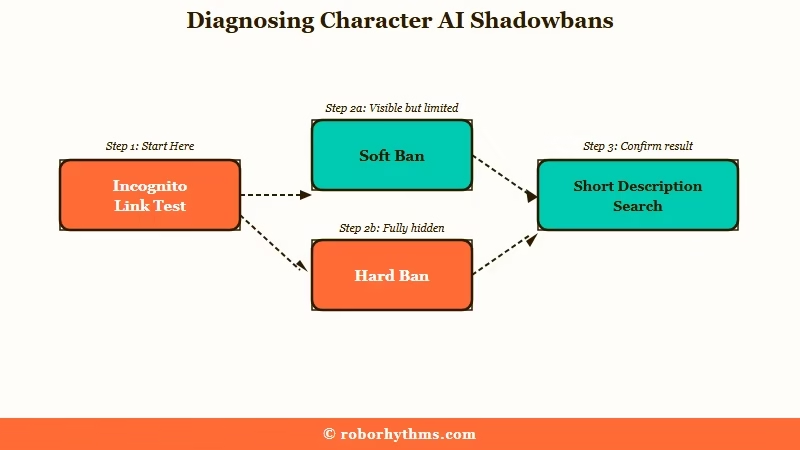
Here is the sequence I’d walk through:
- Copy your character’s direct URL from your creator dashboard.
- Open a private/incognito browser window (not logged into Character AI).
- Paste the URL. If the character loads, it is a soft ban (search-hidden only). If it fails, it is a hard ban (link dead).
- Search for your character by its exact name on Character AI. If it does not appear, soft ban is confirmed.
- Search for your character’s exact short description text instead of its name. If the character appears this way but not by name, the issue is a name-specific filter, not a full shadowban.
Before: You search for your character name, get no results, and assume the platform deleted it.
After: You test the direct link in incognito. It loads fine. Your character is soft-banned from search, not deleted. The fix is in the definition, not a support ticket.
Step 5 is a diagnostic most creators miss. Searching by the short description text instead of the character name can sometimes bypass the filter and surface the character. If this works, the shadowban is triggered by something in the name field specifically.
What Words and Phrases Trigger a Shadowban
A single flagged word in the greeting field is the most common shadowban trigger, and the greeting is more sensitive than the description.
One creator documented that including “a\\hole” in the character greeting caused an immediate soft ban that lifted the moment the word was removed.
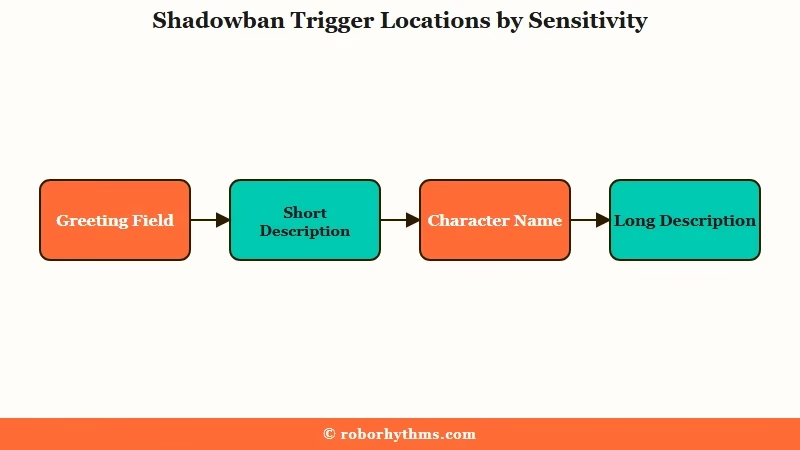
The platform scans three fields for trigger content: the character name, the short description, and the greeting. The greeting field is the most aggressively filtered because it is the first content a user sees.
| Trigger Location | Sensitivity | Example |
|---|---|---|
| Greeting field | Highest | “a\\hole” in greeting = immediate soft ban |
| Short description | High | “is bottom heavy” flagged even on SFW bots |
| Character name | Medium | IP names (Disney, Marvel characters) trigger visual-signature sweeps |
| Long description | Lower | Scanned but less likely to trigger alone |
Words that trigger soft bans (character hidden from search but link works): mistress, hostess, lewd, swallow, cleavage, moaning, and context-dependent terms like virgin, thrusting, and sucking.
Words that trigger hard bans (character link stops working): the platform maintains an unpublished list, but community documentation identifies terms explicitly referencing anatomy and sexual acts. Using any of these in any field removes the character entirely.
The phrase “is bottom heavy” is a case worth knowing about. It is a physical description that reads as SFW, but the platform’s filter flagged it as suggestive and removed the character from search. Creators who write detailed physical descriptions for non-sexual characters are particularly vulnerable to this.
How to Fix a Shadowbanned Character
The fix for a soft-banned character is to find and remove the trigger word, then wait for the search index to update. There is no “unban” button. The system re-indexes the character after the flagged content is gone.
Here is the process I’d recommend:
- Open your character’s definition in the creator dashboard.
- Read the greeting field word by word. Compare it against the trigger lists above. Remove anything that could be flagged.
- Check the short description for physical descriptors, profanity (even mild), or suggestive phrasing.
- Save the changes.
- Wait 24-48 hours for the search index to re-crawl the character.
- Search for the character name again. If it appears, the fix worked.
If the character still does not appear after 48 hours, submit a support ticket through Character AI’s help center. Include the character’s direct URL and a clear statement that the character contains no policy-violating content. Tickets for search visibility issues are handled separately from content moderation appeals.
For characters hit by a hard ban (the “Moderated” label, also called “Gravestone mode”), editing is disabled. The character is sealed. The one recovery option is to search your browser history for URLs containing /share/ or ?share= parameters. These cached share links sometimes provide a read-only view of the character sheet, letting you copy the personality and greeting text to rebuild the character from scratch under a clean definition.
When the Problem Is the Search System Itself
Character AI’s search breaks independently of shadowbans during platform outages and updates. When this happens, even popular characters with millions of chats stop appearing in results.
Common fixes for a platform-wide search bug:
- Clear your browser cache and cookies for character.ai specifically.
- Disable any ad blockers or privacy extensions temporarily.
- Try a different browser (Firefox, Edge, or Safari instead of Chrome).
- Wait 30-60 minutes and retry. Server-side search issues typically resolve within an hour.
The Character AI status page tracks incident history, though it shares the same acknowledgement lag problem other AI platforms have. Community reports on r/CharacterAI tend to surface search outages faster than the official status page.
According to Business of Apps, Character AI had roughly 45 million users in 2025. At that scale, search bugs affect millions of users simultaneously, which makes them easier to confirm through community channels.
If search is broken for everyone and you are in the middle of an active roleplay session, the practical move is to bookmark your character’s direct URL and share it manually until search recovers. For an alternative that does not depend on a public search index at all, Candy AI lets you build private characters that are always accessible through your account without needing search to find them. Nectar AI takes a similar approach, with the added benefit that your conversation history persists across sessions without any manual save or export step.
For more alternatives when Character AI’s limitations become a pattern, the full Character AI alternatives list covers the broader options. And for related issues with the platform’s filter system, the guide to Character AI deleting messages explains the separate mid-chat filter mechanic. If you have been locked out of your account entirely during one of these events, the age verification troubleshooting guide covers the verification flow.
Frequently Asked Questions
Does Character AI tell you if your character is shadowbanned?
No. Character AI does not send any notification when a character is removed from search results. The only way to detect a soft ban is to search for the character yourself and notice it is missing.
Can you recover a hard-banned character on Character AI?
Not directly. Hard-banned characters receive a “Moderated” label that disables editing and seals chat history. The only partial recovery method is searching your browser history for cached /share/ URLs that may contain the character’s definition text.
How long does it take for a shadowban to lift after fixing the trigger?
Most creators report 24-48 hours for the search index to update after removing flagged content. Some characters reappear within hours. If the character is still missing after 48 hours, submit a support ticket.
Why does my SFW character get shadowbanned?
The filter scans for words and phrases that could have suggestive meaning in any context. Terms like “is bottom heavy” or “hostess” can trigger a soft ban even on characters with no adult content. Physical descriptions are the most common false-positive category.
Is there a way to export Character AI chats before a ban?
Yes. Character AI offers an official data export tool at Settings > Account > Download My Data. Third-party tools like CAI Tools (Chrome extension) and characterai-dumper (GitHub) can also export individual chat logs.
Can I find shadowbanned characters using third-party tools?
Yes. Sites like caibotlist.com index characters independently of Character AI’s built-in search. If a character was indexed before being shadowbanned, it may still appear on these external directories.
Quick Takeaways
- Character AI search not working usually means your character is soft-banned, not deleted. Test the direct link in incognito to confirm.
- The greeting field is the most sensitive trigger zone. A single flagged word there causes immediate shadowbans.
- Remove the trigger word and wait 24-48 hours for the search index to update. There is no manual unban button.
- Search by your character’s short description text instead of its name to diagnose whether the filter targets the name specifically.
