
What’s Changed: Character AI scans each reply in real time and wipes the whole message the moment a chunk trips its filter, even on non-sexual roleplay. The 2026 filter flags emotional patterns like possessiveness and dependency, not just banned words, which is why innocent scenes vanish. This guide explains the mechanic and the workarounds that genuinely keep a scene going.
You are mid-scene, the reply is flowing, and then a sentence or two in, the whole message vanishes. A gray “this message may violate our guidelines” notice sits where your story was, and the bot picks back up writing nonsense.
If that loop is driving you up the wall, you are in a very large crowd. Character AI still pulls around 45 million active users, per Business of Apps data, and message deletion is one of the loudest complaints among them.
Here is the part most people get wrong. Character AI deleting messages is almost never about your input. The filter only scans what the bot writes, and it does it in real time, chunk by chunk, as the reply generates.
The way this filter behaves in 2026 explains nearly every frustration people have with it. Once you understand why the wipe happens, the workarounds stop feeling like guesswork. Let me walk you through the mechanic and how to keep a scene from collapsing.
Why Character AI Deletes Your Messages Mid-Chat
Character AI deletes messages because its filter scans the bot’s reply in real-time chunks and wipes the entire message the instant one chunk trips a safety rule. That is why you see a sentence appear before it disappears.
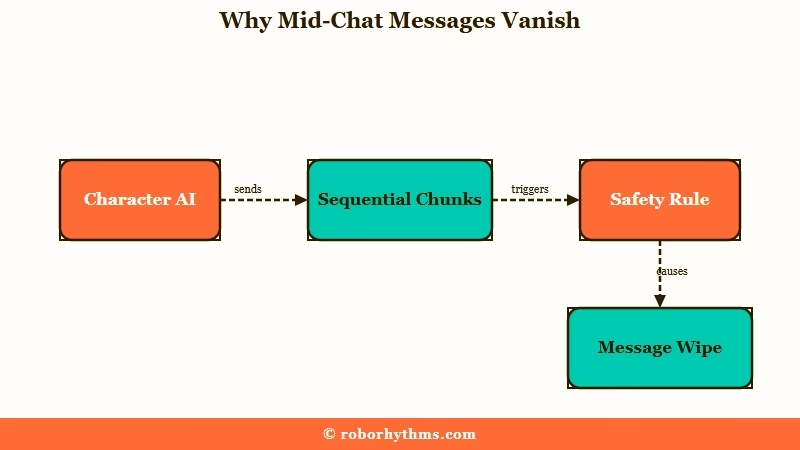
The bot does not generate a full reply and then check it. It writes in sequential chunks, and the moderation layer scans each chunk as it lands. So a perfectly good opening sentence can show up, and then a single word three sentences later trips the scanner and the whole message gets pulled.
That “ghosting” effect, where text appears and then vanishes, is the clearest sign the bot was generating what you wanted right up until one phrase set off the alarm. It is not random, even though it feels that way.
What is the Character AI filter: A real-time moderation layer that scans the bot’s generated text as it streams and removes any reply it flags, separate from the model writing the response.
The detail that surprises people most is that the filter watches the bot, not you. Your own messages are never deleted, no matter what words you use. Your input still shapes what the bot tries to write next, which is why the bot’s reply gets caught even when your message sailed through fine.
Why Innocent Roleplay Gets Flagged
Innocent roleplay gets flagged because the 2026 filter analyzes emotional patterns and intent, not just banned words. It now flags possessiveness, obsession, and dependency, which is why a non-sexual, non-violent fluff scene can still get wiped.
This is the shift almost nobody explains. Through 2026, Character AI moved its filter from simple keyword detection to layered behavioral analysis. The system reads tone, emotional intensity, and conversational patterns, and it specifically watches for archetypes like possessiveness, obsession, and emotionally manipulative behavior.
So a tender, clingy “I never want to leave your side” moment in a romance roleplay can trip the same wire as something genuinely against the rules. The filter is not reading the scene as harmless fluff. It is reading the emotional pattern and deciding it looks like dependency.
What gets me about this is how counterintuitive it makes the whole system. You can have a scene with mild profanity sail through because the context reads as casual, and then watch a sweet, completely clean exchange get deleted because the emotional tone tripped a behavioral flag. The filter cares about pattern, not just vocabulary.
The Hidden Costs of a Deleted Message
A deleted message does more than break immersion. It burns your daily swipe allowance and can freeze the chat into a forced restart. Those two costs are what turn an annoyance into a reason to quit.
The first hidden cost hits free-tier users hardest. A filtered message still counts against your daily swipe and message limit, so every wipe spends one of your limited interactions on a reply you never even got to read. You can burn through a chunk of your daily allowance on content the system deleted.
The second cost is technical. A filtered message frequently leaves the chat stuck, with an unresponsive bubble or garbage text, and the only fix is to restart the bot or the whole app. The deletion is not just a content problem at that point, it is a UI freeze.
Here is how to read what you are seeing and what to do about each version of the problem.
| What you see | What it means | What to do |
|---|---|---|
| Text appears then vanishes mid-reply | A chunk tripped the filter during generation | Swipe for a new reply or reword your last message |
| Clean fluff scene gets wiped | Behavioral filter flagged the emotional pattern | Add an OOC tone instruction, soften the intensity |
| Chat freezes after a deletion | Filtered reply left the interface stuck | Restart the bot or app to unfreeze it |
| Swipes draining fast | Filtered messages still count against your limit | Reword before sending to cut wasted generations |
| Bot writes garbage after a wipe | The deletion confused the bot’s context | Edit its last message to restore the thread |
The swipe-burn issue is the one I would watch most closely, because it stacks on top of the existing daily cap. If you are already rationing swipes, our breakdown of the Character AI swipe limit covers how the cap works and why filtered messages make it bite harder.
How to Stop Character AI From Deleting Messages
The most reliable way to stop deletions is to steer the bot with blunt out-of-character instructions and reword away from the patterns the filter flags. Arguing with the bot in-scene does not work; direct commands do.
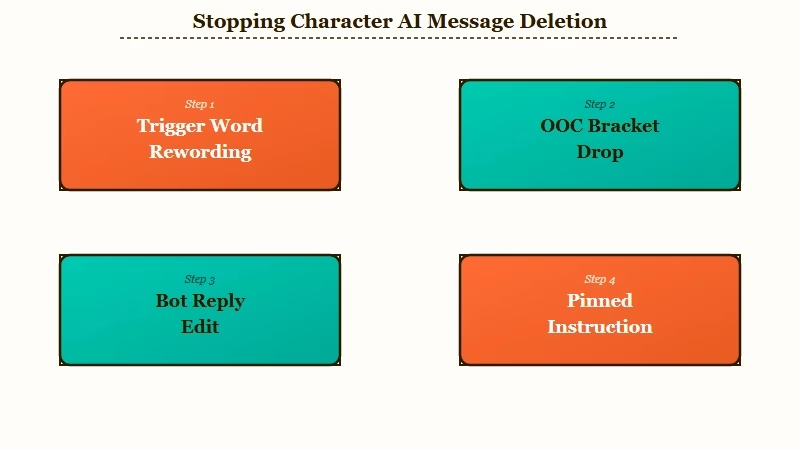
The filter responds to context and emotional pattern, so the fixes that work are the ones that change the pattern. Here is the sequence I would run, in order:
- Reword your own message to avoid the trigger. Swap direct phrasing for indirect, suggestive language, and soften an emotional spike before it escalates.
- Drop an out-of-character instruction in brackets. The reliable format is
(OOC: keep the tone calm and avoid escalating). Keep it short and blunt, never polite. - If the bot ignores the OOC note and stays in character, do not argue with it. Use the Edit button on its reply and rewrite it to acknowledge the instruction, which forces the correction into the chat history.
- Pin your OOC instruction so it stays in the bot’s active memory. This stops the bot from forgetting the boundary after 20 to 30 messages, which is when most scenes start drifting back toward deletions.
- Build intensity gradually rather than jumping straight into a charged scene. A slow ramp from a calm starting point keeps the filter from registering a sudden shift.
The bracket syntax is the part people fumble, so here is the difference that matters most.
Vague: “please can you maybe tone it down a little if that’s okay?”
Specific: “(OOC: reset tone. Keep the scene calm and concise. Continue.)”
The first reads as in-scene dialogue, so the bot treats it as part of the roleplay and ignores it. The second is a blunt system-style command the bot recognizes as an instruction, which is the whole point. Politeness is what makes OOC fail.
If your messages are not vanishing but getting chopped off at the end instead, that is a different issue. Our guide on Character AI cutting off messages covers the truncation problem, which has its own fixes.
What Does Not Work When Messages Get Deleted
Several popular fixes are myths that make the loop worse, especially being polite or arguing with the bot inside the brackets. Knowing what to avoid saves you from solidifying the exact behavior you are trying to break.
I see the same dead-end moves over and over, so here is what to skip:
- Being polite in your OOC notes. The bot reads “could you please” as roleplay dialogue, not a command, so the instruction gets absorbed into the scene and ignored.
- Engaging when the bot starts talking back inside OOC brackets. Replying only cements the loop. Delete both your OOC message and the bot’s reply to break it cleanly.
- Believing the developers are “scrubbing” your chats to punish you. There is no evidence of that. Sudden strictness is almost always a backend update or a server reset, not a targeted action.
- Treating OOC as a permanent setting. It is a temporary override. Once a chat drifts or resets, the bot reverts to its defaults and you have to reestablish the instruction.
The broader frustration here is real, and it has been building all year. Our piece on the filter breaking the app lays out why so many longtime users feel the platform has turned on them.
When the Filter Is Not Worth Fighting
If you are spending more time managing the filter than enjoying the roleplay, the math has tipped and it is time to look elsewhere. The workarounds buy you stability, but they do not remove the wall.
I am not against working with the system. The OOC and rewording tactics genuinely help, and for a lot of people they are enough. The way I see it, though, there is a point where babysitting a behavioral filter through every scene stops being worth it, especially when a clean fluff moment keeps getting wiped for no reason you can see.
If you have hit that point, the realistic move is a platform that does not delete your scenes mid-sentence. If you want creative roleplay that holds its tone without a filter pulling the rug every few messages, Candy AI is the one I would try first. It keeps scenes stable and remembers context across sessions, which is exactly what the deletion loop destroys.
For something closer to a like-for-like companion experience with fewer interruptions, Nectar AI is the other one worth a look. It leans into longer memory and consistent tone, so a scene you build does not get reset by a filter wipe. For a wider field, our roundup of no-filter Character AI alternatives lays out the trade-offs.
Example scenario: On Character AI, a clingy romance line gets flagged as dependency and the reply vanishes, burning a swipe and freezing the chat. On Candy AI, the same scene continues uninterrupted, and the companion remembers the emotional thread instead of dropping it.
Frequently Asked Questions
Why do my Character AI messages disappear after they start typing?
Because the filter scans the bot’s reply in real-time chunks as it generates. When a later chunk trips a safety rule, the system wipes the entire message, even though the opening sentences were fine. Seeing text before it vanishes means the bot was generating normally until one phrase flagged.
Does Character AI delete the messages I type?
No. The filter only monitors and removes the bot’s generated replies, never your input. You can use any wording you want without your own message being deleted, though what you write still influences what the bot tries to generate next.
Why does Character AI delete clean, non-sexual roleplay?
The 2026 filter analyzes emotional patterns, not just banned words. It flags possessiveness, obsession, and dependency, so a clingy or emotionally intense fluff scene can trip the same wire as prohibited content even when nothing against the rules is involved.
Do deleted messages count against my swipe limit?
Yes. A filtered message still consumes your daily swipe and message allowance. Free-tier users end up burning limited interactions on replies the system deletes before they can read them.
How do I use OOC to stop messages getting deleted?
Use a short, blunt instruction in brackets like (OOC: keep the tone calm and avoid escalating). Keep it direct, never polite, because the bot reads polite phrasing as dialogue and ignores it. Pin the instruction so it stays in memory.
Quick Takeaways
- Character AI deletes messages because its filter scans the bot’s reply in real-time chunks and wipes the whole message when one chunk trips.
- The 2026 filter flags emotional patterns like possessiveness and dependency, which is why clean fluff roleplay gets deleted.
- Filtered messages still burn your daily swipe limit and can freeze the chat into a forced restart.
- Blunt OOC instructions, rewording, and edit-and-continue work; being polite or arguing with the bot does not.
- If managing the filter costs more than the roleplay is worth, a stable alternative like Candy AI or Nectar AI removes the wall.
