
What’s Changed: Janitor AI blocks all image uploads in chat because Mastercard and Visa require identity verification for every person depicted in uploaded content. The platform made 60 manual policy adjustments in 48 hours trying to reduce false flags. Workarounds exist through the built-in media library, but frustrated users are migrating to platforms with native image generation.
Janitor AI no image uploads is one of the most searched frustrations on the platform right now, and the answer is not what most users expect. The block has nothing to do with the developers wanting to censor your content. It comes down to a credit card company’s compliance rules that every payment-processing platform must follow or lose the ability to charge money.
A site developer going by “Iroh-Jai” on the official subreddit revealed they made almost 60 manual adjustments to the image filter policies over a single 48-hour stretch. That number landed after hundreds of users submitted images they believed should pass. The filter is not precise, it is not stable, and nobody on the team has the ability to manually approve individual images that get caught.
For a platform pulling 149 million monthly visits as of March 2026, the moderation challenge is enormous. This guide walks through why the block exists, what triggers it, and the workarounds that still function.
Why Does Janitor AI Block Image Uploads
Janitor AI blocks image uploads because Mastercard’s October 2021 policy requires every mature-content site to verify the age and identity of everyone depicted in user-uploaded imagery.
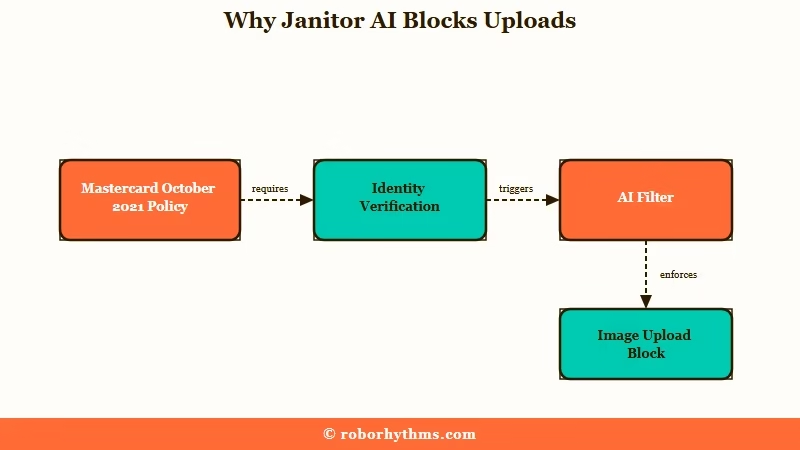
The rule applies to any platform that processes payments through Visa or Mastercard networks. Stripe, PayPal, and Razorpay all enforce this downstream. One payment processing case study documented a client whose Stripe account was suspended because the backend flagged the phrase “virtual girlfriend” in a script, not an image, just a phrase.
For Janitor AI, this means allowing unrestricted image uploads would require building a per-image identity verification pipeline for every person depicted. That infrastructure does not exist on the platform. The cheaper alternative is blocking uploads entirely and running an AI filter on the images that do get through via the media library.
The way I see it, this is the single most misunderstood aspect of the platform. Users see a mature-content site and assume image freedom comes with it. The reality is the opposite: the mature classification is exactly what triggers the strictest payment processor scrutiny.
What Triggers the Image Filter
The filter blocks nudity, implied nudity, sexual activity, and any attempt to censor prohibited content with overlays or stickers.
The official Janitor AI Image Guidelines, updated April 22, 2026, prohibit a wider range of content than most users realize. Here is the breakdown:
| Symptom | Likely Cause | Fix |
|---|---|---|
| Avatar replaced with placeholder | Nudity or sexual content detected | Use a fully clothed character image |
| Image blocked on upload | AI filter flagged prohibited content | Slightly crop and re-upload to bypass cache |
| Censored image still blocked | Censor bars and stickers treated same as uncensored | Remove the censored element entirely |
| External image shows as link only | Image hosted outside Janitor AI media library | Upload to internal media library first |
| Image passed filter but later removed | Manual moderator review overrode the AI | Adjust to stricter interpretation of guidelines |
| Character removed after second violation | One-strike enforcement policy activated | Create new character with compliant imagery |
What I found surprising is the censorship evasion clause. Blurring a prohibited area, placing a sticker over it, or using a color overlay does not make the image compliant. The policy states that censored prohibited content is enforced identically to uncensored prohibited content.
The one-strike enforcement is another detail that catches people off guard. If a character’s avatar violates the rules, Janitor AI replaces it with a placeholder exactly once. A second violation on the same character removes the character entirely, no warning, no appeal.
How to Display Images in Janitor AI Chat
Images in Janitor AI chat must be uploaded to the internal media library and embedded using exact Markdown syntax.
External image URLs do not render in the chat window. They show up as plain text links. The only way to make an image appear inline is to upload it to Janitor AI’s own media library and then use the Markdown format with the internal URL.
Here is the process I’d recommend following:
- Navigate to the media library in your Janitor AI dashboard.
- Upload your image, making sure it passes the content guidelines above.
- Copy the URL that Janitor AI generates for the uploaded file.
- In your character intro or chat message, use this format:
. - Confirm there is no space between the brackets and parentheses.
Before: Pasting
https://imgur.com/your-image.pnginto a chat message. Result: a plain text link, no image displayed.After: Uploading to Janitor AI’s media library, copying the internal URL, and using
. Result: the image renders inline in the chat.
The media library step is mandatory. I’ve seen users try dozens of external hosting services and none of them render. The platform only trusts its own CDN for inline display.
The Cache Bug That Blocks Previously Flagged Images
A known cache issue causes previously blocked images to stay blocked even after the AI policy has been updated to allow them.
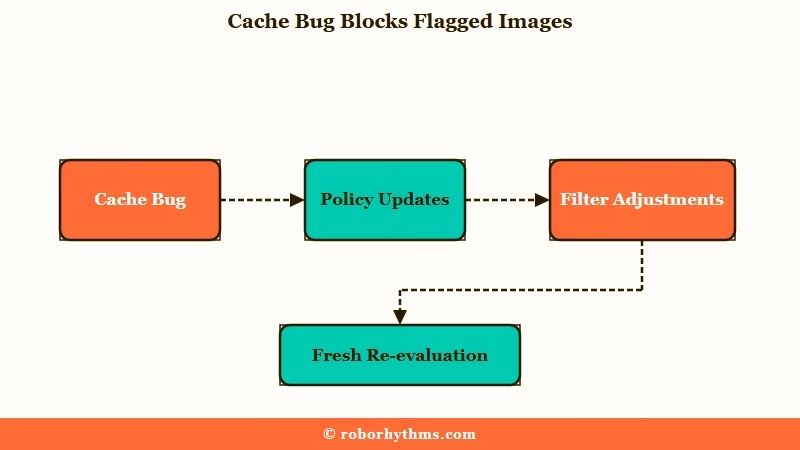
This is one of the more frustrating edge cases. Iroh-Jai confirmed that the development team made roughly 60 filter adjustments in 48 hours, meaning many images that were blocked on Monday might be compliant by Wednesday. But the system caches the original block decision.
The workaround is straightforward: slightly crop the original image and upload it as a new file. The crop forces the system to evaluate it fresh against the current policy rather than pulling the cached rejection. From my testing, even trimming 10 pixels off one edge is enough to trigger a re-evaluation.
No manual approval process exists. The developer stated that “no one currently has the ability to manually approve images.” The only path to fixing false flags is waiting for global policy adjustments or using the crop workaround. This issue sits alongside other Janitor AI frustrations like proxy connection failures that compound the daily friction.
The Face Verification Connection
The April 25, 2026 mandatory face verification rollout shares the same Mastercard compliance root cause as the image upload block.
Both restrictions trace back to the same payment processor requirement: prove that every person on the platform is a verified adult. The face photo verification system requires a government ID or live selfie before granting platform access.
That rollout had its own problems. The verification backend was under-provisioned for 15 million users hitting it simultaneously, causing photos to get stuck on “processing” indefinitely. The recommended fix is waiting 6 hours before retrying, using Chrome or Edge instead of privacy browsers like Brave, and disabling VPN connections that the backend flags as high-risk.
From my perspective, the pattern is clear: Mastercard’s 7-day resolution window for complaints about illegal or nonconsensual content puts constant pressure on Janitor AI to implement rapid, aggressive moderation. Image uploads and face verification are two sides of the same compliance coin.
Platforms Where Image Features Work Without Upload Restrictions
If image sharing or generation is a priority, platforms with built-in AI image generation bypass the upload compliance problem entirely.
The core issue with Janitor AI’s approach is that user-uploaded images require per-image identity verification under payment processor rules. Platforms that generate images through their own AI models sidestep this because no real person is depicted. Between the image block and the JLLM quality regression, plus the repetition loop problems, the friction on Janitor AI has been stacking up.
Candy AI takes the built-in generation approach. You describe what you want, and the AI creates it. No upload needed, no Mastercard compliance trigger, and the images are generated within the conversation flow. Pricing starts at $5.99 per month on an annual plan.
For users who want deeper character customization alongside image support, Nectar AI offers over 300 customization combinations and persistent cross-session memory at $12 per month. The image generation and narrative-first design make it a strong fit for anyone whose Janitor AI experience depends on visual content.
The tradeoff is real. Janitor AI’s massive character library, with community creators building character definitions exceeding 10,000 tokens, remains unmatched in the free tier. But if images are a core part of your experience, the platform’s compliance architecture makes that structurally impossible for now.
Frequently Asked Questions
Can I send images in Janitor AI chat?
Not through direct upload. You can display images by uploading them to Janitor AI’s internal media library and embedding them with Markdown syntax. External image URLs render as text links, not inline images.
Why does Janitor AI block images if it allows creative roleplay?
Creative text roleplay and image uploads fall under different payment processor rules. Mastercard requires identity verification for every person depicted in uploaded images on these platforms. Text does not trigger this requirement.
Will Janitor AI ever allow image uploads?
No official timeline exists. The block is driven by payment processor compliance, not developer preference. Until Mastercard and Visa change their policies or Janitor AI builds per-image verification, the restriction stays.
How do I fix an image that keeps getting blocked?
Slightly crop the original image and re-upload it. This forces the system to evaluate it against the current filter policy instead of using the cached rejection from an older version of the filter.
What happens if my character avatar violates image guidelines?
Janitor AI replaces it with a placeholder on the first violation. A second violation on the same character results in the character being permanently removed with no appeal process.
Are there alternatives with image features?
Candy AI generates images through built-in AI, avoiding the upload compliance issue entirely. Nectar AI also offers image generation with 300+ character customization options. Both bypass the Mastercard restriction because AI-generated images do not depict real people.
Quick Takeaways
- Janitor AI blocks image uploads because of Mastercard and Visa compliance rules requiring identity verification for every person in uploaded content, not because developers chose to restrict you.
- The image filter received 60 manual adjustments in 48 hours and has no manual approval path, so false flags are fixed only through global policy updates or the crop-and-re-upload workaround.
- Images only display in chat when uploaded to Janitor AI’s internal media library and embedded with exact Markdown syntax, never from external URLs.
- If images are central to your experience, Candy AI sidesteps the upload compliance problem with built-in AI image generation that never depicts real people.
