
The Fix: Most Janitor AI lorebooks that “do not work” are not broken. The entries are stuck at the 1 percent default trigger probability that imports apply, the keyword is not matching because of whole-word or case settings, or the book was never linked to the character. Set probability to 100, fix the keyword match, and confirm the lorebook is attached.
The most common reason a Janitor AI lorebook is not working has nothing to do with your writing. It is a single hidden number. When you import a lorebook, Janitor often sets each entry to a 1 percent trigger probability, which means the lore almost never fires no matter how perfectly you wrote it.
I have watched people rebuild entire lorebooks from scratch over this, convinced their entries were malformed, when the actual fix was changing one field from 1 to 100. That is the kind of trap this platform is full of, and it is why “my lorebook does not work” is one of the most repeated questions in the Janitor community.
So here is the full diagnostic. I will walk through why entries fail to trigger, the exact settings that control activation, a step-by-step fix sequence, and a test you can run in 10 seconds to confirm the lore is firing. You will finish knowing whether your lorebook works or exactly which setting is killing it.
Why Your Janitor AI Lorebook Is Not Triggering
A Janitor AI lorebook fails to trigger for one of five reasons: a 1 percent probability default, a keyword that does not match, the book not being linked to the bot, scan depth set too shallow, or token budget overflow dropping the entry.
Almost every “not working” case is one of these.
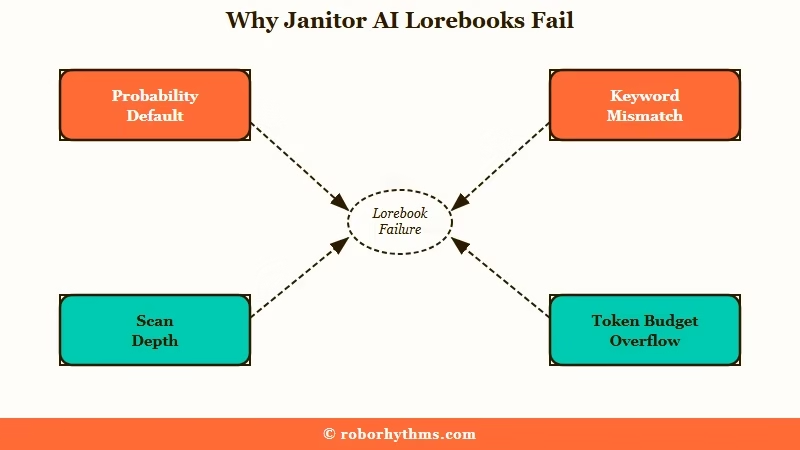
The frustrating part is that none of these throw an error. The lore just silently never appears, so the bot acts like the entry does not exist. People assume the writing is wrong when the real culprit is a setting they never opened.
Here is the fast diagnostic table I would run through first.
| Symptom | Likely cause | Fix |
|---|---|---|
| Entry never appears, even with the keyword | Probability stuck at 1 percent (import default) | Set probability to 100 |
| Keyword is used but nothing fires | Match Whole Words on, or Case Sensitive mismatch | Turn off whole-word match or fix capitalization |
| Lore worked early then vanished in long chats | Scan depth too shallow or token budget overflow | Raise scan depth, set key entries to Constant |
| Bot ignores the lore entirely | Lorebook not linked to the character | Attach the book in the character settings |
| Bot gives contradictory facts | Multiple entries firing on the same keyword | Use secondary keys or higher priority |
What is a lorebook: A lorebook is a set of text entries that inject world or character details into the prompt only when their trigger keyword appears in chat. It is not a wiki the AI looks things up in.
The 1 % Probability Trap on Imported Lorebooks
Imported Janitor AI lorebook entries usually default to a 1 percent trigger probability, so they fire roughly once in a hundred messages.
This single setting is behind most “my lorebook does nothing” reports.
The way I see it, this is the first place to look before you touch anything else. Open each entry and find the probability field. If it reads 1, that entry was effectively switched off the moment it was imported, and no amount of perfect keywords will save it.
Set critical lore to 100 percent so it always fires when triggered, and use 90 to 95 percent for entries you want firing often but not on every single message. I would not leave anything important below 90.
Before: Entry “Brittany’s backstory”, keyword “Brittany”, probability 1 percent. The bot has met Brittany 40 times and still describes her wrong.
After: Same entry, probability set to 100 percent. The backstory now injects every time “Brittany” appears in your message.
How Janitor Lorebook Triggers Work
Janitor AI lorebook entries are triggered by keywords in the user’s message, not by the AI, and the match must satisfy your case and whole-word settings.
Misunderstanding this is the second biggest cause of dead lore.
The myth I see most often is that the bot will “remember” a keyword once it says the word itself. It does not work that way. The entry only activates after the keyword exists in the chat history from your side, so if the bot mentions a character, the lore fires on your next message, not the bot’s current reply.
Two match settings quietly break triggers. With Case Sensitive enabled, “Apple” will not fire for “apple”, and with Match Whole Words enabled, “Apple” will not fire inside “Applebottom”. I keep Match Whole Words on for clean triggers but always double-check my capitalization.
Scan depth is the other silent killer. A scan depth of 2 means Janitor only checks the last user message and the last bot message for keywords, so lore mentioned several turns ago stops counting.
If your bot forgets lore mid-scene, raise the scan depth or set that entry to Constant so it is always included. For deeper steering, Janitor AI OOC commands pair well with a working lorebook.
How to Fix a Janitor AI Lorebook That Will Not Work
To fix a broken Janitor AI lorebook, raise the probability, confirm the keyword match, link the book to the character, then test it with an out-of-character command.
This sequence resolves the large majority of cases.
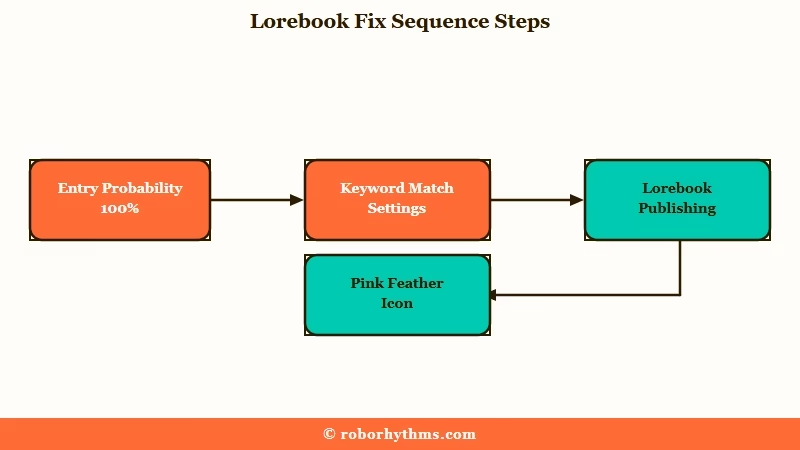
The order matters here, because you want to rule out the silent settings before you start rewriting entries. Here is the exact path I would walk.
- Open each entry and set probability to 100 for critical lore, 90 to 95 for frequent lore.
- Check the keyword. Turn off Match Whole Words if your trigger is part of a larger word, and fix capitalization if Case Sensitive is on.
- Hit Publish on the lorebook. In Janitor, Publish is the save button, and an unsaved book never functions.
- Open the character settings and confirm the lorebook is linked to that bot, not just created.
- Raise scan depth if the lore needs to survive several messages, or mark it Constant if it must always be present.
- Test it. Send an out-of-character message like “(OOC: Tell me about [keyword])” and see if the bot returns your exact lore.
One detail almost nobody mentions: when an entry successfully activates, a small pink feather icon appears in the chat where the lilac doge icon normally sits. That feather is your live confirmation the lore fired.
If you never see it, the entry is not triggering, and you are back to step one. If steps like this keep failing, Janitor AI roleplay prompt fixes cover the next layer.
Priority and Insertion Order Are Not the Same Thing
Priority decides which lorebook entries survive when the token budget overflows, while insertion order decides how close the text sits to the conversation.
Confusing the two is why “important” lore still gets ignored.
This trips up almost every creator I have seen. People set priority to 10 thinking it tells the AI to focus harder on that entry. It does not. Priority is a survival ranking, so a 10 means the entry is kept and a 1 or 2 means it is dropped first when too much lore triggers at once.
To make the AI pay attention to an entry, you change its insertion order instead. Numbers from 0 to 10 push the text far back in the prompt with the least attention, and numbers from 76 to 100 place it right next to the live conversation where the model weighs it most. I reserve the high insertion-order range for immediate details like appearance and current scene.
There is a “more is better” trap here too. Stuffing in hundreds of entries can overflow the token budget, which then drops your core character data and makes replies inconsistent.
Janitor AI keeps growing fast, with traffic up about 26 percent month over month according to Similarweb, so a lot of new users hit this exact wall. Lean books with high-priority essentials beat sprawling ones every time.
When to Stop Fighting the Lorebook
If you are spending more time tuning probability and scan depth than chatting, a platform with automatic memory is the better fit.
Lorebooks reward tinkerers, and they punish everyone who just wants the bot to remember.
The honest truth is that Janitor’s lorebook system is powerful precisely because it is manual, and that manual control is exactly what frustrates casual users. If you want a companion that remembers names, history, and preferences across sessions without you building a single entry, the platform you pick matters more than your settings.
For that hands-off experience, Nectar AI is the one I point people to first, because it carries persistent memory across sessions automatically. If you also want voice and image features in the same app, Candy AI covers that ground without asking you to learn a token budget.
If you would rather stay in the roleplay-frontend world, the best Janitor AI alternatives lays out the trade-offs.
If a bot disappears entirely instead of just ignoring its lore, our explainer on moderated versus deleted Janitor AI bots shows how to tell which state it is in.
Frequently Asked Questions
Why is my Janitor AI lorebook not triggering even when I use the keyword?
Check the trigger probability first, since imports often default it to 1 percent. Then confirm Match Whole Words and Case Sensitive are not blocking the match, and make sure the lorebook is linked to the character.
How do I know if my lorebook is working?
Send an out-of-character test like “(OOC: Tell me about [keyword])” and see if the bot returns your exact lore. In active chats, a small pink feather icon appears when an entry successfully fires.
What is the difference between priority and insertion order?
Priority decides which entries survive when the token budget runs out, so higher numbers stay. Insertion order decides where the text sits in the prompt, so higher numbers get more AI attention. They do different jobs.
Do lorebooks work with proxies like DeepSeek or Claude?
Yes. Lorebooks function by injecting text into the prompt before it reaches the model, so they work with both the native JLLM and external proxies. The proxy mainly changes writing quality, not whether lore fires.
Why does my bot give contradictory lore?
This happens when multiple entries trigger on the same keyword at once. Use secondary keys or raise the priority on the entry you want to win so the bot stops receiving conflicting facts.
Do I need to publish a lorebook for it to work?
Yes. In Janitor AI, the Publish button is the save action, and an unpublished lorebook stays a draft that does nothing during chat. Publishing does not make it public.
Quick Takeaways
- The number one reason a Janitor AI lorebook fails is the 1 percent default probability on imported entries, so set critical lore to 100.
- Lorebook entries trigger on keywords in your message, not the bot’s, and whole-word or case settings can silently block the match.
- Confirm the book is linked to the character and Published, then test with an “(OOC: Tell me about [keyword])” command and watch for the pink feather.
- Priority controls survival under token budget, insertion order controls AI attention, and bloated books overflow and drop your core lore.
