
What’s Changed: Character AI biased or out-of-character responses usually come from two hidden causes: the platform silently routing you to a lighter model during busy hours, and the model drifting off its persona during deep, emotional chats. Both are fixable with a few steering tricks, not a new app.
If your Character AI suddenly started giving stereotyped, sexist, or weirdly out-of-character replies, your instinct is probably that the platform broke something. The real story is more useful than that, because most of it is in your control.
Two things drive almost every “my character changed” complaint I see. The model quietly downgrades you to a lighter version when servers are busy, and any long, emotional roleplay slowly pulls the bot off its assigned personality.
In this guide I explain why biased and off-character responses happen, what is really going on under the hood, and the exact steering moves that snap a character back into place. None of it requires a new account or a paid tier.
Why Character AI Gives Biased or Stereotyped Replies
Character AI gives biased replies because the model inherits stereotypes from its training data, and those same statistical patterns are what make it sound human in the first place.
You cannot fully delete the bias without making the model useless.
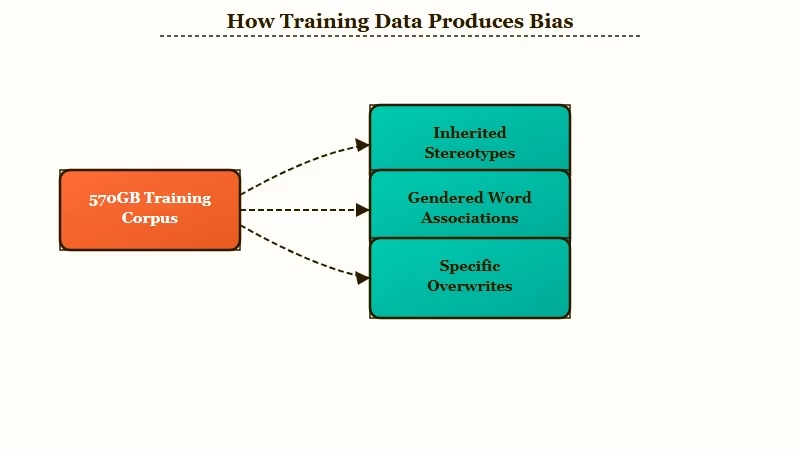
Language models learn from a massive corpus of human writing, on the order of 570GB of books, articles, and internet text. That data carries every cultural assumption baked into it, so the model defaults to “construction worker equals male” because that is the most statistically likely guess.
This is measurable, not anecdotal. A UNESCO study on bias in language models found women were linked to domestic words like “home” and “family” up to four times as often as men, while male names drew “business,” “executive,” and “career.”
Here is the counterintuitive part. A model with zero bias would be a random word generator, since the same predictive patterns that make a character feel real are the ones that occasionally produce a sexist or stereotyped line. From my testing, that means the goal is steering the model, not expecting it to be perfectly neutral on its own.
The fix is to overwrite the default with specifics. A bot told only “she is confident” leaves the model free to fill gaps with stereotypes, while a bot shown exactly how she talks has far less room to drift into generic archetypes.
Why Your Character Suddenly Feels Dumb or Off
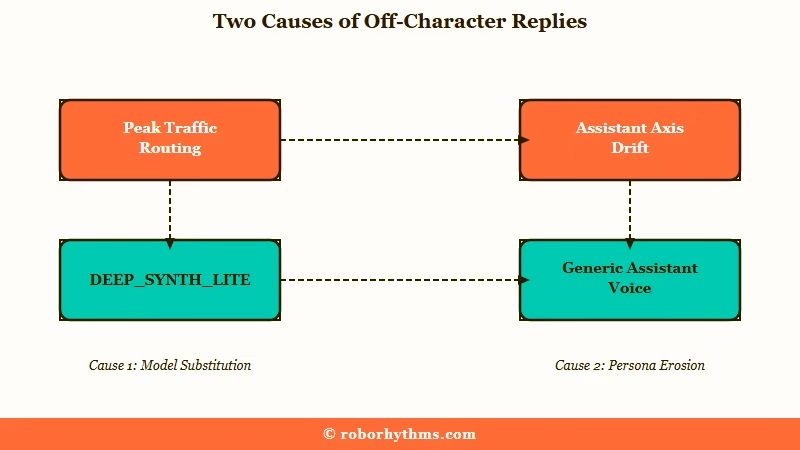
A character that suddenly turns generic or “braindead” is usually a sign Character AI silently routed you to a lighter model during heavy traffic, not that your bot is broken.
This is the single most misunderstood cause of off-character replies.
What is persona drift: When an AI model slowly abandons its assigned character and slips back toward a generic, helpful “assistant” voice over the course of a conversation.
Network analysis shows the platform runs more than one model behind the scenes. The high-fidelity style carries a DEEPSYNTH tag, while the lighter, faster one uses DEEPSYNTH_LITE, and during peak hours you can get quietly bumped to the lite version. That is why replies often feel sharper late at night when server load drops, an effect the community calls temperature drift.
The second cause is persona drift, and it has a name in the research. Anthropic’s work describes an “Assistant Axis,” where models are trained to default to a helpful assistant persona, and the further a bot drifts from that anchor during emotional or vulnerable roleplay, the more likely it is to produce harmful, biased, or out-of-character lines.
The way I see it, that is why characters tend to break exactly when the scene gets deep.
The newer PipSqueak 2 model makes this worse by rambling and anchoring on its own mistakes. One off-context reply can cascade into a whole conversation of invented details, so catching drift early matters more than it used to. The PipSqueak 2 fix guide covers the model-specific quirks in depth.
How to Fix Biased and Out-of-Character Responses
You fix biased or off-character replies by steering the model back with persona specifics, OOC commands, and aggressive pruning, rather than swiping endlessly.
The daily swipe cap makes swiping a losing strategy anyway.
Here is the sequence I would run the moment a character starts drifting:
- Prune the bad reply immediately. Regenerate or delete the first off-context message before the model anchors on it. Deleting the last 5 to 10 messages where it started hallucinating clears the drift fast.
- Drop an OOC command. Type an instruction in the format “OOC: stay in character and be more assertive.” This steers the model thousands of tokens deep without breaking your chat history. The same OOC command technique used on Janitor AI works here.
- Use the Global Edit trick. Star a high-quality past reply, click the edit pencil, and append a style hint like “[Internal monologue enabled]” or “Respond with detailed narration and dialogue.”
- Add a scene anchor. At the top of your message, state three things: location, mood, and goal. This pins the model to the current context and stops it inventing events.
- Cap the length. If PipSqueak 2 is rambling, write a hard cap into the character definition, such as “Respond in 2-3 short paragraphs maximum, never exceed 150 words.”
Example scenario: Say your knight character starts giving polite, therapist-style advice mid-battle. Instead of swiping, you add “OOC: stay in character, he is blunt and impatient under pressure” and regenerate. The next reply snaps back to the gruff voice because you steered the model instead of gambling on a reroll.
How to Stop Drift Before It Starts
The best defense against biased and off-character replies is a character definition that shows the voice with example dialogue instead of describing it, plus a short, focused lore set. Prevention beats mid-chat firefighting.
The strongest technique I have found is a voice sheet. Rather than a personality summary, you write short example lines showing how the character really speaks, including how their voice shifts under stress, like “Robert (angry): Wait, what did you call me?” Showing the model the voice leaves far less room for stereotype fill-in.
Counterintuitively, more lore makes drift worse, not better. Dumping a wall of backstory overloads the model into vague, generic replies, so pinning three canon facts the character must never forget beats a 2,000-word biography. Less context, tightly chosen, holds a persona better than a flood of detail.
The symptom-to-fix map below covers the common failure modes in one place.
| Symptom | Likely cause | Fix |
|---|---|---|
| Suddenly generic or “assistant” voice | Persona drift along the Assistant Axis | OOC steer plus a scene anchor |
| Stereotyped or sexist lines | Training-data bias filling vague gaps | Voice sheet with example dialogue |
| Short, “braindead” replies | Silent routing to the lighter model | Retry off-peak, use the Global Edit trick |
| Invents events that never happened | PipSqueak 2 contextual drift | Prune the last 5 to 10 messages |
| Rambling 300-word walls | PipSqueak 2 default length | Hard length cap in the definition |
When a Different App Handles Characters Better
If you are fighting drift every session, a companion app built around persistent character consistency will frustrate you less than constantly steering Character AI. It comes down to how much manual upkeep you want.
Character AI gives you a huge character library and a free tier, but the silent model routing and tightening limits mean you do a lot of the consistency work yourself. Some apps put that work on their side instead.
If memory and a stable persona across sessions matter most, Nectar AI is the alternative I steer people to, since it holds character details without the constant re-anchoring. For a polished all-in-one companion that keeps a consistent personality, Candy AI is the other one worth testing. If you would rather stay and optimize, knowing which Character AI model is best for your style is the next step.
Frequently Asked Questions
Why did my Character AI bot suddenly become sexist or biased?
The model inherits stereotypes from its training data and falls back on them when your character definition is vague. It is not usually a deliberate change. A voice sheet with specific example dialogue is the most reliable fix.
Why does my character act generic or like a therapist now?
This is persona drift along the “Assistant Axis.” The model is trained to default to a helpful assistant voice and slips toward it during long or emotional chats. An OOC command plus a scene anchor pulls it back.
Why are my replies suddenly short and dumb?
Character AI runs multiple models and can route you to a lighter one during heavy traffic. Replies often improve off-peak. The Global Edit trick, starring a good reply and adding a style hint, also helps recover quality.
Does deleting messages fix out-of-character responses?
Yes, pruning works well. Newer models anchor on their own mistakes, so deleting the last 5 to 10 messages where the bot started drifting clears the bad context before it cascades into the rest of the chat.
Can I fix bias without writing a long backstory?
Yes, and a long backstory often makes it worse. Pinning three key canon facts and adding a few example dialogue lines holds a persona better than a giant lore dump, which tends to overload the model into generic replies.
Quick Takeaways
- Biased replies come from training-data stereotypes filling vague character definitions, so show the voice with example dialogue.
- “Braindead” replies are usually a silent downgrade to a lighter model during peak traffic, so retry off-peak or use the Global Edit trick.
- Characters drift toward a generic assistant voice during deep roleplay, the effect Anthropic calls the Assistant Axis.
- Steer with OOC commands and scene anchors instead of swiping, since the daily swipe cap makes rerolling a losing game.
- Pin three canon facts instead of dumping lore, and switch to a memory-first app like Nectar AI if the upkeep gets old.
