
What’s Changed: Most CrushOn AI message blocks are model-specific, not an account ban or a sitewide crackdown. The “I cannot generate” wall usually comes from GPT-3.5-based Classical models that are hard-coded to refuse, and switching to one of CrushOn’s own models clears it. A depleted free quota is the other common cause people mistake for a filter.
When CrushOn AI blocks your messages, the first thing most people assume is that the platform cracked down on everyone at once. From what I have seen, that is almost never what is happening.
The block you hit is usually tied to the specific model your character is running. Models built on GPT-3.5, like CrushOn’s Classical Alpha and Beta, are hard-coded to refuse certain prompts no matter what settings you change. Swap that character onto one of CrushOn’s own models and the same message often goes through untouched.
The other half of the time, the “Message Blocked” error is not a content filter at all. Free accounts get only 50 messages a month, and once that runs dry the app throws an error that looks identical to a moderation block.
This guide walks through why CrushOn AI blocks content, which models avoid it, and the exact sequence I would run to fix a blocked message in under a minute.
What’s Happening When CrushOn AI Blocks Your Messages
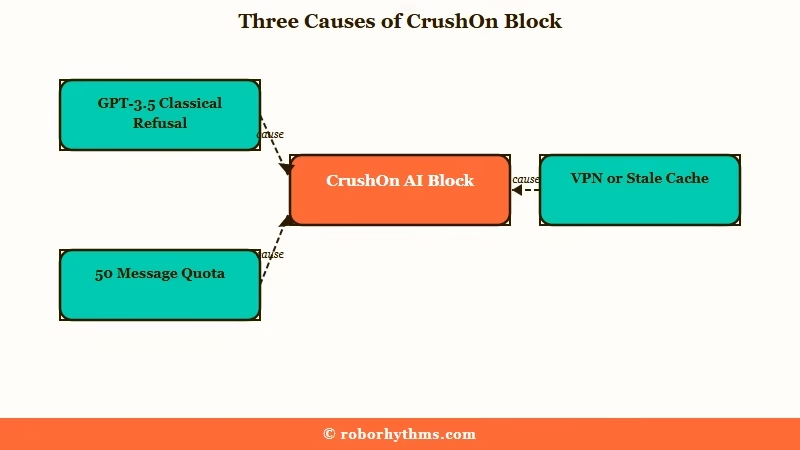
A CrushOn AI block is usually one of three things: the wrong model, a depleted message quota, or a technical glitch. It is rarely a permanent account action.
What is a model in CrushOn AI: The underlying language engine running your character. CrushOn lets you switch a single character between many models, each with its own filtering behavior and memory quality.
The most common trigger is the model. CrushOn runs a mix of engines, and the ones based on GPT-3.5 are the strictest. Its Classical Beta and Alpha models are hard-coded to refuse certain prompts, which is why a workaround that clears the block on one model fails completely on another.
The second trigger is your quota. Free users get 50 messages per month, and the error that appears when you run out reads almost the same as a content block.
I have watched people spend an hour troubleshooting a filter when they had just run out of messages. The April 2026 free tier change shifted those limits, so check your current cap before you blame the filter.
The third trigger is technical. A VPN, an ad blocker, or a stale app cache can all interrupt the chat and surface a generic block error that has nothing to do with what you typed.
Why CrushOn AI Blocks Content
CrushOn AI blocks content for one of a handful of specific reasons, and each has a different fix. The fastest way to diagnose it is to match the symptom to the cause before you start changing settings.
Here is the cause-and-fix map I would keep handy.
| Symptom | Likely cause | Fix |
|---|---|---|
| “I cannot generate” mid-chat | GPT-3.5 Classical model refusing | Switch the character to Aries, Taurus, or Hermes |
| “Message Blocked” instantly | Free quota of 50/month used up | Wait for reset or upgrade your plan |
| Chat freezes or errors randomly | VPN, ad blocker, or stale cache | Disable VPN, clear cache, reload |
| Character vanished from your list | Visibility glitch or paywall | Reopen from chat history or the web version |
| Replies ignore your last message | Model memory limit reached | Delete the last one or two messages |
The pattern I have noticed is that people reach for the most dramatic explanation first. A block feels personal, so the instinct is to assume a ban. In practice, the boring causes (wrong model, empty quota, a VPN flag) cover the large majority of cases.
That matters because the fix for each one is completely different. Fighting a quota limit with prompt tricks gets you nowhere, and switching models does nothing if your real problem is a stale cache.
How to Fix the CrushOn AI Message Blocked Error
Fixing a CrushOn AI block is a five-step sequence, and most people resolve it at step two. Work through them in order rather than guessing.
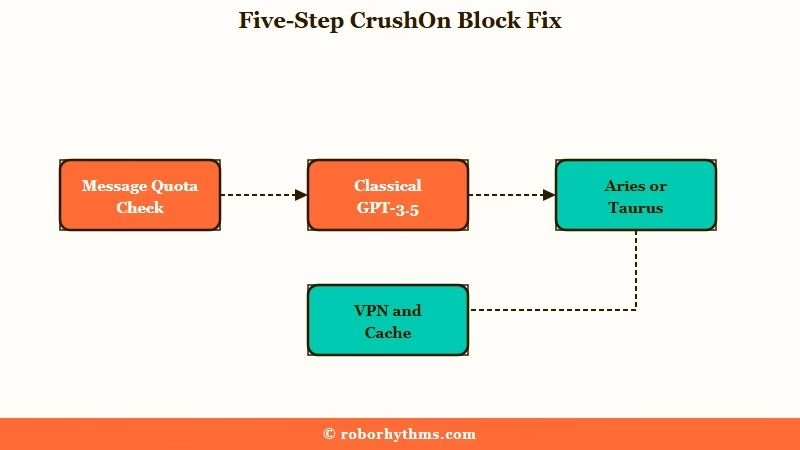
From what I have seen, cache and quota account for a big share of the false alarms, so here is the order I would run:
- Check your message quota first. If you are on the free 50-a-month tier and the error hit suddenly, you have likely run dry, and no setting will change that.
- Switch the character off any Classical or GPT-3.5 model onto Aries, Taurus, or Hermes 7B. This single step clears most mid-chat refusals.
- Edit the message to soften the exact trigger word, then resend. CrushOn evaluates the latest message, so a small rewrite often slips through.
- Delete the last one or two messages to reset the conversation context, which clears a block that latched onto a single bad turn.
- Disable any VPN or ad blocker, clear the app cache, and reload. If the app keeps misbehaving, the web version is noticeably more stable.
Before: “Why won’t it respond, the screen just says it cannot continue and I did not change anything.”
After: Switch the character from CO Classical Beta to Crushon Aries, delete the last reply that triggered the wall, and resend the same message. The scene continues without the block.
If a character keeps breaking its persona instead of blocking outright, an out-of-character command helps. Typing the bracketed instruction “don’t reflect or break character” pushes the model back into the role rather than into a generic safety response. The Janitor AI guide to OOC commands covers the same technique in more depth.
Which CrushOn AI Models Do Not Block Content
CrushOn’s own models and open-weight engines are far less likely to block content than the GPT-3.5-based Classical models. Picking the right engine is the single biggest lever you have.
The way I see it, model choice is where most of the frustration starts and ends. Switch off the strict engines and a lot of the “censorship” people complain about just disappears.
Engine choice decides reply quality too, not only what gets past the filter, which we broke down separately in the best CrushOn AI model comparison.
| Model | Filtering behavior | Best for |
|---|---|---|
| CO Classical Alpha and Beta | Strict, GPT-3.5 hard-coded refusal | Safe, story-light chat only |
| Crushon Aries and Taurus | Loose, built for no-filter roleplay | Most users hitting blocks |
| Hermes 7B | Very loose, chaotic and creative | Experimental, less predictable |
| Ultra Gemini 3 Pro | Loose with strong logic and memory | Long, consistent story builds |
| Ultra Kimi K2 | Loose and fast | Quick, responsive scenes |
The Ultra tier is where memory and consistency jump up, which matters if your blocks are really the model losing track of the scene. Ultra models hold a storyline far better than the Pro tier, though they cost more per message. If memory loss is your real issue, the guide to CrushOn AI memory not working breaks down the settings that help.
One honest caveat: Hermes 7B is fun but unpredictable, and I would not lead with it if you want a stable scene. Aries or Taurus is the safer default for most people who just want the blocks to stop.
Is CrushOn AI Safe and Private
CrushOn AI is functional but carries real privacy tradeoffs, so treat it as a public service rather than a private journal. The data practices are the part most users never check.
This is the section I wish more people read before they get attached to the platform. Mozilla’s research team flagged CrushOn in its Privacy Not Included review, and the findings are worth knowing.
Mozilla found 45 trackers firing within one minute of using the service, including standard marketing trackers. Its researchers also noted the privacy policy references “health data” 23 times, covering sensitive categories, and that the company could not confirm basic security standards like encryption at rest.
None of that means you cannot use CrushOn. It means you should keep genuinely sensitive details out of your chats and assume the conversation is not as private as the intimate framing suggests. The full CrushOn AI review digs into the value side of that tradeoff.
What to Do If CrushOn AI Keeps Blocking
If the blocks keep coming after you have switched models and cleared your cache, you have two real options: upgrade for the better models or move to a platform with fewer restrictions. Both are valid depending on how much you like CrushOn otherwise.
If you mostly like CrushOn and the blocks trace back to the free tier or the weaker models, the paid plans are the cleaner fix. Upgrading unlocks the Ultra models and a much larger message allowance, which removes both the quota error and the strict-model refusals in one move. You can upgrade your CrushOn plan directly if that is the path you want.
If the blocks have worn you down and you want a platform that just gets out of your way, it is worth trying an alternative built around persistent characters and fewer interruptions.
Nectar AI is the alternative I would test first, because it holds a consistent persona across long conversations and tends to interrupt the scene far less than CrushOn’s stricter models. It is the smoother ride if constant troubleshooting is what pushed you away.
Frequently Asked Questions
Why does CrushOn AI keep blocking my messages?
Usually because the character is on a strict model, you have used up your free monthly messages, or a VPN or cache glitch is interfering. Switching to a model like Aries or Taurus fixes most mid-chat blocks.
How do I fix the CrushOn AI message blocked error?
Check your message quota first, then switch off any GPT-3.5 Classical model, edit the triggering message, delete the last one or two replies, and disable any VPN or ad blocker. The web version is more stable than the app.
Which CrushOn AI models do not block content?
Crushon Aries, Taurus, Hermes 7B, and the Ultra models like Gemini 3 Pro are built for no-filter roleplay and rarely block. The Classical Alpha and Beta models, based on GPT-3.5, are the strict ones to avoid.
Is CrushOn AI free?
There is a free tier, but it caps you at 50 messages per month with reduced memory. Paid plans start around $4.90 to $5.99 a month and unlock higher message limits and the better models.
What is the difference between Pro and Ultra models?
Ultra models offer noticeably better memory and story consistency for long, complex scenes. Pro models are often bundled into unlimited message packages, which suits users who want to tweak characters without burning credits.
Is CrushOn AI safe to use?
It works, but privacy is a real concern. Mozilla found 45 trackers in one minute and flagged extensive sensitive-data collection, so keep genuinely private information out of your chats.
Quick Takeaways
- Most CrushOn AI blocks are model-specific, so switch off GPT-3.5 Classical models onto Aries or Taurus first.
- A “Message Blocked” error is often just a depleted free quota of 50 messages a month, not a content filter.
- Run the five-step fix in order: check quota, switch model, edit the message, delete the last one or two replies, disable VPN and cache.
- Keep sensitive details out of CrushOn chats, since Mozilla found 45 trackers and heavy data collection.
- If blocks persist, upgrade CrushOn for the Ultra models or try Nectar AI for fewer interruptions.
