
TL;DR: Control AI agent tool access in production by enforcing permissions outside the model, not in the prompt. Give each agent the narrowest typed tools its workflow needs, route any action you cannot undo in five minutes through a human approval gate, and review tool scopes as a deployment artifact so permissions do not drift.
Losing control of AI agent tool access is the fastest way to scare your security team. It usually happens the moment you move a multi-agent system from staging to production with the same broad API keys you used in development.
In dev, handing every agent generic write access and a shared key is what keeps the errors down, and in production it is what keeps the incident channel busy.
Here is the uncomfortable part. Researchers at Johns Hopkins recently demonstrated they could exfiltrate API keys and credentials from production agents running at Anthropic, Google, and Microsoft by abusing GitHub Actions workflows the agents were allowed to touch. These were not toy setups, and the root cause was the same every time: the agent could reach more than its task required.
This guide walks through how I would lock down AI agent tool access before it reaches production, using risk tiering, narrow typed tools, and enforcement that lives outside the model. You will finish with a concrete checklist you can apply to your own agent stack this week.
Why Broad Agent Permissions Blow Up in Production
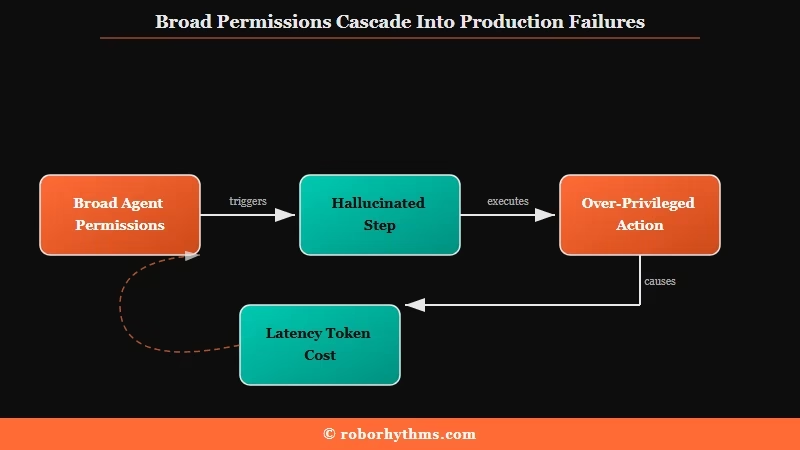
Broad agent permissions blow up because an agent will use any access it has the moment the model hallucinates a step, and most teams cannot even tell afterward that an agent did it. The blast radius is the whole problem.
The scale of the blind spot surprised me. A March 2026 Cloud Security Alliance study found that more than two-thirds of organizations cannot clearly distinguish between actions taken by an AI agent and actions taken by a human. If you cannot tell who did what, you cannot audit, roll back, or assign responsibility when something goes wrong.
There is a cost angle most developers miss too. Loading an agent with everything it might conceivably need is not just a security risk, it is an operational tax. Gartner research shows that once an agent has more than roughly 40 tool definitions in context, latency and token costs climb measurably, even for tools the agent never calls.
From what I have seen, the mental model that gets teams in trouble is treating an agent like a chatbot with opinions. In production it is an operator with hands.
The right framing is to ask not what the agent knows, but what it can do, and then cut that down to the minimum the workflow truly needs. The same discipline that keeps an AI agent reliable also keeps it safe.
How to Decide What an Agent Can Execute vs Recommend
Decide by reversibility: if an action cannot be undone in under five minutes, it needs a human approval gate, not autonomous execution. That single heuristic resolves most of the debate about what to automate.
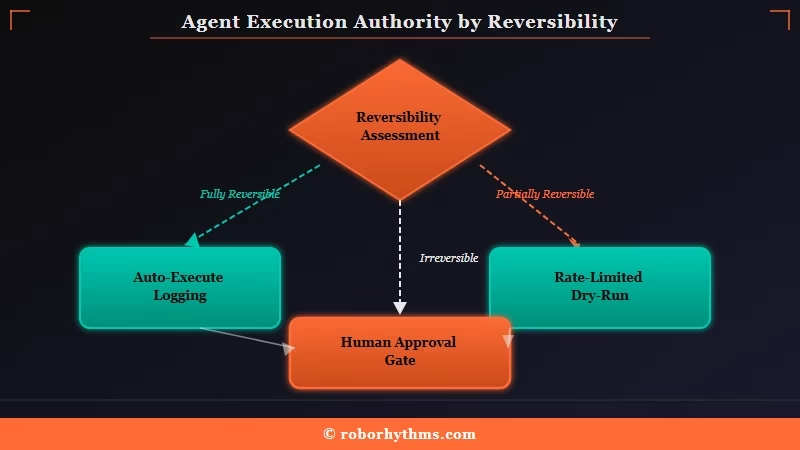
The cleanest production pattern I have seen splits actions by stakes. Low-impact work runs automatically with async logging.
High-impact or irreversible work sits in a queue until a person clears it. A draft email can be deleted; a sent email cannot, so sending external mail belongs behind a gate.
Here is the risk tiering I would start with.
| Action tier | Examples | How it should run |
|---|---|---|
| Low impact, reversible | Tag a ticket, log a call summary, update an internal note | Auto-execute with structured logging |
| Medium impact | Change a lead status, schedule a task, draft an external message | Auto-execute with rate limits, keep a dry-run preview |
| High impact, irreversible | Send external email, refund a payment, delete records, deploy | Human approval gate, model can only propose |
The key split is between execution rights and recommendation rights. Let the model reason about anything, then keep what it can trigger far narrower than what it can suggest. The most common failure I have watched is an agent doing exactly what it was permitted to do, just in the wrong context.
When you map the tiers, run through them in this order:
- List every action your agents can currently take and mark each one reversible or irreversible.
- For each irreversible action, add a human approval step before it can execute.
- For each reversible action, decide whether async logging is enough or whether it needs rate limits.
- Write down who owns the approval queue, because an unowned queue becomes a rubber stamp.
How to Build Narrow Tools That Cannot Be Abused
Build narrow, typed tools scoped to one business outcome, and enforce the valid inputs outside the model so a hallucinated parameter fails before anything runs. Generic tools are where the danger hides.
The trap I see most often is exposing something like updaterecord or sendemail. Those hand the model a loaded weapon and trust it to aim. The fix is to replace them with capabilities scoped to a single workflow, with the allowed values validated in code the model cannot reach.
Before (generic, dangerous):
update_record(table="leads", id=4412, fields={"status": "anything the model invents"})
# the agent can write any field, any value, on any table
After (narrow, typed, validated):
update_lead_status(lead_id=4412, new_status="qualified")
# new_status is checked against an enum OUTSIDE the model
# an unauthorized value is rejected before execution
Scope tools by business outcome, not by database table. One runqualificationworkflow(lead_id, outcome) with an enum-validated outcome beats five generic table-write tools, because the agent sees a small surface and every call is auditable and reversible. This is also where velocity comes back: you are not hand-building a tool per micro-step, you are building one safe tool per workflow.
If you would rather not assemble all of this plumbing yourself, a managed agent platform like Dynamiq gives you scoped tool definitions and orchestration out of the box, which is a reasonable build-versus-buy call for a small team. Either way, the rule holds: the schema decides what happens, not the model. For the failure mode where tools are scoped right but still misfire, the breakdown on fixing AI agent tool-call errors covers the debugging side.
Where to Enforce Agent Permissions in Production
Enforce permissions in two places: the tool schema defines the smallest safe action, and an application or policy layer checks identity, scope, risk, and whether approval is required. A system prompt is not one of those places.
This is the point I wish more teams internalized early. Telling an agent in its system prompt to “never delete files” is not a security control, because prompt instructions fall to model drift and injection. Real enforcement has to be a hard deny at the tool wrapper, API gateway, or policy layer, where the answer does not depend on what the model was told.
A strong reference architecture routes every agent action through a gateway: identity, then a policy gate, then the tool, then approval, then an audit record. The detailed InfoQ guide to agent gateways is the best technical walkthrough I have read on wiring this up, including running each action in short-lived isolated runners that get destroyed after the task.
A few specifics worth copying from the better implementations:
- Externalize authorization into declarative policy (Open Policy Agent is the common choice) so rules live outside application code.
- Issue just-in-time scoped tokens valid for 5 to 15 minutes instead of long-lived keys, and never let the agent see a raw secret.
- Give sub-agents their own scoped credentials rather than letting an orchestrator hold the union of everyone’s permissions, which would make it a single point of total compromise.
- Keep policy decision latency under 100 milliseconds so the safety layer stays invisible to the agent.
One caution that connects to wider agent hardening: authentication is not authorization. Standard OAuth tells you who the agent is, not what it should be allowed to do, and a non-deterministic agent will happily call an authorized but irrelevant API because it inferred that might help. If you are also thinking about isolation, the guide to the best AI agent sandbox setups pairs well with gateway-level control.
How to Stop Permission Drift Over Time
Stop permission drift by reviewing tool scopes as a deployment artifact and revoking any permission an agent has not used in 90 days. Permissions rot quietly, and the rot only surfaces during an incident.
The pattern that bites teams six months in is scope creep. At launch you carefully restrict an agent, then its workflow gradually expands, and one day someone adds a send_email capability to a qualification flow because it was convenient. Nobody notices until it does something it should not.
I would treat unused permissions as technical debt with a hard expiry. Run a quarterly review where any scope not exercised in the last 90 days gets revoked automatically, and version your tool schemas so a permission change shows up in code review like any other deploy.
Drift is also an ownership problem, not just a technical one. The split that works is a technical owner who manages logs, permissions, and the kill switch, plus a business owner who reviews failure patterns and can say whether the agent’s decisions matched intent.
Schema validation catches “technically invalid,” and the business owner catches “technically allowed, completely wrong for this situation,” so you need both because they fail at different stages. This sits alongside other long-running agent risks like memory poisoning, which deserves the same scheduled review.
Frequently Asked Questions
Can I just put the rules in the system prompt?
No. Prompt instructions are guidance, not enforcement, and they fall to model drift and prompt injection. Put hard limits in the tool wrapper, gateway, or policy layer where a denial does not depend on what the model was told.
Should an AI agent inherit the permissions of the human who runs it?
No. A human has broad access tied to their role, but an agent should only get the specific APIs its task needs. Inheriting a person’s full permission set turns the agent into a liability that moves at machine speed with no job-preserving instinct.
How do I decide which actions need human approval?
Use reversibility as the test. If an action cannot be undone in under five minutes, such as sending external email, refunding a payment, or deleting data, route it through a human approval gate. Reversible, low-impact actions can run autonomously with logging.
Does least-privilege slow my agents down?
The opposite. Loading more than about 40 tool definitions raises latency and token cost even for unused tools, so scoping an agent to the tools its workflow needs is both a security and a performance win.
What is the orchestrator trap?
It is giving a high-level orchestrator agent the combined permissions of all its sub-agents so it can delegate. That makes the orchestrator a single point of total compromise. Give each sub-agent its own scoped credentials instead.
Quick Takeaways
- Enforce agent permissions outside the model, at the tool wrapper, gateway, or policy layer, because system prompts are not a security control.
- Use the five-minute undo rule: any action you cannot reverse in five minutes needs a human approval gate.
- Replace generic tools like update_record with narrow typed capabilities scoped to one workflow, validated against enums in code the model cannot reach.
- Keep two enforcement layers, schema for the smallest safe action and an app or policy layer for identity, scope, risk, and approval.
- Review tool scopes every quarter and revoke anything unused for 90 days, with a named technical owner and business owner accountable for drift.
