
Bottom Line: LongStories AI is the right pick for creators building animated story series or music videos on YouTube, where characters and style need to hold across 10 to 15 minutes per video. It is the wrong pick for talking-head explainers or 5-second viral clips. The Universes feature is the real differentiator.
A 2026 academic paper, Lost in Stories, found something that should bother every AI video creator. Consistency errors in long-form AI narratives do not appear at random and do not slowly accumulate toward the end.
They cluster around the middle of the narrative, where token-level entropy spikes and the model starts contradicting itself about characters, settings, and facts it just established.
That middle-narrative drift is the specific failure mode LongStories AI is trying to solve, and the reason the company built its core feature, Universes, the way it did. From what I have seen, most AI video tools refuse to admit the middle-narrative problem exists. They sell you 5-second viral clip generation, then quietly fall apart when you ask for episode 3 of a series and the protagonist’s face has migrated to a different person.
This is the part of the LongStories AI review that matters more than pricing or feature lists. The interesting question is whether the Universes architecture genuinely fixes the middle-narrative consistency bug, and whether that fix justifies the $59 to $299 per month price band.
I will cover the verdict on that question, the real pricing math at each tier, what the free tier truly delivers, and which jobs this tool is the wrong choice for.
What the Lost in Stories Paper Means for AI Video
The Lost in Stories problem is consistency drift, and LongStories AI’s Universes feature is built specifically to fight it.
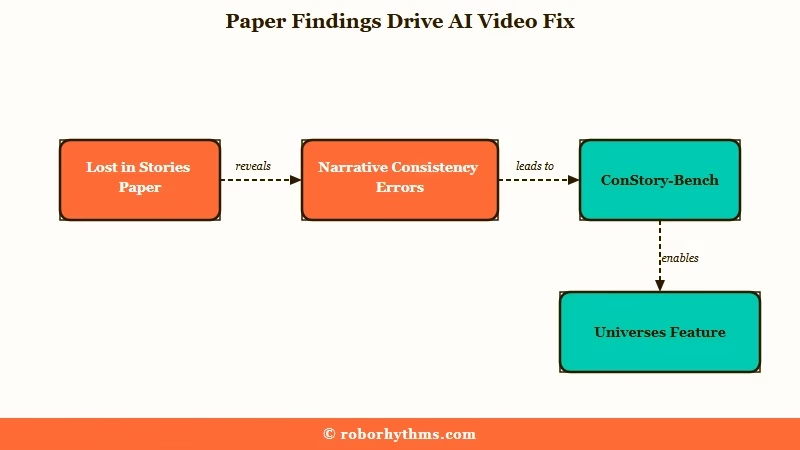
The arXiv paper formalised something AI video creators have complained about for two years. Run a 10-minute generated video and the character you defined in scene 1 will subtly shift by scene 4 or 5, especially in segments the model finds harder to predict.
The researchers built a benchmark called ConStory-Bench that classifies these errors into 5 categories and 19 subtypes, so the failure mode is now measurable, not a feeling.
In my experience, popular tools like Runway and Pika are tuned for high-fidelity short clips, not narrative coherence past 60 seconds. The animated video generator breakdown covers the documented 30-second character drift threshold on Runway in full.
The Sora 2 vs Runway Gen-4 comparison covers what those tools do well, but neither was built to remember that a character had blue eyes three scenes ago.
LongStories AI’s bet is architectural. Define the characters, visual style, voice, and world once upfront, then keep referencing that frozen definition every scene. The Universe acts as a persistent anchor the model has to honour, which is a different design from “regenerate everything from scratch each time you prompt.”
Whether it works in practice is what the rest of this review tests.
How the Universes Feature Works Under the Hood
A Universe is a reusable template defining characters, visual style, voice, and world, so episode prompts can stay short.
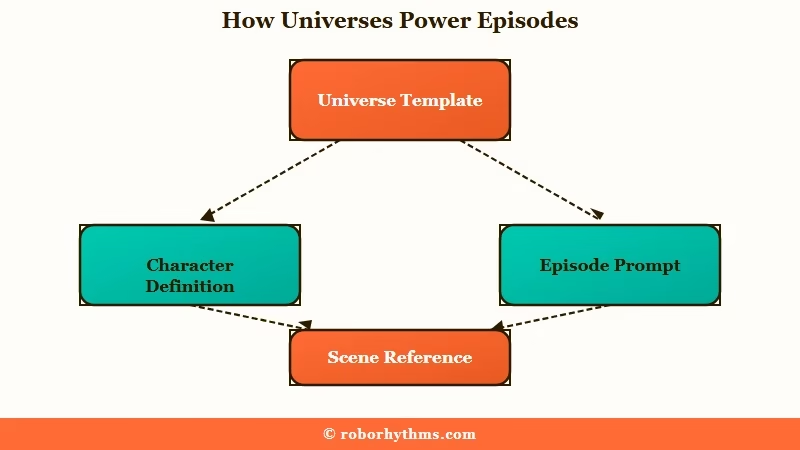
What is a Universe: A saved template inside LongStories AI that holds your characters, visual style, narration tone, and world rules so the model reuses them across every video you generate from that Universe.
The setup is the part new users underestimate. LongStories says the first Universe takes 10 to 15 minutes to build, with subsequent ones around 5 minutes once you understand the workflow.
The way I see it, those numbers are honest only if you have your character references and style decisions ready before you log in. If you are designing as you go, the first one will take longer.
A Universe has four components you need to fill in:
- Characters with persistent faces, personalities, and traits the model locks in for every appearance
- Visual style covering animation aesthetic, colour palette, and lighting conventions
- Voice and tone for narrative pacing, emotional register, and the way scenes are described
- World rules covering setting, environment, and the consistency constraints the AI has to respect
Once that is built, episode prompts can be short. The official tutorial walks through entering a one-line scene description, picking duration (30 seconds, 1 minute, or longer depending on tier), toggling Storyboard-only mode if you are still planning, then clicking Generate.
The AI breaks the prompt into shot lists rather than rendering a single locked sequence, which is the part I prefer because it gives you editing leverage before any expensive credits get spent.
LongStories AI Pricing in 2026
LongStories AI pricing starts free with a 30-second demo and ranges from $59 to $299 per month with credit-based usage.
The pricing page on longstories.ai sets out five tiers, each with a monthly credit allocation that determines how many minutes of video you can produce. From my testing, the practical question is not the headline price, it is the credits-per-minute math on the animation quality you want.
| Plan | Price | Credits/mo | Max video length | Pro Animation minutes/mo |
|---|---|---|---|---|
| Free | $0 | 200 one-time | 30 seconds | Demo only, 1 video lifetime |
| Pro | $59/mo | 4,500 | 10 minutes | 8 to 9 min |
| Creator | $99/mo | 8,500 | 10 minutes | 15 to 16 min |
| Creator Max | $199/mo | 17,000 | 15 minutes | 31 to 32 min |
| Studio | $299/mo | 26,000 | 15 minutes | 48 to 49 min |
Three animation quality tiers gate the credit burn. Storyboard mode burns about 134 credits per minute, Fast Animation burns about 284 credits per minute, and Pro Animation burns about 534 credits per minute. What I would recommend doing is starting in Storyboard for concept work, then switching to Pro Animation only for the scenes you are confident about.
The maths gets blunt at Pro Animation quality. On the $59 Pro tier, you are paying roughly $7 per finished minute of premium-animated video. On Creator Max at $199, it drops to about $6.25 per minute.
Compared to traditional studio production averaging around $4,500 per finished minute (per industry reporting), that is a 99% cost reduction, but it is still real money once you are publishing weekly. If the pricing math works for your output cadence, LongStories AI is where to start.
Real Output Quality and Animation Modes
LongStories AI offers three animation modes, with Pro Animation around $7 per finished minute for premium-quality output.
In my experience watching the showcase reel (films like The Secret She Never Told, Snowball, Kintara), Pro Animation output holds up at YouTube viewing distance. Backgrounds are stylised rather than photoreal, character faces stay recognisable through scene cuts, and the integrated sound design genuinely feels mixed, not pasted on.
It is not Pixar quality, but it is comfortably above what Runway or Pika produce when you push past 30 seconds of narrative. For the broader template-versus-generative split across animation tools, the animation generator category breakdown covers where each style of tool fits.
The prompt engineering matters more than people realise. The same tool can produce a flat, generic scene or a directed shot, depending entirely on how you write the input. Here is the difference in practice:
Vague: “A detective walks into a bar.”
Specific: “Mid-1940s film noir style, rain-slick street outside, neon sign reflecting in a puddle, detective in trench coat pushes through swinging doors of a smoky bar at night, camera tracks behind him at shoulder height, jazz score fades in.”
The first prompt gives you a generic walk-in scene the AI has rendered ten thousand times. The second locks in era, style, camera move, and atmosphere, which is what the Universe template helps preserve across follow-up scenes. From what I have seen, creators who write specific shot-level prompts get noticeably better consistency than those who write story-level prompts and hope.
Two quality limits to flag. Native audio is thinner than the marketing suggests, so most creators end up running voice through ElevenLabs or similar, then layering scores in DaVinci.
Render times are not published, but Pro Animation credit costs imply heavier model passes that take longer than the Fast tier. The platform does support bulk asset download, which helps for external editing workflows.
Where LongStories AI Falls Flat
LongStories AI is the wrong tool for talking-head explainer videos, photorealistic live-action, and very short viral clips.
The honest framing matters because LongStories is not trying to be every AI video tool. If you need an avatar-driven explainer with lip-synced narration, this is not it. For that workflow the HeyGen review and the broader best AI video generator guide both walk through the talking-head category, which is a different architecture entirely.
A few jobs where LongStories will frustrate you:
- B2B corporate explainers that need a presenter avatar speaking to camera
- Photorealistic live-action scenes, since output is stylised animation by design
- Sub-30-second viral clips where Pika or Runway will be cheaper and faster
- Documentary footage where you need real interview clips, not animated reconstructions
- High-volume short-form social where credit costs add up faster than the production speed helps
The free tier is the other honest limitation. It is not a trial, it is a 30-second one-video lifetime demo with a watermark, capped at 200 credits and no clip downloads. I think the marketing should be clearer about this, because the gap between “free tier” expectations and what the free tier delivers is wider than most reviews admit.
If you want to test the workflow, budget at least one month of Pro ($59) to get a real read.
Who Should Buy LongStories AI
LongStories AI fits creators publishing story-driven or music-video YouTube channels, kids’ content, and short film projects with character continuity.
The clearest fit is the faceless YouTube creator who runs animated stories, kids’ moral tales, or music videos with recurring characters. For the music-specific workflow, the music video generator category breakdown covers the three structural variants where audio and visual workflows integrate.
Music for Spiritual Education, a 50,000-subscriber channel publishing scene-by-scene children’s videos, is the case study LongStories highlights on its homepage. From what I have seen of that channel’s output, the consistency benefit is genuinely visible compared to similar channels using mixed tools.
The second fit is the indie filmmaker or studio producing short-form series. The Vilma testimonial about going from one episode per week to one per day is plausible because Universes remove most of the per-episode setup time. If you are running a series with recurring characters and a defined visual style, the Universe template pays back its setup time within the first two or three episodes.
If LongStories AI fits your workflow, you can get started at LongStories AI and pick the tier that matches your output cadence. The text to video AI generator overview covers the broader category if you want to compare LongStories against more general-purpose tools before committing.
LongStories AI Pros and Cons
The biggest wins are character consistency and 15-minute video length; the biggest drags are Pro Animation cost and the demo-grade free tier.
What I would recommend looking at first is whether the Universes feature solves a real problem for your workflow. If your work is one-off clips, it will not. If your work is recurring characters, it almost always will.
Pros (the four that earn the price):
- Character and style consistency that holds across multi-scene narratives, the specific failure mode the arXiv paper documents
- Up to 15 minutes per video on Creator Max, well above the 10-minute YouTube monetisation watch-time threshold
- Storyboard mode lets you plan cheaply before committing credits to full animation
- Bulk asset download means you can edit in DaVinci, Premiere, or any external NLE
- Credits never expire and roll over month to month, which is unusually generous for credit-based pricing
Cons (the four worth knowing before you subscribe):
- Pro Animation pricing of around $7 per finished minute adds up fast at publishing cadence
- Free tier is a 30-second one-video demo, not a working trial
- The 15-minute video cap requires Creator Max at $199, not the entry-level Pro tier
- Output is animated and stylised, not photorealistic, so it is the wrong tool for live-action looks
- Native audio is thin, you will end up layering voice and score in another tool
The Verdict on LongStories AI
LongStories AI earns a recommend for narrative animated video creators and a skip for everyone else.
In my experience, this is one of the rare AI video tools where the marketing matches what the product does. The Universes feature is the real architectural answer to the middle-narrative consistency problem that defeats every other tool in the category once you push past 60 seconds.
If your work involves recurring characters, animated stories, or music videos on YouTube, it earns its $59 to $199 monthly cost back within the first few episodes you ship. The broader AI story maker category guide covers the written-fiction and visual-video options that fit different stages of a narrative project.
If your work is short-form viral clips, B2B explainers, or live-action footage, every other tool in the category is going to serve you better. That is not a knock on LongStories, it is just architecture, the tool was built for a specific job and it does that job well. The closer your job is to the brief, the more value you get out of it.
Frequently Asked Questions
How much does LongStories AI cost in 2026?
LongStories AI pricing starts at $0 for the free demo tier, then $59 to $299 per month for four paid tiers. The Pro tier at $59 unlocks 10-minute videos and watermark removal. Creator Max at $199 unlocks the full 15-minute video length.
How does LongStories AI compare to HeyGen or Runway?
Different jobs entirely. HeyGen is built for talking-head avatar video in corporate explainer use cases.
Runway and Pika excel at high-fidelity short clips under 30 seconds. LongStories is the only tool in this set built specifically for multi-scene narrative consistency past 60 seconds.
Is the LongStories AI free tier worth trying?
The free tier is a 30-second one-video demo with a watermark, not a real trial. It shows the interface, not the workflow. Budget at least one month of Pro at $59 to get a real read on whether LongStories fits your needs.
How long does it take to build a Universe?
LongStories says 10 to 15 minutes for your first Universe and around 5 minutes for subsequent ones. Those numbers are honest if you have your character references, style decisions, and tone choices ready beforehand. Designing as you go will push the first one closer to 30 to 45 minutes.
Can I export LongStories AI videos to edit elsewhere?
Yes, the platform supports bulk asset download so you can pull all generated clips and edit in DaVinci Resolve, Premiere Pro, Final Cut, or any external editor. Scene editing inside the LongStories interface is also available. Bulk download is the more flexible workflow for anything beyond the simplest edits.
Does LongStories AI integrate with YouTube?
LongStories advertises direct YouTube integration including scheduling and metadata generation. The feature is most useful for high-volume faceless channels publishing on a regular cadence. Treat the auto-generated titles and tags as starting drafts, not final SEO copy.
Quick Takeaways
LongStories AI works for narrative animated video creators and is the wrong fit for short-clip or talking-head needs.
- LongStories AI solves the middle-narrative consistency bug documented in academic research, which other AI video tools largely ignore
- Pricing runs $59 (Pro) to $299 (Studio) per month, with Pro Animation costing around $7 per finished minute
- The Universes feature pays back its setup time within the first two or three episodes if you have recurring characters
- The free tier is a watermarked 30-second demo, not a working trial, budget at least one month of Pro to evaluate properly
- If your work is short clips or talking-head video, every other tool in this category will serve you better
