
TL;DR: A working AI voice receptionist for a service business needs three things: a sub-700ms voice stack the human ear forgives, a booking loop wired into your real calendar, and a human handoff that does not make the caller repeat themselves. Pick Retell or Vapi over Bland for production. Run the lead-recovery math before pitching anyone.
A dentist friend of a Reddit builder had a steady practice, good reviews, and quietly flatlined patient growth. The lost growth was hiding in voicemail. His front desk could not cover lunch, after-hours, and weekends, so new patients calling for the first time hit a recording and just booked the next clinic that picked up.
The builder shipped an AI voice receptionist that answered 24/7, booked appointments on the spot, and escalated clinical questions to staff. After one month: three new bookings traced back to voicemail-bound calls. For a dental practice, that single month of recovered leads more than paid for the entire year of AI voice spend.
I could write up a generic “how to build a voice agent” tutorial for that, but platform pickers and latency benchmarks are saturated already. The harder questions a small-business operator really has are about the booking loop, the human handoff, and the cost math the platform marketing pages hide.
This piece walks through all three.
Pick the Right Voice Stack for a Small Operator
The right voice platform for a small service business in 2026 is Retell for natural conversation quality, Vapi for cost control with developer access, or Voksha-style wrapper services for operators who never want to touch a config.
Skip Bland for production receptionist work, the outage history and hidden fee structure are wrong for a single-location practice.
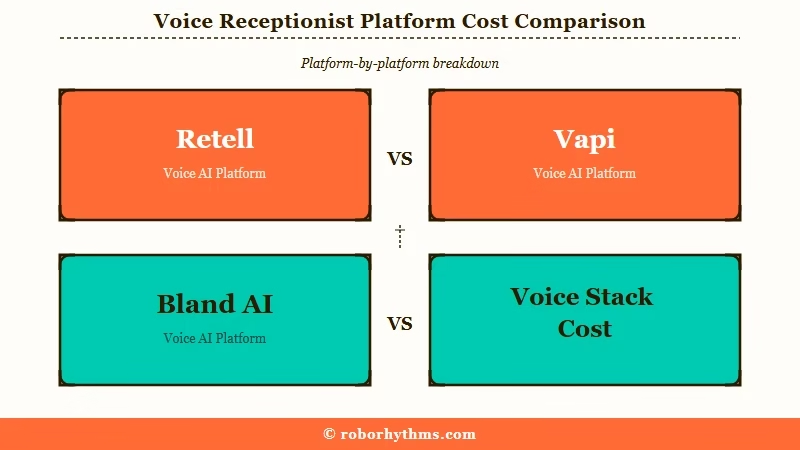
Set aside the “$0.09 per minute” headline Bland AI is famous for. In production, that rate requires a monthly subscription tier (Build at $299/month or Scale at $499/month) or an enterprise contract.
The all-in number for most small operators lands between $0.07 and $0.19 per minute depending on platform, LLM model, and voice provider.
The bigger reliability story is uptime. Bland AI had three outages each exceeding two hours during 2025. Vapi and Retell published 99.9 percent and 99.95 percent uptime respectively over the same period.
For a dental practice depending on the agent during lunch hour, a two-hour outage during peak is the entire economic case going dark.
| Platform | Per-minute all-in | Monthly minimum | Avg latency | Best fit |
|---|---|---|---|---|
| Retell | $0.08 to $0.19 | None | 400 to 600 ms | Single-location operators who want natural-sounding calls and the lowest configuration overhead |
| Vapi | $0.10 to $0.18 | None | 500 to 800 ms | Developers who want to choose every layer of the stack and stretch margins on high call volumes |
| Bland AI | $0.11 to $0.17 | $299 to $499 | 600 to 900 ms | High-volume outbound campaigns rather than inbound receptionist work |
| Voksha (Enterprise) | Bundled | $899 | Vendor-managed | Operators who never want to touch a config and need Square Appointments booking with prepay built in |
What I would pick for a single-location operator today is Retell. If you are already comparing builds against the more developer-heavy production AI voice agent stack using Vapi with AssemblyAI + Groq + ElevenLabs, Retell is the lighter alternative that costs less to maintain at small volumes.
Cut 1500ms of Latency Before You Touch the LLM
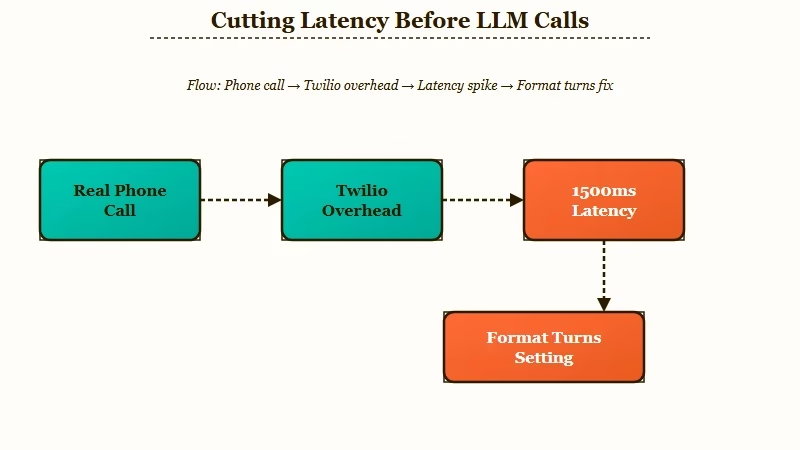
The single biggest latency win for an inbound voice receptionist is disabling Vapi’s default Format Turns and no-punctuation delay, which saves 1500 ms before you change a single model parameter.
Most operators tune the LLM choice first and never touch this setting. That is backwards.
What I noticed in AssemblyAI’s lowest-latency Vapi build is that a Vapi pipeline can hit 465 ms end-to-end on the web by combining AssemblyAI Universal-Streaming at 90 ms, Groq Llama 4 Maverick 17B at 200 ms, and ElevenLabs Flash v2.5 at 75 ms. Network overhead is the rest. That is the human-ear threshold where the caller stops hearing “AI” and starts hearing “fast receptionist.”
But there is a hidden tax most operators do not see coming. Telephony networks (Twilio, Vonage) add a hard 600 ms or more of overhead that does not exist on the web.
So an agent that feels instant in your browser test will feel close to one second slow on a real phone line. That is the difference between a caller waiting patiently and asking “are you still there”.
Here is the operator’s optimization order I would run in production:
- Disable Format Turns and the no-punctuation delay in Vapi advanced settings. Saves 1500 ms instantly.
- Set turn detection to “advanced” with the silence threshold lowered to 250 ms (default is 500). Cuts about another 250 ms off awkward pauses.
- Lock the LLM to a fast model with strict max_tokens (150 for receptionist replies). Avoid the “smartest” model temptation when you need speed.
- Skip Zapier inside the call loop. It adds 1 to 3 seconds per tool call. Use direct API calls to your booking system instead.
- Test on a real cellular phone line, not a desk softphone. WebRTC test results are not what your callers will hear.
Before: Vapi default settings on a Twilio phone number deliver a perceived 1.6-second response after every caller sentence. Callers ask “are you still there” inside ten minutes.
After: Same Vapi stack, Format Turns off, advanced turn detection on 250 ms silence, Groq Llama 4 routing, max_tokens 150, delivers around 650 to 800 ms perceived response on cellular. Callers stop noticing.
Wire the Booking and Calendar Loop
The booking loop is where most small-business voice agents fall apart, because the AI can quote times correctly but cannot reliably write the booking back to the operator’s actual calendar.
The fix is to wire tool calls directly to the calendar API rather than routing through Zapier or generic webhook glue.
For dental specifically, NexHealth publishes a documented docs.nexhealth.com/llms.txt index of OpenAPI endpoints designed for AI agent use. That is the cleanest path if you are deploying against a dental practice using NexHealth. For Square Appointments (more common on the salon and home-services side), Voksha integrates real-time availability checks plus text-to-pay prepayment collection during the call, but the integration is gated behind their Enterprise tier at $899 per month.
The DIY path for an operator on $50 to $200 monthly platform spend is simpler. Define one tool per action (checkavailability, bookappointment, reschedule, escalate), give each a JSON schema, and let the LLM decide which one to invoke. The trap is letting the AI just “say” a booking is confirmed without writing it down.
Before: A vague booking-flow prompt produces this exchange:
- Caller: “Can I get a cleaning Wednesday morning.”
- AI: “Sure, I have you booked for Wednesday morning. Have a great day.”
- Operator: Opens the calendar at 7am. No booking. Caller does not show.
After: A specific booking-flow prompt with strict tool schema produces this:
- Caller: “Can I get a cleaning Wednesday morning.”
- AI calls
check_availability(service="cleaning", date="2026-05-28", window="morning")→ returns three slots
- AI: “I have 9 am, 10:30 am, or 11:15 am open on Wednesday. Which works.”
- Caller: “10:30 please.”
- AI calls
bookappointment(service="cleaning", time="2026-05-28T10:30", patientphone=caller_id)→ confirms booking ID
- AI: “Booked you for cleaning at 10:30 Wednesday May 28. You will get a text confirmation in a minute.”
The right structured-prompt pattern for keeping tool calls clean is the four-section system prompt that has been the consistent fix across multiple agent-stack failure modes. Same pattern applies to voice as to text agents.
The Human Handoff Is the Hardest Part
The hardest engineering problem in a voice receptionist build is not the AI, it is making the handoff to a real human feel smooth when a clinical or sensitive call needs one.
A reactive-only escalation that fires when the caller gets frustrated is too late. Sentiment-triggered handoffs need to fire before the caller hits the “rage-quit” point.
What surprised me reading the operator notes is that 80 percent of callers will only use an AI agent if they know a human option exists. That number is the entire reason a clear “press 0 for a person” path matters, even when the AI is good. The trust signal is the safety net, not the AI capability.
There are three failure modes I would watch for in production:
- The AI claims it handled something it escalated, and the human picks up cold without context.
- The warm transfer drops the call history, so the caller has to repeat their problem.
- The AI does not detect a clinical or urgent signal early enough and keeps trying to book the call in.
| Failure mode | Cause | Fix |
|---|---|---|
| Cold handoff, human picks up clueless | AI does not pass conversation history into the transfer payload | Configure the warm-transfer endpoint to include the last 6 turns plus structured caller intent |
| Caller repeats their problem after transfer | Handoff payload exists but staff dashboard does not display it | Pipe the transfer payload into the staff CRM screen or a Slack notification with the summary |
| AI tries to book a clinical question | Sentiment trigger waits for explicit “rage” signal | Add hard keyword triggers (pain, bleeding, emergency, hurt, swelling) on top of sentiment |
| Caller hangs up after transfer | Network latency on warm transfer exceeds 8 seconds | Pre-warm the transfer with a “one moment, connecting you” line so the wait feels handled |
The iteration cycle that fixes this is to listen to ten real failed handoffs every week for the first month. Tag each failure mode in the table above. Adjust one variable at a time and re-listen.
That is how the dental-clinic builder eventually got handoffs to feel smooth, the same way Make.com automation flows need real-traffic tuning before they survive production.
Track These First-Week Metrics
The metrics that matter in the first week are not handle time or call deflection rate, they are hallucination rate, silence fatigue, and booking accuracy.
Standard call-center KPIs are aimed at established operations. A new receptionist build needs safety-and-accuracy metrics that reveal trust gaps before the agent damages the relationship.
These are the four I would track from day one:
- Hallucination rate. How often did the bot misquote a price, hours, or insurance status. Log this manually by spot-checking calls. Target zero in week one. Anything above zero means the FAQ knowledge base needs more specific data.
- Silence and latency fatigue rate. Count callers who say “are you still there” or “hello” mid-call. If more than 5 percent of calls show this signal, your latency stack is too slow even if the dashboard says sub-second.
- Booking write-through accuracy. Did the booking land on the calendar with the correct service code, time, and caller details. Sample at least 20 percent of bookings against the real calendar in week one.
- Handoff resolution rate. Of calls escalated to a human, what percentage of callers got their question answered without having to repeat themselves. Sub-90 percent in week one means your warm-transfer payload is incomplete.
This is the same metrics-first discipline that makes a lead-qualification agent run in Slack ship without breaking sales pipeline trust. The voice version just gets less forgiveness because errors are audible in real time.
Run the Lead-Recovery Math Before You Pitch a Client
The economic case for a service-business voice receptionist is missed-call leakage, not labor savings, and the math works at three confirmed bookings per month for any vertical where lifetime value clears $500.
That is the headline result from the dental case study and it generalizes cleanly.
Here is the worked calculation an operator can run against any service vertical:
- New customer lifetime value (dental): roughly $1,000 to $3,000 per patient over the relationship
- Lost calls per month to voicemail at a busy clinic: 15 to 40 typical estimates from operator surveys
- Realistic recovery rate from those lost calls once the AI answers: 10 to 25 percent (the dental builder hit 3 of an estimated 25 to 30 lost calls in month one)
- Recovered LTV per month at 3 patient bookings: $3,000 to $9,000
- All-in voice agent cost per month at moderate volume: $80 to $250
The break-even is one recovered patient per month for a $1,000 LTV vertical and roughly six recovered customers per month for a $200 LTV vertical like hair salons. Dental, medspa, law firms, dermatology, and home services all clear the math comfortably. Quick-service food businesses and most retail do not.
What I would do before pitching this to a single-location operator is a one-week missed-call audit. Most service operators have no idea how many calls are hitting voicemail. The number is almost always higher than they think, and the data alone closes the sale.
Frequently Asked Questions
The most common questions about building an AI voice receptionist cover platform pick, all-in cost, HIPAA safety, and how to wire booking into a real calendar.
Which voice platform should I pick for a single-location service business?
Retell is the best default for a single-location operator who wants natural conversation quality with the least configuration work. Pick Vapi if you have a developer who wants to choose every layer. Skip Bland for inbound receptionist deployments.
How much does an AI voice receptionist really cost per minute including hidden fees?
Expect $0.07 to $0.19 per minute all in. Watch for monthly subscription gates ($299 to $499 on Bland), a $0.015 failed-call tax on quick voicemails, and Zapier middleware that quietly adds 1 to 3 seconds of latency to every tool call.
Is an AI receptionist HIPAA-safe for dental or medspa clinical calls?
Yes if the transcription layer is HIPAA-eligible and signs a Business Associate Agreement. AssemblyAI’s Medical Mode hits 4.97 percent Missed Entity Rate versus Deepgram Nova-3 Medical at 7.32 percent, which matters when the AI has to handle drug names and dosages correctly.
What happens when the AI gets confused or someone really needs a person?
Configure a warm transfer with the last six turns of conversation passed as a payload to the staff CRM or Slack. Trigger on sentiment plus hard keyword matches (pain, bleeding, emergency) so the escalation fires before the caller is frustrated.
Can the AI book on my real calendar without me checking every entry?
Yes if you wire direct API tool calls to your calendar (NexHealth for dental, Square Appointments via Voksha for salons, Google Calendar for everything else). Avoid Zapier inside the call loop. Define one tool per action with strict JSON schemas.
How do I know the receptionist is working in the first week?
Track four metrics. Hallucination rate (zero target), silence fatigue (below 5 percent of calls), booking write-through accuracy (audit 20 percent), and handoff resolution (above 90 percent of escalations resolved without repeats).
