
Bottom Line: Beacons AI is the strongest creator link-in-bio platform if you sell digital products and want AI-generated media kits, but the 9% free-tier transaction fee turns into a tax once monthly sales clear about $334. Stick to the free plan only as a launchpad, switch to Creator Plus once revenue starts.
Beacons AI counts more than 7 million creators on the platform, which puts it in the same conversation as Linktree but with a different bet underneath. Linktree is a directory. Beacons is trying to be the entire monetisation stack on one page.
I have been testing the free plan and the paid Creator Plus tier across a small digital-product sale, an email opt-in funnel, and the AI media-kit generator. The picture that emerged is mixed in interesting ways.
The AI features are better than the marketing copy suggests, the desktop website builder is a real differentiator, and the 9% transaction-fee math on the free plan turns into a trap faster than most creators expect.
What follows is the honest review with the tradeoffs called out. The 9% fee is a real cost, the AI media kit is a real win, and customer support is the weakest part of the package.
If you only care about the verdict, jump to the last section. The pricing math in the middle is where the real decision lives.
What Beacons AI Really Is in 2026
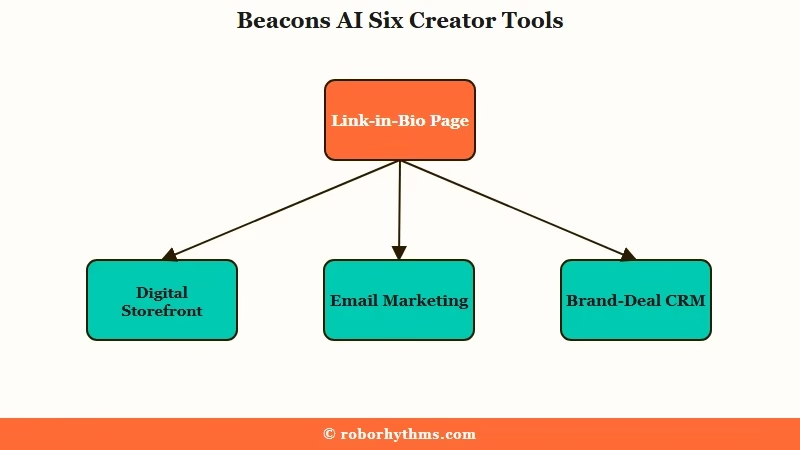
Beacons AI is an all-in-one creator monetisation platform that pairs a link-in-bio page with a digital storefront, email marketing, AI media kits, brand-deal CRM, and a desktop website builder.
It is not a Linktree clone. It is closer to a creator operating system that happens to have a link-in-bio surface on top.
The platform was founded by three Stanford PhDs in machine learning, which shows up in the AI features. Most link-in-bio tools added AI as a marketing veneer in 2024.
Beacons built the AI into the bones of the product: media kits pull and synthesize real-time social data, the email-drafting assistant uses platform-specific analytics, and the brand-outreach generator pulls from your live engagement numbers.
The product surface covers six discrete jobs. Each one matters at a different stage of a creator’s life:
| Beacons capability | What it does | When it matters |
|---|---|---|
| Link-in-bio page | Single URL hub with custom blocks | Day 1 |
| Digital storefront | Sell ebooks, courses, templates, accept tips | Once you have a product |
| Email marketing | Built-in capture and AI-drafted sends | Once you want repeat buyers |
| AI media kits | Auto-generated kits pulling live social data | Once brands start asking |
| Brand-deal CRM | Pipeline, invoicing, paid-deal tracking | Once brand revenue is real |
| Desktop website builder | Converts link list to full-width site | When you outgrow the link page |
The way I see it, the platform earns its $10-$30/month price point on capabilities four and five. The first three you can replicate elsewhere for free or cheap. The last three are why creators with real revenue stick around.
Beacons AI Pricing and the 9% Transaction Fee Math
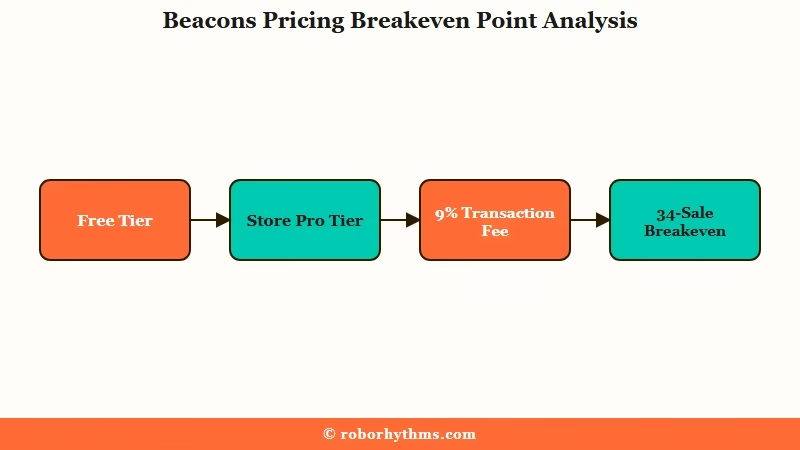
Beacons AI pricing runs free, $10/mo Creator, $30/mo Store Pro, and $75/mo Creator Max, with a 9% transaction fee on the free and lower tiers that drops to 0% on Store Pro and above.
The breakeven point against the next-paid plan is the math most creators miss when they pick the free tier.
The tier mechanics are documented but the trap lives in the comparison, not in any single tier on its own:
| Plan | Monthly cost | Transaction fee | Email sends |
|---|---|---|---|
| Free | $0 | 9% | 50 per month |
| Creator | $10 | varies by source | unlimited |
| Store Pro | $30 | 0% | unlimited |
| Creator Max | $75 | 0% | unlimited |
The annual Creator pricing drops the effective monthly rate to $8.33 when you pay yearly. That is the rate I would benchmark against if you are doing the math.
Before: Selling a $100 digital guide on the Free plan means Beacons takes $9 in transaction fees on top of payment-processor fees. Across 4 sales a month, that is $36 in transaction fees.
After: Selling the same product on Store Pro ($30/mo, 0% transaction fee) means you keep the full $100 per sale. Across 4 sales, your net is $370 (4 x $100 minus the $30 subscription) versus $364 on Free.
The breakeven point: once your monthly product sales exceed roughly $334, the 9% free-tier fee costs you more than the $30 Store Pro subscription. The math gets brutal fast above that line.
At $1,000/month in digital-product sales, Free costs you $90 in fees vs $30 on Store Pro. You are leaving $60 a month on the table to “stay free.”
Anyone who already has a small audience and is about to launch a digital product should start on Store Pro or at least the $10 Creator plan, not the Free plan. The “save money by staying free” reflex costs more than it saves the second sales start hitting.
The AI Features That Earn Their Slot
The Beacons AI features that justify the price point are the auto-generated media kits and the brand-outreach assistant, both of which use real-time social data the way other creator tools use static profile fields.
The bio-writer, caption generator, and content-idea features are useful but not unique to the platform.
The media kit deserves the deepest call-out. Most link-in-bio tools either skip media kits entirely or generate a static PDF you have to refresh manually.
Beacons rebuilds the media kit on every load against your current follower count, engagement rate, and audience demographics. From what I see in the use case, this matters because brands check media kits before sending pitches, and a 3-month-old kit with stale numbers gets a creator skipped.
Practical performance notes:
- Bio generator. Decent first drafts in 4-6 seconds. The output usually needs a 10-15% manual rewrite to remove generic phrasing. I would not call this the differentiator.
- Caption generator. Better than the bio generator because it consumes your last 10 posts as context. Captions read in your voice within the first 5-10 outputs once the model has enough samples.
- Email draft assistant. This is where the Stanford-ML pedigree shows. The drafts respect open-rate-friendly structure (short subject, single CTA, scannable middle), and the assistant adjusts tone to match your past sends. Same caveat as captions: it needs 5-10 reference emails to lock in voice.
- AI media kit. Strongest feature in the suite. Worth the subscription on its own once brands are reaching out.
- Brand outreach generator. Pulls live engagement numbers into pitch templates. The output is “starting point” quality, not “send as is” quality.
ManyChat for Instagram DMs handles the lead-capture side of the same creator workflow if you want automated DMs before traffic hits your Beacons page.
For the writing side of the funnel, Jasper AI’s analytics features cover the longer-form content that fills the page Beacons is acting as a hub for.
Pros and Cons of Beacons AI
Beacons AI’s strongest pros are the AI media kits, desktop website builder, and 7M-creator scale; its biggest cons are the free-tier 9% transaction fee, slow customer support, and email-send limits on the free plan.
Here is the honest breakdown.
Pros:
- AI media kits with real-time social data. Brands trust live numbers. Static PDFs get skipped.
- Desktop website builder. Converts the link-in-bio page into a full-width responsive site. Most competitors are mobile-only.
- Built-in digital storefront. Sell ebooks, courses, music, templates without leaving the platform.
- AI features built by ML PhDs, not bolt-on marketing copy. The email-draft assistant and caption generator earn the AI label.
- Generous free plan structurally. Real features work, not just a 7-day trial.
- 7M-creator scale. Reasonable assurance the platform will be around in 12 months.
Cons:
- 9% transaction fee on Free and lower tiers. Becomes more expensive than the paid plan above roughly $334/month in sales.
- Customer support is slow. Email responses can take up to 5 days. Real risk if you have a live sales issue.
- 50 email sends per month on Free. A small list will hit the cap on the first newsletter.
- Some advanced features locked behind Store Pro and above. Custom-domain setup, advanced analytics, and 0% fees only activate at $30/month.
- The AI bio generator is weaker than the rest of the AI suite. Outputs need rewriting.
Who Should Choose Beacons and Who Should Skip It
Choose Beacons AI if you sell digital products, manage brand deals, or want a creator hub that doubles as a website; skip it if you only need a basic link-in-bio for social media navigation.
This is the call-out that separates revenue-bearing creators from casual users.
Choose Beacons if:
- You sell ebooks, courses, templates, presets, or accept tips. The integrated storefront beats stitching Gumroad to a Linktree page.
- You are pitching brands for deals. The auto-updated media kit is a measurable conversion lever.
- You want one URL to act as your full website. The desktop builder is a hidden killer feature.
- You are running an email list and want AI-drafted sends without leaving the platform.
Skip Beacons if:
- You only need a Linktree replacement to point followers at three social accounts. Linktree’s free tier handles that and Beacons is overbuilt for the use case.
- You sell physical products or run a Shopify storefront. Beacons is built for digital revenue, not inventory management.
- You depend on fast customer-support response. The 5-day email-support window is a real risk for active sellers.
- You are happy with Stan Store. Stan’s sales-funnel focus is sharper if you only sell one or two flagship products and never need brand-deal flow.
According to Statista’s creator-economy data, the global creator economy is now estimated at over $250 billion and growing roughly 22% year-on-year.
The platforms that take the most-creator-share over the next 2 years are the ones that consolidate the most jobs onto one surface. Beacons is positioning around that thesis, and Linktree is not.
Verdict
Beacons AI is worth paying for once you start monetising, and worth ignoring if you do not.
The free plan is a launchpad, not a destination. The $30 Store Pro tier is the floor for any creator generating more than ~$334/month in digital sales.
If I were giving the recommendation in one sentence: ship a $9.99 PDF this week, drive your existing audience to the Beacons page, watch your sales for one month, and if you cross $334 in monthly product revenue, upgrade to Store Pro the next day. The math will pay for itself.
Sign up via Beacons AI if you want to lock in the current pricing tier. The Creator economy has been raising prices quarterly across most tools; the $8.33/month annual rate on Creator is the cheapest path to 0% fees if you commit annually.
For a creator looking to round out the rest of the stack alongside Beacons, the Writesonic content engine covers the long-form writing the Beacons page links to. Pair both and you have the writing + monetisation surface in roughly $40/month combined.
Frequently Asked Questions
Is Beacons AI free to use?
Beacons offers a free plan with real features, including a custom link-in-bio page, a digital storefront, and 50 email sends per month. The catch is a 9% transaction fee on sales. Once your sales exceed about $334 per month, the paid Store Pro tier ($30/mo, 0% fee) saves you money.
How does Beacons AI compare to Linktree?
Beacons is a full creator monetisation platform; Linktree is primarily a link directory. Beacons includes a digital storefront, email marketing, AI media kits, brand-deal CRM, and a desktop website builder, while Linktree treats most of these as paid add-ons or skips them entirely.
What does the Beacons AI media kit do exactly?
The Beacons AI media kit auto-generates a professional kit using your live social media stats, including follower count, engagement rate, and audience demographics. It refreshes on every load, so brands always see current numbers, which makes inbound brand-deal requests measurably more likely.
Is Beacons AI safe for selling digital products?
Yes. Beacons uses secure payment processors and integrates with Stripe-grade billing infrastructure. The platform handles customer receipts, refunds, and download delivery. The risks are not platform safety but customer-support response time, which can stretch to 5 days during high-volume periods.
What is the biggest reason to switch from Linktree to Beacons?
The auto-generated AI media kit. If you are pitching brands or receiving inbound brand-deal requests, a live-data media kit converts at a meaningfully higher rate than a static PDF. Linktree does not currently match the feature, and the gap is the strongest single switching argument.
Who should NOT use Beacons AI?
Creators who only need a basic link directory, sell physical inventory, or depend on instant customer support. Beacons is overbuilt for simple link-in-bio needs and underbuilt for physical-product fulfilment. The 5-day email-support window is also a real concern for active sellers.
