
TL;DR: Building AI voice agents that paying clients keep comes down to four skills: system prompt engineering, custom tool calls, third-party integrations, and Vapi mastery. The agents that win on price all hit under 500ms end-to-end latency with the right provider stack, and they price recurring maintenance separately from the build. Here is the production playbook.
A working builder posted publicly last week that their best voice-agent client pays them $9,000 per month for one system. Starting builds at this builder’s agency sit at $5,000, and the recurring-maintenance fee is separate.
The pricing structure is consistent with what other voice-AI agencies are publishing this year.
The thing that surprised me looking at the production playbook is that the technical work is not the moat. The moat is the conversation craft and the operational discipline around it.
I have been picking apart the documentation, the latency benchmarks, and the prompt patterns the production builders use. What follows is the version of the playbook I would have wanted on day one.
None of it is theoretical. Every recommendation maps to a specific configuration you can copy into a working Vapi assistant before lunch.
What Makes a Voice Agent Worth $5k a Month
A voice agent worth $5k a month does four things competently: it talks like a human, it triggers the right tool at the right moment, it integrates cleanly with the client’s existing stack, and it runs on a Vapi configuration that has been tuned past the defaults.
Most beginner agents fail on two or more of these and never reach paying-client quality.
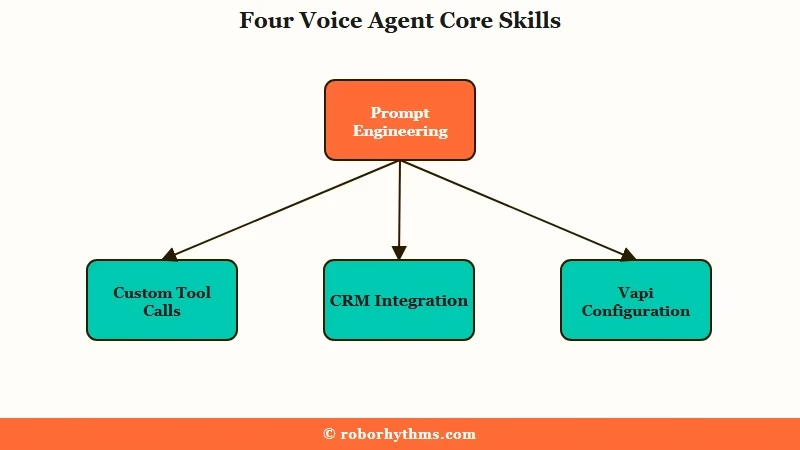
The first skill is system prompt engineering, and it is the single most underrated lever in voice AI. Production builders report rewriting system prompts hundreds of times across an 8-month run.
I see why. A prompt tuned for tonality, objection handling, pause behavior, and “when to push forward” produces an agent callers mistake for human. A prompt that reads like a terms-and-conditions document produces an agent the caller hangs up on inside 30 seconds.
The second skill is custom tool calls. A voice agent that only talks is a chatbot with audio, and a voice agent that books, charges, looks up, escalates, or logs is a product.
Custom tools are also where most beginners give up. The pattern that survives production is: every tool has a clear conversational trigger, every tool returns a value the agent can use in the next sentence, and every tool failure is handled gracefully without breaking immersion.
The third skill is integrations. CRMs, calendars, databases, payment rails, ticketing systems. Real money lives in stitching the agent to whatever back-office system the client already runs.
This is where workflow automation tools earn their seat at the table. Make.com is the cleanest cross-system glue for voice-agent integrations when the client already runs a SaaS stack, and Dynamiq for custom AI agents handles the harder pattern where the agent needs to call multiple tools in a single conversation turn.
The fourth skill is Vapi itself. Builders skip Vapi-mastery to their cost. The platform’s defaults are tuned for cautious demos, not production conversations.
Operators who hit profitable margins are running every Vapi knob away from default. The next section covers the specific dials.
How to Hit Sub-500ms Latency on Vapi
Sub-500ms end-to-end latency on Vapi is a configuration problem, not a model problem.
AssemblyAI’s documented benchmark shows ~465ms web latency with a Universal-Streaming STT + Groq Llama 4 Maverick 17B + ElevenLabs Flash v2.5 stack. The catch is that Vapi’s default turn-detection settings can add 1.5 seconds on top of any LLM choice if you do not override them.
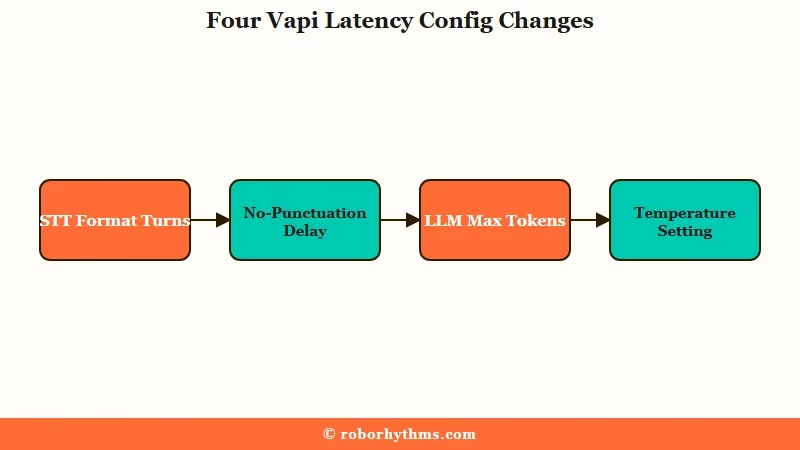
From what I see in the production playbooks, three configuration changes do most of the latency work, and they are not the ones a beginner reaches for first.
| Vapi setting | Default | Production value | Why it matters |
|---|---|---|---|
| Format Turns (STT) | true | false | Skipping punctuation and capitalization processing saves hundreds of ms per turn |
| startSpeakingPlan no-punctuation delay | 1500 ms | near zero | Default waits 1.5s if it cannot detect a sentence boundary in the STT stream |
| LLM Max Tokens | unbounded | 150 to 200 | Shorter responses generate faster and match conversational expectations |
| Temperature | 0.7 | 1.0 | Lower temperatures produce robotic-sounding output that increases hang-up rate |
| Voice speed | 1.0 | 1.05 to 1.10 | Slightly faster TTS reads as more competent without losing comprehension |
The provider stack matters too, but secondary to the configuration. The fastest documented combinations on web (WebRTC) hit ~465ms end-to-end.
Telephony (Twilio or Vonage) adds 600ms or more of network overhead alone, which is why production builders sometimes route the same agent through different stacks depending on the channel.
Prompt phrasing is the third lever. The rule the production guides converge on is “sixth-grade English with contractions.” Simple words, common grammar, short responses, contractions like “don’t” and “I’m” instead of “do not” and “I am.” This both speeds up token generation and makes the agent sound like a peer instead of a script-reader.
Vague: “You are a helpful AI assistant. Please respond to the caller’s questions politely and provide accurate information.”
Specific: “You’re Sarah, the booking assistant at Maple Dental. Keep replies to 1 or 2 sentences. Use contractions. If the caller asks about pricing, say ‘I’ll grab that for you’ and call the getpricing tool. If they want to book, ask only for their name and preferred day, then call scheduleappointment. Never read a list of options. Always offer two.”
Both prompts produce something. Only the second one books appointments at a rate clients pay for.
The Beginner Mistakes That Kill Voice Agents
The four mistakes that kill beginner voice agents are: monologues, robotic tone, default turn-taking, and ignoring TCPA-style compliance work.
Each one is fixable in under an hour, and each one cuts hang-up rate measurably.
The way I would sequence the fixes from highest hang-up impact to lowest:
- Cut response length to 1 or 2 sentences in the system prompt, hard cap. Long monologues are the top reason callers disconnect. Add a literal “Keep replies to 1 or 2 sentences” line to the prompt and add Max Tokens 150 to the LLM config. The agent that summarizes a 200-word answer down to one clean line wins.
- Bump Temperature to 1.0 and use natural language in the prompt. Voice prompts that read like documentation produce agents that sound like documentation. The fix is not tuning a different model. The fix is rewriting the prompt to read like a conversation with a friend who works the front desk.
- Override Vapi’s default startSpeakingPlan and disable Format Turns. This single change cuts perceived latency by hundreds of milliseconds and removes the awkward 1.5-second silence the default produces when the STT cannot detect a sentence boundary. It is the easiest production win in the entire stack.
- Build the TCPA and two-party consent flow into the agent before the first paid call. For US deployments specifically, you need an opening line that identifies the agent as AI, you need the call recording disclosure embedded as a tool call rather than scripted prose, and you need KYC registration with your telephony provider so calls do not get blocked under Shaken/Stirred spam filters. Clients in regulated industries will not pay until this is in place.
The fifth less-common mistake is skipping observability. Production builders log structured call data on every conversation: latency-per-segment (STT, LLM, TTS), interruption events, tool call success/failure, full transcripts, and any human-handoff trigger.
Without this, you cannot debug why your agent is performing worse on Tuesday than it did on Monday. The same pattern shows up in agent production infrastructure patterns more broadly: the boring observability work is what separates demo-quality systems from production ones.
How to Price Voice Agent Builds for Clients
The pricing model that holds up in 2026 is a one-time build fee of $3,000 to $7,000 plus a recurring maintenance retainer of $1,500 to $9,000 per month per client.
Builders who land at $5,000 starting builds are pricing realistically given the integration depth most clients want.
The pricing logic clients respond to is ROI, not hour count. A voice agent that answers 200 inbound calls a week at a $15-per-call internal cost saves the client roughly $12,000 a month. Charging $5k upfront plus $3k recurring against that saving is a clean conversation.
Three structures I see working today:
| Structure | One-time fee | Monthly retainer | Best when |
|---|---|---|---|
| Build + Ongoing tuning | $3,000 to $5,000 | $1,500 to $3,000 | Single-purpose agent (booking, lead intake) for SMB |
| Build + Multi-channel ops | $5,000 to $7,000 | $3,000 to $5,000 | Mid-market client running voice plus SMS plus CRM sync |
| Build + Volume scaling | $7,000+ | $7,000 to $9,000+ | Call-center replacement with multi-agent routing |
For a builder bootstrapping toward a $9k/month anchor client, the path I see working is: ship the first build at $3,000 to $5,000 specifically to a client who will give you a testimonial, then negotiate retainer separately once the agent is live and the savings are documented. A documented case study is worth more than any cold-outreach script.
The reason the recurring fee is non-negotiable is that voice agents need ongoing tuning. Prompts evolve as the business evolves, and integrations break when the client’s CRM pushes an update.
New edge cases surface in the call logs every week. A builder who tries to ship a voice agent and walk away ends up rebuilding it for free six months later.
The same pattern shows up in the broader multi-agent system patterns you would apply to a more complex orchestration build. If you are still on the free-tier AI agent stack, the upgrade-to-Vapi conversation is where production-grade voice work begins.
External benchmark on the cost side: the AssemblyAI engineering writeup breaks down the per-second cost of each provider in the documented sub-500ms stack, which is the authoritative reference for client-facing margin math.
Frequently Asked Questions
What is the lowest latency I can realistically hit on Vapi for a production voice agent?
Under 500ms end-to-end is achievable on web (WebRTC) using a tuned stack like AssemblyAI Universal-Streaming for STT, Groq Llama 4 Maverick 17B for the LLM, and ElevenLabs Flash v2.5 for TTS. Telephony deployments add 600ms or more of network overhead, so plan for around 1 second.
When should I use Vapi vs OpenAI Realtime vs a local stack?
Vapi when you want modular orchestration and the option to swap providers per call. OpenAI Realtime when you want a single-vendor pipeline and are willing to trade flexibility for simplicity. Local stacks like LiveKit when you need on-premises deployment for regulated industries.
How do I handle two-party consent and TCPA compliance on voice agents?
Embed the AI disclosure and call-recording notice as a tool-call trigger at the start of every conversation. Register your brand with your telephony provider for KYC and Shaken/Stirred compliance so calls do not get blocked as spam. Use customizable consent workflows that produce audit trails.
What is the biggest beginner mistake building voice agents?
Letting the agent talk too long. Monologues over 1 to 2 sentences cause callers to hang up. The fix is a literal “Keep replies to 1 or 2 sentences” line in the system prompt plus a Max Tokens 150 cap on the LLM config.
How do I get my first paying voice agent client?
Build one polished agent for a specific vertical (dental booking, real-estate lead intake, restaurant reservations) and offer the first build at $3,000 to land a testimonial. Document the ROI in a public case study. Use the case study to anchor every subsequent pitch at $5,000-plus.
Do I need to code to build production voice agents?
You need to read code and configure JSON cleanly. Most production-grade Vapi deployments do not require writing the agent from scratch, but they do require comfortable use of tool-call definitions, webhook integration, and prompt iteration cycles. Plan for a 3-to-4-month ramp from zero to sellable.
