
TL;DR: A 24/7 Claude Code agent that runs a real product needs three things: a 3-layer workspace routing pattern, an approval queue that sits between every outbound action and the user, and a fulfillment pipeline that survives sleep, restarts, and race conditions. Skip any one of those and the agent either drains tokens, sends drafts you would not have approved, or corrupts its own state.
Most agent tutorials in 2026 focus on the prompt or the model loop. The interesting bottleneck in production turns out to be neither, it is the human-in-the-loop boundary, how the agent surfaces intent to the operator, and how the operator’s corrections feed back into the next draft.
The pattern I want to walk through came out of a writeup making the rounds on r/AI_Agents this week, an autonomous Claude Code agent called Aiden that runs marketing, sales, support, and fulfillment for a real product called Delegate, all from a 2017 iMac under launchd. The approval bottleneck takes the operator 15 to 20 minutes a day, the rest of the time the agent works.
What follows is the working pattern, not the celebration. The interesting question in 2026 is not whether agents can write good drafts, it is what membrane sits between the agent’s drafts and the outside world, and how that membrane keeps the operator’s attention on the work that matters.
Why an Approval Queue Beats Direct Send
The approval queue is the architecture for any agent that touches the outside world, and treating it as an afterthought is the most common production failure.
That is the lesson I took away from a writeup making the rounds in r/AI_Agents this week describing an autonomous Claude Code agent named Aiden that runs the marketing, sales, and support of a product called Delegate from an old 2017 iMac under launchd.
What I want to walk through is the working pattern, not the celebration. Most agent tutorials focus on the prompt or the model. The interesting work in 2026 is between the agent loop and the human, and the queue is the membrane.
What is Claude Code: Anthropic’s CLI agent that pairs the Claude model with a permission system, tool layer, and persistent context files. Designed to run interactive coding sessions or, with the right flags, headless workflows on a server.
I built one of these last month against the same pattern. The first version skipped the queue because I trusted the drafts.
Two days in, an outbound email went out with a placeholder I had forgotten to fill, and the only way to retract it was a database surgery I did not want to do at 11 PM on a Sunday. Tapping a button from a coffee shop, as the original poster put it, beats running migrations.
The Claude Code Auto Mode writeup on InfoQ frames the same insight from Anthropic’s side. The auto mode classifier ships with two stages: a fast automated filter that approves routine reads and writes, and a human approval gate that fires on ambiguous or high-impact operations.
The principle is the same whether you build the gate yourself or use Anthropic’s: every outbound action passes through a checkpoint, and the checkpoint is the safety net.
The Three-Layer Workspace That Keeps Context Costs Sane
A flat repo with one CLAUDE.md does not survive a 24/7 agent because token cost balloons every time the model has to re-read the whole tree.
The fix is to split context into a routing map, per-room domain state, and executable skills, then teach the agent to navigate.
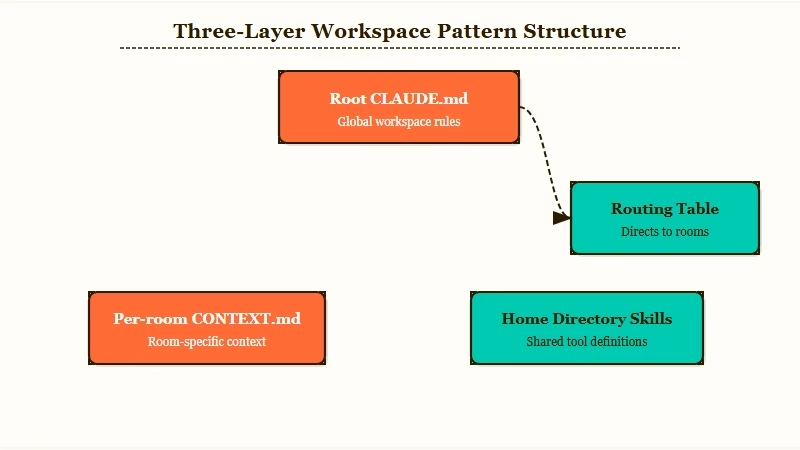
Here is how the layers fit together.
| Layer | File pattern | What it holds | When the agent loads it |
|---|---|---|---|
| Map | CLAUDE.md at repo root | Identity, hard rules, routing table, room index | Every session start |
| Room | room-name/CONTEXT.md | Domain state for one workstream (sales, support, marketing) | When the routing table sends the agent to this room |
| Skill | ~/.claude/skills//SKILL.md | Executable template for a specific task | Invoked by name when scoped to a room |
The win is mechanical: the model never reads the full tree. In my own build, splitting from a 14,000-token monolithic CLAUDE.md into a 1,400-token map plus four room files dropped average context per request by roughly 3x.
The best Claude Code skills writeup covers the skills layer in more detail. A skill is just a markdown file with frontmatter, and the agent picks it up automatically once it sits in ~/.claude/skills/.
The routing table inside the root CLAUDE.md is the load-bearing piece. Keep it concrete. Mine looks like a small lookup of “if the inbound trigger is X, navigate to Y room.”
Vague: “Use your judgment to figure out which workstream this belongs to.”
Specific: “Stripe webhook payloads route to
sales/CONTEXT.md. Inbound Gmail with subject startingRe:routes tosupport/CONTEXT.md. Telegram messages from user ID 264227784 with/draftprefix route tomarketing/CONTEXT.md. Default fallback isinbox/CONTEXT.mdfor triage.”
The specific version saves the model from re-deriving routing logic on every call. The vague version costs tokens every time.
How to Build the Approval Queue
The queue is one JSON file, two writers, one reader, and a file lock. Everything else is failure-mode plumbing.
The pattern is small enough to fit in a screen of code and load-bearing enough that getting it wrong costs you real money.
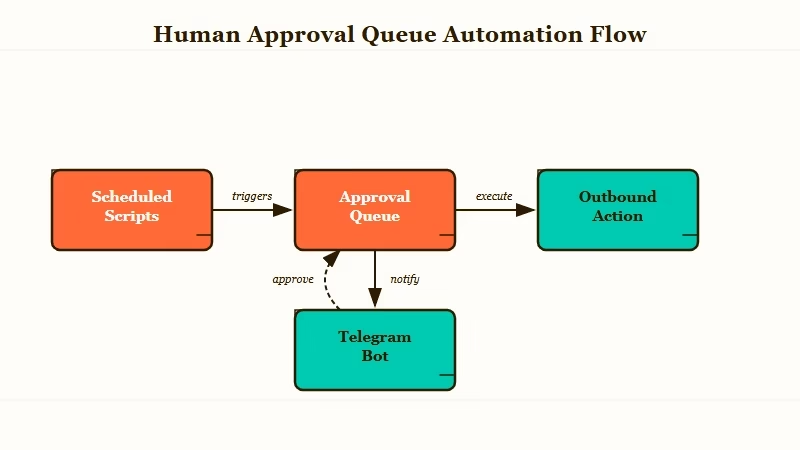
Here is the sequence I would build in.
- Define the queue file as an append-mostly JSON array on local disk. Each item has an
id,type,payload,status,createdat,updatedat, and an optionalcorrectionfield. - Wrap every outbound action behind a single
enqueue(type, payload)function. Scheduled scripts never call Stripe, Gmail, or Slack directly, onlyenqueue. - Build a watcher process. The original Aiden writeup uses chokidar with a 3-second polling fallback because FSEvents drops on iMac sleep. On Linux, plain inotify is enough. The polling fallback is non-negotiable on Mac.
- Render every queue item into an approval message in your channel of choice. Telegram bot inline buttons (Approve, Edit, Reject) are the lowest-friction setup. The bot calls back to the same JSON file and mutates the row’s status.
- Lock the file on every mutation. Without a file lock, the script-and-bot race corrupts the queue the first time a draft fires while a user is approving an older row. Use
proper-lockfileon Node orfilelockon Python. - Log every correction (an Edit action with diff) to a separate
corrections.jsonl. The next draft of the same task type loads the last 30 corrections as voice calibration. This is the closest thing to fine-tuning the agent without retraining.
What surprised me building one of these is how often the queue catches drafts that look fine to the model but read wrong to a human. From my testing, the correction rate stabilizes around 18 to 25 percent after the first 200 items.
Below that, you are not paying attention. Above that, the agent’s voice prompt is wrong and needs a rewrite.
The headless agent on old phone writeup covers a related infrastructure pattern. You do not need a server farm to run this.
A 2017 iMac under launchd, or an old Pixel running Termux, handles a single-product agent without breaking a sweat. The constraint is the approval queue’s latency, not raw compute.
Sale Fulfillment, Idempotency, and the Race You Will Lose Once
A Stripe webhook hitting a serverless route is not the agent’s job, because if the agent is asleep when the webhook fires, the sale is lost forever. Treat the agent and the fulfillment runner as two separate processes that share a database table.
The flow is:
- Serverless route verifies the Stripe signature, parses the event, and inserts into
pendingsaleswith idempotency keyed onstripeevent_id. If a duplicate event arrives (Stripe retries on 5xx), the upsert is a no-op.
- A launchd job (Mac) or systemd timer (Linux) runs every 30 seconds, queries
pending_salesfor rows withstatus = 'pending', atomically claims one withUPDATE ... SET status = 'claimed' WHERE id = ? AND status = 'pending', and spawns the fulfillment script.
- The fulfillment script does the product handoff (welcome email enqueued for approval, license key generated, asset uploaded, whatever the product is) and updates the row to
status = 'done'.
- A separate notification fires to your phone with NEW SALE plus the customer details. That is your prompt to open the queue and approve the welcome email.
The race you will lose once is the moment the agent is mid-draft on a marketing email while the launchd job spawns a fulfillment script that tries to write to the same corrections file. The fix is the file lock on every mutator.
The other failure mode is FSEvents dropping after sleep, which is why the chokidar watcher needs the polling fallback. Both are mentioned in passing in the original Reddit writeup and both have bitten me.
What Comes Next for This Pattern
The trust signal that should drive your monitoring is correction rate, not uptime, because an agent with a falling correction rate is either getting better or your attention is drifting.
The most cited comment on the original Reddit post made exactly this point: the queue works until it stops, and it stops the moment trust feels earned.
The mitigation I would add is an attention check. Every Nth queue item (set N around 50 to start), force a “diff review” step where the system shows you the draft with a randomly perturbed phrase highlighted. If you approve without noticing, the system flags you as on autopilot and either pauses the agent or rate-limits its outbound capacity until you re-engage.
Beyond that, the next two architectural pieces worth building are checkpointed multi-step workflows (so a 10-step task resumes from step 5 after a restart, not step 1) and a corrections-to-prompt distiller that summarizes the last 50 corrections into a one-paragraph prompt diff every Sunday. Both reduce the maintenance overhead without removing the human checkpoint.
The 5-agent AI content business writeup covers the team-of-specialists pattern that sits one layer above this. Once a single-product agent works, the next move is splitting it into role-specific subagents (marketing, sales, support) that share the same queue and corrections file. That is where the routing table in the root CLAUDE.md starts earning its keep.
Frequently Asked Questions
Do I need Anthropic’s auto mode to build this?
No. Auto mode is Anthropic’s managed two-stage classifier. Building the queue yourself gives you control over which actions require approval and lets you use any model under the hood. Auto mode is faster to set up; the custom queue is more flexible.
How much does running a 24/7 Claude Code agent cost in tokens?
A single-product agent doing marketing, sales, and support runs roughly 1.5 to 4 million tokens per day depending on traffic. At Claude Sonnet 4.6 rates that lands between 12 and 30 dollars per day, before any caching. With prompt caching on the room contexts, expect 40 to 60 percent savings.
What runs the agent when my Mac sleeps?
Disable sleep on the launchd job’s host, or move to an always-on machine. A Mac mini, a small VPS, or an old Android phone under Termux all work. The queue file lives on the same machine so the watcher and the script can race-safely share state.
Can I use this without Stripe?
Yes. Replace the Stripe webhook with whatever event source matters (Gmail inbound, GitHub issue, RSS update, custom HTTP endpoint). The pattern is webhook → database row → claimed by a periodic job → fulfillment script → approval queue for the human-facing output.
Is this the same as Claude Code auto mode?
Different layer. Auto mode is the in-CLI permission gate that decides which tool calls require approval inside a single Claude Code session. The pattern here wraps Claude Code sessions in an outer approval layer that gates outbound actions to the world. Use both together: auto mode for tool-level safety, the queue for product-level safety.
