
What’s Changed: Character AI removed the Roar chat style on April 28, 2026 with no legacy fallback. Pipsqueak 2 is now the default for everyone. There is no in-app way to bring Roar back. The closest workaround is Deepsqueak with style-hint prompting; the cleanest exit is switching to Nectar AI or Candy AI for the conversational depth Roar used to deliver.
If you landed here looking for a “bring back Roar” toggle in Character AI, I am sorry, the news is not great. Roar was pulled on April 28, 2026 in the same Pipsqueak 2 rollout that retired Pawly and trimmed the chat style menu. Unlike Meow, Nyan, Soft Launch, and Goro (which moved to a legacy submenu retiring May 8), Roar has no fallback.
The Reddit threads from May 4 and 5, 2026 are full of users asking the same question this article answers. “How do I get Roar back?” “Bring back Pipsqueak 1.” “Chat style get Roar back on.” The short answer is that Character AI is not reversing this decision. The longer answer is that there are workarounds inside the app, and there are exits to platforms that are still shipping the kind of conversational quality Roar was known for.
What I want to walk through here is the honest version of both options. The in-app workarounds will get you 60 to 70% of the way back to a Roar-like experience. The platform alternatives will get you 100% of the way there but require a switching cost. Both paths are covered below.
What’s Happening With Roar Right Now
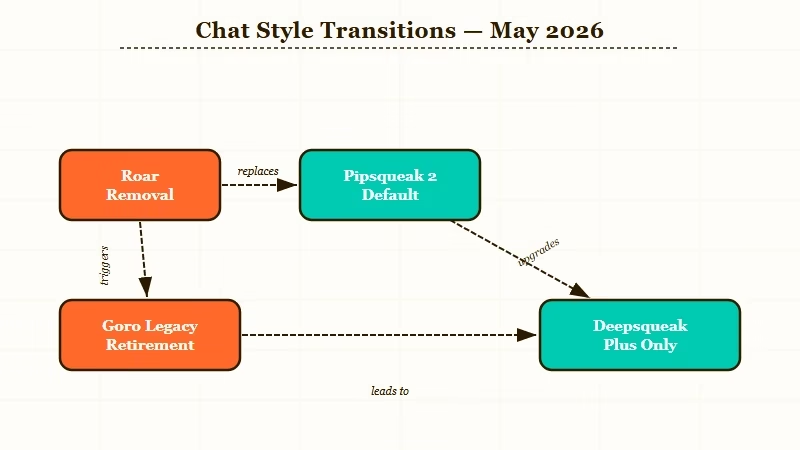
Roar is removed from Character AI as of April 28, 2026 with no legacy fallback or planned reinstatement. Users on free and Plus tiers default to Pipsqueak 2; c.ai+ subscribers can also choose Deepsqueak.
The way I see the timeline matters for understanding why this is final. Character AI announced the Pipsqueak 2 rollout on April 28, 2026, removed Roar and Pawly the same day, and put Meow, Nyan, Soft Launch, and Goro into a legacy submenu set to retire on May 8.
That means by the time you are reading this in mid-May, even the legacy options will be gone. The chat style picker for free users will be Pipsqueak 2 and nothing else.
Roar’s reputation in the community came from short, punchy replies and a willingness to commit to a tone without drift. Users in the May 4-5 threads describe Pipsqueak 2 as “rambling,” “ChatGPT-flavored,” and “drifting out of character.” Whether you agree with that read or not, the community pressure is strong enough that Character AI’s silence on a reversal is itself a signal. They are not going to walk this back.
For full context on what changed in the rollout, the existing piece on Character AI pulling Roar and Soft Launch in April 2026 covers the announcement and the 24-hour aftermath.
The Pipsqueak 2 fix piece walks through the immediate quality issues users hit when the new model became default.
Why You Cannot Bring Roar Back Through Settings
There is no toggle, hidden setting, or browser extension that restores Roar. The model itself was deprecated on the back end, not just hidden in the UI, so any in-app workaround can only mimic Roar’s behavior, not run the actual model.
I want to address the “is there a hack” question directly because it shows up in every comment thread. The answer is no. Several specific things readers have asked me about that do NOT work:
| Workaround attempted | Why it does not work |
|---|---|
| Switching account regions or VPN | Pipsqueak 2 default rolled to all regions simultaneously |
| Reinstalling the app or clearing cache | Settings sync from server, not from local cache |
| Using a c.ai+ subscription | c.ai+ unlocks Deepsqueak but not Roar; Roar is not on the back end |
| Browser dev tools / requesting old model | The model endpoint is decommissioned, not gated |
| Restoring an old chat from backup | Old chats display content but use the new active model for responses |
A handful of community guides have suggested using the chat style “Soft Launch” as a Roar replacement before May 8. That is closer to true than the others, but Soft Launch retires on May 8 itself, so it is at best a 12-day stopgap depending on when you read this.
The Closest In-App Workaround Today
The closest you can get to Roar inside Character AI today is Deepsqueak (c.ai+ only) with direct style-hint prompting in the global edit and a hard cap on chat length to prevent context drift.
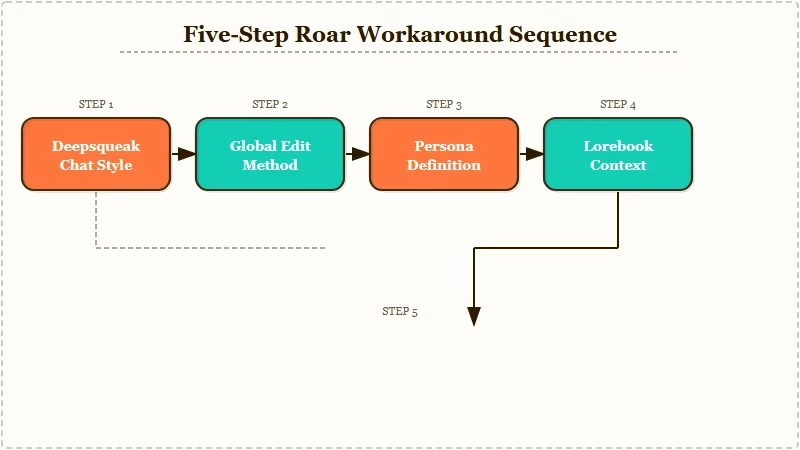
This is the workaround I would really run if you have a c.ai+ subscription and want to stay on Character AI. It will not match Roar exactly, but it gets meaningfully closer than Pipsqueak 2 default.
The numbered sequence:
- Switch to Deepsqueak. Settings → Chat Style → Deepsqueak. This is c.ai+ only ($9.99 per month). Free users cannot do this step.
- Use the global edit method. Start a chat. When the bot produces a reply you like, star it, then click the edit icon and append a style hint at the end of the response in brackets:
[Keep replies under 80 words. Internal monologue enabled. Maintain tone consistency.]. The model treats this as a steering signal for subsequent responses. - Front-load the persona definition. In the character’s definition field, add a direct length and tone instruction. The format that works for me: “Replies are 60 to 100 words. No long monologues. Stay in character. Do not break the fourth wall.”
- Cap chat length aggressively. From what I have seen, Pipsqueak 2 and Deepsqueak both drift after about 80 to 100 messages. Restart the chat when responses start losing the persona, instead of trying to repair mid-chat.
- Use a lorebook for persistent context. Pipsqueak 2’s lorebook feature, the one positive thing the rollout introduced, lets you pin facts that survive chat resets. Use it for character backstory rather than relying on the running context.
Before: Pipsqueak 2 produces a 250-word reply with three internal monologue paragraphs and a tangent about the character’s past.
After: Deepsqueak with the global-edit style hint produces a 70-word reply that stays in character and ends on an action beat instead of monologue.
That is the realistic ceiling on the in-app workaround. It is closer to Roar than Pipsqueak 2 default, not identical to Roar.
When to Just Switch Platforms
If your primary value from Roar was the conversational tone and short reply discipline, the platforms shipping that quality in 2026 are Nectar AI and Candy AI. Both have free tiers worth testing before committing to a paid plan.
The honest assessment from what I have seen across the May 4-5 threads is that maybe 30 to 40% of the users frustrated with Pipsqueak 2 will leave Character AI within the next 60 days. That is the platform-switching window every time a major model rollout disappoints a long-tail user base.
The pick I would make depends on what you used Roar for:
| What you valued in Roar | Closest 2026 platform | Why |
|---|---|---|
| Short, punchy replies that stay in character | Nectar AI | Reply length defaults are tight; tone consistency holds across long sessions |
| Emotional depth without ChatGPT-style hedging | Candy AI | Memory architecture rivals Roar’s session continuity; cleaner persona enforcement |
| Free tier that lets you really roleplay daily | Chai (free 70 msgs/day) | Not a Roar replacement on quality, but the message limit is workable |
For a longer evaluation of options, the best Character AI alternatives roundup covers more candidates and goes deeper on the trade-offs.
Nectar AI specifically is the alternative I would point a Roar refugee at first. The reply discipline is the closest to Roar’s old behavior in the active 2026 market, and the platform has been stable through the same period that Character AI has been thrashing. Nectar AI is worth a free-tier test before committing to a paid plan.
What I Would Do If I Were a Long-Time Roar User Today
Run the in-app Deepsqueak workaround for 7 days while testing Nectar AI on the free tier in parallel. If Deepsqueak with style-hint prompting holds your character, stay. If it drifts within the first session, switch.
The way I see the choice: do not make the switching decision in the heat of the May 4-5 frustration. Pipsqueak 2 is rough today, but Character AI is still iterating, and the 7-day Deepsqueak test costs you nothing if you already have c.ai+. If you do not have c.ai+, the answer simplifies. Free Pipsqueak 2 is not going to give you Roar’s tone, and the workarounds are weaker without Deepsqueak. Switching to a free-tier alternative is the more honest path.
For longtime users who have invested months or years in custom characters, the data export piece matters too. Character AI does not currently offer character export, so anything you have built lives on the platform. That is a real switching cost, and it is worth flagging up-front: switching means rebuilding your characters from scratch on the new platform.
Pipsqueak vs Roar comparison is the right context for understanding what the two models really delivered side by side. I would point any reader still on the fence at that piece for the head-to-head before deciding.
Frequently Asked Questions
Is Roar coming back to Character AI?
No. Character AI has not signaled any reversal, and the model has been deprecated on the back end (not just hidden in the UI). As of May 2026, treat Roar as permanently retired.
Can I use a VPN to get Roar back?
No. The Pipsqueak 2 default rolled to all regions simultaneously, and the Roar model endpoint itself is decommissioned, so changing your account region does not help.
What is the closest chat style to Roar in May 2026?
Deepsqueak (c.ai+ only, $9.99/mo) with the global-edit style-hint method. It will not match Roar exactly, but it is meaningfully closer than the default Pipsqueak 2.
Should I cancel my c.ai+ subscription?
Only if you are leaving the platform entirely. If you are staying on Character AI, c.ai+ unlocks Deepsqueak, which is the closest in-app Roar replacement. If Deepsqueak does not satisfy you, cancel and use the saved budget on a Nectar AI or Candy AI subscription.
Will Character AI bring Roar back if enough users complain?
Unlikely. The May 8 retirement of the legacy submenu (Meow, Nyan, Soft Launch, Goro) is the stronger signal. Character AI is consolidating around Pipsqueak 2 and Deepsqueak, not preserving optionality.
