
TL;DR: Slopsquatting is the new supply chain attack where attackers register the fake package names AI coding agents hallucinate. With ~20% of LLM-recommended packages not existing on npm or PyPI, the attack surface is huge. The three-layer defense that holds up: pin a real registry source of truth, run installs in an isolated container, and intercept the install command with Aikido SafeChain or Socket before anything touches your machine.
The first time I caught my AI coding agent trying to install a package that did not exist on npm, the slopsquatting term had not been coined yet. I assumed it was a bug. The second time, I realized it was a security problem. The third time, it was already a real attack vector with documented victims.
Slopsquatting is what happens when attackers stop waiting for human typos and start pre-registering the fake package names that LLMs hallucinate.
The agent confidently writes npm install starlette-reverse-proxy, the user accepts the suggestion, and the package was registered last week by someone with bad intentions. No human ever typed the wrong name. The model invented it, and the attacker was waiting.
What I want to walk through here is not the academic side of this attack. The Socket and Trend Micro write-ups already cover that. I want to share the actual three-layer defense I run on every project where an AI coding agent has any ability to suggest dependencies, and the specific commands that go on each layer.
What Slopsquatting Really Is
Slopsquatting is the registration of fake package names that LLMs repeatedly hallucinate, so when an AI coding agent suggests one of those names the install command lands on attacker-controlled malware.
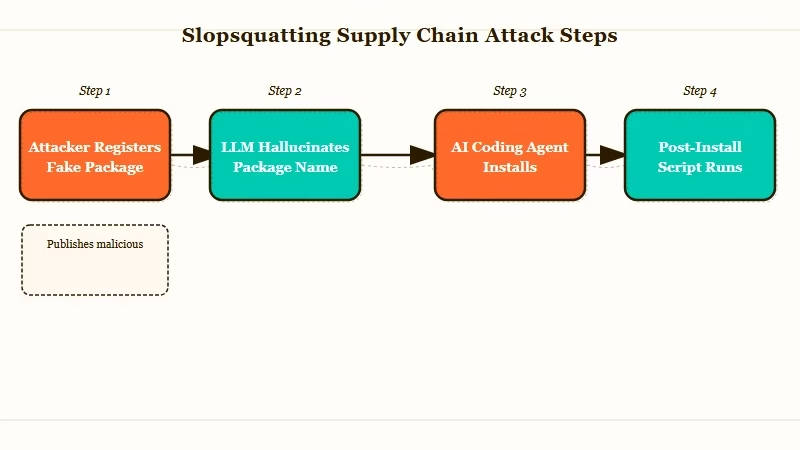
The term itself was coined in early 2025 by Seth Larson at the Python Software Foundation. The mechanism is older than the term. Researchers ran 576,000 code samples through major LLMs and found that 19.7% of the package names the models recommended did not exist on npm or PyPI at all.
Open-source models are worse, with a 21.7% hallucination rate, compared to 5.2% for the commercial models. CodeLlama 7B and 34B hallucinate package names in more than a third of their outputs. GPT-4 Turbo is the only one I would describe as well-behaved at 3.59%.
The reason this matters more than typosquatting ever did is repeatability. When the same prompt is run ten times against the same model, 43% of the hallucinated names appear on every single run. That is not noise. That is a stable target an attacker can register once and harvest for months.
There is a documented case of huggingface-cli on PyPI. The real Hugging Face CLI installs via pip install -U "huggingface_hub[cli]". A researcher registered the hallucinated name huggingface-cli and got over 30,000 authentic downloads in three months from agents and developers who never thought to check.
# This is the kind of command an AI coding agent will confidently produce.
# Copy-paste it without reading and you might be installing a slopsquatted package.

pip install huggingface-cli   # WRONG, does not exist on PyPI
pip install -U "huggingface_hub[cli]"   # RIGHT, the real package
The other documented case I keep coming back to is react-codeshift on npm. It was a hallucinated conflation of jscodeshift and react-codemod. Forty-seven LLM-generated agent skills on GitHub recommended it, and the package spread to 237 repositories through forks before anyone noticed.
Why AI Coding Agents Are the Perfect Attack Vector
AI coding agents install packages without human review, run install scripts with full shell privileges, and trust their own confident output, which is exactly the threat profile slopsquatters need.
Three properties of agentic coding workflows make this worse than the same attack against human developers. From what I have seen running agents in production:
- Agents run install commands without verification. A human developer who has never heard of
unused-importswould Google it before runningnpm install. An agent will not. The agent reads its own output as ground truth and shells out. - Install scripts execute on first contact. Both npm and pip run post-install scripts by default. The malicious package does not need the developer to import it. It runs the moment the install finishes, which means the agent’s own machine, the CI runner, or the dev container is compromised before any code is written.
- The agent loop trusts its own past output. Once a package name has been “successfully” installed once, the agent will reference it in future suggestions, in committed code, and in documentation it generates for the project. The fake name spreads through the codebase faster than a human review cycle can catch it.
For context on why this matters in agent design generally, I would point to the existing rag chunking kills agents piece. That article covers a different agent failure mode (silent retrieval failures), but the underlying lesson is the same: agents fail silently when their own outputs are treated as facts rather than hypotheses to verify.
The defense pattern that matters here is not “make the model stop hallucinating.” That is not solvable in the next year. The defense that works is “intercept every install command before the package touches the system, and verify against a real registry.”
The Three-Layer Defense I Run on Every Agent Project
The defense that holds up under real conditions has three layers: a pinned registry policy, an isolated execution environment, and a real-time install interceptor that checks every package against a threat intelligence feed.
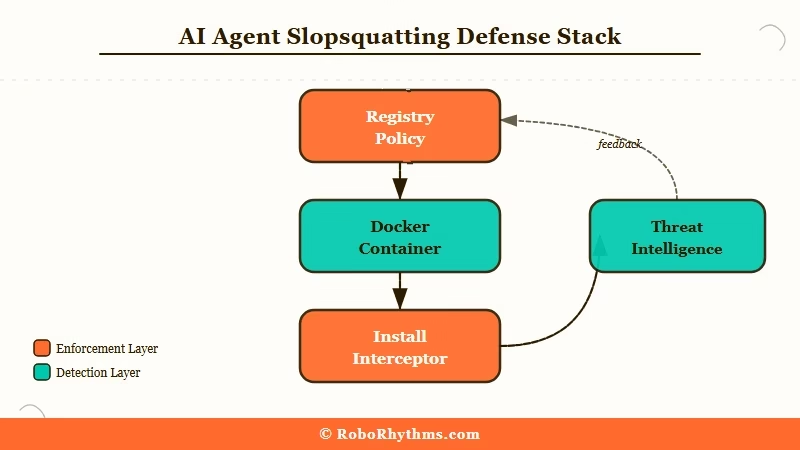
The way I see it, you cannot rely on a single layer. The model will sometimes get the name right, the container will sometimes leak credentials, and the interceptor will sometimes have stale data. The three layers compensate for each other’s failures.
| Layer | What it does | Tool I use | Cost |
|---|---|---|---|
| 1. Registry policy | Pins a minimum release age so brand-new packages cannot install | pnpm 11 + minimum-release-age=72h | Free, included in pnpm |
| 2. Isolated environment | Runs every install inside a disposable container with no host credentials | Docker dev container or ephemeral VM | Free tier covers most projects |
| 3. Install interceptor | Checks every install command against threat intelligence before fetch | Aikido SafeChain (free) or Socket (paid tier) | Free or $19/mo |
Here is what each layer catches that the others miss. Layer 1 stops the most common slopsquatting attack pattern, where the attacker registers the fake package days before the developer’s agent recommends it. A 72-hour minimum release age cuts off the freshest malicious packages.
Layer 2 contains the blast radius. If a malicious package gets through layers 1 and 3, it executes inside a container with no SSH keys, no .aws/credentials, no cloud tokens, and no way to reach the host machine. The post-install script gets to do nothing useful.
Layer 3 is the live check. Aikido SafeChain wraps npm, npx, yarn, and pnpm and queries threat intelligence before any download happens. If the package was reported as malicious in the last hour, the install is blocked at the command line before the registry hit.
Setting Up Pnpm 11 With Minimum Release Age
The cheapest layer-one defense is pnpm 11’s built-in minimum release age, which blocks any package version published in the last 72 hours from installing.
Here is how I configure a fresh project. The numbered steps below are the exact sequence I run on every new repo where an agent has dependency-suggestion power:
- Install pnpm 11 globally:
npm install -g pnpm@11. Earlier versions do not have the minimum release age flag. - In the project root, create or edit
.npmrcand add:minimum-release-age=72handblock-exotic-subdependencies=true. - If a package legitimately needs to install a fresh version (e.g. a same-day security patch), override on the command line:
pnpm install --minimum-release-age=0 known-good-package. Make this an exception, never a default. - Add the
.npmrcto git so the policy travels with the repo.
The agent itself does not need to know about this. It runs pnpm install whatever. Pnpm refuses if the package is fresher than 72 hours old, returns a clear error, and the agent loop sees the error and tries something else (or surfaces it to the human).
Before: the agent runs
pnpm install starlette-reverse-proxyand pnpm fetches the package, runs the post-install script, and grants the attacker shell access.After: the agent runs
pnpm install starlette-reverse-proxyand pnpm responds withERRMINIMUMRELEASE_AGE: package starlette-reverse-proxy@1.0.0 was published 2 hours ago, minimum required age is 72h. The agent loop catches the error and either retries with a different package name or escalates to the human.
That is the entire layer-one investment. Free, persistent, and breaks the 24-to-48-hour attacker reaction window that slopsquatting depends on.
How Aikido SafeChain Catches the Stuff That Slips Through
Aikido SafeChain is a free open-source wrapper for npm, npx, yarn, and pnpm that intercepts every install command and checks it against threat intelligence before the package is fetched.
I add it as the third layer because the registry-age policy and the container layer both have gaps. A 70-hour-old malicious package slips past pnpm. A container with a credential mount that someone forgot about gets compromised. SafeChain is the redundant net under both.
Setup is short. Here is the sequence:
- Install:
npm install -g @aikidosec/safechain - Replace the binary calls with the wrapped versions:
safechain npm,safechain npx,safechain yarn,safechain pnpm. Most teams alias these in.bashrcor.zshrc. - Configure the threat feed URL (defaults to Aikido’s public feed, which pulls from Socket, Snyk, and OSV). For enterprise use, point it at a private feed.
- Make it the default in your dev container Dockerfile so the agent has no choice but to use it.
The agent’s install commands now route through SafeChain transparently. If the package is on the threat list, SafeChain blocks the install with a clear reason. If it is clean, the install proceeds normally. The agent never sees the wrapper.
For workflow automation around the install gate, I have been using Make.com automation pipelines to fan out the SafeChain block events to a Slack channel and a PagerDuty rotation.
When an agent tries to install something that gets blocked three times in an hour, somebody gets paged, because that is the signature of an active attack rather than a normal hallucination.
What to Do If You Already Installed a Slopsquatted Package
The recovery path depends on whether the install ran a post-install script and whether that script had access to credentials.
The honest answer is that the moment a slopsquatted post-install script runs, you should assume credentials are gone. From what I have seen on real incidents, the attacker is usually exfiltrating environment variables and any token files in ~/.npmrc, ~/.aws, ~/.config, and ~/.ssh within seconds.
The exact incident response sequence I run:
- Disconnect the affected machine or container from the network immediately. Do not “investigate first” while the connection is live.
- Rotate every credential the machine had access to: cloud keys, npm tokens, GitHub PATs, SSH keys, database creds. Assume all of them are compromised.
- Pull the package’s tarball from the registry and inspect the
package.jsonforscripts.postinstalland the lifecycle scripts that fired. The Socket and Trend Micro write-ups have good walkthroughs of the artifact analysis. - If the install happened on a developer machine, wipe it. If it happened in CI, destroy the runner and rebuild from a clean image. If it happened in a container with no credential mount, you got lucky, just kill the container.
- Audit recent commits for any code the agent committed referencing the slopsquatted package. Remove the references and pin a known-good replacement.
For the post-incident audit, Anthropic’s $30 billion revenue trajectory is irrelevant context, ignore that. The relevant context is that automated dependency installation is now treated as a privileged operation in security frameworks. The Stanford AI Index has called this out as one of the top three new attack surfaces for autonomous agents in 2026.
That last claim deserves a real authority link rather than my paraphrase. The Trend Micro analysis of slopsquatting covers the threat model in depth and is the source I trust most on incident-response sequencing.
For builders shipping their own agents, the related n8n AI agent tutorial and the multi-agent system distributed pattern guide both apply the same isolation principles to non-coding workflows.
Frequently Asked Questions
How common is slopsquatting in 2026?
Slopsquatting is now treated as a top-three supply chain threat against AI-driven development. Roughly 20% of LLM-recommended package names do not exist on npm or PyPI, and attackers actively monitor LLM outputs to register the most-hallucinated names within hours.
Can Claude Code or Cursor protect against slopsquatting on their own?
Not fully. Claude Code does dynamically verify packages via web search before suggesting them, which reduces the hallucination rate. Cursor and most other AI coding tools do not. Treat any tool’s built-in defense as one layer, not the whole stack.
Does the 72-hour minimum release age break legitimate workflows?
Rarely. Most production projects pin to versions that are weeks or months old. The exception is same-day security patches, which you can override on a per-install basis. The default is conservative because slopsquatted packages live almost entirely in their first 48 hours.
Is slopsquatting only an npm and PyPI problem?
No. The attack works against any package registry where install runs untrusted scripts: npm, PyPI, RubyGems, crates.io, Go modules, Maven, Gradle, Packagist. Slopcheck supports all seven by default. Defense layers should be applied across every registry your agents touch.
How do I detect a slopsquatting attempt that has not yet been reported?
Three signals to watch for: an agent suggesting a package name you do not recognise, a package with under 1,000 weekly downloads being recommended for a critical dependency, and any install whose package.json declares a postinstall script that touches the network or filesystem outside the project directory. Any one of those gets a manual review.
