
Bottom Line: Windsurf is the AI IDE I would put in front of a developer who has not yet picked sides between Cursor and Claude Code. Cascade is genuinely better at multi-file edits than what Cursor shipped at the same price tier. The cost is reliability. Pro at $15 a month is a strong entry point if you can tolerate the occasional crash; Max at $200 is overkill unless you are running it as your primary editor.
Windsurf was Codeium until Cognition AI acquired it for around $250 million in December 2025, after which the brand and the product line both relaunched as a full IDE.
The agentic pivot landed harder than expected. Six months later, Windsurf is the AI IDE I find myself defaulting to when I need a code editor that drives multi-file changes through to completion without making me babysit each step.
This review covers the pricing tiers as they stand in May 2026, what Cascade and Memories really do that Cursor’s equivalents do not, where Windsurf still falls down compared to Cursor and Claude Code, and the verdict on who should pay for which tier.
The short version is at the top of the page; the detail below is what I wish I had read before signing up for Pro.

What Windsurf Is and What Cognition Changed
Windsurf is an agentic AI IDE built on a forked VS Code base, with Cascade as its multi-file edit agent and Memories as its long-term context layer.
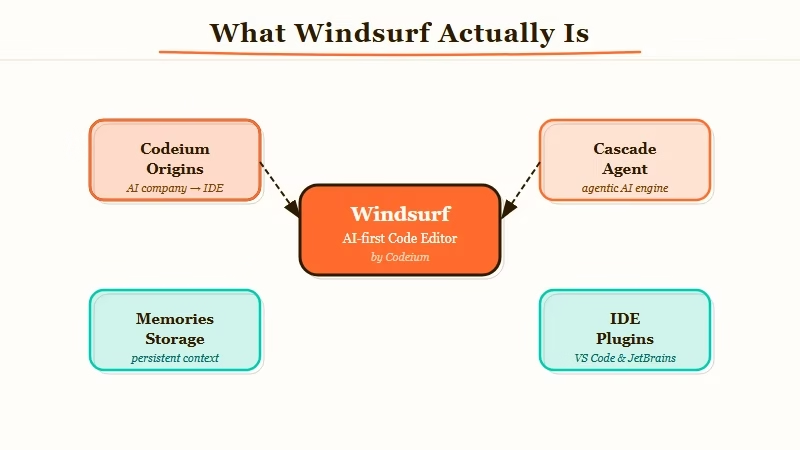
Cascade is the headline. It reads your codebase, builds a plan, then executes edits across multiple files while explaining each step.
The way I see it, that “explains while doing” piece is what separates Cascade from Cursor’s agent mode, which often runs ahead and asks forgiveness later. Cascade’s pacing makes it easier to catch a wrong assumption before it becomes a wrong refactor.
Memories is the second meaningful differentiator. Rather than starting fresh each session, Windsurf stores your naming conventions, file structures, and frequently-used patterns and feeds them back into Cascade as implicit context.
From my own use, the difference shows up around week two. By the time I had used it for ten or twelve sessions on the same project, Cascade was producing code that matched my house style without me having to spell it out each time.
The plugin breadth is the third surprise. Windsurf ships with 40-plus IDE plugins (JetBrains, Vim, NeoVim, Xcode, Android Studio) on top of its own VS Code-based editor.
Cursor ships in one form: its own editor. That difference matters more than I expected for anyone whose workflow lives outside VS Code.
Windsurf Pricing in 2026
Windsurf has four paid tiers (Free, Pro, Max, Teams) plus a usage-based credit system; Pro at $15 per month is the right entry point for individual developers.
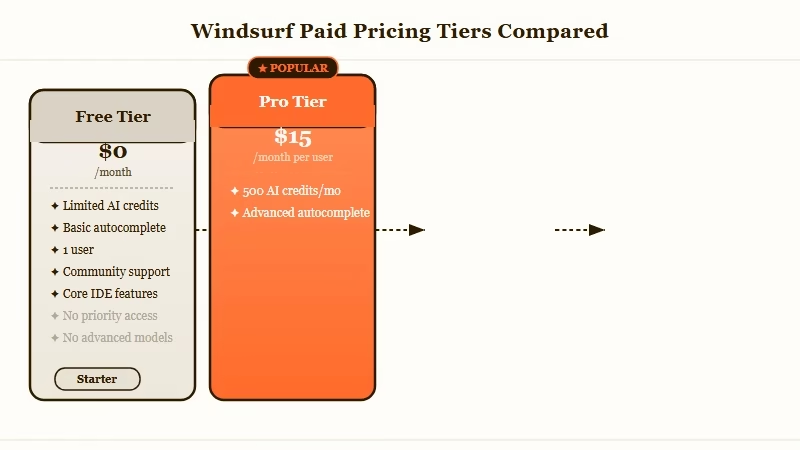
Windsurf revamped pricing in March 2026, dropping the old confusing credit-only system for clearer monthly tiers. Here is how the lineup looks today:
| Tier | Monthly cost | What you get | Best for |
|---|---|---|---|
| Free | $0 | Unlimited basic completions, 5 Cascade sessions per day | Trying it before paying |
| Pro | $15 | 500 credits per month, full Cascade access, Memories | Individual developers |
| Max | $200 | Effectively unlimited credits, priority queue | Heavy users running it as primary editor |
| Teams | $40/user/month | Pro features plus team admin and shared Memories | Small teams and agencies |
The number that matters is the gap between Free and Pro. Free’s 5 Cascade sessions per day is enough to evaluate the tool but not enough to use it as a daily driver; if you find yourself reaching for Cascade more than a few times in an afternoon, Pro is the path.
Max is justifiable only if Windsurf is your primary editor and you are running multiple Cascade sessions in parallel. From what I have seen of how most users land, Pro is the right pick for 80% of developers.
What Cascade Does That Cursor’s Agent Does Not
Cascade differs from Cursor’s agent mode in three specific ways: it pauses for explicit confirmation between phases, it surfaces a written plan before any file is touched, and it tracks dependencies across files better than Cursor’s current implementation.
The differences are subtle on a one-off task and load-bearing on a multi-step one. Here is a concrete example from my own use.
Before: Asking Cursor’s agent to refactor a Python module’s auth handler to use a new signing key format, the agent would update the auth handler, save, and move on. I would then discover three other modules importing the old handler signature broke, and I would spend the next twenty minutes patching them.
After: Asking Cascade the same question, it surfaces a written plan listing every file that imports the auth handler, asks if I want to update them all in the same pass, then walks through each file with a diff preview. Total time is similar, but the surprise count is zero.
That said, Cascade is not strictly better at everything. Cursor’s tab-completion is faster for line-by-line work, and Cursor’s editor feels snappier on a slow laptop.
The choice between them is not “which is better” but “which workflow do you want.” If you want fast inline help, Cursor. If you want a thinking partner for multi-file work, Cascade.
Where Windsurf Still Falls Down
Windsurf’s reliability is its biggest weakness in 2026: occasional crashes, intermittent Cascade timeouts, and slower cold-start times than Cursor.
Three months of daily use has surfaced a consistent pattern. About once every two weeks, Cascade times out mid-task with no useful error message.
About once a month, the editor itself crashes and loses an unsaved Cascade session. The crashes are recoverable (the editor reopens cleanly) but the lost Cascade context is the part that stings.
Cursor by comparison has been more stable in the same period. Same task volume, fewer interruptions. If you cannot tolerate any interruption to your flow, Cursor is currently the safer pick.
From my experience, the Windsurf team has been shipping fixes consistently since the Cognition acquisition, and the trend line is positive, but as of May 2026 the gap is still real.
The other persistent issue is cold start. Windsurf takes noticeably longer than Cursor to launch on a clean boot, and Cascade adds a few seconds of warmup on the first invocation in each session. Once warm, both feel similar.
Pros and Cons
Windsurf’s pros are Cascade’s multi-file pacing, the Memories long-term context layer, broad IDE plugin support, and pricing parity with Cursor; the cons are reliability gaps, slower cold start, and a credit system that can surprise heavy users.
Pros, in order of how much they matter to me:
- Cascade walks through multi-file changes with explicit pauses, reducing surprise refactor breakage.
- Memories stores coding patterns and file conventions, producing better suggestions over time.
- 40-plus IDE plugins beat Cursor’s single-editor model for anyone outside VS Code.
- Pro pricing at $15 a month undercuts Cursor’s equivalent tier.
- Acquired by Cognition AI, the same team behind Devin, which pulls Windsurf into a serious agent-research roadmap.
Cons, also in order:
- Cascade times out or crashes more often than Cursor, costing me a session every two weeks on average.
- Cold-start speed lags Cursor noticeably on a clean boot.
- The credit system on Pro can surprise you mid-month if you run Cascade aggressively on a large codebase.
- Memories occasionally over-fits to early-session patterns, which can feel like the editor “deciding” how I write before I have finished deciding myself.
- Documentation lags the product; new features ship faster than the docs cover them.
Who Should Use Windsurf and Who Should Skip
Windsurf is the right pick for individual developers who do significant multi-file work, work across multiple IDEs, and can tolerate occasional reliability hiccups in exchange for stronger agent pacing.
Use Windsurf if you:
- Do real multi-file refactoring more than once a week and lose time when an agent runs ahead.
- Work across multiple IDEs (JetBrains for Java, VS Code for TypeScript, Xcode for iOS) and want one AI layer everywhere.
- Are comparing it against Claude Code and want a graphical IDE with similar agentic depth.
- Want to lock in Pro pricing before usage-based caps tighten further.
Skip Windsurf if you:
- Are doing primarily line-by-line completion work where Cursor’s tab autocomplete feels faster.
- Cannot afford any session interruption (financial models, CI scripts, live demo prep).
- Need the most polished editor experience on a slow machine, where cold-start time matters.
- Already have a deeply tuned Cursor or Claude Code Skills workflow you do not want to migrate.
A 2025 GitHub Octoverse report found that Python overtook JavaScript as the most-used language, driven heavily by AI tooling adoption, which gives some context for why agentic IDEs like Windsurf are growing this fast.
The category is going to consolidate over the next 12 months. Picking between Windsurf, Cursor, and Claude Code is less about which is best forever and more about which fits your current workflow.
Frequently Asked Questions
Is Windsurf better than Cursor in 2026?
Windsurf is better at multi-file agent work and IDE plugin breadth; Cursor is better at speed, reliability, and pure tab-completion. Most individual developers will get more from Windsurf if they refactor often, more from Cursor if they edit one file at a time.
How much does Windsurf cost?
Free for limited use, $15 per month for Pro (500 credits and full Cascade), $200 per month for Max (unlimited credits), and $40 per user per month for Teams. Pro is the right entry tier for most individual developers.
What is Cascade in Windsurf?
Cascade is Windsurf’s multi-file agent. It reads your codebase, builds a written plan, then walks through edits across files with explicit pauses. The pacing is the difference: Cascade asks before it acts, where Cursor’s agent often runs ahead.
Did Cognition AI buy Windsurf?
Yes, Cognition AI (the team behind Devin) acquired Windsurf for approximately $250 million in December 2025. The Windsurf brand and product line continue, with Cognition’s agent research feeding into the roadmap.
What does the Memories feature do?
Memories stores your naming conventions, file structures, and recurring patterns across sessions. After 10 to 12 sessions on a project, Cascade starts producing code that matches your house style without explicit prompts. It is the feature that makes Windsurf better the longer you use it.
Can Windsurf replace Claude Code?
Windsurf is a graphical IDE; Claude Code is a terminal-first agent. They overlap on multi-file work but serve different workflows. If you live in a graphical editor, Windsurf is the closer match. If you live in a terminal, Claude Code is still the stronger pick.
