
What’s Changed: On April 28, 2026, Character AI made Pipsqueak 2 the default for every user, removed Roar and three other models immediately, and moved Meow, Nyan, Soft Launch, and Goro to a legacy menu that retires on May 8, 2026. Pipsqueak 2 is rambly, replies to nonexistent context, and drifts mid-roleplay. There are workarounds, and there are escape hatches.
The April 28 update killed the chat-style menu most Character AI users had built their workflow around. Roar is gone. Pawly, Goro, Dynamic, and Nyan are sitting in a “legacy” submenu marked for retirement on May 8.
What replaced them is Pipsqueak 2 as the universal default, with Deepsqueak as the only other first-class option. The community response on r/CharacterAI has been brutal, and the complaints are concrete: longer responses than people want, replies that reference things that never happened in the chat, and drift that breaks character mid-message.
This is the troubleshooting guide I would have wanted on April 29 when my own bots started getting weird. Where the old models really went, how to access the legacy submenu while it still exists, what to do about Pipsqueak 2’s specific failure modes, and which switch destinations are worth setting up before May 8.
What Happened to Roar and the Other Character AI Models
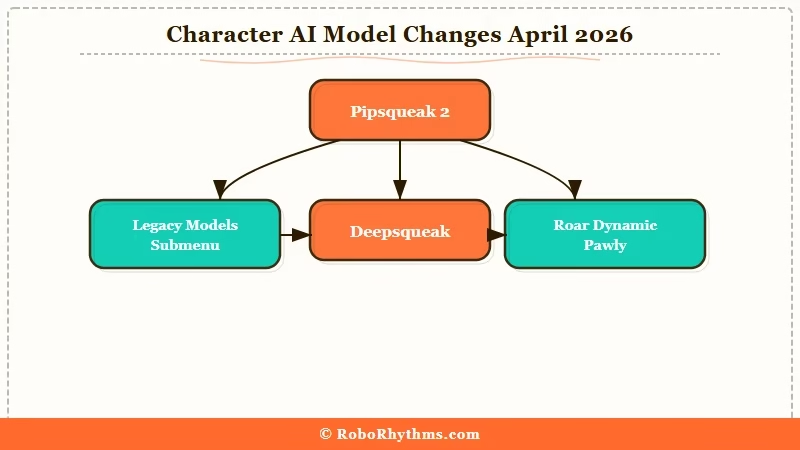
Character AI removed Roar, Dynamic, Pawly, and one other model immediately on April 28, 2026, and moved Meow, Nyan, Soft Launch, and Goro to a legacy submenu that will be fully retired on May 8, 2026. Pipsqueak 2 and Deepsqueak are now the only two officially-supported chat styles. Character AI has since started rolling out Character AI LongSqueak, which has not reached every account yet.
The full list of what changed in the April 28 update:
- Pipsqueak 2 is now the universal default model for all users.
- Roar was removed immediately, no legacy fallback.
- Dynamic, Pawly, and one other older style were also pulled with no legacy access.
- Meow, Nyan, Soft Launch, Goro were moved to a “Legacy Models” submenu, accessible until May 8.
- Deepsqueak remains as the secondary first-class option.
The platform claims Pipsqueak 2 is “better across dimensions the community cares about” with stronger in-character consistency, better memory, and sharper writing quality. From what I am reading on the subreddit, those claims are not landing with users yet.
The reasoning Character AI gave is that supporting eight chat styles fragmented engineering effort and slowed feature work like the upcoming Lorebook v2 and the rebuilt memory layer. From a platform-engineering lens, that is defensible. From a paying-user lens, watching Roar disappear from your menu in the middle of an active roleplay is not.
Per Business of Apps’ 2026 report, Character AI has roughly 20 million monthly active users as of late 2025 to early 2026, down from a 28 million peak in mid-2024.
The model purge is happening at exactly the wrong time for retention; the platform is already losing users to alternatives, and removing the styles people built their workflows around is not the obvious retention play.
How to Find the Legacy Roar and Pawly Models While They Still Exist
Tap the chat menu, open chat style, scroll to the “Legacy Models” submenu. If you see it, Meow, Nyan, Soft Launch, and Goro are still selectable until May 8, 2026. If the submenu is missing, the legacy access has been pulled for your account tier or platform. Roar, Dynamic, and Pawly are gone everywhere.
The legacy submenu rollout has been inconsistent. Plus subscribers report seeing the legacy menu more reliably than free users.
Mobile users see different option sets than web users. There is no official explanation for the discrepancy, and the rollout appears to be a server-side flag, not a client one.
Here is the symptom-cause-fix table for what users are reporting right now:
| Symptom | Likely cause | Fix |
|---|---|---|
| “Legacy Models” submenu missing entirely | Free tier or specific platform variant | Open on web browser instead of mobile app, or upgrade to Plus |
| Submenu shows but Roar is greyed out | Roar was removed immediately, not legacy-listed | Switch to Deepsqueak as the closest behavioral substitute |
| Legacy models work in one chat, missing in another | Per-character chat-style flag inherited from creator | Manually set chat style in the affected chat |
| Pipsqueak 2 feels different from old default | Behavior is genuinely different (longer outputs, more drift) | See the next section for prompt-side fixes |
| “Soft Launch” gone | Removed entirely with the April 28 patch | No fix, switch to Pipsqueak 2 with a spelled-out length cap in your bot definition |
Before: “I select Roar from the chat-style menu” (this no longer works, the menu entry is gone)
After: “I open the legacy models submenu, pick Goro or Meow as the closest behavioral analogue, and pin it for the chat” (works until May 8)
If your bots feel “off” since April 28 and you have not opened the chat-style picker since then, that is the first place to look. Many users were on Roar by default and got silently switched to Pipsqueak 2 without ever seeing a notification.
How to Fix Pipsqueak 2’s Rambling and Drift
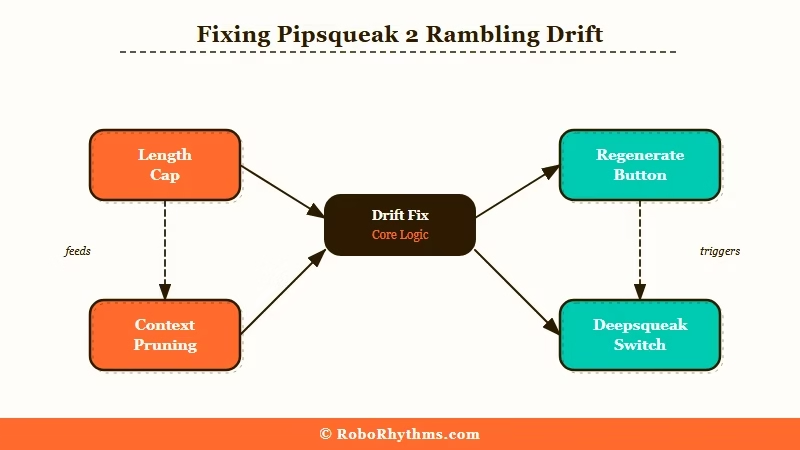
The two most-reported Pipsqueak 2 failure modes are over-long replies (300+ words when 100-150 was the norm) and contextual drift where the model references events that never happened in the chat. The fix stack is: tighten the bot definition’s response-length instruction, use the regenerate button aggressively, prune older messages that may be poisoning context, and switch to Deepsqueak for chats where Pipsqueak 2 keeps breaking.
In my testing the rambling problem responds well to two prompt-side fixes:
- Add a spelled-out length cap in the bot’s character definition. A line like “Respond in 2-3 short paragraphs maximum, never exceed 150 words” placed in the persona definition pulls Pipsqueak 2’s output back toward the old Roar-length default within 2-3 messages.
- Use the regenerate button on the first off-context reply. Pipsqueak 2 appears to anchor harder on its own previous outputs than the old models did, so a single weird reply tends to cascade into more weird replies. Regenerating early breaks the pattern.
- Prune the chat history when drift starts. Edit or delete the last 5 to 10 messages where the model started referencing things that never happened. Pipsqueak 2’s context handling seems to amplify hallucinated details once they enter the rolling window.
- Switch to Deepsqueak for high-stakes chats. Deepsqueak is the only other first-class style and behaves closer to the old defaults than Pipsqueak 2 does for most prompt shapes. The way I see it, if a chat matters enough that you do not want to risk Pipsqueak 2 breaking it, just pick Deepsqueak from the chat-style menu.
Where this does not work: if your character definition is heavily reliant on a specific Roar voice or pacing, no amount of prompt fix will recreate it on Pipsqueak 2. Different model, different behavior. That is a switch-platform problem, not a switch-model problem.
What Are the Best Character AI Alternatives After the Pipsqueak 2 Switch
The four Character AI alternatives users are migrating to right now are Candy AI (memory + style depth), Nectar AI (looser scope and persona pacing), Chai (lighter free tier with unlimited messages), and SpicyChat (creator-driven character library). Pick based on which Character AI feature you are missing most.
The way I’d think about which alternative fits which loss:
- You miss Roar’s depth and longer-form roleplay: Candy AI is the closest behavioral match, with stronger persistent memory than Character AI ever shipped. Founding rates make it the most defensible monthly cost.
- You miss Soft Launch’s looser content scope: Nectar AI is the cleanest pick, with persona pacing that does not collapse under longer chats and a more relaxed default content posture.
- You only used Character AI for casual conversation: Chai’s free tier still gives unlimited messages with a lighter restriction set; the memory is shallower but the friction is lowest.
- You used Character AI mostly to browse user-created bots: SpicyChat has a similar creator economy with looser content rules.
For a deeper view on the Roar-removal news, yesterday’s announcement coverage covers the policy side of this. For the longer view on Character AI’s chat-style history, the Character AI chat styles explained piece is the reference. And the broader alternatives roundup covers the migration math across more platforms.
Nectar AI deserves a specific call-out for users frustrated with Pipsqueak 2’s rambling. The platform’s persona pacing and memory layer are tuned for the long-form roleplay style that the legacy chat models supported, with looser default scope than Pipsqueak 2 enforces.
If your Character AI workflow centered on multi-week persistent characters, Nectar AI is the migration target most worth setting up before May 8. The Founding Member rates are still available.
Frequently Asked Questions
Why did Character AI remove Roar?
Character AI removed Roar on April 28, 2026 to consolidate engineering effort behind Pipsqueak 2 and Deepsqueak as the two flagship chat styles. The platform claims supporting eight chat styles slowed feature work on Lorebook v2 and the rebuilt memory layer. Users have not been persuaded by the rationale.
Can I still use the old Character AI models?
Some, until May 8, 2026. Meow, Nyan, Soft Launch, and Goro are accessible via the “Legacy Models” submenu in the chat-style picker. Roar, Dynamic, Pawly, and one other older model were removed immediately with no legacy fallback.
How do I find the Legacy Models menu?
Tap a character’s name to open the profile, then tap “Chat Style”. Scroll past the default Pipsqueak 2 and Deepsqueak entries; the legacy submenu sits below. The menu is server-flagged, so Plus users see it more reliably than free-tier users on certain device builds.
Why is Pipsqueak 2 producing such long replies?
Pipsqueak 2 has a longer default response length than the old Roar default. Adding a length cap to your character’s persona definition like “respond in 2-3 short paragraphs, never exceed 150 words” pulls the output back to the old length within 2-3 messages. Regenerating off-pattern replies early helps prevent cascading drift.
What if Pipsqueak 2 keeps replying to things that never happened?
Edit or delete the last 5-10 messages where the contextual drift started. Pipsqueak 2’s context window appears to amplify hallucinated details once they enter the rolling chat. Pruning resets the context cleanly and a regenerate after pruning usually returns the model to the actual chat state.
What is the closest substitute for Roar on Character AI?
Deepsqueak is the closest first-class substitute for Roar’s response style. For users who specifically miss Roar’s longer-form depth and pacing, the closer behavioral match is moving to a different platform like Candy AI or Nectar AI, whose memory layer and persona pacing match the old Roar workflow better than Pipsqueak 2 does.
