
TL;DR: Claude Code only speaks the Anthropic Messages API. vLLM only speaks the OpenAI Chat Completions API. To run Claude Code against your local vLLM model, you put a LiteLLM proxy in the middle, point Claude Code at the proxy, and you are done. Total setup is about 20 minutes if you already have vLLM running.
I have been running this setup on a workstation for the last week. The reason is simple. My Anthropic bill for Claude Code crossed a number this month that I was no longer comfortable paying for marginal gains over a local Qwen 3.5 model.
The good news is that the integration is solid once you know the shape of the problem. The bad news is that the docs from Anthropic, vLLM, and LiteLLM each cover one piece of the puzzle and none of them stitch the whole thing together.
This is the stitched version. I will walk through what each component is doing, show the exact config, and flag the three things that broke for me before I got it working.
Why the Two APIs Do Not Talk Directly
Claude Code expects POST requests to a /v1/messages endpoint that follows Anthropic’s Messages API schema. vLLM serves an OpenAI-compatible /v1/chat/completions endpoint with a different request and response shape.
A direct connection fails because Claude Code does not understand what comes back from vLLM, and vice versa.
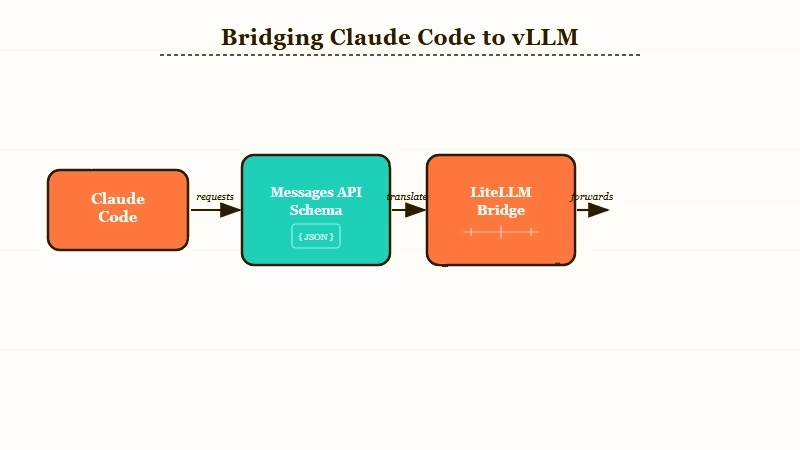
The differences are not cosmetic. The Anthropic Messages format groups system prompts separately, structures tool calls differently, and uses a different streaming event format. Translating between them is a real piece of work.
This is exactly the gap LiteLLM was built for. LiteLLM accepts Anthropic-formatted requests on the front, translates them to OpenAI format on the back, sends them to vLLM, and translates the response back. From Claude Code’s perspective it looks like it is talking to api.anthropic.com.
The other path is to use a Claude Code-specific proxy like fuergaosi233/claude-code-proxy. From what I have seen, LiteLLM is the cleaner bet because it also gives you OpenAI-compatible endpoints for other tools you might want to point at the same model later.
The Components You Need Running
You need three things up and running before any wiring happens: vLLM serving your model, LiteLLM running as the proxy, and Claude Code installed locally with the right environment variables set.
Each runs as a separate process. None of them know about each other until you tell them.
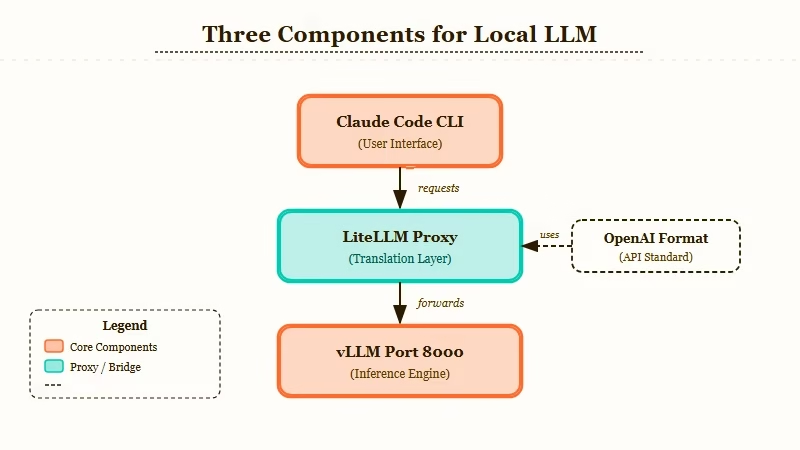
| Component | What it does | Default port |
|---|---|---|
| vLLM | Serves your local LLM with an OpenAI-compatible API | 8000 |
| LiteLLM Proxy | Translates Anthropic format requests into OpenAI format | 4000 |
| Claude Code | The CLI you run; it talks to LiteLLM | (client only) |
I run all three on the same workstation. You can split them across machines if you want; just point the URLs at the right hosts.
The model I used for testing was Qwen/Qwen3.5-Coder-32B-Instruct because it has decent tool-calling support. Models without strong tool calling will fail silently in Claude Code’s agent loop. That is the first gotcha. If you pick a model that cannot do structured tool use, Claude Code will sit there spinning while the model returns plain prose instead of the tool call format the harness expects.
Step by Step Setup
Here is the sequence I would walk through on a fresh machine. Each step assumes the previous one finished cleanly. Total wall time is about 20 minutes if your model is already downloaded.
- Start vLLM serving your chosen coding model on port 8000
- Install LiteLLM proxy with
pip install 'litellm[proxy]' - Write a
litellm_config.yamlthat maps an Anthropic model name to your local vLLM endpoint - Start LiteLLM proxy on port 4000 pointing at that config
- Set Claude Code environment variables to redirect API calls to localhost:4000
- Run
claudeand verify it is hitting your proxy by watching LiteLLM logs
The pieces that trip people up are step 3 and step 5. Let me show the actual files.
vLLM launch command (Step 1):
vllm serve Qwen/Qwen3.5-Coder-32B-Instruct \
  --port 8000 \
  --enable-auto-tool-choice \
  --tool-call-parser hermes
The --enable-auto-tool-choice and --tool-call-parser flags are non-negotiable. Without them, vLLM will not produce tool calls in the format LiteLLM expects to forward.
LiteLLM config (Step 3):
model_list:
  - model_name: claude-3-5-sonnet-20241022
    litellm_params:
      model: openai/Qwen/Qwen3.5-Coder-32B-Instruct
      api_base: http://localhost:8000/v1
      api_key: dummy

litellm_settings:
  drop_params: true
The trick here is that you label the model as claude-3-5-sonnet-20241022 even though the underlying model is Qwen.
Claude Code sends requests for that model name. LiteLLM intercepts and routes to vLLM. Claude Code never knows the difference.
The drop_params: true setting silently discards Anthropic-specific parameters that OpenAI does not understand, instead of erroring out. Without it, you will see 400 responses on roughly half your requests.
Claude Code env vars (Step 5):
export ANTHROPIC_BASE_URL="http://localhost:4000"
export ANTHROPIC_AUTH_TOKEN="sk-anything"
export ANTHROPIC_MODEL="claude-3-5-sonnet-20241022"ANTHROPICBASEURL is the override that redirects Claude Code from api.anthropic.com to your local proxy. ANTHROPICAUTHTOKEN can be any non-empty string because LiteLLM does not enforce auth in this config.
Run claude and you should see the LiteLLM logs light up with incoming requests.
The Three Things That Broke for Me
The three failure modes I hit, in the order I hit them, were tool-call formatting, streaming response truncation, and Claude Code’s hidden retry behavior masking real errors. All three are fixable. None of them are documented in one place.
The first issue was tool-call formatting. Qwen3.5-Coder claims to support tool calling, but vLLM’s default parser misread the model’s output. The fix was the --tool-call-parser hermes flag in the vLLM launch. Different models need different parsers. Llama models want llama3_json, Mistral wants mistral. If your model is producing tool calls but Claude Code is not seeing them, this is almost always the cause.
Symptom and fix table:
| Symptom | Likely cause | Fix | |
|---|---|---|---|
| Claude Code spins forever waiting for a tool call | Model’s tool calls are not being parsed by vLLM | Set --tool-call-parser to match your model family | |
| 400 errors on roughly half your requests | LiteLLM forwarding Anthropic-only params to vLLM | Add dropparams: true to litellmsettings | |
| Streaming responses cut off mid-sentence | LiteLLM proxy timing out the SSE stream early | Add requesttimeout: 600 to litellmsettings | |
claude command fails with auth error | ANTHROPICBASEURL not exported in current shell | Re-export and confirm with `env \ | grep ANTHROPIC` |
| Model returns prose instead of structured tool calls | Model lacks proper tool calling support | Switch to a model with native tool support like Qwen Coder, DeepSeek Coder, or GLM Code |
The second issue was streaming. Claude Code expects SSE responses for long completions. LiteLLM forwards the stream by default, but the proxy’s request timeout can cut off long generations. Set requesttimeout: 600 in litellmsettings if you see truncated output.
The third issue was the most painful. Claude Code retries failed requests silently up to three times, which means a malformed config can look like it is working slowly when it is failing on every attempt and retrying behind the scenes.
The way I caught it was by tailing the LiteLLM logs in a second terminal and watching the request count climb faster than the Claude Code UI implied.
Why This Is Worth Doing for Some Workflows
It is worth doing if your monthly Claude API spend is meaningful and the model gap is narrow for your specific code. It is not worth doing if you are doing exploratory work that benefits from frontier reasoning.
For routine refactoring, test generation, and boilerplate, a 32B coding model on a workstation is close enough to Claude Sonnet that the difference does not show up in finished commits. For architectural exploration, novel algorithms, or anything where the model needs to make non-obvious connections, the frontier model still wins by a margin you will feel.
The setup also pairs well with the Claude Code subagent pattern, where you can use cheap local inference for the parallel research agents and reserve frontier API calls for the synthesis layer. Routing through LiteLLM makes that split a config-file change instead of a code change.
If you are coming from a different agent setup and exploring options, it is worth seeing how the broader coding agent space is restructuring before committing to a local-first workflow. The short version is that local inference plus a thin proxy layer is becoming a more credible substitute for hosted agents than it was six months ago, and tools like Make.com make it easy to bolt webhook triggers onto whatever agent loop you settle on.
The other angle worth flagging: a workstation running a 32B model continuously costs real electricity. For most solo developers, the math still favors local once your monthly Anthropic spend crosses about $80. Below that, you are paying for the optionality of frontier capability and that is fine.
Frequently Asked Questions
Can I use this same setup with Codex or Cursor instead of Claude Code?
You can. LiteLLM serves both Anthropic and OpenAI compatible endpoints from the same proxy. Point Cursor or Codex at the OpenAI endpoint on port 4000 with the same config, and they will hit the same vLLM model. You can run all three tools against one local model.
What model should I start with for coding work?
Start with Qwen3.5-Coder-32B-Instruct if you have 24GB of VRAM or more. For 16GB, drop to DeepSeek-Coder-V2-Lite-Instruct. For 8GB, you are below the floor where local coding models are good enough to replace frontier APIs and should stay on the hosted route.
Does this setup support multimodal inputs like screenshots?
Not with the configuration shown. Claude Code’s multimodal pathway goes through Anthropic’s vision API, which has no direct vLLM equivalent for arbitrary models. You can add vision-capable local models, but the wiring is more involved and outside the scope of this setup.
How much does this save versus the Anthropic API?
For a workflow that was costing $200 a month on Claude Sonnet, my electric bill went up about $15 and the API spend dropped to $20 (kept for the frontier reasoning escape hatch). Net savings about $165 a month. The math gets better at higher API spend levels and worse at lower.
Can I run this without LiteLLM, using only vLLM?
You cannot, because Claude Code does not speak OpenAI. You need either LiteLLM, fuergaosi233/claude-code-proxy, or one of the other Anthropic-to-OpenAI translators in the middle. Pick one and stick with it; running two proxies in series is a debugging nightmare.
Does Claude Code see this as the real Claude or as a local model?
Claude Code sees whatever model name the proxy returns in responses. Because we map the local model to claude-3-5-sonnet-20241022 in the LiteLLM config, Claude Code’s UI will display “Sonnet” even though the actual inference is happening on Qwen. This is intentional and works fine, just be aware when you are debugging that the model name is a label, not a fact.
