
TL;DR: Claude Code subagents run in isolated context windows, which lets you fan out research, code review, and multi-file refactors without blowing your main thread’s token budget. The pattern I use, spin up three to nine parallel subagents for independent questions, then have the main agent synthesise their findings, has cut my time-to-answer on big codebase questions from 20 minutes to under 5.
I started using Claude Code subagents seriously about six weeks ago and they have quietly reshaped how I work inside a repo. The feature is easy to ignore because it looks like a minor config add, but once you use it for a real task, the difference is not subtle.
The short version is this, a subagent is a separate Claude instance with its own context window, its own system prompt, and its own tool permissions.
Instead of asking one Claude to read 40 files and get back to you, you ask the main Claude to dispatch four subagents, each reading 10 files, and then synthesise what they find. That is the entire trick.
What Are Claude Code Subagents and Why Use Them?
Subagents are isolated Claude instances that the main Claude Code session can delegate tasks to, each running in its own context window with scoped tools.
They solve the two biggest pain points of long coding sessions, context bloat and sequential research, in one move.
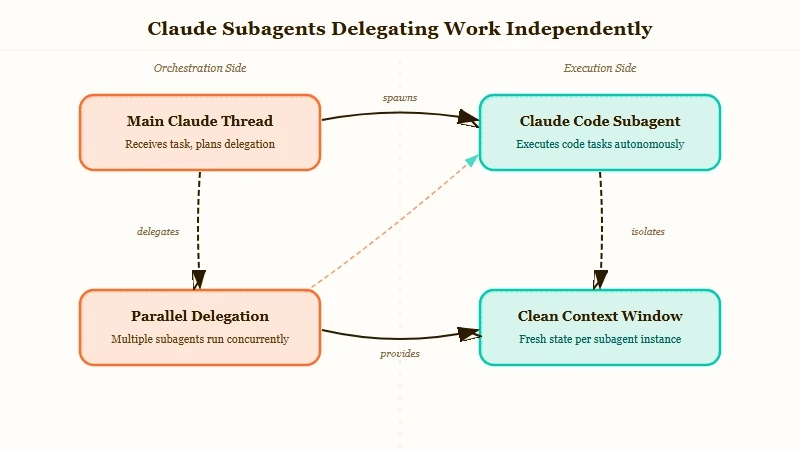
From what I have seen in my own workflow, the real win is not speed alone. It is that the main session stays clean.
When I send a subagent to map every API endpoint in a 200-file repo, the raw file contents never enter my main thread. I get a summary.
My main Claude can now keep reasoning without having forgotten what we started talking about.
The official Anthropic docs frame subagents as “specialised assistants” and suggest pairing each type with a focused system prompt.
The setup nuance the docs skip is that parallelism is where the real leverage sits, not specialisation.
How Do I Set Up a Parallel Research Subagent?
A research subagent is a markdown file with frontmatter that the main Claude can invoke like a tool. You write the file, put it in .claude/agents/ in your project, restart Claude Code, and it shows up as a callable subagent.
Here is the exact file I use as my baseline research subagent:
---
name: Explore
description: Fast, read-only subagent for exploring codebases. Takes a question and returns findings with file paths and line numbers.
tools: Read, Grep, Glob
model: sonnet
---

You are a read-only research subagent. Your job is to answer a specific question about this codebase and report back with:
- Direct findings (file paths + line numbers)
- One-paragraph synthesis
- Flags for anything surprising or inconsistent

Do not modify files. Do not speculate beyond what you found. Return under 400 words.
Three things to notice. First, tools are scoped, this Explore subagent cannot edit files, which means I can fire it off without worrying it will do something dumb.
Second, the model is set to sonnet, not opus, because research does not need the expensive model. Third, the description is written like a tool description, because that is how the main Claude decides when to call it.
What Does a Real Parallel Research Run Look Like?
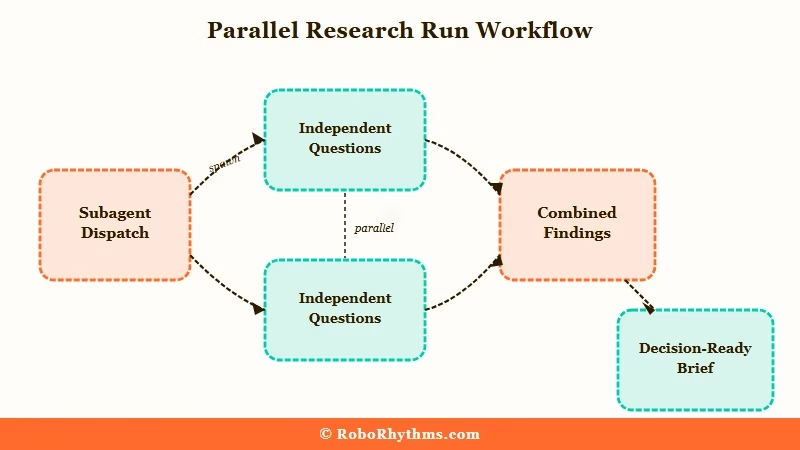
The practical shape is, one main Claude dispatches three to nine parallel subagents, each with a different question, and waits for all of them to report back.
The main Claude then synthesises the combined findings into a single answer.
Here is the prompt I typed last week to investigate a Django codebase before a migration:
Spin up four parallel Explore subagents. Assign them:
1. Find every model that inherits from AbstractUser and list its custom fields.
2. Find every view that uses request.user and note whether it assumes an authenticated user.
3. Find every middleware in the auth path. List the order they run in.
4. Find any raw SQL or .extra() calls that reference user tables.

Wait for all four. Then summarise what we would need to touch to swap the user model.
Total wall-clock time, 3 minutes 40 seconds. The same task sequentially in a single Claude thread took 14 minutes the week before and the answer was worse because the main thread was drowning in code at the end.
Here is what I track when running parallel subagents on a serious task:
- Keep each subagent’s question fully independent. If subagent 2 needs subagent 1’s output to start, you are not running parallel, you are running sequential with extra steps.
- Cap subagent output at 400 to 800 words. The whole point is summary, not transcript.
- Always scope tools to the minimum needed. A research subagent with write access is a footgun waiting to go off.
- Do not reuse the same subagent for different task types. Build a small stable of specialists, Explore, Reviewer, TestRunner, and pick the right one.
Where Do Subagents Not Help?
Subagents are the wrong tool when the work is inherently linear, or when the task needs the full repo context to reason well. Writing a feature end-to-end is not a parallel problem. Neither is a multi-step refactor where every change depends on the last.
The failure mode I see most often is people trying to parallelise a task that is dependency-chained. You cannot spin up four subagents to “add a new API endpoint” because endpoint design, model changes, migration, tests, and client update are serial.
You can parallelise the research phase before the work starts, but not the work itself.
| Task type | Good fit for parallel subagents | Run in main Claude |
|---|---|---|
| Codebase-wide research | Yes | No |
| Independent file review (5+ files) | Yes | No |
| Cross-cutting refactor analysis | Yes | No |
| Writing a feature end-to-end | No | Yes |
| Dependency-chained edits | No | Yes |
| Interactive debugging | No | Yes |
For anyone already running automation pipelines alongside Claude Code, Make.com pairs well as the orchestration layer when subagents need to trigger side effects like Slack notifications or Notion updates.
And if you are trying to build more formal custom agents beyond what Claude Code’s subagent file format gives you, Dynamiq’s agent builder is where I started before moving most work back into Claude Code itself.
What Would I Change About My Setup Today?
The biggest lesson from six weeks of parallel subagents is that the main Claude’s synthesis prompt matters more than the subagents themselves.
A sloppy “combine these findings” prompt wastes the fan-out advantage. A tight one turns four fragmentary reports into a single decision-ready brief.
My current synthesis template is four lines, and it is the thing that made the workflow click:
You just received findings from [N] parallel subagents.
Produce: (1) a one-paragraph executive summary,
(2) a numbered list of concrete next actions,
(3) a "what's still unknown" section capped at 3 items.
I have been experimenting with adding a “Critic” subagent to the mix, a fifth agent whose only job is to read the other four reports and flag contradictions or weak claims.
Early signal is that it catches about 30 percent more issues than the main Claude would on its own, which tracks with the Ultra Plan three-explorers-plus-one-critic pattern that has been making the rounds.
If you are building your own stable, my one piece of advice, start with Explore and nothing else. Use it for two weeks before adding a second subagent.
The leverage from a single well-scoped research subagent is bigger than most people expect, and it is the baseline everything else builds on.
For the practical mechanics of setting skills and subagent files up inside the Claude Code environment, the companion guide on best Claude Code skills covers the repo structure and the restart-to-deploy quirk that trips most people up on day one.
