
What’s Changed: Janitor AI’s “infrastructure is at maximum capacity” error is appearing more frequently in 2026 as the platform’s user base has grown faster than its server capacity. Peak hours now trigger slowdowns that can last 30 to 60 minutes. This guide covers the four causes, the six fastest fixes, and what to use when the platform is completely down.
The error message is blunt: “Infrastructure is at maximum capacity. Please try again later.” For a platform people use daily for creative writing, roleplay, and AI companion sessions, that message cuts a session short at exactly the wrong moment.
From what I’ve seen in the community, the frustration is less about occasional slowdowns and more about the unpredictability. The platform will work fine all morning, then grind to a halt exactly when you’re in the middle of a long session.
The good news is that most of the fixes work and the platform usually recovers within an hour. Here is what is actually happening and how to get back to your characters as fast as possible.
What Is the “Infrastructure Is at Maximum Capacity” Error?
Janitor AI’s capacity error means the platform’s servers are processing more requests than they can handle, and your request is being queued or dropped. It is not a ban, not a content moderation flag, and not related to your account.
If peak-hour queues keep eating your evenings, keep a second app ready. Candy AI is the one I would bookmark first.
The AI chatbot market has expanded fast in 2026. According to Statista’s AI chatbot market data, the sector was valued at $5.4 billion in 2023 and is projected to hit $15.5 billion by 2028. Platforms like JanitorAI are absorbing user growth faster than they can provision infrastructure.
JanitorAI runs on shared compute that serves thousands of simultaneous sessions. During peak hours, typically 6pm to 11pm US Eastern, the queue backs up and response times stretch from the normal 3-5 seconds to 30 seconds or more. At maximum load, requests time out entirely and return the capacity error.
The error appears in two forms. The explicit “infrastructure is at maximum capacity” message shows up when the system is actively throttling your requests. A slow, spinning response with no timeout message usually means the request entered a queue that is moving very slowly. If your error names a specific Proxy Error 429 rather than the capacity message, the slowdown sits on your API provider side and has its own set of fixes.
Why Does Janitor AI Get Slow?
Janitor AI slows down for four specific reasons, and each has a different fix. Understanding which one you’re hitting cuts the troubleshooting time significantly.
| Symptom | Likely Cause | Fix |
|---|---|---|
| “Infrastructure is at maximum capacity” | Peak-hour server overload | Wait 30-60 min, try at off-peak hours |
| Response takes 30+ seconds | High queue load | Switch to personal API key |
| Response cuts off mid-sentence | Context overflow or server timeout | Shorten prompt, start fresh session |
| No response at all | Complete platform outage | Check Discord, try alternative platform |
| Works on one device, fails on another | Browser cache or extension conflict | Clear cache, try incognito mode |
The most common cause in 2026 is peak-hour overload. JanitorAI’s native model, the free-tier compute, is most constrained during US evenings when the bulk of the user base is active simultaneously.
The second cause worth understanding is context overflow. Long conversations accumulate context tokens, and when a session gets very long, the model sometimes times out trying to process the full history.
Trimming the conversation or starting a new session with a brief character summary fixes this immediately.
From what I’ve tracked in the community, Friday and Saturday evenings are the worst windows for JanitorAI response times. The platform runs noticeably faster on Tuesday and Wednesday mornings.
How to Fix Janitor AI Slow Response
The fastest fix for JanitorAI’s slow response is switching from the native model to a personal API key, which bypasses the shared capacity queue entirely.
Here are the steps in order, from fastest to most involved.
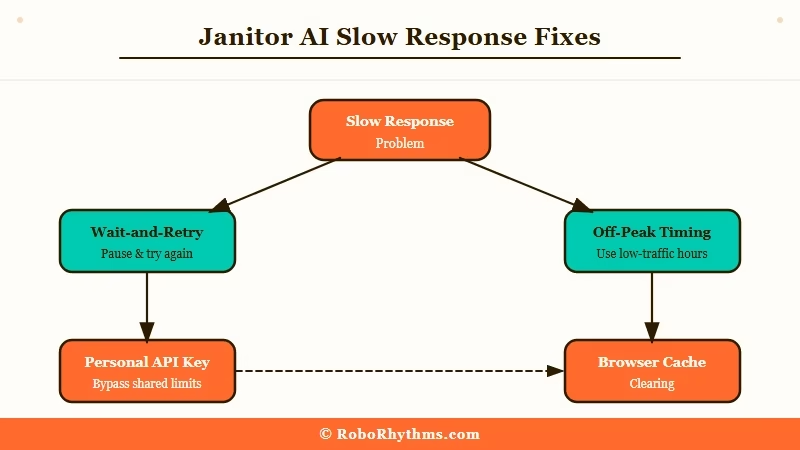
- Wait 30-60 minutes. Peak-hour overload typically clears within an hour. If it’s between 6pm and 11pm Eastern and you’re not in a hurry, this is the zero-effort fix.
- Try at off-peak hours. 6am to 10am Eastern is consistently the fastest window. The server queue is nearly empty during this window.
- Switch to a personal API key. In JanitorAI settings, connect your OpenAI or Claude API key. Your requests go directly to the model provider’s infrastructure instead of JanitorAI’s shared servers. This is the most reliable permanent fix for slow response times.
- Clear your browser cache. Go to your browser settings, clear cache and cookies for janitorai.com, and reload. Corrupted session data sometimes causes artificial slowdowns that have nothing to do with server load.
- Try incognito mode or a different browser. Browser extensions, particularly ad blockers and privacy tools, occasionally interfere with JanitorAI’s connection and make responses appear slow when the server is actually fine.
- Check the JanitorAI Discord. The official Discord has a status channel that posts outage notices and expected resolution times. If the platform is down across the board, there is no local fix while you wait for their team.
For users who want more detail on the personal API key setup, JanitorAI’s settings panel walks through both the OpenAI and Anthropic Claude API connections.
The key costs money per token but eliminates the capacity problem permanently.
If you want to know whether the wait you are seeing is normal, the community picture helps. Our roundup of reports on Janitor AI taking too long to respond tracks how long replies actually take across users and why the delay is so unpredictable.
What to Do When Janitor AI Keeps Failing
When JanitorAI is fully down and you need a platform that works now, Candy AI, SpicyChat, and Dusk AI are the three alternatives worth having bookmarked.
Candy AI is a paid service rather than a free community platform, but it publishes no status page, so I cannot promise how it holds up at peak hours. The tradeoff is cost, since the free tier stops at 5 messages. It fits best if you want one polished companion with image generation rather than a large character catalog.
SpicyChat runs on its own infrastructure and is rarely affected when JanitorAI goes down. The character creation tools are comparable and the platform supports the kind of creative roleplay sessions JanitorAI users typically run.
For a sense of SpicyChat’s current feature set, the SpicyChat multilingual support coverage shows how the platform has expanded in 2026.
Dusk AI takes a different approach. It is designed around a single deep relationship rather than a catalog of characters. The writing quality is noticeably higher than JanitorAI’s native model, and the platform launched its paid tier with a Founding Member rate of $12.99/month permanently locked.
The full Dusk AI review covers whether that price is worth it for users coming from JanitorAI.
For context on how other companion platforms handle similar capacity problems, the Chai App message limit guide covers recurring throttling issues on a competing platform.
The workaround patterns are nearly identical.
Frequently Asked Questions
What does “infrastructure is at maximum capacity” mean on Janitor AI?
It means the platform’s shared servers are processing more requests than they can handle. Your request is being queued or dropped. It is not a ban or a content flag. The fix is to wait for off-peak hours or switch to a personal API key to bypass the shared queue.
How long does the Janitor AI capacity error last?
Peak-hour overload typically clears within 30 to 60 minutes. Complete platform outages can last 2 to 4 hours. Check the JanitorAI Discord for official status updates during longer outages.
Does using a personal API key fix Janitor AI slow response permanently?
Yes, for capacity-related slowdowns. Connecting your own OpenAI or Claude API key routes requests directly to the model provider’s infrastructure, bypassing JanitorAI’s shared servers completely. You pay per token, but response times are consistent.
Is Janitor AI down right now?
JanitorAI now runs an official status page at status.janitorai.com, which reports backend and frontend uptime in real time. Check it first, then the official Discord server for incident notes. Reddit’s r/JanitorAI_Official also surfaces outage reports quickly from the community.
What is the best Janitor AI alternative when it’s down?
Candy AI, SpicyChat, and Dusk AI are the alternatives worth having bookmarked. Candy AI runs separately from JanitorAI, so a JanitorAI outage does not take it down with it, though its character catalog is small. SpicyChat has a similar character catalog structure. Dusk AI focuses on a single companion relationship with noticeably higher writing quality. All three stay available when JanitorAI hits capacity issues.
