
Bottom Line: Surfer SEO is worth it if you publish at least 6-8 SEO-targeted articles per month and need clear optimization guidance at the writing stage. At $89/month for the Essential plan, it pays for itself the moment it helps two articles hit page one. Casual bloggers or low-volume sites will struggle to justify the cost.
Most content teams that buy Surfer SEO use about 20% of what it does. They open the Content Editor, follow the keyword density suggestions, and publish. That is a legitimate workflow.
The question this review answers is whether the $89-to-$219/month price tag is justified for what you actually need, not the full feature set you will never touch.
From what I’ve seen, Surfer is one of the few SEO tools that directly improves the article you are currently writing rather than telling you which articles to write next. That distinction matters a lot in practice.

What Is Surfer SEO and Who Is It For?
Surfer SEO is an on-page content optimization platform that analyzes top-ranking pages for your target keyword and tells you exactly how to structure, write, and score your article to compete.
It does not replace a keyword research tool. It sits after keyword selection and before publishing.
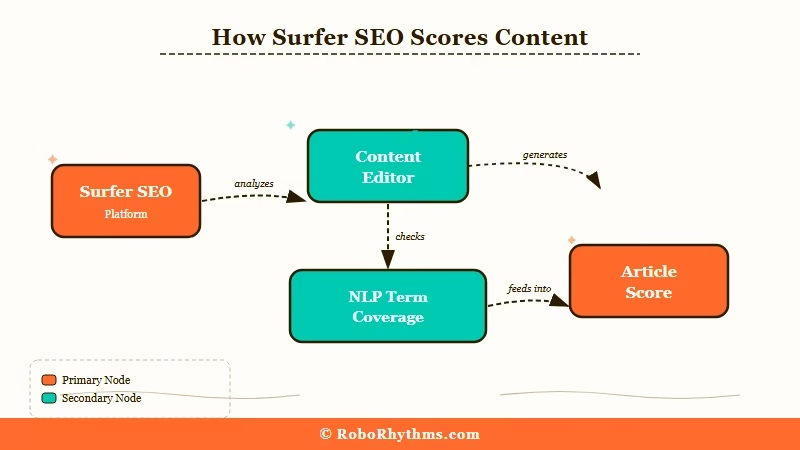
What is Surfer SEO: A content optimization tool that scores articles against top-ranking competitors and provides specific NLP-based recommendations for headings, word count, and keyword usage.
The core product is the Content Editor. You enter a keyword, Surfer pulls the top 10 to 20 ranking pages, and the editor shows you a real-time score (0 to 100) that updates as you write.
It flags which terms you are missing, which headings competitors use, and whether your word count is in range.
From my experience with content tools, what makes Surfer different from a checklist is that the recommendations are data-driven against the actual pages ranking for your keyword right now.
A tool like Yoast tells you to use your keyword 10 times.
Surfer tells you that for your specific keyword, the top 10 pages average 1,847 words and include the terms “content brief” and “search intent” in their H2s. That specificity is where the value is.
The tool is built for: freelance SEO writers getting paid per article, content teams producing 5 to 30 articles per month, and agencies running SEO campaigns across multiple clients. It is not built for one-person blogs publishing twice a month.
What Are the Surfer SEO Pricing Plans for 2026?
Surfer SEO offers three paid plans in 2026: Essential at $89/month, Scale at $219/month, and Enterprise at custom pricing.
Annual billing reduces costs by about 20%.
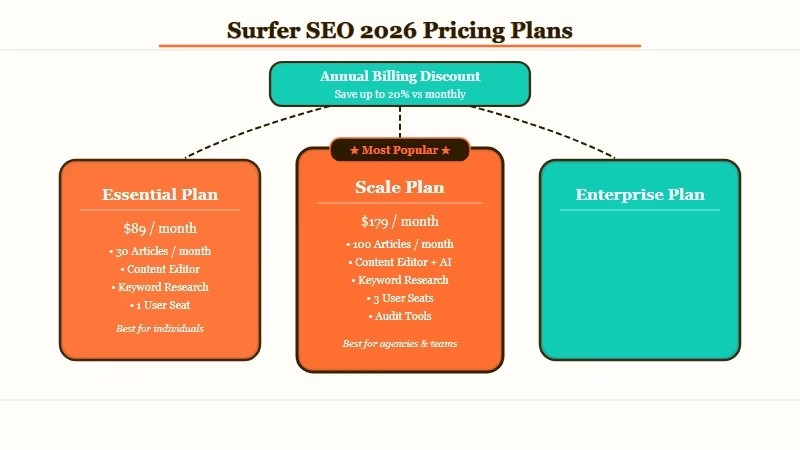
Here is how I’d think about which tier makes sense:
| Plan | Monthly Price | Annual Price | Best For |
|---|---|---|---|
| Essential | $89/month | $79/month | Freelancers, solo bloggers, small content teams |
| Scale | $219/month | $175/month | Content agencies, teams publishing 20+ articles/month |
| Enterprise | Custom | Custom | Large agencies, white-label needs, API access |
Surfer offers a 7-day money-back guarantee. There is no free plan, but a 7-day trial gives enough time to run 3 to 4 real articles through the Content Editor and see whether your score improvements translate into ranking lifts.
What Does the Surfer SEO Content Editor Actually Do?
The Surfer Content Editor gives you a real-time optimization score and a list of NLP-based terms to include as you write, calibrated against the pages currently ranking for your exact keyword.
It is the core reason most people buy the tool.
When you open an article in the editor, you see your current score on the right side (say, 42 out of 100). Below it, a list of terms sorted by coverage gap: terms the top-ranking pages use frequently that your draft is missing.
Terms in red are gaps. Terms in green are covered.
What I find most useful is not the term list itself but the heading structure suggestions. Surfer pulls the H2s from the top 10 ranking articles and shows which topics appear consistently. If 8 out of 10 articles have a section on “Surfer SEO vs Clearscope,” you know that is a gap a well-optimized article needs to cover.
Here is a concrete before/after to show what one optimization pass looks like in practice:
Before optimization: Article draft at 1,100 words, Surfer score 31/100. Terms flagged in red: “content brief,” “SERP analysis,” “NLP keywords.” No H2 covering “Surfer vs Clearscope” despite 8 of 10 top-ranking competitors including it.
After one optimization pass: Article expanded to 1,820 words, score 73/100. Missing terms added in H2s and body, word count aligned to competitor range (1,700-2,100 words), new section added to close the heading gap.
The score is a directional signal, not a guarantee. From what I’ve tested across different niches, reaching a score of 68 to 75 is where the improvements become meaningful.
Chasing 90+ often produces keyword-stuffed articles that rank nowhere. Among 539 Surfer users on G2, the most common feedback is that mid-range scores in the 68-75 band drove better ranking results than pushing for 90+.
How Does Surfer SEO Compare to Clearscope and MarketMuse?
Surfer SEO is the most price-accessible of the three major content optimization tools. Clearscope starts at $170/month and MarketMuse at $149/month, making Surfer the entry point for content teams that want optimization guidance without enterprise pricing.
Here is how they compare across the dimensions that matter most to a working content team:
| Feature | Surfer SEO | Clearscope | MarketMuse |
|---|---|---|---|
| Content Editor | Yes | Yes | Yes |
| Topical Authority Map | Yes | No | Yes |
| AI Writing Integration | Yes (AI Outline) | Partial | Yes |
| Starting Price | $89/month | $170/month | $149/month |
| Annual Discount | ~20% | Limited | Yes |
| Best For | Freelancers, growing sites | Enterprise editorial | Strategic content planning |
From what I’d recommend: Surfer for anyone who needs optimization guidance at article level without paying enterprise prices. Clearscope for teams that need a more polished editor UI and don’t care about price.
MarketMuse for content strategists planning topic clusters and pillar pages.
If you are running an AI-focused content site, Surfer pairs well with GSC data for keyword selection. The workflow I’d use: pick keywords from Search Console by position 5 to 20, draft with the Content Editor targeting a score of 70+, then publish.
For the writing step before you paste into Surfer, tools like Jasper AI and Writesonic handle first-draft generation without replacing what Surfer does at the optimization layer.
For keyword research itself, you still need a dedicated tool like Ahrefs or Semrush. Surfer does not replace that step.
Surfer SEO Pros and Cons
Surfer SEO has clear strengths at the article level but meaningful gaps at the keyword research and analytics layers that require a second tool to fill.
Pros:
- Content Editor updates in real-time. You see your score change as you type, making optimization feel like a game rather than a checklist.
- NLP term suggestions are calibrated per keyword, not generic. “Content brief” means something different for a B2B SaaS keyword versus a recipe blog keyword.
- Topical Map feature builds out a content cluster with suggested articles, useful for planning category coverage.
- Content Audit surfaces existing pages with decay potential before they drop off the first page.
- 7-day money-back guarantee removes the risk of testing it on a live project.
Cons:
- Keyword research is basic. You will need Ahrefs, Semrush, or at minimum GSC alongside Surfer for keyword discovery.
- AI-generated outlines are generic, useful as a starting scaffold but requiring significant editing to match real topical authority.
- Score gaming is real. It is possible to hit 80+ by stuffing in required terms without improving readability or depth.
- No rank tracking. Surfer tells you how well-optimized your article is at publish time, not how it moves after indexing.
Is Surfer SEO Worth It in 2026?
Surfer SEO is worth it for content teams publishing 6+ SEO-targeted articles per month who need real-time guidance during drafting. It is not worth it for low-volume publishers or anyone whose content strategy does not depend on organic search rankings.
Here is the math I’d run: Surfer Essential costs $89/month or $948/year. If a well-optimized article earns $50/month in affiliate revenue for 12 months, you need Surfer to push two articles per year from page two to page one to break even. For a serious SEO content operation, that is an extremely low bar.
For teams already using AI writing tools like Copy.ai, Surfer fits naturally as the optimization step that follows first-draft generation. The workflow: generate the draft, paste it into Surfer, optimize to a score of 70+, then publish.
Who Should Buy Surfer SEO
- Freelance SEO writers who need to deliver consistently high-scoring content to clients
- Content teams producing 8 to 30 articles per month across competitive niches
- Sites recovering from Google algorithm updates where on-page optimization was neglected
Who Should Skip Surfer SEO
- Blogs publishing 2 to 3 articles per month without a clear monetization-through-search model
- Anyone who already has an established high-DA site where authority matters more than NLP optimization
- Teams using Clearscope or MarketMuse at the agency level. Surfer adds overlap without meaningful new signal at that tier.
From what I see across SEO tools in 2026, Surfer remains one of the better-priced options in its category. The main gap to watch is whether its AI writing features catch up to tools like Jasper AI that are building direct CMS integrations and first-draft generation into the optimization workflow.
For now, Surfer wins on price and real-time editing feedback.
Frequently Asked Questions
Does Surfer SEO have a free trial?
Surfer SEO does not offer a permanent free plan. It has a 7-day money-back guarantee on paid plans. That is enough time to run 3 to 5 articles through the Content Editor and judge the quality of suggestions for your specific niche.
Is Surfer SEO worth it for a small blog?
For a blog publishing fewer than 6 articles per month without a clear organic monetization strategy, Surfer is hard to justify at $89/month. The tool pays off when you are publishing frequently enough that consistent on-page optimization compounds across your content library.
How does Surfer SEO content score work?
The Content Score (0 to 100) measures how closely your article matches the NLP term patterns and structural features of the top-ranking pages for your keyword. A score of 68 to 75 is a practical target. Scores above 80 often indicate over-optimization rather than a better article.
Can Surfer SEO help with existing articles?
Yes. The Content Audit feature identifies published pages where your current content score has slipped relative to fresh competitors. It flags which articles to update and shows which terms are now missing.
Does Surfer SEO replace Ahrefs or Semrush?
No. Surfer optimizes articles you are already writing for keywords you have already chosen. Ahrefs and Semrush handle keyword discovery, competitor analysis, backlink auditing, and rank tracking. Most serious SEO operations use both.
