
TL;DR: Graphify turns your code, PDFs, and markdown into a persistent knowledge graph you query in plain English inside Claude Code. Install it with two commands, run
/graphify, and cut token usage by 71x compared to reading raw folders every session. The main risk is graph drift when merging new files, and I cover how to handle it below.
On April 2, 2026, Andrej Karpathy posted about his raw/ folder workflow for LLM context and ended with a clear challenge: “I think there is room here for an incredible new product instead of a hacky collection of scripts.” Someone built it within 48 hours.
The tool is called Graphify. It runs as a Claude Code skill, reads your files once, builds a persistent knowledge graph, and then lets you query the entire thing in plain English without re-reading a single file. The reported token reduction is 71.5x compared to dropping raw files into context each session.
I went through the setup and tested the workflow. If you already use Claude Code seriously for development or research, this is worth your attention. The install takes two minutes and the payoff is a knowledge base that survives across sessions.
Before the setup, a quick framing: Graphify is a graph-based indexing layer that lives on top of your project files. It is not a chat interface or a document search tool. Once that distinction clicks, the whole approach makes sense.
What Problem Does an LLM Knowledge Base Actually Solve
The core problem with raw file context is token cost per session. Every time you start a new Claude Code session, you either re-read your key files from scratch or accept that Claude has no memory of what you built last week. A persistent knowledge graph means you pay the indexing cost once and query from the graph every subsequent session.
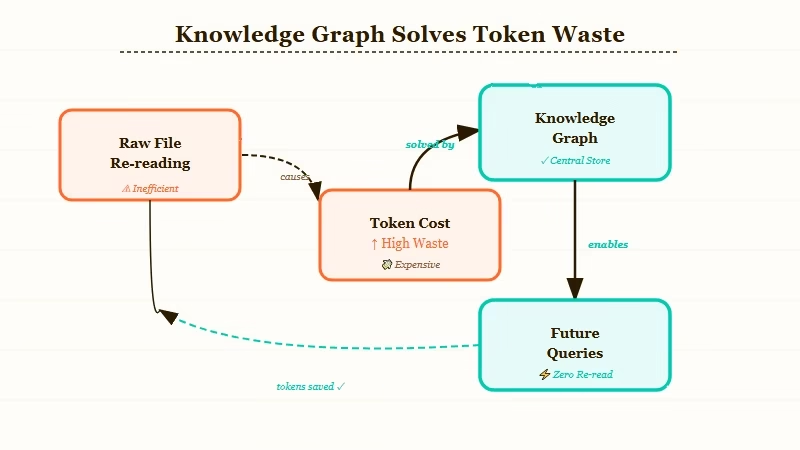
From what I have seen, this is the hidden cost most Claude Code users do not track. A moderately complex codebase with 30 to 40 files can cost 15,000 to 20,000 tokens just to re-establish project context at session start. Multiply that across 20 sessions per week and you have a significant chunk of your token budget doing nothing useful.
The Karpathy workflow that triggered this build is worth understanding. He maintains a raw/ folder with PDFs, papers, code, and markdown. Every session, he feeds Claude a subset of those files to work from. The problem he described is exactly this re-reading overhead. Graphify automates the indexing step so you pay that cost once.
The knowledge graph approach also changes how you query. Instead of “here is the file, work from this,” you ask questions like “what connects the authentication module to the rate limiter?” and Claude answers from the graph topology rather than raw file content. That is where the token savings come from.
How Do You Install Graphify as a Claude Code Skill
Installing Graphify takes two commands in any terminal. Run them in order:
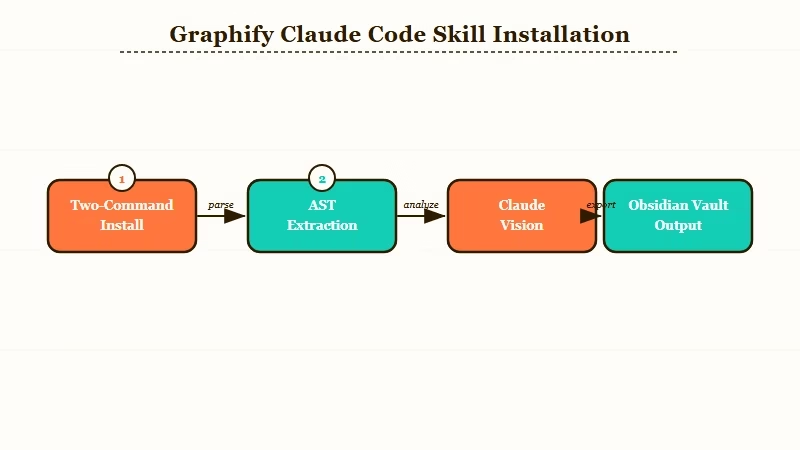
pip install graphifyygraphify install
After both commands complete, open Claude Code in your project directory and type /graphify. That triggers the initial indexing run.
Here is what happens during that first run:
- Graphify scans for files in 13 supported languages (Python, JavaScript, TypeScript, Go, Rust, Java, C++, and others), plus PDFs, images, and markdown
- For code files, AST extraction pulls out functions, classes, imports, and relationships
- For PDFs and papers, citation mining surfaces references and conceptual links
- For screenshots and diagrams, Claude Vision extracts meaning from image content
- Community detection groups related nodes into thematic clusters
- The resulting graph writes to an Obsidian vault in your project directory, with a searchable wiki alongside it
The full run takes a few minutes on a mid-sized project. After it finishes, the graph persists between sessions. You do not run /graphify every time you open Claude Code, only when you first index a project or after significant structural changes.
Here is the exact experience difference between raw folder context and the graph approach:
Without Graphify (raw folder): “Here are auth.py, rate_limiter.py, and middleware.py. What is the relationship between the rate limiter and the auth module?”
With Graphify (graph query): “What connects the authentication module to the rate limiter?”
The second version uses no file attachments and zero re-read tokens. Claude answers from the graph topology built during the first /graphify run. That is the 71x reduction in action.
How Do You Query Your Knowledge Base Once Graphify Is Running
Querying the Graphify graph uses plain English questions about relationships, paths, and structure. You are not searching documents; you are traversing a graph of connected concepts.
The three query patterns I found most useful:
- Relationship queries: “What connects X to Y?”, this uncovers how two modules interact without reading both files
- Importance queries: “What are the most important nodes in the codebase?”, good for onboarding to an unfamiliar project
- Path tracing: “Trace the path from the API entry point to the database layer”, ideal for debugging or refactoring planning
You can also run /update to merge new files into the existing graph without re-indexing from scratch. Drop new files into the project directory, run /update, and Graphify merges them into the current graph. This is where the drift problem comes in, which I cover in the next section.
For teams using Dynamiq to orchestrate multi-step agent workflows, Graphify slots in naturally as the context layer. The agent reads from the knowledge graph rather than re-reading raw files on each task execution. For researchers who want voice-powered note capture routed into their Obsidian vault, Notis AI captures voice notes that feed the vault Graphify indexes on the next /update run.
Here is how the main approaches to LLM knowledge management compare:
| Approach | Token cost per session | Persistence | Query style |
|---|---|---|---|
| Raw folder (Karpathy method) | High (re-read every session) | None | File paste |
| Vector embeddings (manual setup) | Low after indexing | Partial | Semantic search |
| NotebookLM | Zero (managed service) | Yes | Chat interface |
| Graphify (Claude Code skill) | Very low (graph queries) | Full | Plain English |
What Happens to Your Knowledge Graph When You Add New Files
Graph drift is the main failure mode for any persistent knowledge base. When you merge new files with /update, Graphify runs community detection again, but it does not automatically remove or correct stale relationships from earlier indexing runs.
This was the top concern in the Reddit thread where Graphify launched. The highest-voted comment put it plainly: once you start merging new inputs, things drift, producing duplicated nodes, broken relationships, and stale assumptions. The builder acknowledged this as an open problem on the GitHub repo.
From my reading of the source and the community discussion, the current /update path is best-effort clustering rather than strict consistency validation. There is no automatic layer that checks whether a new node contradicts an existing relationship.
My recommendation is to treat /update as appropriate for new files only, and run a full fresh /graphify re-index whenever you make structural changes. Rename a module, restructure the architecture, pull in a major new dependency: these warrant a clean re-index. For actively developed codebases, plan for a fresh re-index every two to three weeks.
You can spot-check for drift by running a path query on a module you recently refactored and comparing the graph output against what you know the current structure looks like. If the graph describes old relationships, it is time for a fresh run.
What Should You Pair With Graphify for a Full Knowledge Workflow
Graphify handles the indexing layer, but a complete LLM knowledge workflow needs a few more pieces. The practical stack for most Claude Code users involves a skill layer, a context layer, and an orchestration layer.
For the skill layer, check out the best Claude Code skills roundup on this site. For the orchestration layer, the guide on AI employee with MCP covers how to wire Claude tools together into persistent workflows. If you need multi-agent coordination, the AI orchestration without LangChain approach pairs cleanly with a graph-based context layer.
The open question is what happens when Anthropic ships native project memory for Claude Code. The current skill fills a genuine gap. When native memory arrives, the graph-based querying pattern will likely remain faster than full-context re-reads for large projects, but Graphify’s install advantage disappears. Worth tracking the Claude Code roadmap on that front.
Frequently Asked Questions
The most common questions about building an LLM knowledge base with Claude Code cover installation, token costs, and graph maintenance.
Is Graphify free to use?
Graphify is free and open source. You pay standard Anthropic API costs for Claude Vision calls during image indexing. Text and code indexing runs locally and does not call any API.
How long does the first graphify run take?
On a project with 50 to 100 files, the first run takes 2 to 5 minutes. Projects with many images or PDFs take longer because each image triggers a Claude Vision call. Code-only projects index faster since AST extraction is local.
Does Graphify work with non-Python codebases?
Yes. Graphify supports 13 programming languages including JavaScript, TypeScript, Go, Rust, and Java, plus PDFs and markdown. You only need Python installed to run the install commands.
How do I handle graph drift after a major refactor?
Run a full fresh /graphify re-index rather than /update after any structural refactor. For minor additions like new files or new functions, /update is fine. For renamed modules or restructured architecture, a clean re-index produces a more trustworthy graph.
What is the actual token saving versus reading raw files?
The reported figure is 71.5x fewer tokens per query compared to pasting raw file content each session. This assumes a project where you would normally re-read several files at session start. Actual savings scale with project size.
